

A “360-degree” label doesn’t guarantee that a camera captures every part of a room. A 360 degree wifi light bulb security camera uses a light socket for power and a panoramic viewing design, but the socket’s position, nearby obstacles, and the camera’s actual field of view can leave blind spots. The format can be convenient, but coverage depends on more than the number in the product name.
If you want to monitor a room without adding a separate camera mount, a bulb-style camera may be worth considering. This guide explains how these cameras work, what a 360-degree viewing claim can and can’t tell you, and how to assess whether the format fits your space before setup.
Use the practical checks here to assess socket placement, Wi-Fi signal, app requirements, privacy, and product specifications. Resolution, storage, audio, and motion detection vary by model, so compare the product details with your needs instead of assuming that every camera includes the same functions. These checks can help you decide whether a bulb camera suits your room and monitoring goals.
Key Takeaways
- Read “360-degree” as a viewing claim, not proof that every part of a room will be visible.
- Assess the socket’s position and likely obstructions before relying on a 360 degree wifi light bulb security camera for coverage.
- Distinguish basic camera operation from model-specific app, recording, storage, and notification features.
- Compare bulb-style, mini, and conventional cameras by placement, visibility, coverage, and setup needs.
- Review privacy needs and network conditions, then compare them with the details for TopShop’s bulb-camera option.
What Is a 360 Degree WiFi Light Bulb Security Camera?
A 360 degree wifi light bulb security camera is a camera built into a bulb-style housing, designed to operate from a compatible light socket and connect over Wi-Fi. The format combines a camera with a bulb-shaped body, but it doesn’t mean the device can show every part of a room. Actual coverage depends on the camera’s viewing design and where it is positioned.
The phrase “360-degree” describes a viewing claim, not a guarantee of uninterrupted room-wide visibility. In product descriptions, it may refer to a panoramic lens view, camera movement, or another feature. These functions aren’t interchangeable: a wide view from a fixed position differs from a camera that physically changes direction. Check the specification wording to understand what the figure describes.
Bulb-style cameras are one category within the broader field of omnidirectional camera technology, which captures views across a wide area. The label alone doesn’t describe image quality, recording options, app compatibility, audio, or detection features. Evaluate these details separately from the camera’s form factor.
How Does a Bulb-Style Wi-Fi Camera Differ From a Standard Camera?
A bulb-style model places a camera inside a bulb-shaped housing intended for a compatible socket. Its position is therefore determined by where that socket is located. A dedicated camera may instead be positioned on a wall or shelf, depending on its design and mounting options. That flexibility can make it easier to aim a conventional camera toward a particular doorway or section of a room.
Socket placement can be useful, but it can also limit the view. A fixture may sit close to a wall, face an awkward direction, or be partly blocked by a shade. Don’t assume you can reposition the camera like a separately mounted unit. Check its design and assess the view from the intended position.
What Does 360-Degree Camera Coverage Mean?
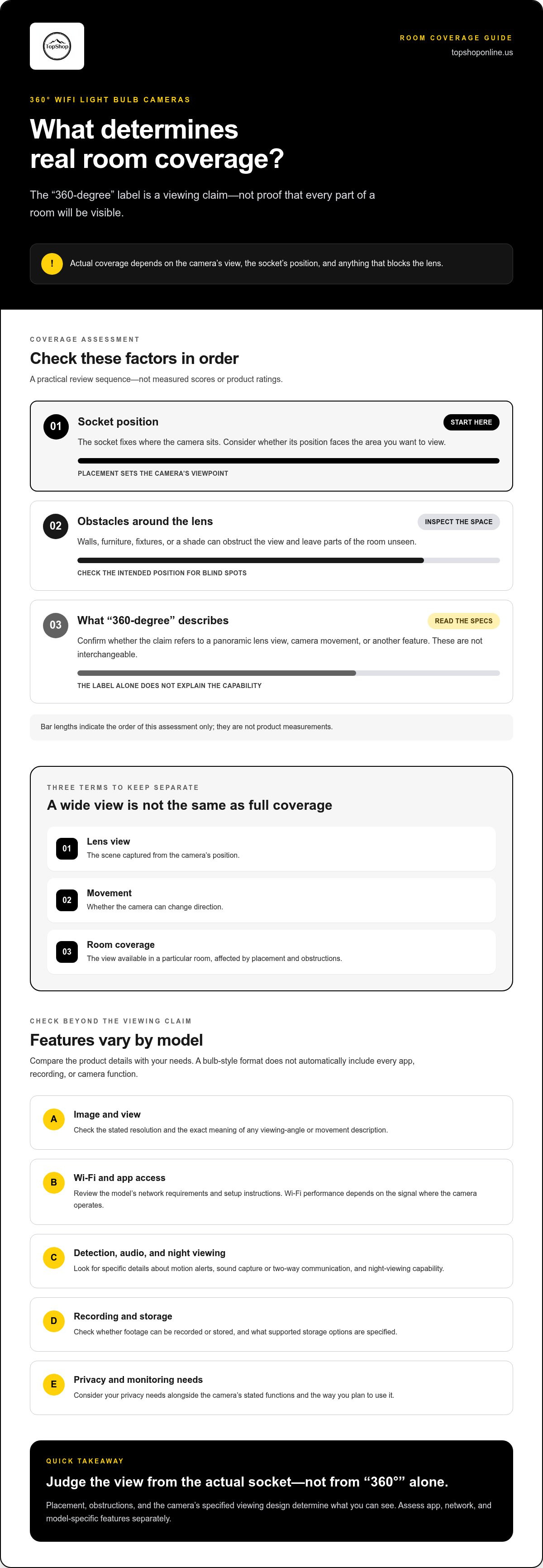
Field of view means the area a camera can see from its position. A wide or panoramic field of view can include more of the surrounding scene than a narrow one, but it doesn’t guarantee a clear view of every corner or object. Walls, furniture, fixtures, and mounting height can obstruct the lens and leave parts of the room outside the captured scene.
Before treating a “360-degree” claim as room coverage, identify what the specification describes. Look for whether it refers to the lens’s field of view, motorized movement, or another function. Don’t infer that the camera continuously sees every direction or eliminates blind spots unless the product details explain that capability.
- Lens view: Describes the scene captured from the camera’s position.
- Movement: Describes whether the camera can change direction.
- Room coverage: Depends on placement and obstructions, not the label alone.
For example, a socket above a central area may provide a different view from one tucked beside a wall or inside a shaded fixture. Treat the viewing terminology as one specification to interpret, then compare it with your room layout and intended viewing area. This helps distinguish a broad product claim from the coverage a camera can provide in a particular space.
How a 360 Degree WiFi Light Bulb Camera Connects and Captures a View
A bulb-style Wi-Fi camera combines a camera with a bulb-shaped housing intended for a compatible socket. In general, the device receives power according to its design, connects to a Wi-Fi network through the model’s setup process, and provides a viewing interface, often an app. The exact setup steps, network requirements, and controls depend on the model, so follow its instructions rather than assuming every camera works the same way.
Think of camera operation as separate functions: capturing a view, sending data over a network, presenting a live feed, and saving footage. A 360 degree wifi light bulb security camera may support some or all of these functions. Local viewing means accessing a feed on a device connected within the relevant network; remote access means viewing from outside that network; recording means saving footage for later playback. These are separate capabilities, and one doesn’t automatically guarantee the others.
Which Camera Features Should Shoppers Check?
Compare the stated resolution and viewing-angle description, then read any movement claim carefully. A camera that can turn or track doesn’t necessarily have the same view as a fixed panoramic lens. Also review details about motion alerts, audio, night viewing, recording, and supported storage. Match these functions to what you need from the camera.
- Image and view: Find the resolution and the exact meaning of the viewing-angle or movement description.
- Detection and audio: Review details about motion alerts, sound capture, or two-way communication.
- Night and recording: Check night-viewing capability and whether footage can be recorded or stored.
Feature names can hide important differences. “Motion detection,” for example, doesn’t by itself explain what triggers an alert, how notifications are delivered, or whether an event is recorded. Read the accompanying feature description for those details rather than inferring a complete workflow from a short label.
How Wi-Fi and App Access Affect Everyday Use
Wi-Fi performance depends on the camera’s stated network requirements and the signal where it will operate. A weak or unstable connection can interrupt live viewing or delay data transfer. Before setup, review the supported network specifications and assess the signal at the intended socket, not only near the router.
An app’s live-view screen, push notifications, recorded-event playback, and saved footage are distinct functions. Review which phones or other devices the app supports, whether an account is required, and how recording and storage work. Product information should explain local-storage options, cloud terms, or additional requirements. Live viewing doesn’t necessarily mean footage is being saved.
TopShop’s 360° Panoramic Hidden Light Bulb Wifi Camera is a bulb-camera option to compare with these criteria. Review its product details for the connection and camera functions that matter to your setup.
How to Compare Bulb Cameras With Mini and Conventional Security Cameras
Compare camera formats by the view you need and the locations available, not by shape or a headline feature. A 360 degree wifi light bulb security camera depends on a compatible socket for its position, while mini and conventional cameras may offer different placement options depending on their mounting and power designs. No format guarantees a clear view without considering the product specifications and the actual installation location.
| Camera format | Placement | Coverage | Visibility | Setup considerations |
|---|---|---|---|---|
| Bulb-style | Position is tied to a compatible socket. | Depends on the stated lens view or movement and nearby obstructions. | Housing may resemble a bulb, but appearance doesn’t establish concealment or coverage. | Check socket compatibility, viewing direction, network requirements, and setup instructions. |
| Mini | May allow placement apart from a light socket, subject to its mounting and power design. | Depends on the listed field of view and mounting position. | Size and visibility vary by model and placement. | Review power, mounting, network, app, and recording specifications. |
| Conventional | May be mounted on a wall or placed on a shelf if its design supports it. | Can be aimed toward a target area, depending on mounting and camera functions. | Often more apparent as a dedicated camera, depending on design. | Check mounting method, power source, network needs, and adjustment options. |
Use the comparison as a starting point, then verify each point against the specific product details. For example, an advertised wide view doesn’t confirm that a camera can pan, and a compact size doesn’t establish where or how it can be powered.
When a Bulb-Style Camera May Fit the Room
A bulb-style camera may be worth evaluating when an existing compatible socket provides a useful position and the camera’s stated view covers the area you need to monitor. It may be less suitable if the socket points away from the target, sits high enough to make details difficult to see, or is inside a fixture that creates glare or blocks the lens. The familiar bulb shape doesn’t prove broad, clear, or unobstructed coverage.
When to Compare a Mini or Conventional Camera Instead
Consider another format if a separate mounting point could give a clearer view of a doorway, entry path, or specific work area. Compare each model’s visibility, power source, network requirements, mounting flexibility, and stated field of view. A dedicated position can offer more control over aiming, but only if the camera’s design supports that placement. No format suits every room or monitoring task.
For related format and specification context, review TopShop’s wireless mini security camera guide. Use its product-specific details for that camera, and compare them with the bulb-style camera’s own details rather than assuming the two share features. The better fit is the model whose placement, power, and viewing specifications match the space.
How to Plan Placement, Wi-Fi, and Privacy Before Setup
Plan the viewing position before relying on a 360 degree wifi light bulb security camera. A compatible socket may provide power, but its direction, height, and surrounding objects determine what the camera can capture. Review the product’s stated network and app requirements, then assess the live view from the intended socket before using the camera for monitoring.
Check Socket Position and Viewing Obstructions
Start with the area you want to monitor, such as an entryway or shared living space. Compare that target with the socket’s direction and height. A socket facing away from the area, or one positioned above a tall fixture, may not provide the view you need. Lampshades, shelves, furniture, glass, and decorative objects can also block or distort parts of the scene.
Use this pre-setup checklist:
- Identify the target area. Decide what needs to be in view and which areas don’t need to be captured.
- Inspect the socket position. Note its direction and height, and check that the camera is intended for that socket type.
- Check for obstructions. Look for shades, nearby walls, furniture, reflective glass, and other objects that could interfere with the lens.
- Assess the actual view. After setup, check the camera’s live view from the intended socket. Confirm that the target area is visible before relying on it.
- Review the network requirements. Compare the product’s stated Wi-Fi band and app requirements with your home network and devices.
- Consider privacy and access. Review what the camera may capture, who can view its feed, and which access controls are available.
Check Network Access and Household Privacy
Wi-Fi performance can vary with distance from the router, walls, and competing network conditions. A strong connection in one room doesn’t guarantee the same signal at a socket farther away or behind several walls. Assess the connection where the camera will operate, and follow the product documentation for its supported Wi-Fi band, app, and account requirements.
Live viewing, alerts, and saved recordings can have separate requirements. Review the model’s setup instructions to understand how access is managed and whether other household members can use the viewing interface. Use secure account credentials and the product’s access controls. Don’t assume that a camera feed or recording is private solely because it’s accessed through an app.
Limit the view to the intended area where possible. Check whether the lens may capture neighboring spaces, shared areas, or rooms where people expect privacy, and adjust the camera’s position or field of view if the product supports it. Compare the product details with your placement, Wi-Fi, and privacy checklist. Review the 360° Panoramic Hidden Light Bulb Wifi Camera as one option for that assessment.
Is the TopShop 360° Panoramic Hidden Light Bulb WiFi Camera Right for You?
A bulb-style camera may be worth considering if a compatible socket is positioned where you need a view and you prefer a camera built into a bulb-shaped housing. It’s a less direct fit if the available socket points away from the target area, the lens would be blocked, or the product’s network and app requirements don’t match your setup. The format isn’t automatically right for every room.
Use the same criteria for any 360 degree wifi light bulb security camera: match its actual placement and stated capabilities to your monitoring needs. A broad viewing claim, familiar housing, or Wi-Fi label doesn’t by itself tell you what the camera can capture, how you can access footage, or which functions suit your use.
Use This Decision Checklist Before Choosing
- Match the socket to the target. Confirm that the intended monitoring area aligns with the available compatible bulb socket. Consider the camera’s direction and height, along with fixtures or objects that could obstruct its view.
- Check required functions. Identify whether you need a particular app, recording, audio, or alerts. Compare those needs with the product specifications instead of inferring features from general category terms.
- Assess connectivity. Review the stated Wi-Fi and app requirements, then consider whether your network reaches the camera’s intended position.
- Consider visibility and privacy. Decide whether the camera’s appearance and capture area suit the household. Check whether its view might include shared or private areas beyond the intended monitoring zone.
- Evaluate the view before relying on it. Use the product’s viewing interface to inspect what the camera captures from the intended position. A product label can’t establish what is visible in your room.
Review the TopShop Product Listing
TopShop’s catalog includes the 360° Panoramic Hidden Light Bulb Wifi Camera. Compare its product details with the functions you need, including resolution, app compatibility, recording method, audio, motion alerts, and accessories. These capabilities differ across camera models, so use the product information to understand how this camera fits your setup.
Look for clear descriptions of the viewing claim, connection requirements, compatible app or devices, and recording or alert functions relevant to your use. If a feature matters to your decision, base your comparison on the camera’s stated specifications rather than assumptions from another bulb camera or a similar product title.
Review the TopShop product listing and compare its details with your socket position, network setup, required functions, and privacy preferences. That final check can help you decide whether this bulb-camera format suits your space or another camera placement would better match your needs.
Choose the Camera That Fits Your Room
Before choosing a 360 degree wifi light bulb security camera, turn your monitoring goal into a simple room plan. Mark the area you need to see, note where a compatible socket sits, and decide which features are essential rather than optional. This makes it easier to judge product details against your setup instead of relying on a broad viewing claim.
TopShop’s catalog includes the 360° Panoramic Hidden Light Bulb Wifi Camera, available through its online store. Review the listing’s details and compare them with your placement, network, app, recording, and privacy requirements. Choose this format when its stated capabilities and real-world position align with the task.
View the 360° Panoramic Hidden Light Bulb Wifi Camera and compare its product details with your needs. A clear plan and careful specification check can help you choose the right setup.
Frequently Asked Questions
What is a 360-degree Wi-Fi light bulb security camera?
A 360-degree Wi-Fi light bulb security camera is a bulb-shaped camera that connects to a wireless network, with viewing functions determined by its specific design. “360-degree” may describe a stated viewing angle or another camera function, so read how the product defines the term. A socket facing a wall, a deep fixture, or an object near the lens can restrict the captured scene even when the product uses panoramic wording.
Does a 360-degree bulb camera show the entire room?
No, the label alone doesn’t guarantee that every part of a room will appear clearly in the camera’s view. Lens design, field of view, mounting height, socket direction, walls, and furniture all affect the result. For example, a tall cabinet may block a lower section of the room from a ceiling socket. Check the stated coverage details and inspect a live view from the planned position before depending on it.
Can a Wi-Fi light bulb camera work in any light socket?
No, compatibility depends on the camera’s specified socket type, power requirements, and installation instructions. A socket that looks like the right shape may still differ in a way that matters to the device. Check the fitting and electrical details in the product documentation before installation. Also consider whether that socket points toward the area you want to monitor, since a compatible location may not provide a useful camera view.
Does a bulb security camera need Wi-Fi to record video?
Not necessarily, because network access and recording are separate functions that vary by model. A camera might require Wi-Fi for app access or remote viewing, while its recording method may depend on separate storage features. Don’t assume it records continuously, saves footage locally, or works without an internet connection. Check the product details or manual for network requirements, recording modes, storage options, and playback conditions.
Can a bulb camera be used outdoors?
Outdoor use depends on the camera’s documented environmental rating and installation requirements. A bulb-shaped housing or Wi-Fi connection doesn’t establish that a device can withstand moisture, temperature changes, or other exposure. Before choosing an outdoor socket, check the product specifications for approved locations and exposure limits. Avoid installation where conditions exceed those instructions, and don’t rely on an indoor-use product outdoors based on its shape alone.
Are hidden light bulb cameras appropriate for every room?
No, suitability depends on the monitoring purpose, the people who use the room, and what the camera can capture. A camera in a shared living area may record more than the intended activity if its view includes adjoining spaces. Use it transparently and considerately, limit the captured area where possible, and review applicable rules. Don’t assume discreet placement is appropriate in every household or type of space.
What should I check before setting up a bulb-style Wi-Fi camera?
Check the required socket and power details, the network and app requirements, and whether the planned position captures the area you intend. Review the product’s stated recording and alert functions, then consider who or what else may enter the frame. For example, a doorway-facing socket might also capture a shared hallway. Compare resolution, audio, storage, and motion detection details with your needs.