

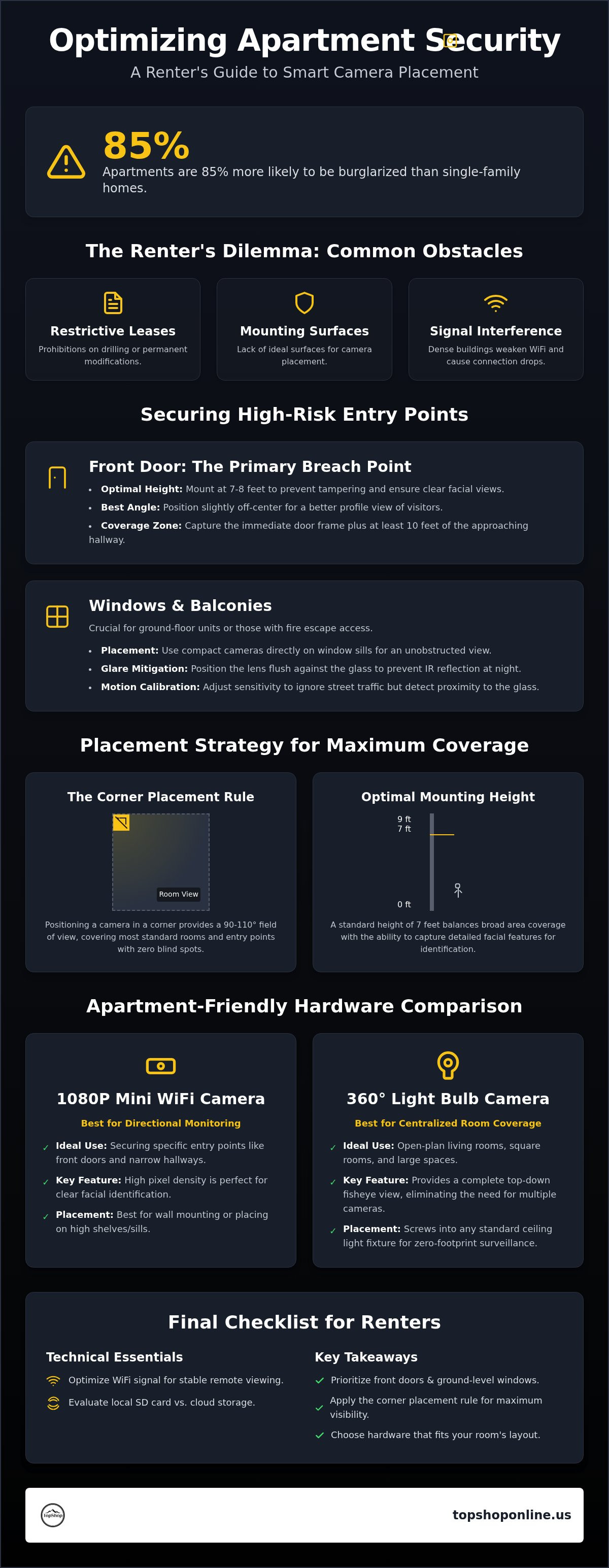
Apartments are 85% more likely to be burglarized than single-family homes according to recent security data. Most renters prioritize safety but face challenges with restrictive lease agreements, limited mounting surfaces, and signal interference in dense buildings. Finding the best place to put security camera in apartment layouts requires a technical balance of entry point visibility and hardware concealment. You want full coverage without risking your security deposit or dealing with frequent connection drops.
This guide provides a detailed analysis of optimal mounting locations and hardware specifications for maximizing unit surveillance. We evaluate high-performance 1080P HD Wireless Mini Security WiFi Cameras for discreet entry monitoring and 360° Panoramic Hidden Light Bulb Wifi Cameras for zero-footprint central room coverage. You'll learn specific placement strategies for multi-room layouts, technical methods to stabilize WiFi connectivity, and ways to eliminate common blind spots. This technical overview ensures your hardware operates at peak efficiency for reliable remote viewing and comprehensive security through precise positioning and hardware optimization.
Key Takeaways
- Prioritize front door and ground-level window monitoring to secure high-risk unauthorized entry zones effectively.
- Identify the best place to put security camera in apartment layouts by applying the corner placement rule for maximum square footage visibility.
- Compare 1080P fixed-lens mini units for directional monitoring against 360° panoramic light bulb cameras for centralized room coverage.
- Optimize WiFi signal penetration and power management strategies to ensure stable remote viewing in high-interference apartment environments.
- Evaluate local SD card storage versus cloud-based DVR functionality to maintain data integrity without permanent installation requirements.
Identification of Primary Apartment Entry Points and Vulnerabilities
Effective apartment surveillance starts with a comprehensive perimeter assessment. The primary entrance is the most critical point of failure in unit security. Statistical data indicates that the front door is the most frequent point of breach for unauthorized individuals. Beyond the main entrance, secondary access points such as ground-floor windows, fire escape access points, and sliding balcony doors require specific hardware configurations. Determining the best place to put security camera in apartment units involves mapping these vulnerabilities to ensure zero blind spots during monitoring.
Front Door Surveillance Optimization
Mounting the 1080P HD Wireless Mini Security WiFi Camera at a vertical height of 7 to 8 feet is the standard for entry point monitoring. This height prevents easy physical tampering while maintaining a clear downward angle for facial recognition. The camera must be angled to capture the immediate door frame and at least 10 feet of the approaching hallway. High-definition 1080P resolution is necessary for identifying delivery personnel and verifying credentials. Positioning the unit slightly off-center from the door provides a better profile view of visitors compared to a direct head-on angle.
Window and Fire Escape Monitoring
Ground-floor units and apartments with fire escape proximity face unique risks. Placing compact mini cameras directly on window sills allows for an unobstructed view of the exterior glass and surrounding perimeter. Wireless security camera technology facilitates these placements without the need for permanent drilling or complex wiring. Technical optimization for window monitoring includes:
- Glare Mitigation: Position lenses flush against the glass or use anti-reflective shrouds to prevent nighttime IR bounce-back from the pane.
- Motion Calibration: Adjust detection sensitivity to filter out external movement like swaying trees or street traffic while maintaining alerts for glass proximity.
- Field of View: Ensure the lens covers both the locking mechanism and the lower sash of the window frame.
Internal traffic zones and sliding patio doors also require attention. Hallways connecting bedrooms to common areas act as a secondary line of defense if a perimeter breach occurs. For large glass sliding doors, the 360° Panoramic Hidden Light Bulb Wifi Camera offers a comprehensive view that covers the entire floor-to-ceiling opening. This setup is often the best place to put security camera in apartment living rooms because it monitors both the entry point and the internal floor plan simultaneously. Proper placement in these zones ensures that any movement within the unit is logged and transmitted to your remote viewing device without delay. These high-traffic areas require stable connections to maintain real-time alerts and high-frame-rate recording.
Technical Specifications for Mounting Heights and Viewing Angles
Maximizing surveillance coverage requires precise Field of View (FOV) calculation. In standard rectangular apartment rooms, the corner placement rule is the most efficient method for reducing dead zones. A camera positioned in a corner covers approximately 90 to 110 degrees of horizontal FOV, capturing the entire floor plan including entry points. This strategy is often cited as the best place to put security camera in apartment units to ensure no movement is missed within a 15x15 foot area. Height-to-depth ratios must be calculated to maintain facial recognition clarity at distances exceeding 10 feet.
360° Panoramic vs. Wide-Angle Fixed Lens
Functional reviews of 360° Panoramic Hidden Light Bulb Wifi Cameras show they are superior for central ceiling mounting in open-plan spaces. These units eliminate the need for multiple fixed-lens cameras by providing a top-down fisheye view. In contrast, wide-angle fixed lenses are better suited for narrow hallways or specific entry monitoring where high pixel density is required for facial identification. At 1080P resolution, digital zoom capabilities allow for clear identification of objects within a 12-foot radius. Square room configurations benefit most from central panoramic placement, while rectangular layouts may require two fixed-lens units at opposite ends to eliminate perimeter dead zones.
Optimal Height for Indoor Hardware
Standard mounting for indoor hardware is 7 feet. This height balances detail capture with broad area coverage. It's high enough to prevent easy tampering but low enough to maintain a favorable height-to-depth ratio for identifying intruders. Shelf-level placement offers a discreet alternative but often results in significant blind spots caused by furniture height and room layout obstructions. For example, a camera placed on a 3-foot media console cannot view the floor space directly in front of it, creating a 4-foot blind zone.
Calculating blind spots involves assessing the vertical FOV against furniture depth. A camera mounted too high may miss movement directly underneath its lens, creating a visual gap. Key factors affecting blind spot size include:
- Vertical FOV limits: Standard lenses often cut off at 60 to 90 degrees.
- Furniture depth: High-profile bookshelves or wardrobes block floor-level visibility.
- Ceiling obstructions: Hanging light fixtures or fans disrupt the lens path.
In panoramic setups, avoid proximity to ceiling fans. Moving blades cause constant motion alerts and visual flickering that degrades video quality. Selecting high-specification security hardware ensures these technical mounting requirements are met with minimal adjustment and maximum coverage efficiency.
Strategic Indoor Placement for Multi-Room Apartment Monitoring
Internal surveillance requires a modular approach tailored to the specific function of each room. While previous sections focused on perimeter entry points, internal placement optimizes asset protection and safety monitoring. The best place to put security camera in apartment layouts often shifts based on the location of high-value electronics, safes, or utility hazards. Strategic positioning ensures that even if a perimeter breach occurs, the subject’s path through the unit is documented with high-definition clarity.
The Living Area: Central Hub Surveillance
Living rooms serve as the primary traffic hub and house the highest concentration of expensive hardware. Positioning the 1080P HD Wireless Mini Security WiFi Camera on a shelf near entertainment centers or gaming consoles provides a direct line of sight to these assets. This shelf-based monitoring is non-invasive and ideal for renters who cannot modify walls. Integrating night vision capabilities is essential for 24/7 capture, as most unauthorized entries occur during low-light hours. For pet tracking, place the unit at a 4-foot height to capture ground-level activity while maintaining a wide-angle view of the room's primary exit.
Kitchens and utility areas present unique surveillance opportunities focused on safety rather than just security. Mounting a camera with a view of the stove or under-sink plumbing allows for visual confirmation of hazards. While these units don't replace dedicated leak sensors, they provide real-time visual verification during remote viewing. In bedrooms, focus monitoring exclusively on personal safes or jewelry storage areas. Placing a mini camera inside a closet or facing a specific drawer ensures discreet protection of sensitive items without compromising the general privacy of the sleeping area.
Privacy and Legal Compliance in Shared Units
Surveillance in shared apartments requires strict adherence to privacy laws and roommate agreements. As of September 2026, federal law mandates one-party consent for audio recording, but states like California, Florida, Illinois, Maryland, Massachusetts, Pennsylvania, and Washington require all-party consent. It's recommended to disable audio recording in common areas to mitigate legal risks. Best practices for shared units include:
- Roommate Notification: Obtain written consent before installing hardware in shared living rooms or kitchens to avoid lease disputes.
- Privacy Modes: Utilize hardware with scheduled privacy modes that electronically disable the lens during hours when roommates are home.
- Physical Shutters: Select cameras with visible physical shutters to provide roommates with tangible confirmation that monitoring is inactive.
Navigating these social and legal boundaries ensures that your security system remains a tool for protection rather than a source of domestic conflict. Selecting the best place to put security camera in apartment units involves balancing these privacy requirements against the technical need for clear, unobstructed viewing angles across all high-traffic zones.
Power Supply Management and Connectivity Stability
Apartment security infrastructure relies on balancing electrical access with signal integrity. Renters cannot use Power over Ethernet (PoE) solutions because lease agreements prohibit structural cabling through walls. This constraint directly influences the best place to put security camera in apartment layouts, as hardware must remain within 10 to 15 feet of a power source. Precise placement is dictated by the proximity of AC outlets and the penetration capabilities of the local wireless network. Managing these technical requirements ensures continuous 1080P recording without the need for permanent modifications.
Expanding Power Access for Security Hardware
Older apartment buildings often feature limited outlet density, which complicates multi-room monitoring. The Power Strip with 6 AC Outlets & 6 USB Ports serves as a central distribution hub for complex camera arrays. It provides the necessary voltage stability for 1080P HD Wireless Mini Security WiFi Cameras, which typically require a consistent 1.0A to 2.0A current. Fluctuations in peak load can cause hardware reboot cycles or data corruption on local SD cards. Strategic hub placement allows for long-reach USB power delivery to high-shelf mounting points. This configuration maintains a non-invasive setup by keeping cables organized along baseboards or behind furniture, avoiding the cable clutter that often triggers landlord inspections.
Optimizing Wireless Connectivity
Wireless connectivity in dense apartment environments faces significant interference from neighboring networks. Selecting the 2.4GHz frequency band is recommended for cameras separated from the router by more than one wall. The 2.4GHz wavelength offers superior obstacle penetration through common building materials like drywall and brick compared to the 5GHz band. For optimal performance, hardware should be positioned to maintain a signal strength of -60 dBm or better. This ensures the best place to put security camera in apartment units remains viable for high-bitrate 1080P streaming. Technical optimization for wireless stability includes:
- Obstacle Mitigation: Position cameras at least 3 feet away from large metal objects, mirrors, or kitchen appliances to minimize signal reflection.
- Bandwidth Management: Ensure the network supports a minimum of 4 Mbps upload speed per active 1080P stream to prevent lag during remote viewing.
- Channel Selection: Use a WiFi analyzer to identify and switch to the least congested wireless channel in your building.
Stable connectivity is the foundation of any remote monitoring system. Without a consistent data link, even the highest resolution hardware fails to provide reliable alerts. For reliable, non-permanent surveillance infrastructure, browse the full range of apartment-optimized security hardware to find units designed for high-interference environments.
Apartment-Friendly Security Hardware: Technical Comparison
Selecting the appropriate form factor is the final step in technical optimization. Renters must prioritize hardware that offers high-speed deployment without structural alteration. The best place to put security camera in apartment units depends on whether the user requires centralized room coverage or targeted entry-point monitoring. A technical comparison between 360° panoramic light bulb units and wireless mini cameras reveals distinct advantages in field of view, mounting versatility, and concealment levels. Both options utilize 1080P resolution as a standard for clear identification in high-density residential settings.
The Hidden Light Bulb Camera: Zero-Footprint Solution
The 360° Panoramic Hidden Light Bulb Wifi Camera utilizes existing E27 light sockets for both power and positioning. This integration eliminates the need for external cables or batteries, making it the best place to put security camera in apartment kitchens or living rooms with central lighting fixtures. The discreet design mimics a standard LED bulb, providing covert surveillance that is difficult for unauthorized parties to detect. Functional specifications include:
- Socket Compatibility: Direct fit for standard E27 screw-in bases.
- Viewing Angle: 360-degree fisheye lens for total room visibility.
- Installation Time: Under 60 seconds with zero tool requirements.
Wireless Mini Cameras: Maximum Versatility
The 1080P HD Wireless Mini Security WiFi Camera offers superior mounting flexibility for targeted surveillance. Its compact dimensions allow for placement in confined spaces such as bookshelves, window sills, or behind household objects. These units can run on internal batteries for short-term events, but continuous USB power is required for 24/7 monitoring. Magnetic bases and high-strength adhesive mounts ensure a damage-free installation that preserves the tenant's security deposit. Night vision IR sensors provide clear 1080P footage in zero-lux environments, ensuring reliable capture regardless of ambient lighting conditions.
Data management for these units typically involves local SD card storage or cloud-based DVR functionality. Local storage via microSD cards (up to 128GB) offers a one-time cost solution with no recurring fees, ensuring data remains within the physical unit. Cloud-based options provide remote redundancy. This allows users to access footage even if the hardware is tampered with or removed. Portability is a critical metric for frequent movers. Both the light bulb and mini camera formats allow for immediate disassembly and re-installation in a new unit within minutes. This modularity ensures that security investments remain valuable across multiple rental agreements.
Optimizing Your Apartment Surveillance Infrastructure
Effective unit security relies on the technical integration of precise spatial orientation and high-specification hardware. Identifying high-priority entry points and calculating exact mounting heights ensures comprehensive coverage with zero blind spots. Stabilizing power delivery and optimizing wireless signal penetration are mandatory for maintaining continuous 1080P video transmission. Determining the best place to put security camera in apartment units allows you to achieve professional-grade monitoring without violating rental agreements or damaging surfaces. This data-driven approach minimizes technical failures while maximizing asset protection.
TopShop provides a specialized inventory of high-specification, affordable security tools designed for immediate, non-permanent deployment. You can utilize the 1080P HD Wireless Mini Security WiFi Camera with Night Vision for discreet entry monitoring or the 360° Panoramic Hidden Light Bulb Wifi Camera for Drill-Free Setup for centralized room surveillance. All hardware orders include fast nationwide shipping to ensure your security system is operational without delay. Shop Technical Apartment Security Hardware at TopShop to finalize your surveillance configuration today. You're now equipped to maintain a secure, private, and technically optimized living environment.
Frequently Asked Questions
Where is the best place to put a security camera in a small studio apartment?
The best place to put security camera in apartment studios is typically a high corner that provides a diagonal view of the entrance and the main living area. This positioning maximizes the field of view while minimizing blind spots. A 360° Panoramic Hidden Light Bulb Wifi Camera installed in a central ceiling fixture offers total room coverage, eliminating the need for multiple units in a single-room layout.
Can I put a security camera in the hallway outside my apartment door?
Placement in common hallways is generally restricted by lease agreements and building management policies. Landlords usually maintain jurisdiction over shared spaces. It's recommended to install hardware inside your unit, facing the door from the interior. A 1080P HD Wireless Mini Security WiFi Camera positioned at eye level on the interior door frame captures high-resolution facial data of anyone entering without violating building-wide privacy regulations.
How do I mount a security camera in my apartment without drilling holes?
Damage-free mounting is achieved through adhesive strips, magnetic bases, or utilizing existing fixtures. The 360° Panoramic Hidden Light Bulb Wifi Camera screws directly into standard E27 light sockets, providing a zero-footprint installation. For vertical surfaces, high-strength adhesive strips or magnetic mounts included with wireless mini cameras allow for secure positioning on metal door frames or refrigerator tops without compromising your security deposit or requiring professional tools.
Is it legal to have a security camera in my apartment if I have roommates?
Internal surveillance is legal in shared units provided cameras are restricted to common areas and all parties are notified. Federal law requires one-party consent for audio, but several states mandate all-party consent as of September 2026. Avoid placing hardware in areas with a reasonable expectation of privacy, such as bathrooms or roommate bedrooms. Using cameras with physical privacy shutters or scheduled recording modes helps maintain transparency and legal compliance.
How many security cameras do I need for a typical two-bedroom apartment?
A standard two-bedroom configuration requires approximately three units for comprehensive coverage. One 1080P mini camera should be dedicated to the primary entrance. A second unit, such as a 360° light bulb camera, provides wide-area surveillance for the living room and kitchen hub. The third camera should monitor secondary access points like a balcony or fire escape. This multi-unit array ensures all high-risk zones are covered while maintaining stable WiFi bandwidth.
What is the best height to mount a 360 panoramic light bulb camera?
The optimal mounting height for panoramic hardware is between 8 and 10 feet. This height ensures the 360-degree fisheye lens captures the full floor plan without significant distortion at the edges. Central ceiling placement in a standard E27 socket provides the most symmetrical field of view. Avoid mounting near hanging light fixtures or ceiling fans, as these obstructions create visual flickering and recurring motion detection interference in the 1080P video stream.
Do wireless mini security cameras work without a WiFi connection?
Most wireless mini cameras support local recording to a microSD card without an active WiFi link. In this offline mode, the unit stores 1080P footage directly to the hardware for manual retrieval. However, remote viewing, real-time mobile alerts, and cloud backup functionality require a stable 2.4GHz internet connection. For continuous monitoring, ensure the unit is positioned within the effective range of your router to maintain data transmission for remote application access.
How do I hide a security camera in plain sight in my living room?
Concealment is best achieved by integrating hardware into existing functional objects. The 360° Panoramic Hidden Light Bulb Wifi Camera is virtually indistinguishable from a standard LED bulb when installed in a lamp or ceiling fixture. Alternatively, placing a 1080P HD Wireless Mini Security WiFi Camera on a bookshelf between books or inside a decorative housing provides discreet monitoring. Ensure the lens remains unobstructed and avoid placing units behind glass, which causes infrared glare.