

The smartest Christmas tree lights aren’t always the easiest to control. Bluetooth Christmas tree lights smart control can let a phone operate compatible lights nearby, but Bluetooth, Wi-Fi, handheld remotes, and built-in timers work differently. A control method that sounds convenient may not fit your room, phone, or preferred setup.
Before choosing lights, consider how you’ll use them: Will they pair with your phone? How far away can you control them? Do they need Wi-Fi, a hub, or a USB power source? This guide explains what Bluetooth control can and can’t do, which app, lighting, and connectivity specifications to compare, and how to match string length and power to your tree.
Keep control features separate from power and light specifications. TopShop’s 10M/20M USB Christmas Tree LED String Lights offer a USB-powered option, but USB power alone doesn’t indicate Bluetooth or app control. Use the comparisons ahead to decide whether smart control is essential, check compatibility before setup, and plan a manageable arrangement for your tree and power source.
Key Takeaways
- Bluetooth Christmas tree lights smart control depends on the specific light set, app, and available functions. Compare stated features before choosing.
- Follow the product’s instructions for app installation, Bluetooth permissions, pairing mode, device selection, and the first control test.
- Compare Bluetooth and Wi-Fi app control with remotes and timers by connection needs, phone dependence, operating location, and available functions.
- Match string length, power input, and indoor or outdoor placement to your tree and intended setup. USB compatibility depends on the product’s power requirements.
- Plan in order: control method, phone needs, light length, power source, and placement. TopShop’s 10M/20M USB Christmas Tree LED String Lights are a USB-powered option.
What Bluetooth Christmas Tree Lights with Smart Control Actually Do
Bluetooth-controlled Christmas tree lights use a compatible phone or other device to send commands to the lights, usually through an app. Controls vary by product: one set may offer app-based on/off commands, while another may also support brightness adjustment, color selection, effects, or schedules. The phrase bluetooth christmas tree lights smart control describes a connection method, not a standard package of features.
Bluetooth is short-range wireless communication between compatible devices. Some smart lights use Bluetooth Low Energy, a version designed for low-power device communication; Bluetooth Low Energy technology is used in many connected-device applications.
What does Bluetooth control mean for Christmas tree lights?
With app control, a phone sends a command to the light set over Bluetooth. Depending on the product specification, the app might turn lights on or off, change brightness or color, select effects, or set schedules. These functions aren’t universal, so check the feature list rather than assuming that “smart” includes dimming, color changes, or timing.
The control method differs from a physical switch or standalone remote. An inline switch requires reaching the cord or controller. A remote sends commands from its handset. An app puts supported controls on your phone, but requires a compatible app and a paired light set.
Bluetooth versus Wi-Fi, remotes, and timers
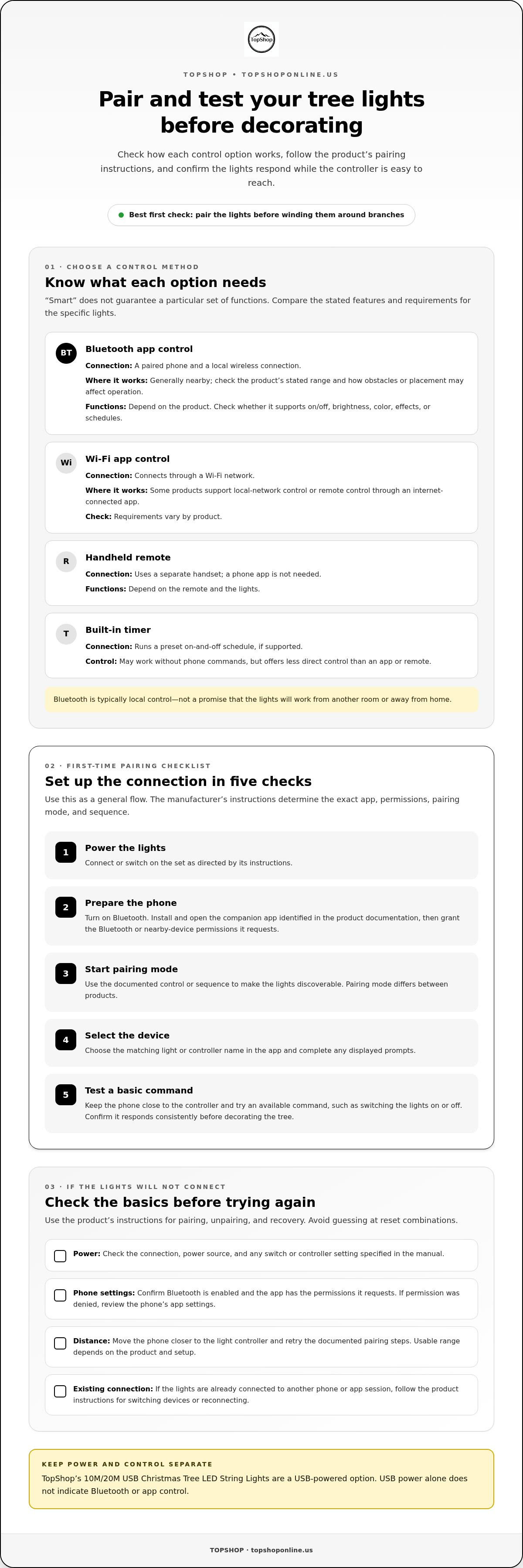
Control options differ in their connection requirements and where they work. Exact setups vary by product, but these are the typical distinctions:
- Bluetooth app control: Uses a paired phone and local wireless connection. It generally works nearby. Check the product’s stated range and how obstacles or placement may affect operation.
- Wi-Fi app control: Connects through a Wi-Fi network. Some products support control over the local network or remotely through an internet-connected app, while requirements vary.
- Remote control: Uses a separate handset, without needing a phone app. Available functions depend on the remote and lights.
- Timer: Runs a preset on-and-off schedule, if supported. It may work without phone commands, but offers less direct control than an app or remote.
Bluetooth control is typically local, not a promise of operation from another room or away from home. Check the product’s range, pairing requirements, and app functions before choosing. For more indoor LED feature context, see the smart LED fairy lights guide.
How Bluetooth Pairing and App Control Work on Tree Lights
Pairing connects a compatible phone app to a light controller so the app can send commands. The process varies by manufacturer: app names, permission prompts, pairing modes, and device labels aren’t universal. Follow the light set’s instructions for the correct sequence. Bluetooth SIG’s official Bluetooth technology website provides information about the technology and its standards.
A practical first-time Bluetooth pairing sequence
Use this general flow as a starting point, then follow the product-specific manual and on-screen prompts. Pair the lights before winding them around branches so you can test the connection while the controller is easy to reach.
- 1. Power the lights. Connect or switch on the set as directed by its instructions.
- 2. Prepare the phone. Turn on Bluetooth. Install and open the companion app identified in the product documentation. Grant the Bluetooth or nearby-device permissions it requests.
- 3. Start pairing mode. Use the documented control or sequence to make the lights discoverable. Pairing mode differs between products.
- 4. Select the device. Choose the matching light or controller name in the app, then complete any displayed prompts.
- 5. Test a basic command. With the phone close to the controller, try an available command, such as switching the lights on or off. Confirm that it responds consistently before decorating the tree.
What to check when the lights will not connect
Check basic connection conditions before repeating setup. Avoid guessing at reset combinations: an undocumented reset can interrupt a correct setup. Use the manufacturer’s instructions for pairing, unpairing, and recovery steps.
- Power: Check the connection, power source, and any switch or controller setting specified in the manual.
- Phone settings: Confirm Bluetooth is enabled and the app has the permissions it requests. If permission was denied, review the phone’s app settings.
- Distance: Move the phone closer to the light controller and retry the documented pairing steps. Usable range depends on the product and setup.
- Existing connection: If the lights are already connected to another phone or app session, follow the product instructions for switching devices or reconnecting.
Pairing before installation can reveal an app or compatibility issue before the lights are wrapped around the tree. For a USB-powered option, TopShop’s USB Christmas tree LED string lights can be considered when comparing light and power setups. USB power alone doesn’t indicate Bluetooth or app control.
Bluetooth Christmas Tree Lights Compared with Other Control Options
The right control method depends on how you plan to operate the lights, not on whether the packaging calls them “smart.” Bluetooth Christmas tree lights smart control can suit nearby phone adjustments, while Wi-Fi, remotes, and timers use different control paths. The table compares typical setups; exact range and functions depend on the light set and its specifications.
| Control method | Connection needs | Phone dependence | Typical control location | Feature availability |
|---|---|---|---|---|
| Bluetooth app | Bluetooth connection between compatible phone and lights | Usually requires a paired phone and compatible app | Generally nearby, within the product’s usable range | App commands vary, such as on/off, brightness, or effects if supported |
| Wi-Fi app | Wi-Fi network; setup requirements vary by product | Usually uses a phone app | May be local or available over the internet, depending on product and configuration | App functions and remote access vary |
| Remote control | Separate handset and compatible light receiver | No phone required | Within the remote’s effective operating range | Limited to commands provided by the remote and lights |
| Basic timer | Timer built into the lights or a separate compatible timer | Usually no phone needed for preset operation | Runs the programmed schedule; direct control depends on the setup | Typically focused on scheduled on/off operation, if supported |
When Bluetooth control is a practical fit
Bluetooth can be useful when you expect to adjust the lights from nearby, such as changing a supported setting from the sofa or turning the display off without reaching the controller. App access can also put available controls in one place. It’s less suitable if you need operation beyond the product’s connection range. Don’t assume remote access, voice control, or schedules unless the specifications list them.
When Wi-Fi, a remote, or a timer may suit better
A Wi-Fi model may fit a setup that uses network-based app control, but operation away from home depends on the manufacturer’s app, network requirements, and product configuration. A remote can be simpler for direct adjustments without a phone. A timer suits a repeatable schedule when manual changes aren’t needed. Compare each set’s feature list, connection requirements, and controls rather than relying on the word “smart.”
Bottom line: Choose a control method based on where and how you’ll operate the lights. Match the connection and controls to the intended location, phone use, and frequency of adjustments.
How to Choose and Set Up Smart-Control Christmas Tree Lights
Choose lights by matching the physical string, power connection, control method, and intended placement to your tree setup. The keyword bluetooth christmas tree lights smart control describes only one part of the decision: Bluetooth won’t make up for a string that’s too short, an incompatible power source, or an app that doesn’t work with your phone.
Match string length, power, and tree placement
Measure the tree’s height and width, then compare the available string length with the coverage you want. A taller or fuller tree may need more length to distribute lights evenly, while a compact tree may be crowded by an oversized string. Plan where the cord and controller will sit before wrapping the lights.
USB power doesn’t mean every USB source is interchangeable. Read the product’s stated input requirements and use a power source that meets them. Check the connection type and cord reach so the cable can reach its power source without being stretched or pinched. For background on USB power connections, see the USB power strip specifications guide.
Route the cable and position electrical connections as directed by the product instructions. Avoid tangling the string around the controller or placing cords where they could be crushed, pulled, or exposed to conditions the instructions identify as unsuitable.
Check compatibility and safe operation before decorating
Before buying, review the light set’s product documentation for phone operating system compatibility, required app, Bluetooth or Wi-Fi needs, and supported app controls. Confirm whether the set is intended for indoor or outdoor use; don’t infer weather suitability from its connectivity type or USB connection.
- Check the specifications: Compare string length, power input, control method, and intended location with your setup.
- Review the instructions: Follow the stated power-source guidance and directions for positioning connections and controllers.
- Test before decorating: Connect the lights as instructed and verify basic operation and any app controls before placing the string on the tree.
TopShop’s 10M/20M USB Christmas Tree LED String Lights are a USB-powered string-light option. USB power alone doesn’t indicate Bluetooth, app control, colors, timers, or dimming. Explore TopShop USB Christmas tree LED string lights as you compare string length and power needs.
Build a Christmas Tree Lighting Setup Around Your Control Needs
Build the setup around practical requirements, not the word “smart” on a label. For bluetooth christmas tree lights smart control, look for explicit Bluetooth and app support in the product specifications, then confirm the listed functions suit the way you’ll operate the lights. Treat control, phone compatibility, string length, power, and placement as separate decision points.
A quick buyer checklist for Bluetooth-controlled tree lights
Use this order to compare options. It keeps control features from overshadowing the physical and power requirements of your tree setup.
- Control method: Check that Bluetooth is named directly and that the product supports app control. Read the listed controls rather than assuming Bluetooth guarantees particular features.
- Phone needs: Review the companion app name, supported phone requirements, and any stated pairing or permission needs.
- Light length: Compare the stated string length with your tree size and desired coverage. Consider where the controller and plug will sit.
- Power: Check the light set’s stated input requirements and the power source you plan to use. USB describes a connection type, not the full power specification.
- Placement: Confirm whether the lights are intended for indoor or outdoor use, then position cords and connections as directed by the product instructions.
Separate must-have controls from optional extras. For example, app on/off access may be essential, while color changes or schedules may be preferences. Use the specifications to distinguish what the set actually does from features you’re hoping to find.
Match USB string lights to a straightforward setup
TopShop’s confirmed 10M/20M USB Christmas Tree LED String Lights are a USB-powered string-light option. The stated details identify the power connection and string lengths; they don’t establish Bluetooth, app control, color functions, timers, or dimming. Treat the control method and USB power as separate specifications when comparing lights. If Bluetooth app control is essential, choose a set whose documentation explicitly identifies Bluetooth connectivity and compatible app controls.
Make the final choice in sequence: decide how you’ll control the lights, confirm phone needs, match string length to the tree, check power requirements, and plan placement. This keeps the setup manageable without treating one feature as a substitute for another.
Browse Christmas tree LED string lights to review TopShop’s USB-powered option.
Choose Lights That Fit Your Tree and Routine
Smart control is useful when its connection and features suit the way you’ll operate the lights. For bluetooth christmas tree lights smart control, look for explicit Bluetooth and app support, confirm the available controls, and check phone compatibility before buying. Then match string length, power input, and intended placement to your tree.
Bluetooth, Wi-Fi, remotes, and timers offer different control paths, so compare their requirements instead of relying on the word “smart.” Pair and test the lights before decorating, and follow the product’s power and placement instructions during setup.
TopShop’s 10M/20M USB Christmas Tree LED String Lights provide a USB-powered LED option. Their stated details don’t establish Bluetooth or app functionality. Browse Christmas tree LED string lights to explore the available option as you plan your setup.
With the control method, light length, and power source considered together, you can make a more informed choice and start decorating with confidence.
Frequently Asked Questions
Do Bluetooth Christmas tree lights need Wi-Fi to work?
Bluetooth-controlled lights generally connect directly to a nearby compatible phone, so local control doesn’t inherently require Wi-Fi. Wi-Fi or internet access may be needed for app downloads, account setup, updates, or extra connected features, depending on the product. Check the light set’s instructions for setup requirements. Bluetooth alone doesn’t mean the lights can be controlled over the internet or outside their local connection range.
Can I control Bluetooth Christmas lights when I am away from home?
Usually, direct Bluetooth control works only when your phone is within the light set’s usable connection range. Control while away from home requires additional network-connected features, such as a compatible Wi-Fi connection or bridge, if the product supports them. Don’t assume remote access is included. Review the product description for supported control locations, network setup, and any app or hub requirements.
How do I pair Bluetooth Christmas tree lights with my phone?
Use the product’s instructions because pairing steps and app menus vary. In general, power the lights as directed, enable Bluetooth on your phone, install and open the specified companion app, and grant requested permissions. Put the light controller into its documented pairing mode, select the matching device in the app, then follow the prompts. Test a basic command nearby before decorating the tree. Don’t use an assumed reset sequence.
Why will my Bluetooth Christmas lights not connect?
Check that the lights have power, Bluetooth is enabled on your phone, and the app has the permissions it requests. Move closer to the controller and retry the pairing steps in the product manual. The lights may already be connected to another phone or app session, so follow the manufacturer’s reconnection instructions if needed. Pairing modes differ, so avoid undocumented reset steps and use the product-specific troubleshooting guidance.
Are Bluetooth Christmas tree lights compatible with both iPhone and Android?
Compatibility depends on the light set and companion app. Some products may support both iPhone and Android, while others may require particular operating system versions or phone capabilities. Check the product documentation and app listing for supported devices and requirements before buying. Also confirm that the app provides the controls you need. Bluetooth support on a phone alone doesn’t guarantee compatibility with every Bluetooth light controller.
Can USB Christmas tree lights use Bluetooth smart control?
Yes. A USB-powered light set can use Bluetooth if its controller includes Bluetooth hardware and the product supports a compatible app. USB describes the power connection, not the control method. TopShop’s 10M/20M USB Christmas Tree LED String Lights are USB-powered LED string lights, but USB power alone doesn’t establish Bluetooth, app, timer, color, or dimming functions.
What should I check before buying smart-control Christmas tree lights?
Check for explicit Bluetooth or Wi-Fi wording, the required app, compatible phone systems, and the listed controls. Then compare string length with your tree, verify the stated power input and source, and confirm whether the lights are intended for indoor or outdoor use. Review setup and safety instructions before decorating. TopShop’s 10M/20M USB Christmas Tree LED String Lights are a USB-powered LED option, not an indication of smart-control features.