

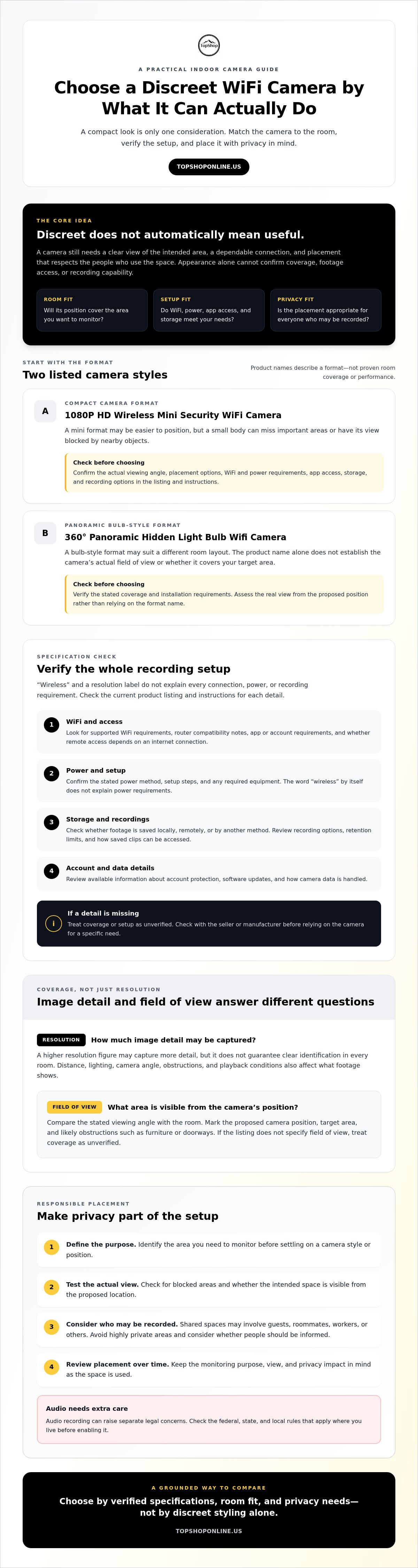
The least noticeable camera isn’t automatically the most useful. A discreet home surveillance wifi camera still needs a clear view of the area you want to monitor, a dependable connection, and placement that respects your household’s privacy. A compact design may be easy to position but miss important areas. A panoramic bulb-style format may suit a different room layout, but check its actual coverage rather than relying on the product name.
Appearance alone won’t tell you whether footage will be accessible when needed or whether setup requirements match your home network. Before choosing, compare the camera format with the room, placement options, and monitoring purpose.
This guide explains how mini and panoramic formats differ, what to verify in a product listing, and how to assess WiFi compatibility, power, storage, app access, field of view, and recording options. It also covers responsible placement, particularly in shared spaces, and why audio recording needs extra care. Use the checks to narrow your options without assuming a discreet design suits every room or situation.
Key Takeaways
- Match camera form factor to the room and monitoring goal; discreet styling alone doesn’t establish useful coverage.
- Check the listing for WiFi compatibility, power method, storage, app access, field of view, and recording options before choosing a discreet home surveillance wifi camera.
- Treat resolution as one indicator of image detail, not a guarantee that footage will identify people clearly in every setting.
- Define the monitoring purpose, test the camera view, secure access, and review placement over time.
- Compare the 1080P HD Wireless Mini Security WiFi Camera and 360° Panoramic Hidden Light Bulb Wifi Camera by verified specifications, room fit, and privacy needs.
What a Discreet Home Surveillance WiFi Camera Can, and Cannot, Do
A discreet home surveillance WiFi camera is an indoor networked camera with a compact or everyday-object-style design for less conspicuous monitoring. Its appearance doesn’t determine what it can record or where recording is appropriate. Discreet means unobtrusive, not exempt from privacy responsibilities. A small body or concealed styling can affect where a camera fits, but it won’t guarantee a useful viewing angle, clear footage, dependable WiFi, or a particular storage method.
What makes an indoor camera discreet?
Some models use compact camera bodies; others are designed to resemble familiar objects. TopShop lists two examples: the 1080P HD Wireless Mini Security WiFi Camera and the 360° Panoramic Hidden Light Bulb Wifi Camera. Their names identify the listed formats, not a guarantee that either suits a particular room or provides a specific field of view.
Placement matters. A small camera tucked behind an object may have part of its view blocked. An object-style design still needs a position that captures the intended area. Neither appearance nor product name establishes image quality, recording duration, storage, or connectivity. Check those details in the product listing and instructions.
When is a discreet camera a practical fit?
Indoor monitoring may help you check a room while you’re away, but the intended use and the people who may be recorded matter as much as camera size. Monitoring an area in your own home is different from recording guests, roommates, workers, or others in shared spaces. Avoid highly private areas, and don’t treat concealed styling as permission to record people without regard for their privacy.
Before recording, check the requirements that apply where you live, including federal, state, and local rules. Audio can raise separate legal concerns, so verify the rules before enabling it. If people regularly use the monitored area, consider whether they should be informed and whether a less intrusive position can meet your goal.
WiFi describes a network connection, not a complete recording setup. IP camera technology sends and receives data over a network, but products differ in how they provide live access and store recordings. Some setups may use built-in storage or an online service; others may require separate recording equipment. Don’t assume a camera records independently, works with a particular app, or saves footage without internet access. Verify the setup, power requirements, network compatibility, and storage options before buying.
Which WiFi Camera Specifications Matter for Discreet Home Monitoring?
Start by identifying the area you need to see, then check whether the camera’s image, connection, power, and recording setup can support that use. Don’t select a discreet home surveillance wifi camera by resolution label or compact size alone. Confirm details in the current product listing and instructions; don’t assume specifications that aren’t stated.
How do resolution and field of view affect coverage?
Resolution describes the number of pixels in a recorded image. A higher figure may capture more image detail, but it doesn’t guarantee clear identification in every room. Distance from the subject, lighting, camera angle, obstructions, and playback conditions all affect what footage shows.
Field of view is the area visible to the camera from its position. Compare the stated viewing angle with a simple room plan: mark the proposed camera position, the area to monitor, and likely obstructions such as furniture or doorways. Check whether the listed view covers that area without relying on assumptions based on a small body or concealed design. If the listing doesn’t specify field of view, treat coverage as unverified.
What connectivity and recording details should you check?
Before purchase, look for supported WiFi requirements, router compatibility notes, and whether setup depends on a particular app or account. Confirm how remote access works and whether it relies on an internet connection. Check the stated power method and setup steps, including any required equipment. The word “wireless” alone doesn’t explain every connection or power requirement.
Storage affects how footage is saved and retrieved. Check whether the listing identifies local storage, remote storage, or another method, along with recording options, retention limits, and conditions for accessing saved clips. If these details aren’t provided, contact the seller or manufacturer before relying on the camera for a specific recording need.
Review available information about account protection, software updates, and how camera data is handled. The Federal Trade Commission provides practical advice on securing your camera feed. Check whether your home WiFi security settings and the camera’s documented security options align. Don’t assume a particular encryption method, update schedule, or privacy feature is included.
Use the same checklist across formats. Review TopShop’s discreet WiFi camera formats, then compare each listing’s stated coverage, connectivity, power, storage, and app requirements with your needs.
Mini Camera or Hidden Light-Bulb Camera: Which Format Fits the Room?
Choose a format based on the room’s layout and mounting options, not on how inconspicuous the camera looks. A compact body may fit a shelf or another suitable position, while a light-bulb-style design depends on a compatible fixture and appropriate placement. TopShop lists both a 1080P HD Wireless Mini Security WiFi Camera and a 360° Panoramic Hidden Light Bulb Wifi Camera. Those names indicate listed formats, not confirmed coverage or suitability for every space.
| Format | Placement to assess | Coverage questions | Specification checks |
|---|---|---|---|
| Mini security camera | Stable position with a clear view and suitable power access | Will the planned angle include the intended area, or will furniture block it? | Dimensions, mounting method, power requirements, stated field of view, WiFi details |
| Hidden light-bulb WiFi camera | Compatible fixture in a location appropriate for monitoring | Does the stated viewing angle cover the room layout and avoid unwanted areas? | Fixture compatibility, installation requirements, power arrangement, WiFi details, stated field of view |
When might a compact mini camera suit the setup?
A mini format may suit a room with a stable, unobstructed position that also meets the camera’s power requirements. Before choosing, check the listing for exact dimensions, mounting method, power method, and stated viewing angle. Don’t assume that a small body fits every location or captures a useful view from it. For more product-specific selection points, see the 1080p wireless mini security camera buying guide.
What should you verify with a hidden light-bulb camera?
Confirm that the fixture type and installation requirements match the intended location, then check how the camera is powered and which WiFi requirements it supports. The product name includes “360° Panoramic,” but don’t treat that wording as proof of the view available in your room. Check the listing’s viewing-angle details and account for walls, furniture, and the installed position.
For either format, sketch the room and mark the area you intend to monitor before choosing a position. Keep the view within appropriate boundaries; don’t place a discreet camera where people reasonably expect privacy or may be recorded without their knowledge. CNET’s Security camera buying guide also discusses general comparison factors such as camera view and storage.
How to Set Up a Discreet Camera Without Overlooking Privacy
A discreet home surveillance wifi camera needs a defined purpose, a tested position, and controlled access. Placement, notice, and account security are part of responsible use, not optional finishing steps. Avoid bathrooms, bedrooms used by others, and other highly private areas. In shared spaces, consider who may be recorded, provide clear notice, and seek consent where appropriate. Check the federal, state, and local rules that apply to your situation; this guidance isn’t legal advice.
How should you choose and test a camera position?
Set a specific monitoring goal first, such as viewing an entry area or checking a room while away. Choose the narrowest camera view that can meet that goal instead of capturing more of a shared space than necessary. Follow the product’s stated setup process, then test the actual view, lighting, and WiFi connection from the intended position.
Use this sequence before relying on the camera:
- Define the goal. Identify the area you need to monitor and who uses it.
- Review the instructions. Confirm the documented setup steps and requirements for that camera.
- Test the view and connection. Check what appears in the image and whether the WiFi connection works from the chosen position.
- Reassess as the room changes. Retest after moving the camera, rearranging furniture, or changing network equipment.
A view that worked during setup may no longer be appropriate after a room or household change. Recheck what the camera captures, then adjust or disable recording if it includes spaces or people beyond the original purpose.
How can you reduce privacy and account risks?
Use a strong, unique password for the camera account and enable available security controls, such as additional sign-in verification, if the product supports them. Check the manufacturer’s documentation rather than assuming a feature exists. Limit account and footage access to people who need it, and remove access when it’s no longer required. Review the manufacturer’s guidance on software updates and data handling.
Before recording guests, roommates, workers, or others in shared areas, consider whether clear notice and consent are appropriate. Verify the rules where you live, particularly before enabling audio. Keep the recording purpose and access list under review. A camera’s discreet appearance doesn’t remove the need to protect the privacy of people it may capture.
Compare the listed camera formats and specifications before choosing a setup. Review TopShop’s WiFi camera options and check the product instructions and privacy-relevant details before use.
Choosing a TopShop Discreet Home Surveillance WiFi Camera
Choose by room requirements and verified listing details, not by appearance alone. TopShop lists two formats: the 1080P HD Wireless Mini Security WiFi Camera and the 360° Panoramic Hidden Light Bulb Wifi Camera. Their names identify the listed formats; treat other capabilities as unconfirmed unless the current listing or product instructions state them.
Which confirmed camera format aligns with your monitoring goal?
The mini camera is a compact-format option to compare with locations that have a suitable position and power arrangement. Don’t assume a particular mounting method, viewing angle, or recording feature from its size or product name. The light-bulb camera is an object-style format. Check that the fixture and installation requirements match the intended location, and verify the actual camera view before relying on its panoramic description.
Use this decision matrix to narrow the choice:
- Room and purpose: Define the specific area to monitor and who uses it. Avoid highly private spaces and consider notice and consent in shared areas.
- Form factor: Compare the mini camera’s compact format with the light-bulb camera’s object-style format. Match the design to the room’s practical placement options.
- Verified coverage: Check the stated field of view and test the camera’s actual view from its intended position. Don’t infer room coverage from camera size or product wording.
- Connectivity: Confirm supported WiFi requirements, setup steps, and any app or remote-access dependencies in the listing.
- Power and storage: Verify the power method, storage type, recording options, and how footage can be accessed. Treat details not stated in the listing as unconfirmed.
- Privacy: Consider who may be captured, limit the camera view to its purpose, and check applicable requirements before recording.
What should you confirm before ordering?
Review the current product page and available instructions for exact specifications, included components, setup requirements, and support information. Confirm WiFi compatibility, power, storage, app access, and camera-view details before relying on any feature. If a key detail is missing or unclear, seek clarification rather than assuming the camera will meet that need.
The right discreet home surveillance wifi camera is the one whose documented capabilities fit the room and whose use respects everyone’s privacy. Compare TopShop’s home camera options.
Make Your Camera Choice With Confidence
A discreet home surveillance wifi camera should fit the room, provide the view you need, and support a setup you can verify before purchase. Resolution and appearance alone don’t confirm usable coverage. Check the current listing for WiFi requirements, power, storage, app access, field of view, and recording details. Treat anything not specified as unconfirmed.
TopShop lists two distinct formats: the 1080P HD Wireless Mini Security WiFi Camera and the 360° Panoramic Hidden Light Bulb Wifi Camera. Compare each with your room layout and monitoring purpose rather than assuming either suits every space. Plan placement carefully, protect account access, and respect the privacy of others who may be recorded.
Use these checks to narrow your options and review product details before deciding. Compare TopShop’s home camera options and choose based on verified specifications and responsible placement.
Frequently Asked Questions
Is it legal to use a discreet camera in your home?
It depends on where you live, where the camera is placed, and whether it records audio. A camera inside your home doesn’t automatically make every recording appropriate or lawful. Avoid highly private areas, consider notice and consent for other occupants or visitors, and check the current federal, state, and local requirements that apply to your situation. This is general information, not legal advice.
Can a WiFi security camera work without an internet connection?
It depends on the camera’s recording and access functions. Some features may require internet access, while others may work differently, so don’t assume either from the term “WiFi camera.” Check the product documentation for setup, network requirements, local recording, and remote viewing. Confirm whether footage remains accessible if your internet connection is interrupted and whether any recording method requires separate equipment or storage.
How do you choose a discreet camera for a room?
Start with the area you need to monitor, then compare the camera’s verified field of view, resolution, power method, WiFi requirements, and mounting or fixture compatibility. Test the view and connection from the intended position. A discreet home surveillance wifi camera should suit the room’s layout and monitoring purpose, not just its appearance. Keep it out of private spaces, limit footage access, and consider informing people who use the room.
What is the difference between a mini security camera and a hidden light-bulb camera?
The main difference is form factor: a mini security camera has a compact camera design, while a light-bulb camera uses an object-style appearance. That distinction doesn’t confirm installation needs, camera view, power, storage, or other features. Compare current product specifications and verify the light-bulb format’s fixture compatibility before choosing it. For either design, assess the intended room, coverage, and privacy boundaries rather than relying on appearance alone.
Does a 1080P camera provide enough detail for home monitoring?
1080P describes image resolution, but it can’t guarantee that every detail will be clear. Results also depend on placement, field of view, lighting, distance, and the camera’s documented performance. First identify the area you want to monitor, then check the product specifications and sample footage if available. Don’t choose by resolution alone; confirm that the camera’s view and image detail suit the room and intended use.
Can a discreet WiFi camera record audio?
Audio recording is product-specific, so don’t assume a camera has this capability based on its appearance or WiFi connection. Check the listing and documentation for microphone and audio-recording details. Before enabling audio, review the laws that apply where you live, since audio can raise separate privacy concerns. Use recording features only when appropriate, and limit access to audio and video files to authorized users.
Where should you avoid placing a hidden home camera?
Avoid bathrooms, bedrooms used by other people, and spaces where occupants reasonably expect privacy. Shared homes and guest areas need extra care; consider notice, consent, and applicable recording requirements before using a camera. Aim its view only at the area needed for your monitoring purpose, restrict who can access footage, and reassess placement if the room’s use changes. Concealed styling doesn’t remove responsibility for the people who may be recorded.