

A camera can show what your dog does after you leave, but it can’t explain the cause of every behavior. If you’re unsure whether barking, pacing, or damage reflects separation-related distress or another issue, a dog camera for separation anxiety can give you useful observations to discuss with a veterinary professional or qualified behavior specialist.
The right setup depends on what you need to observe, not how many interactive features a camera offers. This guide explains how to review behavior during absences, compare practical camera capabilities, and use recorded patterns to inform a gradual support plan. It also covers when professional guidance may be appropriate. TopShop’s 1080P HD Wireless Mini Security WiFi Camera is one general camera option. It isn’t a dedicated anxiety treatment device, and a camera alone can’t prevent or cure separation anxiety.
Key Takeaways
- Use a dog camera for separation anxiety to record when behaviors occur and whether they recur across planned absences.
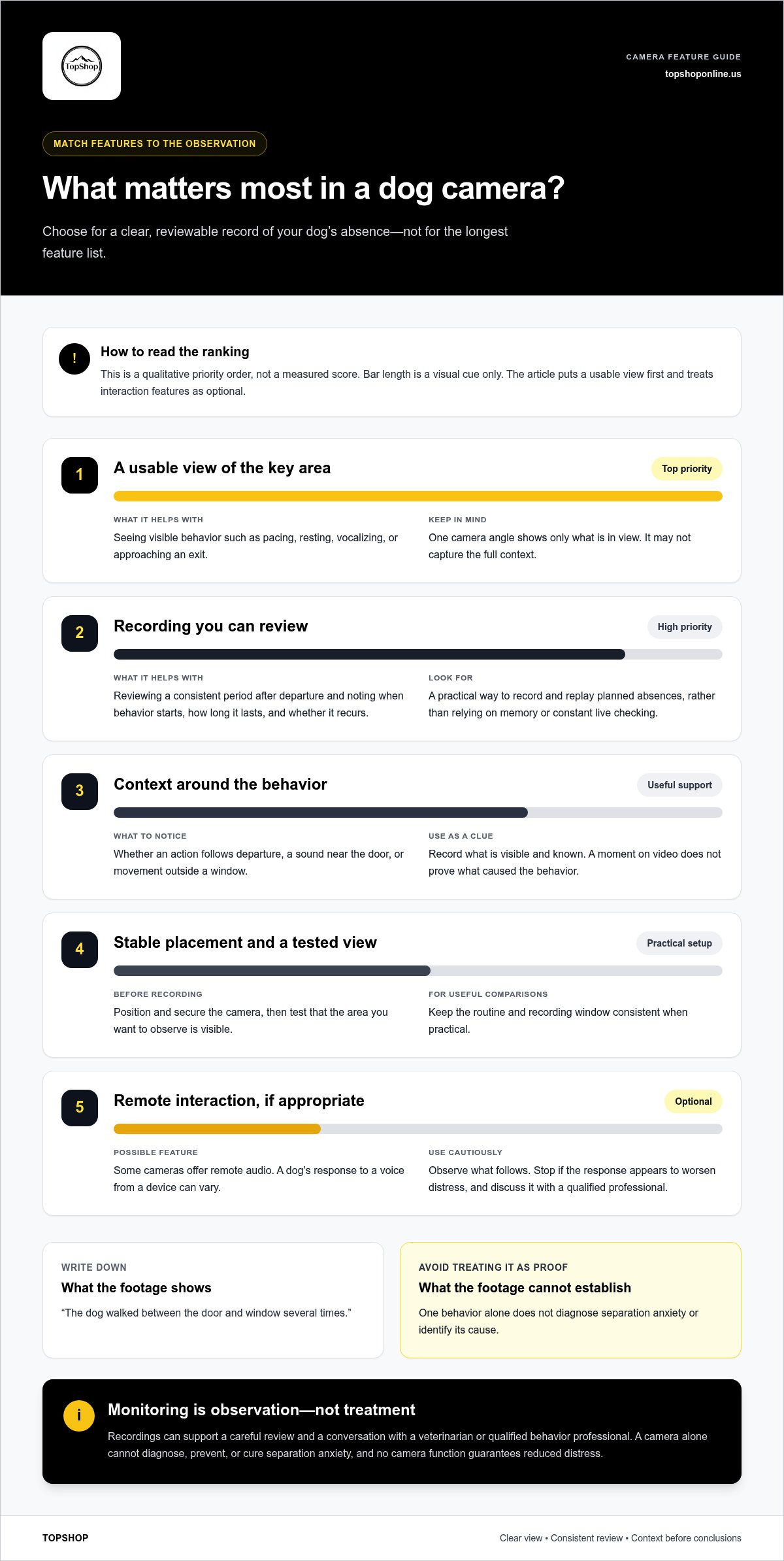
- Match camera capabilities to your observation goal, such as a clear view of a room or a practical way to review footage.
- Follow a repeatable setup routine: position and secure the camera, test the view, record, then note what you observe.
- Prioritize a usable view. Treat interaction functions as optional and footage as observations, not a diagnosis.
Dog camera for separation anxiety: what monitoring can, and cannot, tell you
A dog camera lets you view or record your dog while you’re away. For a dog camera for separation anxiety, the useful information is a record of visible behavior: when it starts, how long it continues, and whether it recurs across absences. Footage can replace guesswork with specific observations, but it can’t reveal a dog’s thoughts or establish a diagnosis.
Look for patterns instead of treating one moment as conclusive. A dog that barks once may have reacted to a sound outside. Repeated pacing after departure is worth documenting, but it still needs context. Separation anxiety in dogs can involve different signs and possible causes, so interpretation should account for the individual dog and circumstances.
What a camera may show during an owner’s absence
Video can document actions such as pacing between rooms, vocalizing, resting, panting, or approaching an exit. It may also show what happened shortly beforehand, such as your departure, a sound near the door, or movement outside a window. Record these details as clues, not proof of what caused the behavior.
When practical, use a consistent recording window for planned absences. Reviewing the same period after departure makes it easier to compare when a behavior starts, how long it lasts, and whether it recurs. Keep what the camera shows separate from your interpretation.
- Observation: The dog walks between the door and window several times.
- Context to record: The behavior begins after departure or follows a sound.
- Conclusion to avoid: This behavior alone proves separation anxiety.
Why video alone cannot diagnose or resolve separation anxiety
Footage captures visible actions from one camera angle during a particular absence. It may not show the full context, and a recording can’t determine whether a behavior reflects anxiety, an environmental response, or another concern. Separation-related distress is a behavioral concern that calls for an individualized assessment. Share relevant observations with a veterinarian or qualified behavior professional, especially when distress appears persistent or severe.
A camera can help you describe what happens, but assessment and treatment decisions require more than video. A veterinary professional can consider your dog’s history, health, environment, and behavior. Any behavior plan should reflect that individual picture. Monitoring by itself doesn’t change the underlying response, and no camera function guarantees reduced distress.
Monitoring provides observations; it is not treatment. Use recordings to support careful review and informed discussion, not as a substitute for a tailored behavior plan.
How dog cameras support useful observation without replacing training
A camera is most useful as part of a repeatable observation routine, not as a reason to check constantly. For a dog camera for separation anxiety, the goal is to gather clear examples of what happens during an absence, then use those observations to guide a conversation or behavior plan. Watching a live feed and reacting to every movement can make it harder to assess the whole sequence.
Keep the process structured:
- Choose a planned absence and a consistent recording window that fits the situation.
- Review the footage afterward, noting visible actions and when they occur.
- Compare observations across recordings for recurring timing or context.
- Discuss relevant patterns with a veterinarian or qualified behavior professional.
Useful video records behavior in context over time. For example, note whether pacing begins soon after departure, follows a sound, or appears only during part of the recording. Record what is visible first. “The dog walked between the door and window” is an observation; “the dog was panicking” is an interpretation that needs more context.
How recordings can inform a behavior conversation
Make brief notes alongside each recording: departure time, when a behavior begins, how long it lasts, and whether your dog appears to settle afterward. Include relevant context, such as a delivery or noise, if it’s visible or known. The ASPCA’s overview of canine separation anxiety symptoms can help identify behaviors to document, but matching a sign on a webpage does not establish a diagnosis.
A short clip can give a professional a useful example, especially alongside notes from other absences. It can’t show your dog’s full history, health, or every environmental factor. Share observations rather than presenting your interpretation as a conclusion.
When remote interaction may not suit the situation
Some cameras include interaction functions such as remote audio, but a dog’s response can vary. A voice from a device may be neutral for one dog and confusing or activating for another. Don’t assume that speaking through a camera will provide comfort or replace a suitable behavior plan.
If your camera has an interaction feature, use it cautiously and observe what follows. Note whether your dog settles, seeks the sound source, becomes more vocal, or shows another visible change. Stop using the feature if the response appears to worsen distress, and discuss the observation with a qualified professional. Interaction is optional. A stable view and consistent review may be more useful for observation.
TopShop lists the 1080P HD Wireless Mini Security WiFi Camera as a general camera option. It is identified as a mini WiFi camera, not an anxiety treatment device. Whichever setup you use, keep recordings focused on observation and leave behavior change to an individualized plan.
Compare dog camera features by the monitoring problem you need to solve
Compare cameras against a defined observation need, not the longest feature list. A dog camera for separation anxiety should provide a usable view of the behavior or area you want to observe. Coverage, image clarity, connection requirements, recording access, and optional interaction functions solve different problems. Features vary by product, so use the table as a comparison framework, not as a list of capabilities every camera includes.
| Owner need | Relevant capability | Practical limitation |
|---|---|---|
| See activity across a room | A fixed view or, if available, adjustable pan-and-tilt coverage | A wider view may show more of the room but make details harder to distinguish; moving coverage may not show every area at once. |
| Review visible actions clearly | Image resolution suited to the distance and lighting in the intended location | Resolution alone doesn’t guarantee a clear view if the camera is poorly positioned, the room is dim, or the dog is far away. |
| View footage away from home | Remote viewing through a compatible connection, if the camera supports it | Remote access depends on the camera’s requirements and a usable network connection. |
| Review behavior after the absence | Recording and playback, with a storage method that fits your review routine | Recording, storage capacity, access, and any related service requirements vary by product. |
| Use an interaction function | Product-specific features such as a microphone, speaker, alerts, or treat dispenser | These functions aren’t universal, and interaction may not suit every dog or observation goal. |
Choose viewing and recording capabilities for the room
Start with the room layout and the behavior you need to see. A focused camera angle may work if the relevant activity happens near one area, such as a doorway. Broader coverage may help if your dog moves between areas, but check whether the image still shows enough detail. Neither view is automatically better.
Assess the intended position for privacy, stability, and obstructions. Avoid aiming into areas where household members expect privacy. Keep the camera secure and away from furniture, curtains, and objects that could block the frame. Review a live view before relying on it for a recording.
Assess connectivity, playback, and interaction separately
Remote viewing and recording are separate functions. A camera may support one without offering the other in the way you need, so compare how you’ll watch live and access footage later. Check the product’s stated connection and storage approach rather than assuming every WiFi camera has the same playback options.
Alerts, microphones, speakers, and treat dispensers are product-specific. Consider them only if they match your use case; they aren’t required for basic observation. TopShop lists the 1080P HD Wireless Mini Security WiFi Camera, a general camera option with 1080P HD and WiFi in its listed name. Don’t assume it includes additional functions unless they’re stated for the product.
Set up a dog camera and review footage with a repeatable routine
A consistent setup makes recordings easier to compare and reduces avoidable changes to your dog’s environment. Choose the view before an absence, check that the equipment is secure, and record without calling, approaching, or otherwise prompting your dog to react. The aim is to observe a typical routine, not stage a test.
Place and test the camera before relying on a recording
Position the camera on a stable surface or mount, aimed at the area you want to observe without blocking your dog’s path. Keep the device and cables out of reach to prevent chewing, pulling, or entanglement. Place equipment away from water and heat sources. While home, follow the device’s instructions to test the view and connection, then check for glare, obstructions, and areas outside the frame.
Use this routine for each planned observation:
- Choose a safe view. Frame the relevant room or area while preserving your dog’s normal movement and access to familiar items.
- Secure the camera. Check that it can’t tip, fall, or be pulled down, and route cords safely.
- Test the feed. Confirm the image and connection from the location where you’ll review it.
- Record a planned absence. Keep your departure and the home environment as typical as practical. Don’t create a noise or use an interaction function just to see how your dog reacts.
- Review the footage. Watch the recording after the absence instead of repeatedly checking and responding to every movement.
- Write brief notes. Log the date, absence duration, visible actions, when they began, and how long they continued.
Review footage for patterns, not isolated moments
Compare similar observation periods when possible. A single clip may show a brief vocalization or a short walk across the room, but it won’t establish whether that behavior is typical. Note what the recording directly shows, such as repeated trips to the door, and keep assumptions about emotional state separate. Consistent notes make recurring sequences easier to discuss.
Keep the camera and your routine unobtrusive. If you notice behavior that appears significant, persists across absences, or raises safety concerns, share relevant recordings and notes with a veterinarian or qualified behavior professional. They can consider the footage alongside your dog’s history, health, and circumstances. Don’t extend an absence or provoke a response to collect more footage if your dog appears distressed.
TopShop lists the 1080P HD Wireless Mini Security WiFi Camera as a general camera option. The product name doesn’t establish dog-specific functions. Browse TopShop’s camera options while comparing a setup with your observation needs.
Choose a dog camera for separation anxiety based on your actual needs
Choose a dog camera for separation anxiety by starting with what you need to observe, then selecting the simplest setup that can provide it. If your priority is seeing whether your dog rests or moves around a particular room, focus on a usable view, stable placement, and practical access to footage. Extra functions matter only if they solve a specific need and are stated for the product you’re considering.
Match the camera category to the owner’s monitoring priorities
For basic observation, prioritize a clear view of the relevant area and a setup you can position safely and review consistently. A fixed camera may suit a focused view; broader or adjustable coverage may be useful if your dog moves through more than one area. Compare the actual field of view and placement needs with your room rather than assuming a particular camera type is best.
Interaction is a separate priority. If you want remote audio, alerts, or treat dispensing, compare only products whose specifications explicitly state those functions. Consider how you’ll use each feature and whether it supports your purpose. Interaction isn’t essential for observing behavior and shouldn’t be treated as a substitute for a tailored behavior plan.
A simpler setup can mean fewer functions to evaluate and a more focused observation goal. A feature-rich device may offer more options, but those options don’t automatically make it a better fit. Decide which capabilities are essential, which are optional, and which you don’t need.
- Essential: A safe, stable position and a view that captures the area you want to observe.
- Useful if needed: Recording or remote access that matches how you plan to review footage.
- Optional: Product-specific interaction functions that align with your intended use.
Consider TopShop’s listed mini WiFi camera as an option
TopShop lists the 1080P HD Wireless Mini Security WiFi Camera as a general security camera option for $24.95. Its listed name identifies it as a mini WiFi camera, not a dedicated dog camera or anxiety treatment device. Keep that distinction in mind when comparing it with products whose specifications describe additional pet-oriented functions.
Before choosing a camera, compare its stated specifications with your observation priorities. Don’t infer alerts, audio, storage methods, or other functions from the product category or name. A camera’s usefulness depends on whether its stated capabilities suit your viewing and review needs. It won’t diagnose or resolve separation-related distress on its own.
If a general mini WiFi camera fits your observation goal, view the 1080P HD Wireless Mini Security WiFi Camera. Select it based on its stated specifications and your planned use.
Set a clear goal for your next step
Before choosing a dog camera for separation anxiety, decide what you want to learn from your next observation: where your dog spends time, when a behavior begins, or whether it recurs. Write that goal down. It can guide your camera comparison and help you select relevant footage instead of collecting recordings without a clear question.
If the footage raises concern about persistent distress, bring your observations to a veterinarian or qualified behavior professional. A camera can inform that discussion, but it can’t determine the right treatment for your dog. Keep the next step practical: identify what you need to observe, choose a camera that suits that purpose, and seek qualified guidance when the behavior warrants it.
TopShop lists the 1080P HD Wireless Mini Security WiFi Camera as a general camera option. Review its listing as you assess whether a mini WiFi camera fits your setup and observation needs.
View the 1080P HD Wireless Mini Security WiFi Camera and choose a specific monitoring goal. A considered setup can make your observations more useful as you decide what support your dog needs.
Frequently Asked Questions
Can a dog camera help with separation anxiety?
Yes. A camera can help you gather observations during absences, but it can’t diagnose or treat separation anxiety by itself. For example, note whether vocalizing starts immediately after departure or later, and whether it continues or stops. Don’t extend an absence just to collect more footage. If distress appears persistent, severe, or harmful to your dog’s welfare, share your observations with a veterinarian.
What features should I look for in a dog camera for separation anxiety?
Choose features based on what you need to observe. If your dog stays near one doorway, a clear view of that area may matter more than room-wide coverage. If your dog moves between spaces, coverage becomes a bigger consideration. Compare image clarity, connection requirements, recording access, and any stated interaction functions. Treat alerts, audio, and treat dispensing as model-specific, not standard features.
Can I talk to my dog through a camera when I leave?
Only if that specific camera has two-way audio. Even then, your dog may respond differently to a voice from a device than to you speaking in person. If you test the function, do so while you’re home and observe whether your dog disengages, searches for you, or becomes more vocal. Stop if the response seems to increase distress, and discuss it with a qualified professional.
Should I leave a camera recording all day?
Not necessarily. Continuous recording can produce more footage than you need to review. A planned observation period tied to a specific question, such as what happens after you leave for an errand, may be more practical. Consider who or what else could enter the camera’s view, and use the device’s instructions to manage recording and access. Longer recording alone won’t resolve distress.
Can a camera diagnose separation anxiety in dogs?
No. A recording can document visible actions, but it can’t determine their cause or assess a dog’s overall health and history. For example, pacing on video is an observation, not a clinical conclusion. A veterinarian can consider behavior alongside health and environmental context, then advise on next steps. Bring specific clips or notes if they help describe what you’ve noticed.
Where should I place a camera to monitor my dog at home?
Place it where the intended area is visible and the device is stable, without narrowing your dog’s normal route through the room. Before leaving, check the image from the viewing position you’ll use and confirm that furniture or glare doesn’t obscure the scene. Keep cables inaccessible and the camera away from water, heat, and reachable chewing areas. Avoid repositioning it to provoke a reaction.