

More camera coverage isn’t automatically better coverage. In the dual dash cam vs 3-channel dash cam comparison, the key question is whether you need footage from inside the cabin as well as from the road ahead and behind. Weigh that extra view against the setup, storage, and footage-review needs it brings.
A dual-channel setup commonly records the front and rear, which may suit drivers focused on events around the vehicle. A 3-channel setup often adds an interior-facing camera, which can help document activity inside the cabin. This guide compares coverage and practical trade-offs, including resolution, storage, and installation. TopShop’s Guardian 3-Channel 4K Dash Cam is one option to assess. Before buying, check its product listing for camera placement and model-specific specifications.
Key Takeaways
- In the dual dash cam vs 3-channel dash cam comparison, choose based on the footage you need: road views or road views plus the cabin.
- Check the resolution of each camera separately. A system’s advertised resolution may not apply equally to every channel.
- Consider storage and the time needed to review footage before adding another camera view.
- Match the setup to your regular use, including whether passenger-facing or interior footage would be relevant.
- Before evaluating the Guardian 3-Channel 4K Dash Cam, verify its camera placement and model-specific details on the product listing.
Dual Dash Cam vs. 3-Channel Dash Cam: What Does Each Setup Record?
A dual-channel dash cam uses two camera inputs, commonly aimed at the road ahead and the area behind the vehicle. A 3-channel dash cam uses three inputs, often adding an interior-facing view to front-and-rear coverage. These are common layouts, not guaranteed configurations, so check where each camera points. A Dashboard camera is designed to record a vehicle’s surroundings, but channel count alone doesn’t tell you how clearly or continuously each view is captured.
Channel count refers to the number of camera inputs, not the image quality of each lens. Resolution, field of view, and recording behavior can differ by channel and model. Use the comparison below as a starting point, then verify the product specifications.
| Setup | Typical coverage | Primary purpose | Key limitation |
|---|---|---|---|
| Dual-channel | Front and rear | Document road events and activity behind the vehicle | Typically lacks a cabin-facing view |
| 3-channel | Front, rear, and cabin | Add interior context to road coverage | More camera views to check and manage; layout varies |
What does a dual dash cam typically capture?
A common dual-camera arrangement records through the windshield and uses a second camera to capture the rear. Rear footage can add context when an incident involves a following vehicle, a rear impact, or activity behind the car that the front camera cannot show. Check how the rear camera is mounted, whether it faces through the back window, and what field of view the listing specifies. Don’t assume every dual model has the same layout.
What does a 3-channel dash cam typically add?
The third camera often faces into the cabin, alongside front and rear cameras, but confirm the actual configuration for each model. Interior footage may be relevant for rideshare or taxi drivers and others who regularly transport passengers, particularly when activity inside the vehicle matters. Three cameras don’t automatically mean all views record simultaneously or share the same resolution. Check camera placement and those specifications before comparing models.
For the dual dash cam vs 3-channel dash cam choice, identify the views you need first. Then compare the actual camera layout and per-camera specifications instead of treating channel count as a measure of coverage or image detail.
Compare Coverage, Image Detail, and Footage Management
Camera count affects how many views a system can record, but the trade-offs also include image detail, storage, file retention, and the effort required to review footage. A third view may capture information a two-camera setup misses, while adding more footage to sort through. The practical difference depends on the model’s recording settings and how useful each view is to you.
| Factor | Dual-channel setup | 3-channel setup |
|---|---|---|
| Coverage priority | Typically front and rear views | Often adds a cabin view; confirm placement |
| Footage review | Review two camera feeds | Review up to three feeds if all record |
| Storage planning | Depends on resolution, recording settings, and card capacity | Check whether simultaneous recording increases storage use |
| Setup considerations | Check camera placement and cable routing | Account for an additional camera and its placement |
Does another camera mean clearer evidence?
No. Channel count describes the number of camera inputs, not the image quality each camera can deliver. Coverage area, usable field of view, resolution, and sensor performance are separate factors. A cabin camera may provide a useful angle without matching the front camera’s detail. Compare specifications for every channel and review daytime and low-light sample footage where available. Don’t infer night performance from channel count or a headline resolution. PCMag’s dash cam buyer’s guide is another reference for comparing model features.
How do channels affect storage and review?
When multiple cameras record simultaneously, their combined footage can affect how quickly storage fills. The impact depends on resolution, recording settings, and the system’s supported microSD capacity. Check whether the manufacturer specifies a card limit and whether all channels record continuously or use different settings.
Loop recording generally means the camera overwrites older footage when storage is full. Event-protected clips are recordings marked to reduce the chance they’ll be overwritten, though the trigger and retention behavior vary by model. Before relying on this feature, confirm how clips are protected and how to save or export them.
Two feeds usually mean fewer views to check; three may take more time to search and review. That added effort can be worthwhile if the extra angle answers a question the other cameras can’t. For model-specific details, review the Guardian 3-Channel 4K Dash Cam against your coverage and footage-management requirements.
When Is a Dual Dash Cam Enough, and When Does 3-Channel Make Sense?
Choose a setup based on the events you want documented. If your main concern is traffic ahead, rear impacts, or activity behind your vehicle, front-and-rear coverage may meet your needs. A cabin-facing camera adds a different kind of record, but also another view to position and review, as well as privacy considerations. Neither configuration prevents incidents or guarantees a particular insurance or claim outcome.
Who may prefer a dual dash cam?
A dual setup may suit drivers focused on documenting road events in front of and behind the vehicle, with little need for interior footage. Before choosing, consider the vehicle and camera route: check where the rear camera mounts, how its cable can be routed, and whether the placement works with your vehicle’s layout. Two cameras may mean fewer coverage decisions, but installation isn’t automatically simpler.
Who may benefit from a third, cabin-facing channel?
Rideshare drivers, taxi operators, and others who frequently transport passengers may have a reason to record the cabin as well as the road. Interior footage can provide context about activity inside the vehicle, but it also raises passenger privacy and disclosure considerations. Decide whether cabin recording fits your needs and how you’ll communicate it to passengers before choosing this setup.
Check the specific model’s cabin-camera position, low-light performance, and recording controls. These features vary, and a third channel alone doesn’t confirm that the camera will capture the details you need or that its recording can be managed as expected. For another comparison reference, CNET’s guide to the best multi-channel dash cam options discusses systems with multiple camera views.
- Choose dual-channel if front-and-rear road context is your main requirement and cabin footage has limited value for your use.
- Consider 3-channel if passenger-facing work or other regular vehicle use makes interior footage relevant.
- Check practical trade-offs including rear-camera routing, cabin-camera positioning, footage review, and passenger privacy expectations.
The right choice in the dual dash cam vs 3-channel dash cam comparison depends on whether the extra cabin view serves a clear purpose. If it doesn’t, prioritize suitable road coverage and a configuration you can install and manage appropriately.
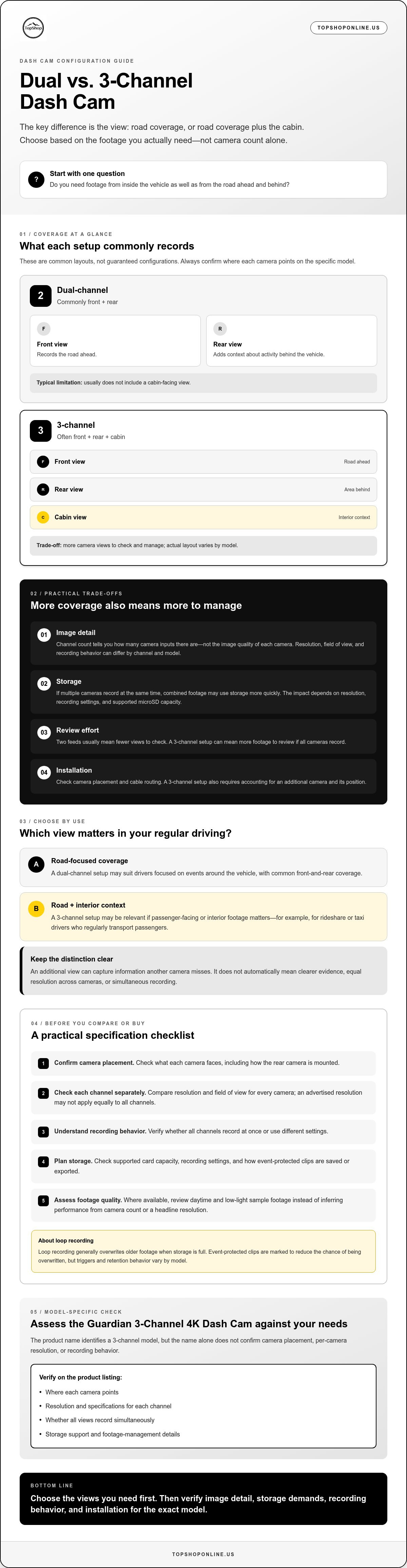
Use This Checklist to Choose the Right Dash Cam Configuration
Work through these checks in order. Start with the footage you’re likely to need, then confirm that the system can record and store it in a way that fits your vehicle and routine.
- Identify the views that matter. Decide whether you need to document traffic ahead, activity behind the vehicle, or both. A front-facing camera records events in front; a rear-facing camera can capture context behind; an interior camera may document activity inside the cabin. Match the number and direction of cameras to those needs.
- Separate driving needs from passenger-facing use. If you regularly carry passengers for rideshare, taxi, or other work, consider whether interior footage would be useful. If your main goal is documenting road events, weigh the value of a cabin view against the extra footage to review.
- Treat parking coverage as a separate requirement. Don’t assume another channel provides parking surveillance. Check whether the specific model supports a parking mode, what it records, and what power or settings it requires.
- Compare each camera’s specifications. Confirm resolution and field of view per channel, not just the headline resolution. Review supported recording settings and sample footage where available, especially if low-light capture matters.
- Check storage and installation details. Verify supported memory-card type and capacity, how recording files are managed, and whether simultaneous recording affects storage use. Review camera mounting instructions, rear-camera cable routing, and the required power connection for your vehicle.
- Confirm features and recording considerations. Check whether GPS, Wi-Fi, app support, and parking mode are included instead of assuming they come with a particular channel count. Before recording people, consider applicable local rules, privacy expectations, and any disclosure obligations relevant to your use.
This process keeps the dual dash cam vs 3-channel dash cam decision focused on coverage, installation, storage, and privacy rather than camera count alone. If an interior view doesn’t serve a clear purpose, it may not be worth adding to your setup.
TopShop’s Guardian 3-Channel 4K Dash Cam is one option to assess against these checks. Its confirmed descriptors establish the channel count and 4K positioning, but don’t specify camera placement, resolution by camera, storage, or other features. Compare the Guardian dash cam details with your checklist and verify the model-specific information before purchase.
Assess the Guardian 3-Channel 4K Dash Cam Against Your Coverage Needs
The Guardian 3-Channel 4K Dash Cam is a TopShop offering. Its name establishes 3-channel and 4K positioning, but those descriptors alone don’t confirm which views the cameras record or the resolution of each camera. Assess it against your coverage checklist rather than assuming it suits every vehicle or driving routine.
Which confirmed details can guide your comparison?
The 3-channel designation signals a three-channel system, while 4K is a product descriptor. Neither tells you whether the cameras cover the front, rear, and cabin, or whether each channel records at the same resolution. To determine whether it captures the views you need, look for an explicit camera-layout description on the product listing. If the placement isn’t clear, you can’t reliably match the system to front-and-rear road coverage or passenger-facing interior recording.
Start with the footage you want. A driver focused on road events may prioritize verified front and rear views. Someone who needs cabin footage should confirm that an interior-facing camera is included and positioned appropriately for the vehicle. Check resolution by channel too: a 4K label doesn’t establish the resolution of every camera or the image detail each view delivers.
What should you confirm before choosing this setup?
Review the product listing for details that affect coverage, recording, and installation. Look for:
- Camera layout: Verify which directions each channel records, including whether there’s a cabin-facing view.
- Per-camera resolution: Confirm the stated resolution for each camera rather than assuming all channels share the 4K descriptor.
- Storage compatibility: Check supported memory-card type and capacity, along with any stated recording and file-management details.
- Mounting and power: Review the listed mounting components, camera placement guidance, cable routing, and power requirements for your vehicle.
- Additional features: Verify whether recording modes, GPS, Wi-Fi, parking mode, app support, or other features are specified. Don’t assume they’re included based on channel count or the product name.
These checks make the dual dash cam vs 3-channel dash cam decision more specific. Choose the Guardian only if its confirmed camera arrangement and operating requirements match the footage you need and the setup you can manage. If key specifications aren’t clear, confirm them before purchase instead of treating the product name as a substitute for model details.
Compare the Guardian 3-Channel 4K Dash Cam details with your coverage and specification checklist.
Choose Coverage That Matches Your Driving
The dual dash cam vs 3-channel dash cam decision comes down to the views you need and the footage you’re prepared to manage. A dual setup may suit drivers focused on recording road events ahead and behind. A third channel may help when cabin footage has a clear purpose, such as documenting passenger-facing work.
Before choosing, check camera placement, resolution for each channel, storage compatibility, mounting, and power requirements. Channel count and a 4K label don’t confirm every detail of coverage or performance. TopShop lists the Guardian 3-Channel 4K Dash Cam, but verify its camera layout and features against the product details before deciding.
Compare the Guardian 3-Channel 4K Dash Cam details with your coverage needs and specification checklist. With those checks in hand, you can choose based on the footage you need, not simply the number of cameras.
Frequently Asked Questions
What is the difference between a dual dash cam and a 3-channel dash cam?
A dual dash cam records through two camera channels, while a 3-channel dash cam records through three. Common layouts use front and rear views for a dual setup, then add a cabin-facing view for a 3-channel system. These arrangements aren’t universal. Check each model’s camera placement, whether all channels record at the same time, and the resolution specified for each camera.
Is a 3-channel dash cam better than a dual dash cam?
A 3-channel dash cam isn’t automatically better; it adds a camera view that may or may not suit your needs. A dual setup may be enough if you mainly want front-and-rear road footage. Consider three channels if interior footage has a practical purpose, such as documenting passenger-facing work. Compare image detail, storage requirements, mounting, and footage review before choosing.
Do 3-channel dash cams record the front, rear, and inside of the car?
Some 3-channel dash cams use front, rear, and cabin-facing cameras, but don’t assume every model follows that layout. Channel count indicates camera inputs, not where each camera points. Check the product description or manual for each camera’s position and field of view, and confirm whether all three channels record simultaneously. Review each camera’s resolution separately as well.
Can a dual dash cam record inside the car?
Yes, a dual dash cam can include an interior-facing camera, depending on its design. “Dual” describes two camera channels, not a fixed front-and-rear layout. A model might pair a front-facing camera with a cabin view instead of a rear camera. If you need to record the road behind you as well as the cabin, verify that the specific system supports those views.
Does a 3-channel dash cam use more storage than a dual dash cam?
It can use more storage if all three cameras record simultaneously, but the difference depends on resolution, recording settings, and file management. Check supported memory-card capacity and whether the model records continuously, protects event clips, or lets you adjust channel settings. Loop recording commonly overwrites older footage when storage fills, while protected clips may be retained according to model-specific rules.
Is an interior-facing dash cam useful for rideshare drivers?
An interior-facing camera may be useful for rideshare drivers who need footage of activity inside the vehicle alongside road views. Its value depends on what you want documented and whether cabin recording fits your privacy and passenger-disclosure practices. Check camera placement, low-light performance, and recording controls. Review applicable local rules and privacy obligations before recording passengers.
What should I check before buying a 3-channel dash cam?
Confirm where each camera points, whether all channels record together, and the resolution and field of view for each camera. Check memory-card compatibility, recording and event-file settings, mounting components, cable routing, and power requirements. Verify any claimed features, such as GPS, Wi-Fi, app support, or parking mode, on the product listing. For the Guardian 3-Channel 4K Dash Cam, TopShop confirms its name and 3-channel, 4K positioning, but verify model-specific details before purchase.