

A bed desk alone doesn’t make an ergonomic workstation for working from bed. If your laptop sits too low, your arms have nowhere stable to rest, or you stay in one position for too long, the setup may still feel uncomfortable. The screen, work surface, posture, and work routine all need to work together.
Limited space and awkward screen height are common challenges when working from a bed. A separate keyboard and mouse can be positioned independently of the screen, while a stable work surface gives them room. The Deskpro XL Ergonomic Adjustable Laptop Bed Desk is one possible surface option. Check its current specifications and assess whether it suits your setup before purchasing.
This guide covers how to position your screen and input devices, choose a work surface for your bed and tasks, and build breaks and position changes into your day. It also explains when bed-based work may be practical and why long sessions call for regular posture changes. Use these steps to create a setup that supports more comfortable work, without treating a bed desk as a substitute for movement.
Key Takeaways
- Build an ergonomic workstation for working from bed by coordinating screen placement, input devices, posture, and movement.
- Assess screen position separately from keyboard and mouse reach to avoid awkward viewing and working angles.
- Compare rigid bed desks, trays, and lap cushions by stability, adjustability, portability, and usable space.
- Use a quick setup check to confirm that your work surface is stable, devices are within reach, and cables and drinks are safely placed.
- Consider whether an adjustable bed desk suits your tasks and available space, and check the current product specifications before choosing one.
What Makes an Ergonomic Workstation for Working from Bed?
An ergonomic workstation for working from bed is an arrangement of the screen, work surface, input devices, body position, and breaks that supports readable viewing, comfortable reach, and regular movement. It isn’t defined by one furniture purchase. The setup should fit the person, the task, and the space available.
Ergonomics considers how people interact with their surroundings and tools. The principles of human factors and ergonomics apply here: arrange the workstation around the user rather than forcing the user to adapt to an awkward layout. In practice, aim to sit upright with your back supported, view the screen without sustained neck bending, reach the keyboard and pointing device without stretching, and change position regularly.
- Neutral positioning: Choose a posture that doesn’t require prolonged twisting or leaning.
- Readable screen placement: Position the display so you can see it without repeatedly bending your neck.
- Usable input devices: Keep the keyboard and mouse or trackpad within comfortable reach.
- Regular movement: Build in position changes instead of staying still through a long work period.
Which ergonomic problems can a bed setup create?
A laptop placed low on a mattress or lap can encourage you to keep your neck bent as you look down at the display. A soft or uneven support surface may also shift under the laptop, making it harder to maintain a consistent viewing position. These are setup challenges, not diagnoses, and their effect varies by person and task.
Typing directly on a laptop can be difficult when the screen and keyboard positions don’t suit you at the same time. Unsupported arms may feel strained during extended typing, and awkward wrist positions can make input less comfortable. A separate keyboard and pointing device can give you more flexibility to position the controls independently from the screen.
When is working from bed a practical option?
Bed-based work may suit occasional laptop tasks, brief reading, or a short video call, particularly when you can sit upright and keep the screen and input devices within reach. It may be less practical as a dedicated setup for a full workday. Available space, task demands, and your ability to reposition all affect whether the arrangement works for you.
Pay attention to how the setup feels as you use it. If discomfort develops, stop or adjust your position, screen, or work surface rather than trying to push through. For longer or frequent sessions, consider whether another workstation gives you more room to support your posture and change positions. A bed desk, including an adjustable model such as TopShop’s Deskpro XL Ergonomic Adjustable Laptop Bed Desk, is one possible surface, not a guarantee of comfort. Check the current product specifications and suitability before purchase.
How Screen Height, Posture, and Input Devices Affect Bed-Work Comfort
Screen placement affects how you hold your head and neck while reading. A display that sits too low may lead you to bend forward or look down for extended periods. If it’s too far away, you may lean closer. There isn’t one ideal distance or height for everyone. Your vision, screen size, task, and bed arrangement all affect what feels readable without leaning.
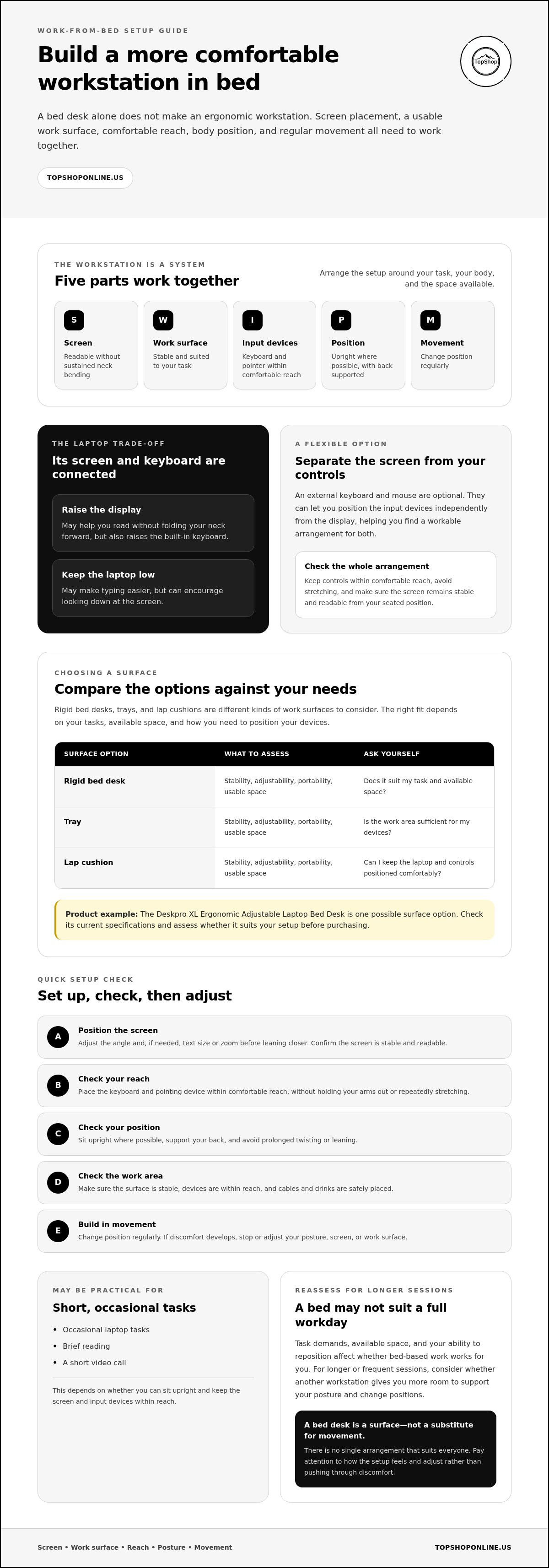
For a more neutral working posture, coordinate a readable screen angle and distance with supported arms, reachable input devices, an upright position, and regular posture checks. A laptop makes this harder because its screen and keyboard are attached. Raising the display also raises the keyboard, while leaving the laptop low may make typing easier but encourage you to look down.
How should you position a laptop screen in bed?
Where practical, raise the laptop display so you can read it without folding your neck forward. Before leaning toward the screen, try adjusting its angle and increasing the text size or zoom. Then check that the display remains stable and comfortable to view from your seated position. The right arrangement depends on your vision, the task, and how the bed and work surface are positioned.
Where should the keyboard and mouse go?
Keep the keyboard and pointing device within comfortable reach, so you don’t have to hold your arms out or repeatedly stretch to type and navigate. An external keyboard and mouse are optional tools, not required purchases. They can separate input positioning from screen positioning. If you use the laptop alone, you may need to compromise between a higher display and a keyboard that remains comfortable to use.
What posture adjustments are realistic on a bed?
Sit upright where possible, with your back supported and your feet supported if the bed arrangement allows. Avoid relying on a position that requires twisting or leaning for long periods. Mattresses and pillows can shift beneath your body or work surface, so recheck your support and reach as you work. Cleveland Clinic offers additional ergonomic tips for working from bed, including guidance on posture and positions to avoid.
Make small adjustments, then test them while doing the task rather than judging the layout at a glance. If viewing or typing requires sustained reaching, bending, or slouching, reposition the screen or input devices, or move to another work location. An adjustable laptop bed desk is one option for changing the work-surface position. TopShop’s adjustable laptop bed desk may be worth reviewing. Check the current listing details and specifications to assess whether it suits your setup.
How to Compare Bed Work Surfaces for an Ergonomic Setup
A work surface should hold your laptop steadily and provide enough usable space for the way you work. A rigid bed desk, a simple tray, and a lap cushion each have different trade-offs. The table compares these broad categories, not ranked or independently tested products. Actual performance depends on construction and the seller’s specifications.
| Option | Support | Adjustability | Portability | Likely limitations |
|---|---|---|---|---|
| Rigid bed desk | May provide a steadier platform, depending on its design and construction | Varies by model; confirm the available adjustments | Depends on size, weight, and storage design | May take up more space than a simple lap surface |
| Simple tray | Offers a defined surface; stability depends on its base and placement | May have limited adjustment; check the listing | Often straightforward to move, depending on its construction | Usable space or support may not suit every task |
| Lap cushion | Can provide a cushioned base, but may shift with body or mattress movement | Usually offers less positioning control than an adjustable desk | Can be convenient to reposition, subject to size and materials | May provide less consistent support and limited room for separate devices |
Bed desk, lap tray, or cushion: which setup fits the task?
For typing, video calls, or work that needs a laptop and separate input devices, a rigid surface may be useful if its construction provides adequate stability and space. A tray can suit simpler tasks when it stays secure in your chosen position. A lap cushion offers a movable, cushioned base, but may be less consistent as your body or bedding shifts. None is automatically the best option for every ergonomic workstation for working from bed.
Review the actual product listing before deciding. Check dimensions, materials, care instructions, and how the product is intended to be supported. TopShop sells the Deskpro XL Ergonomic Adjustable Laptop Bed Desk as one adjustable bed-desk option. Its suitability depends on the current listing details and your setup. You can review TopShop’s adjustable laptop bed desk and verify current specifications before purchase.
Which work-surface specifications should you check?
Measure the laptop and any separate keyboard or mouse you plan to use, then compare their combined footprint with the listed usable surface area. Confirm adjustment options and stability details rather than assuming a product can reach a particular height or hold a specific load. Also consider how you’ll move, store, and position it. A summary of how posture affects your health provides broader context for choosing a setup that supports a workable seated position.
When comparing bed desks, start with your own measurements and the seller’s current specifications. Check that the product will fit the space beside your bed and leave room for the devices you plan to use.
How to Set Up and Use an Ergonomic Workstation in Bed
Use this setup check before starting a task. A small change in bed position or cable placement can affect how stable and usable the workstation feels.
- Choose a position. Sit where you can remain upright and support your back. Make sure there’s enough room for the work surface and laptop, without balancing equipment on an unstable edge.
- Place the work surface. Set it on a stable part of the bed and check that it doesn’t shift when you type. Keep drinks away from the laptop and other electronics to reduce spill risk.
- Set the screen. Adjust the display angle and text size until you can read without sustained forward leaning. Reposition the screen or surface if you find yourself repeatedly moving closer.
- Test device reach. Type a few lines and use the pointing device. Check that your arms can stay relaxed and the devices remain within comfortable reach before beginning a longer task.
- Check the layout again. Confirm that the bedding hasn’t moved the surface and that accessories remain accessible without cluttering the work area.
How can you manage breaks and changing positions?
Bed-based work doesn’t have to be your only position. If another suitable workstation is available, alternate locations as the task allows. Use natural transitions, such as finishing a call or sending a piece of work, as reminders to stand, move, and reassess how the setup feels. There’s no single schedule that suits everyone. If discomfort persists or concerns you, stop working in that position and seek guidance from a qualified health professional.
How should power and accessories fit into the setup?
Route charging cables away from movement paths, mattress edges, and places where an arm or device could snag or pull them. Keep cables gathered and out of the main work area. A cable-management guide for a home office can offer additional routing ideas. Don’t place a power strip where bedding can cover it, and follow the manufacturer’s instructions for electrical equipment. If you need extra charging connections, check the power strip’s specifications and compatibility before use.
Before settling in, make one final check: the surface is stable, the screen is readable, input devices are reachable, and cables and drinks are safely positioned. If an adjustable bed desk suits your space and task, review TopShop’s adjustable laptop bed desk and check its current listing for specifications and suitability.
Choosing a Bed Desk for Your Ergonomic Workstation
An adjustable bed desk may suit occasional or recurring tasks if you need a work surface that can be repositioned and your bed arrangement supports its use. It won’t fit every routine. If you need more room for multiple devices, work for long periods, or can’t sit upright comfortably in bed, another workstation may be more practical. A desk can change where your laptop sits, but it can’t guarantee comfort or replace position changes.
Is an adjustable laptop bed desk right for your routine?
Start with how often you expect to work in bed, the tasks you’ll complete, and the devices you’ll use. A laptop-only setup takes less surface area than one with an external keyboard and mouse. Consider the space you need to position the desk, get in and out of bed, and store it when it’s not in use.
Adjustability is useful only if the product’s actual adjustment range suits your height, bed, and preferred working positions. Don’t rely on a product name alone to determine fit. Check the current listing for dimensions, adjustment details, materials, and any other specifications relevant to your setup.
What to know about the Deskpro XL Ergonomic Adjustable Laptop Bed Desk
The Deskpro XL Ergonomic Adjustable Laptop Bed Desk is a TopShop offering in the adjustable laptop bed desk category. The available product information doesn’t establish its dimensions, materials, load limits, or ergonomic performance. Treat it as one possible work-surface option, then compare verified listing details with your available space, device footprint, and task requirements.
After checking the details provided on the listing, view TopShop’s bed desk options. Review current specifications and availability before deciding whether a particular desk suits your setup.
What are the next steps before buying?
Measure the space where you plan to work, including the area needed to place and use the desk. Compare those measurements with verified product dimensions. Then decide whether your planned arrangement works with the laptop alone or needs a separate keyboard or mouse. If the screen and keyboard positions are difficult to balance with the laptop alone, include that trade-off in your decision.
Choose based on fit and function, not on the assumption that an adjustable desk will automatically make an ergonomic workstation for working from bed. Confirm the details you need on the current listing, and consider another work location if the space or posture doesn’t suit your routine. Browse TopShop to review its product offerings.
Put Your Bed Workstation Setup Into Practice
An ergonomic workstation for working from bed depends on how the parts work together, not on a desk alone. Position the screen for readable viewing, keep the keyboard and pointing device within comfortable reach, and choose a surface that fits your devices and available space. Recheck your posture and setup as bedding shifts, and alternate positions or take breaks rather than staying in one position for an extended period.
Bed-based work may suit occasional tasks, but it won’t fit every schedule or workspace. Compare a bed desk, tray, or other surface based on stability, usable area, adjustability, and storage needs. Before buying, compare your measurements with the product’s current specifications and consider whether your planned setup needs an external keyboard or mouse.
TopShop lists the Deskpro XL Ergonomic Adjustable Laptop Bed Desk as an adjustable bed desk option. TopShop’s e-commerce business serves customers across the United States. Check the listing for current specifications and availability, then decide whether it fits your intended workspace. Browse TopShop’s bed desk options and review the details before choosing a desk for your setup.
Frequently Asked Questions
Is it ergonomic to work from bed?
It may be more workable for occasional tasks if the screen, work surface, and input devices are positioned to suit you, but a bed doesn’t automatically provide a suitable workstation. Soft or shifting bedding can make stable support difficult, and a low screen may encourage you to bend your neck forward. Sit upright where possible, check your setup as you work, and change position if discomfort develops.
How do I set up an ergonomic workstation for working from bed?
Choose a position where you can sit upright, then place a stable work surface within comfortable reach. Adjust the screen angle and text size so you can read without leaning forward for extended periods. Test typing and pointing-device reach before starting a longer task. Keep drinks away from electronics, route cables out of movement paths, and reassess the setup if bedding or pillows shift.
Can I use a laptop in bed all day?
A laptop can be used in bed, but a bed-based setup may be less practical for a full workday than for occasional tasks. Screen and keyboard positions are linked, and mattresses or pillows can shift, making a consistent setup harder to maintain. If you work in bed, change position and take breaks as your routine allows. Stop or adjust if discomfort develops, and seek qualified guidance for persistent concerns.
What should I use as a desk when working from bed?
Choose a surface that stays stable and has enough usable space for your laptop and accessories. A rigid bed desk may suit tasks that need a steadier platform, while a simple tray or lap cushion may offer a more portable surface with different support limitations. Check the current listing for dimensions, materials, care instructions, and adjustment details. Match verified specifications to your available space and work needs.
Should I use an external keyboard when working from bed?
An external keyboard is optional, but it can help separate typing position from screen position. This can be useful because a laptop’s screen and keyboard are attached: raising the display also raises the keys, while keeping the laptop low may encourage you to look down. If you use a separate keyboard, check that it fits on the work surface and remains within comfortable reach. A mouse or other pointing device is optional too.
How high should my laptop screen be when working in bed?
There isn’t one height that suits every person, screen, or bed arrangement. Position the display so text is readable without sustained forward leaning or repeatedly bending your neck to look down. Adjust the screen angle and text size first, then raise the laptop where practical. If lifting it makes the built-in keyboard uncomfortable to use, consider repositioning the devices or changing your work location.
Are adjustable laptop bed desks worth considering?
An adjustable bed desk may be worth considering if bed-based tasks are part of your routine and its footprint and adjustment range suit your space and working position. Adjustability alone doesn’t guarantee comfort or ergonomic support. TopShop lists the Deskpro XL Ergonomic Adjustable Laptop Bed Desk, but check the current listing for verified dimensions, features, and availability. Compare those details with your laptop, accessories, and intended work area before deciding.