

A third camera doesn’t automatically mean useful coverage. A front rear and inside dash cam can record the road ahead, traffic behind, and activity inside the vehicle, but placement, night performance, and recording settings all affect what the footage shows.
A three-channel setup adds a cabin view to front-and-rear recording. That may matter for rideshare drivers and others who need an interior record. More channels also mean more footage to store and another camera to position and connect, so weigh the extra view against the practical setup and storage requirements.
This guide explains what each view captures and what to compare when choosing a system, including resolution, viewing angle, low-light recording, storage, and installation requirements. Use the checks below to match a setup to your vehicle and recording needs instead of relying on headline claims alone.
The Guardian 3-Channel 4K Dash Cam is one example of the three-channel category. Use the criteria below to assess whether a system’s views and supporting features fit your priorities.
Key Takeaways
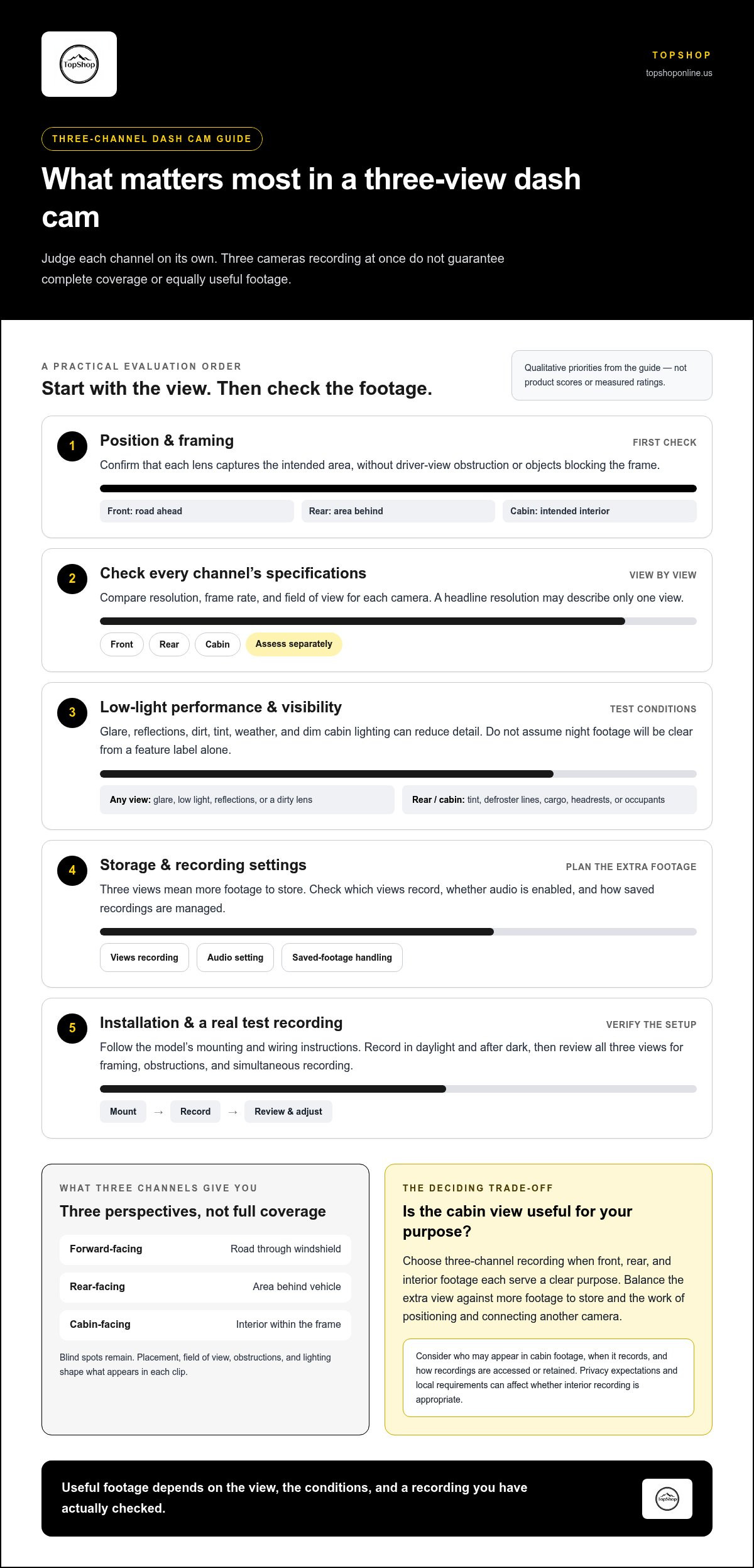
- Match each camera’s position to the area it needs to record. Three channels don’t guarantee complete coverage from every angle.
- Compare each view’s resolution, field of view, and low-light performance together. Resolution alone doesn’t determine whether footage is useful.
- For a front rear and inside dash cam, account for the added storage demand and review sample footage from all three views.
- Follow the model’s manual for mounting and wiring, then test the recordings for obstructions and framing issues before relying on the setup.
- Choose a three-channel setup when front, rear, and cabin footage each serve a clear purpose. Balance that coverage against installation planning and storage needs.
What a Front, Rear, and Inside Dash Cam Records
A front, rear, and inside dash cam is a three-channel system that records three views: through the windshield, toward the area behind the vehicle, and inside the cabin. “Three-channel” describes the number of recording views, not full coverage in every direction. Camera position, field of view, obstructions, and lighting determine what appears in each clip.
A Dashboard camera generally records a vehicle’s surroundings while it is in operation. In a three-view setup, each lens has a separate coverage job. The recordings can show different perspectives of the same trip, but blind spots remain, and a camera cannot capture areas outside its view.
What do the front, rear, and cabin cameras each capture?
The forward-facing camera records the road through the windshield, including the lane ahead and visible traffic. The rear camera records the view behind the vehicle. Its position, angle, and any obstruction from the vehicle or window determine how much of that area is visible. A cabin-facing camera records the interior and occupants within its frame. It may not capture every seat or part of the cabin, especially if objects, headrests, or passengers block the lens.
When is a three-channel setup useful?
A three-channel setup suits drivers who want road-ahead, rear, and cabin footage recorded during the same trip. A personal vehicle owner may prioritize the road and rear views, while someone using a vehicle for work may have a specific reason to record the cabin too. The useful configuration depends on the purpose of the recording, not simply the number of cameras.
Before choosing a three-channel system, consider who may appear in cabin footage, when recording will take place, and how recordings will be accessed or retained. Privacy expectations and local requirements can affect whether interior recording is appropriate. Review the camera’s settings and instructions to understand which views record, whether audio is enabled, and how saved footage is managed.
For example, a driver who wants to document the road and traffic behind the vehicle may not need cabin recording. Someone who also needs an interior view may find the extra channel useful, provided it can be positioned without obstructing the driver’s view. The Guardian 3-Channel 4K Dash Cam is an example of this category. Assess each camera view against your vehicle and intended use.
How Three Dash Cam Channels Work Together
A three-channel system records forward, rear, and cabin views during the same trip, giving each recording a different perspective on the vehicle and its surroundings. Simultaneous recording doesn’t mean the views have equal detail or complete coverage. Resolution, lens field of view, exposure, and recording settings affect each channel separately, so clear footage from one camera doesn’t guarantee equally usable footage from the others.
Position matters. The mounting point, camera angle, glass type, tint, seat and headrest locations, passenger movement, and nearby objects all affect which details fall inside the frame. A camera aimed too high may capture excess sky; a rear lens blocked by cargo may miss the area behind the vehicle. These limitations remain even when all three channels are recording.
Where should each camera be positioned?
The forward camera is typically mounted on the windshield, the rear camera near the rear window, and the cabin camera facing the interior from a position that captures the intended area. The best practical position depends on windshield shape, rear-window layout, mirror placement, seats, and driver sightlines. Follow the device’s mounting and wiring instructions, and observe applicable vehicle rules, including restrictions intended to keep equipment from obstructing the driver’s view.
What can affect footage from each view?
Glare, low light, reflections, obstructions, and dirty lenses can reduce visible detail in any channel. Sunlight reflecting off the dashboard or glass may wash out part of the forward view, while a dusty lens can soften footage regardless of resolution. Clean the lens surfaces and check framing in a recording, not just by looking at the mounted unit.
Rear and cabin recordings have additional variables. Rear-window tint, defroster lines, reflections, cargo, and weather can affect the image behind the vehicle. Interior lighting can create reflections on glass or leave parts of the cabin dim. Occupants or headrests may also block the cabin camera. Don’t assume night footage will be clear based on channel count or a general feature label. Compare actual low-light performance and review footage recorded in conditions similar to your intended use.
Make a short test recording to confirm that all channels capture at the same time and that each frame includes the intended area. Check the video in daylight and after dark, adjust the camera angles if needed, and make sure cables don’t interfere with controls or visibility. These checks help you assess whether a front rear and inside dash cam suits your vehicle. View three-channel dash cam options when comparing systems with this setup.
How to Compare Front, Rear, and Interior Dash Cam Specifications
Compare each channel separately. A system’s headline resolution may describe only one camera, and resolution alone doesn’t show how footage handles motion, glare, or low light. For a front rear and inside dash cam, check the specifications for every view and consider how they fit the areas you need to record.
| Camera view | Resolution and frame rate | Viewing angle | Low-light performance |
|---|---|---|---|
| Front | Check the front camera’s stated resolution and available frame rate settings. | Assess how much of the road and surrounding lanes fit in the frame. | Look for sample footage in dim conditions, not just a feature label. |
| Rear | Confirm the rear camera’s own resolution and frame rate. Don’t assume they match the front. | Check whether the view includes the area behind the vehicle without excessive distortion. | Review footage with the vehicle’s rear glass, tint, and typical lighting conditions in mind. |
| Cabin | Check the interior camera’s resolution and frame rate separately from the road-facing cameras. | Consider whether the frame captures the intended seats and cabin area. | Assess whether occupants and interior details remain visible in the lighting you expect. |
Which image-quality specifications matter most?
Resolution affects how much image detail a camera can record. Frame rate affects how motion is represented, so compare both rather than treating higher resolution as a guarantee of readable details. Viewing angle is a separate trade-off: a wider frame can include more area, but objects may appear smaller. Real-world footage also depends on lens quality, exposure, placement, glass, and lighting. Compare day and low-light test recordings where available, ideally from each channel under similar conditions. Published specifications and usable footage are related, but they aren’t interchangeable.
How do storage, power, and connectivity affect use?
Three simultaneous video streams create more footage to store than a single-channel setup. Check whether the system uses loop recording, which overwrites older footage as storage fills, and confirm supported memory-card types and capacity in the device documentation. GPS, Wi-Fi, and app access are optional comparison points, not features to assume. Parking-mode recording also varies by device and may depend on its power arrangement.
The Guardian 3-Channel 4K Dash Cam is one option in this category. When comparing it with other systems, look at the resolution, viewing angle, frame rate, night performance, storage support, connectivity, and power features for each channel. The “4K” in a product name does not by itself tell you whether that resolution applies to all three cameras.
How to Plan and Set Up a Three-View Dash Cam
Set up each channel for a specific view, then verify that the saved footage matches the plan. Three cameras don’t guarantee complete coverage or uninterrupted recording. Obstructions, incorrect angles, power interruptions, storage limits, and device settings can all affect what gets captured. Mounting and wiring details vary by model, vehicle layout, and power configuration, so use the product manual for device-specific instructions.
Plan the installation before mounting
Check camera positions and cable routes before attaching mounts or connecting power. Windshield shape, rear-window features, headrests, cargo, and vehicle controls can affect placement. Keep cameras and cables clear of the driver’s sightlines and controls, and follow the product manual and applicable vehicle rules.
Follow this setup checklist
- 1. Define the views. Decide what the front, rear, and cabin cameras should show. Identify possible obstructions such as mirrors, window tint, seats, or stored items.
- 2. Plan cable routes. Trace each cable to its connection point. Keep wires clear of pedals, airbags, moving parts, and controls. Wiring complexity depends on the vehicle and whether the chosen power configuration uses a plug-in connection or hardwiring.
- 3. Check requirements. Consult the manual before selecting a memory card, power accessory, or parking-mode setup. Compatibility and operating requirements vary by device.
- 4. Mount and connect. Follow the model’s instructions for camera placement, cable connections, and power. Don’t assume one system’s mounting or wiring steps apply to another.
- 5. Confirm all channels. Start a recording and verify that front, rear, and cabin video are captured. Check that clips save and can be opened for playback.
- 6. Review and adjust. Inspect saved footage for framing, blocked views, reflections, or loose connections. Review daytime and nighttime clips in conditions relevant to normal driving, then reposition a camera and test again if needed.
Test the system after installation and after any mount adjustment. Confirming that each camera records at one moment doesn’t establish uninterrupted coverage on every trip. Power, storage, recording settings, and device operation still matter. Review the manual to understand how recordings are saved and how to check status indicators.
Use these checks to plan a front rear and inside dash cam around your vehicle and recording needs. Explore the Guardian 3-Channel 4K Dash Cam as an example of a three-view system.
Choosing a Three-Channel Dash Cam for Your Vehicle
Choose a three-channel dash cam when all three views serve a defined recording purpose. A front camera covers the road ahead, a rear camera records behind the vehicle, and a cabin camera captures the visible interior. The right setup depends on which views you need, whether they can be positioned effectively in your vehicle, and how you’ll manage the resulting footage.
Who may benefit from three camera views?
Drivers who want a simultaneous record of the road, rear area, and cabin may find a three-channel setup useful. For example, someone who needs an interior view for work-related driving may value the extra channel. A personal driver focused mainly on the road and traffic behind the vehicle may prioritize front and rear coverage instead. Cabin recording also raises privacy considerations, so factor in who may be recorded and applicable local requirements.
More views don’t guarantee complete coverage, prevent an incident, resolve a dispute, or reduce insurance costs. The value lies in recording the areas visible to the cameras under actual operating conditions. Consider whether the extra cabin footage meets a specific need before taking on the associated mounting, wiring, storage, and review tasks.
What should you confirm before selecting a model?
Compare the system’s documented specifications and requirements with your intended use and vehicle layout. Check:
- Camera views: Confirm which cameras are included and what each is designed to record.
- Image specifications: Review resolution, frame rate, viewing angle, and low-light performance for each channel, not only the front camera.
- Storage: Verify supported memory-card type and capacity, plus how the system handles loop recording and saved clips.
- Power: Check the device’s power requirements and whether its intended recording modes fit your planned setup.
- Physical fit: Consider rear-window layout, tint, windshield sightlines, cabin obstructions, and cable routing before mounting.
- Footage review: Make sure you can access and inspect recordings from all views, including clips made in typical daytime and nighttime conditions.
Apply the same criteria when considering the Guardian 3-Channel 4K Dash Cam. Compare its product details with your requirements, including resolution by camera, included components, storage compatibility, power requirements, and other relevant specifications.
If front, rear, and cabin recording match your priorities, view the Guardian 3-Channel 4K Dash Cam.
Choose the Coverage That Fits Your Driving
A three-channel setup records forward, rear, and cabin views, but camera count alone doesn’t guarantee complete coverage or clear footage. Match each view to a specific need, then compare resolution, viewing angle, low-light performance, storage support, and power requirements for each camera instead of relying on a single headline specification.
Before choosing a front rear and inside dash cam, consider how the cameras will fit your vehicle, whether cabin recording suits your purpose, and how you’ll review and manage footage. Follow the device manual for mounting and wiring, then test all views in relevant lighting conditions. These checks help you assess a setup based on practical use, not just its channel count.
The Guardian 3-Channel 4K Dash Cam is a three-channel option. Compare its product information with the criteria in this guide to decide whether its features align with your recording needs.
View the Guardian 3-Channel 4K Dash Cam and take the next step toward choosing a setup that fits your vehicle.
Frequently Asked Questions
What is a front, rear, and inside dash cam?
A front, rear, and inside dash cam is a three-channel system that records views through the windshield, behind the vehicle, and inside the cabin. Each camera captures a separate frame, and the footage can show different perspectives of the same trip. Camera count doesn’t guarantee complete coverage: placement, field of view, obstructions, and lighting affect what each recording shows. Check each camera’s specifications separately when comparing systems.
Is a three-channel dash cam better than a front-and-rear dash cam?
A three-channel dash cam is more suitable if you need cabin footage as well as road-ahead and rear views. It isn’t automatically better for every driver. A front-and-rear system may suit someone whose recording priorities are outside the vehicle. The extra channel can require more storage, positioning, wiring, and footage review. Choose based on the views you need, your vehicle layout, and how you plan to manage recordings.
Can a dash cam record the front, rear, and inside views at the same time?
Yes, a three-channel dash cam designed for simultaneous recording can capture front, rear, and cabin video during the same trip. Confirm that simultaneous recording is supported and check whether all three channels record at the same resolution or frame rate. After mounting, make a recording and verify that clips from each view are saved and playable. Recording all views doesn’t guarantee uninterrupted operation or complete coverage.
Does an interior dash cam record clearly at night?
Night clarity depends on the camera’s low-light performance, cabin lighting, placement, exposure, and any reflections or obstructions. A specification or feature label alone doesn’t guarantee readable footage in your vehicle. Review sample recordings from the interior camera in lighting conditions similar to your usual driving, and check whether faces and relevant cabin areas are visible. Keep the lens clean and account for reflections from windows or interior surfaces.
How much storage does a three-channel dash cam need?
Storage needs depend on channel resolutions, recording settings, compression, and how long footage is retained. Three simultaneous video streams generally use more storage than a single-channel recording, with higher resolutions and bitrates increasing demand. Check the dash cam’s supported card capacity and speed, and estimate how much footage you want to keep before older clips are overwritten. A high-endurance card is designed for repeated writing during loop recording.
Can you install a front, rear, and cabin dash cam yourself?
Often, yes, if you can follow the model’s mounting and wiring instructions and route cables safely. Installation complexity varies with vehicle design, camera placement, and power configuration; hardwiring can require more planning than a plug-in connection. Use the product manual for model-specific steps, keep cables clear of controls and driver sightlines, and avoid interfering with vehicle systems. Test all three views and inspect saved footage after installation.
What should you check before buying a three-channel dash cam?
Check the resolution, frame rate, viewing angle, and low-light performance for each camera, not just the front channel. Confirm which cameras are included, supported memory-card type and capacity, power requirements, and whether the system records all views simultaneously. Assess whether the windshield, rear window, and cabin provide suitable mounting positions. A front rear and inside dash cam should match your intended coverage and your ability to store and review its recordings.
Does a three-channel dash cam record while the car is parked?
Some three-channel dash cams support parking-mode recording, but the feature and its operation vary by model. Check whether the device offers parking mode, what event or recording settings it uses, and what power arrangement is required. Don’t assume it records while parked simply because it has three cameras. Follow the product manual for power setup, and verify parked recordings and saved clips before relying on the feature.