

A light socket can simplify camera placement, but it doesn’t guarantee useful coverage. A hidden light bulb camera for home security still needs a compatible fitting, a reliable Wi-Fi connection, and a clear view of the area you want to monitor. Its discreet form also makes privacy-aware placement essential.
A bulb-style camera can combine a familiar fixture location with indoor monitoring. But room layout, power, connectivity, and who may be recorded all affect whether this format suits your home. A camera that’s easy to position may still leave blind spots or raise privacy concerns if it points toward the wrong space.
This guide compares light bulb cameras with other indoor camera options and explains what to assess before choosing one, including bulb-base compatibility, Wi-Fi requirements, coverage, and recording settings. It also covers practical privacy considerations for camera placement. TopShop offers the 360° Panoramic Hidden Light Bulb Wifi Camera and a separate 1080P HD Wireless Mini Security WiFi Camera, giving you two formats to compare with your room and monitoring needs.
Key Takeaways
- Assess whether a bulb-style camera’s fixture-dependent placement suits the room and monitoring area you need to cover.
- Compare the hidden light bulb camera for home security with mini and standard indoor cameras by visibility, placement flexibility, and room fit.
- Match the camera’s stated power, bulb-base, Wi-Fi, coverage, and recording details to your setup before choosing a model.
- Plan camera placement to capture relevant areas while avoiding spaces where people expect privacy.
- Compare TopShop’s 360° Panoramic Hidden Light Bulb Wifi Camera with its separate mini security camera based on your room and intended use.
What Is a Hidden Light Bulb Camera for Home Security?
A hidden light bulb camera for home security is an indoor camera built in a bulb-style form, designed to sit in a position associated with a light fixture. The shape suggests a possible placement option, but it doesn’t tell you the camera’s image quality, recording modes, network requirements, or whether it provides room lighting. Use the product details to compare those features with what you need.
It helps to separate discreet appearance from surveillance performance. A camera may be less visually prominent than a standalone indoor unit, but its housing alone doesn’t determine how much of a room it captures or how clearly it records. Lens direction, mounting height, obstructions, and room layout all affect the usable view. Connectivity matters for network-based monitoring too. For background on this type of device, see this overview of a network camera.
Start with the monitoring task, then assess the fixture. Decide which area needs observation, whether the fixture gives the camera a useful position, and whether the camera can connect reliably from there. TopShop’s 360° Panoramic Hidden Light Bulb Wifi Camera is one bulb-style option to compare with the intended room, connection, and viewing area.
How Does a Bulb-Style Security Camera Differ From a Standard Camera?
A bulb-style camera has a bulb-shaped housing, while a standard indoor camera is usually a separate visible unit placed on a surface or mounted independently. The bulb-style appearance doesn’t necessarily mean the device emits light. Nor does a discreet housing guarantee a wider view: the lens direction and position determine what enters the frame. A standalone camera may offer more choice in placement, depending on its mount and power setup.
Where Can This Camera Format Be Useful Indoors?
This format may suit a shared space, such as a living area or an entry point, if a compatible fixture offers a useful angle. Check whether walls, shelves, door frames, or furniture block the intended view. A fixture near the center of a room can still point the lens away from the area that matters, so assess the view before settling on a position.
Use your monitoring goal to judge coverage. To observe a doorway, check whether the camera can capture the approach, not just a slice of the room. For a shared household area, consider sightlines from common entry points and keep spaces that should remain private outside the frame. Avoid placing a camera where household members or guests expect privacy.
- Check the fixture: Match the socket and physical fit requirements to the specific model.
- Check the view: Look for obstructions and make sure the lens can face the target area.
- Check the task: Decide whether you need a view of one zone or broader room monitoring.
- Check the limits: Treat a single camera position as one view, not proof of complete home coverage.
These checks help distinguish a convenient position from a useful monitoring plan. A bulb-style model can work well when its fixture location, connection needs, and view align with the room. If the fixture is poorly positioned or limits the angle, a visible mini or standard indoor camera may offer a more suitable placement choice.
How a Hidden Light Bulb Camera Works: Power, Wi-Fi, and Coverage
A bulb-style camera combines a camera unit with a bulb-shaped housing. Depending on its design, it may draw power from a compatible fixture, while Wi-Fi connects it to a home network for features such as remote viewing. Exact power requirements, network compatibility, app access, and recording options vary by model. Use the product instructions and specifications to understand how a particular camera works.
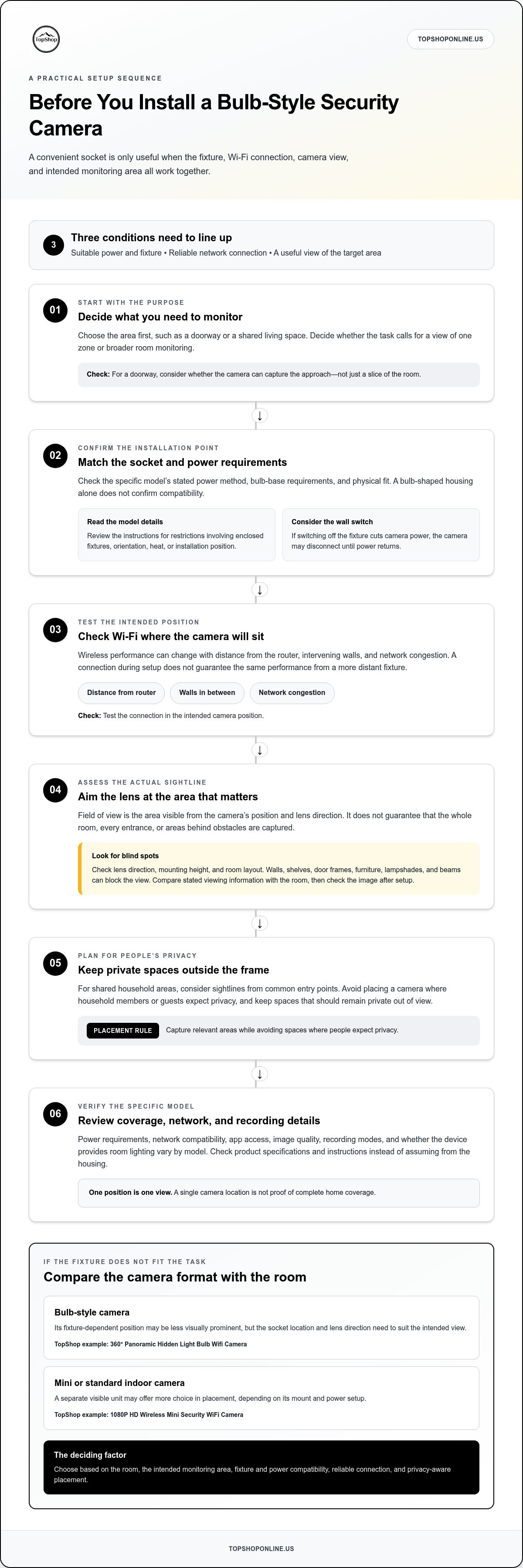
For a hidden light bulb camera for home security, three conditions need to work together: the installation point must meet the camera’s power and fixture requirements, the camera must connect reliably to the network, and its position must capture the area you intend to monitor. If one condition isn’t met, the camera may be less useful, even when the fixture seems convenient.
Field of view means the area visible from the camera’s position and lens direction. It doesn’t guarantee that the entire room, every entrance, or spaces behind obstacles will be captured. A wide-looking view can still miss a doorway if the lens faces away from it, and objects near the camera may block important details. Compare any stated viewing information with the room, then check the actual image after setup.
What Power and Fixture Details Should You Check?
Start with the model’s stated power method and fixture requirements. Confirm that the bulb base and socket match its specifications. A bulb-shaped housing alone doesn’t establish compatibility. Review the manual for any restrictions involving enclosed fixtures, orientation, heat, or installation position. Consider wall switches as well: if switching off the fixture cuts power to the camera, the device may disconnect until power returns.
How Do Wi-Fi and Camera Placement Affect Coverage?
Wireless performance can change with distance from the router, intervening walls, and network congestion. A camera may connect during setup but perform less reliably from a more distant fixture, so test the connection in the intended position. Height and orientation affect the captured angle, while lampshades, beams, shelves, and furniture can obstruct the lens or leave blind areas in the frame.
Use this sequence to assess a planned installation:
- Confirm the fit: Match the camera’s stated power and bulb-base requirements to the fixture.
- Check the connection: Test network access from the intended location, not only beside the router.
- Inspect the view: Review the live image, if available, for blocked sightlines and missed areas.
- Review the settings: Use the manual to identify supported access and recording options instead of assuming they’re included.
Compare TopShop’s 360° Panoramic Hidden Light Bulb Wifi Camera with the fixture, network, and monitoring area you have in mind. For example, check the stated viewing information against the lens position and sightlines in the room. You can review the light bulb camera listing as part of that comparison.
Light Bulb Camera vs. Mini and Standard Indoor Cameras
Camera formats differ mainly in where they can be placed and how much the room layout determines their view. A bulb-style model uses a compatible fixture as its mounting point. A mini or standard indoor camera is a separate unit, with placement options shaped by its design and power method. Neither format is automatically better. Choose based on the room, the position you need, your visibility preferences, and the model’s requirements.
This table compares general format trade-offs, not the specifications of any particular model. Resolution, field of view, power, network requirements, storage, and recording options depend on the camera.
| Format | Placement and fixture dependence | Visibility and room fit |
|---|---|---|
| Light bulb camera | Uses a suitable fixture as its position; placement depends on fixture location and compatibility. | Bulb-style housing may be less visually prominent, but the fixture angle can limit the view. |
| Mini indoor camera | Separate unit; placement depends on its power and mounting design. | Small standalone format may suit a shelf or another available position, but remains a distinct camera device. |
| Standard indoor camera | Separate unit; positioning can be adjusted according to its mount and power setup. | Often more visibly recognizable as a camera; a suitable position may support a deliberate view of a room or entry point. |
When Does a Light Bulb Camera Make Sense?
A bulb-style camera may fit when a compatible fixture is already positioned to view the area you need to monitor. For example, a fixture with a clear sightline to a shared room entrance may offer a practical mounting point. Discreet placement doesn’t replace coverage planning, though. A fixture in a corner, behind an obstruction, or aimed away from the target can restrict the useful view.
Fixture dependence can also be a constraint. If the best camera angle is across the room from the available socket, a bulb-style position may not match your monitoring goal. Check the model’s fixture requirements and assess the likely view before choosing this format.
When Is a Mini or Standard Indoor Camera a Better Fit?
A standalone camera may be preferable if you need to choose its position independently of a light fixture. Depending on its design, it may fit on a shelf or use a separate mounting position. This can help when the available fixture is poorly placed, although the camera’s power and mounting requirements still shape your options. A visible unit may also suit homes where people should readily recognize the device.
TopShop also offers the separate 1080P HD Wireless Mini Security WiFi Camera. Compare it with the 360° Panoramic Hidden Light Bulb Wifi Camera by considering the stated specifications and how each format fits the room. Readers looking for broader mini-camera details can consult the 1080P wireless mini security camera guide.
To narrow the choice, identify the monitoring point first, then compare fixture access with the flexibility of a separate camera. Consider whether a visible unit is acceptable, whether its position can be adjusted, and whether the model’s power and network requirements suit the room. A hidden light bulb camera for home security makes sense when its fixture position and features match the task, not simply because its housing is discreet.
Set Up a Home Security Camera With Privacy and Reliability in Mind
A reliable setup starts with a defined purpose, not with the camera’s most discreet position. Identify the event or area you need to monitor, such as activity at a shared entryway, then choose a location that captures what’s relevant. For a hidden light bulb camera for home security, include the fixture and its power access in the plan, but don’t let convenience override the intended view or household privacy.
How Should You Plan Placement and Test the Camera View?
Map the target area before installing the camera. Check whether walls, furniture, reflective surfaces, or windows could obstruct the image or cause glare and backlighting. Follow the product’s setup process to view a live feed or sample recording, then check whether the intended area is clear and whether private or irrelevant spaces enter the frame.
Use this order to check the setup:
- Define the monitoring need: Choose one specific area or activity to observe, rather than aiming for vague whole-room coverage.
- Select a position: Consider the fixture or mount, lens direction, power access, and sightline to the target area.
- Check connectivity: Complete the documented network setup from the chosen position and note any connection interruptions.
- Test the image: Review the live or recorded view, if supported, at different times and lighting conditions. Adjust the position or framing to reduce obstructions and unnecessary capture.
- Recheck after changes: Furniture moves, doors open, and lighting conditions shift. Confirm the view still serves the original purpose.
How Can You Protect Household Privacy and Account Access?
Tell household members about the camera and explain which area it covers. Give visitors appropriate notice, and avoid positioning cameras in bathrooms, bedrooms, or other spaces where people reasonably expect privacy. Limit the frame to the area you need to monitor; don’t record shared or neighboring spaces unnecessarily.
Privacy rules vary by location and can treat audio recording differently from video. Check applicable federal and state requirements before enabling recording, particularly for audio or conversations involving other people. If the camera offers audio capture and you don’t have a clear need and consent basis, leave audio disabled. Don’t assume a camera’s default settings settle the legal or privacy question.
Protect account access as well. Use a unique password for the camera account, secure the email account used to recover it, and enable available account protections described in the manual. Review who can view the camera, which recording modes are active, and how stored footage can be accessed or deleted. If the device provides retention or sharing controls, set them deliberately and revisit them when household access changes.
A privacy-aware setup keeps the camera’s purpose, viewing area, network access, and account permissions aligned. Compare the 360° Panoramic Hidden Light Bulb Wifi Camera with your intended fixture and monitoring plan before choosing a position.
Evaluate TopShop’s 360° Panoramic Hidden Light Bulb WiFi Camera
TopShop offers the 360° Panoramic Hidden Light Bulb Wifi Camera as a bulb-style option to compare with your room, fixture, network, and privacy plan. Use the product details to assess practical questions such as image resolution, field of view, compatibility, recording modes, and how the camera may fit a particular position.
Match the stated product details to your monitoring goal. Start with the installation point, then consider the camera’s view, connection requirements, and how footage can be accessed or stored. A specification is useful when it answers a practical question: will the camera fit the fixture, connect from that room, and show the area you intend to monitor?
Which Product Details Should You Compare Before Choosing?
Review the listed requirements and features, then compare each item with the room and intended use:
- Resolution: Consider whether the stated image detail suits the task, such as distinguishing activity at a doorway.
- Viewing angle: Compare the stated angle with the room layout and planned camera position. An angle specification doesn’t guarantee every part of the room will be visible.
- Power and fixture fit: Match the stated power method, bulb base, and fixture restrictions to the installation point.
- Connectivity: Check the listed Wi-Fi requirements against the available home network and signal at the fixture location.
- Storage and recording: Review supported storage, recording modes, and related requirements to understand how footage is handled.
- App and access: Check the stated app functions, device access, and account controls against the way you plan to view or manage the camera.
These checks distinguish a product feature from a household fit. For example, a stated viewing angle is useful only if the fixture can be oriented toward the target area without obstructions. Network compatibility matters only if the camera can connect reliably from its intended location.
How to Decide Whether This Camera Fits Your Home
Before choosing a hidden light bulb camera for home security, work through the full setup: confirm fixture compatibility, map the view, assess Wi-Fi access, review operating requirements, and define privacy boundaries. Consider who may enter the monitored area and how recording or account access will be managed. Keep the camera aimed at the relevant space, and don’t treat a discreet form as a reason to record more than necessary.
A single camera provides one position and view. It may not address every room, entrance, or security objective, so compare its intended coverage with the areas you need to monitor. If the fixture position doesn’t match the task, a separate indoor camera format may be a better fit.
Use your room and specification checklist to make the final comparison. View TopShop’s home security camera options.
Choose a Camera That Fits Your Next Step
Before selecting a hidden light bulb camera for home security, turn your monitoring goal into a short set of requirements: the area to observe, an appropriate camera position, the network available there, and your household’s privacy boundaries. Use those requirements to assess the product details, rather than treating a discreet format or product name as proof that the camera will suit your setup.
TopShop offers the 360° Panoramic Hidden Light Bulb Wifi Camera and a separate 1080P HD Wireless Mini Security WiFi Camera. Compare their listed requirements with your intended setup and decide which camera format better fits the room. The right choice is the one whose specifications, placement, and access controls align with how you plan to use it.
Take the next step by comparing the available options with your checklist. View TopShop’s home security camera options and choose a camera with a clear, practical role in your home.
Frequently Asked Questions
Is a hidden light bulb camera legal to use at home?
Home camera use isn’t automatically lawful in every situation; applicable federal and state rules, the location being recorded, and audio capture can affect what’s permitted. Avoid recording bathrooms, bedrooms, changing areas, or other places where people reasonably expect privacy. Before using audio, review consent requirements that apply where you live. Clear household communication matters too, especially in shared homes or when guests may be recorded.
Can a light bulb camera work without Wi-Fi?
That depends on the camera’s design and storage features. Some models may save footage locally during a network outage, while others may need Wi-Fi for setup, alerts, or viewing. A local recording function, if supported, doesn’t necessarily mean remote access continues offline. Check the manual for what happens during an internet interruption, whether recordings are retained, and what reconnect steps are needed after service returns.
Does a hidden light bulb camera need to stay connected to power?
A camera generally needs its specified power source to operate, but the source and fixture requirements differ by model. If it uses a switched socket, turning off the wall switch may cut power and stop monitoring. Consider this in rooms where lights are routinely switched off. Follow the device instructions for compatible sockets and operation; don’t assume a bulb-shaped camera can use every fixture.
Can a light bulb camera connect to 5 GHz Wi-Fi?
Only if the specific camera supports that band. Check the product specifications and setup instructions before pairing; wireless connectivity alone doesn’t confirm 5 GHz compatibility. If your router combines bands under one network name, follow the camera’s documented setup method rather than changing settings at random. For example, a device that supports only one band may fail to pair if the router’s configuration doesn’t meet its requirements.
Can a light bulb camera record continuously?
Continuous recording depends on the model. Check the manual for supported recording modes, required storage, and whether footage is overwritten when available space fills. A camera may instead save clips after detected events or follow a schedule. Decide how much footage you need and how long it should be retained, then confirm that the documented storage and settings support that plan. Don’t infer nonstop recording from the camera’s shape or name.
Will a light bulb camera work in an outdoor fixture?
Use it outdoors only if the manufacturer explicitly states that the exact model is suitable for outdoor conditions and the fixture meets its requirements. Outdoor exposure can include rain, condensation, temperature changes, and a weaker wireless signal. An indoor designation or bulb-style housing doesn’t establish weather resistance. If the instructions don’t specify outdoor use, keep the camera indoors rather than exposing it to moisture or temperature extremes.
How do I know whether a bulb camera covers the whole room?
Don’t assume it does. For a hidden light bulb camera for home security, compare the stated viewing angle with the room’s layout, then check whether corners, entrances, and important activity areas appear in the actual image. A wall, cabinet, or doorway can block part of the scene even with a broad lens. Review the camera’s view from its final position and identify any areas that remain outside the frame.