

A "supported" 4K resolution claim is a misleading metric that often masks low-quality 480p native hardware. Determining how to choose a smart projector for streaming requires an objective analysis of optical resolution, processing power, and software ecosystem compatibility. You likely expect high-definition 1080p output and seamless app integration without the common failures of input lag or streaming service lockouts. This technical guide delivers a specification-heavy breakdown of hardware requirements for reliable home theater deployment in 2026.
We evaluate technical specifications including 30,000-hour LED lifespan ratings, lamp-free cooling systems, and native 1080p liquid crystal display panels. The review covers integrated Android OS hardware, quad-core processor efficiency, and WiFi 6 connectivity modules for buffer-free playback. You'll learn the difference between peak lumens and ANSI lumens while reviewing port configurations for external audio and power delivery. This documentation focuses on measurable data points to ensure hardware-software synergy for Netflix and Disney+ streaming.
Key Takeaways
- Distinguish physical native 1080p hardware pixel counts from "supported" input signal specifications to prevent low-quality upscaled output.
- Standardize brightness measurements using ANSI lumen data to accurately determine hardware suitability for dark or ambient light environments.
- Evaluate internal System on a Chip (SoC) architecture and 2GB+ RAM requirements for high-speed, lag-free integrated Android OS navigation.
- Learn how to choose a smart projector for streaming by prioritizing WiFi 6 throughput and Bluetooth 5.2 low-latency audio connectivity standards.
- Optimize hardware deployment through precise throw ratio calculations and 4-point digital keystone correction for accurate image alignment.
Display Technology and Native Resolution Standards for Streaming
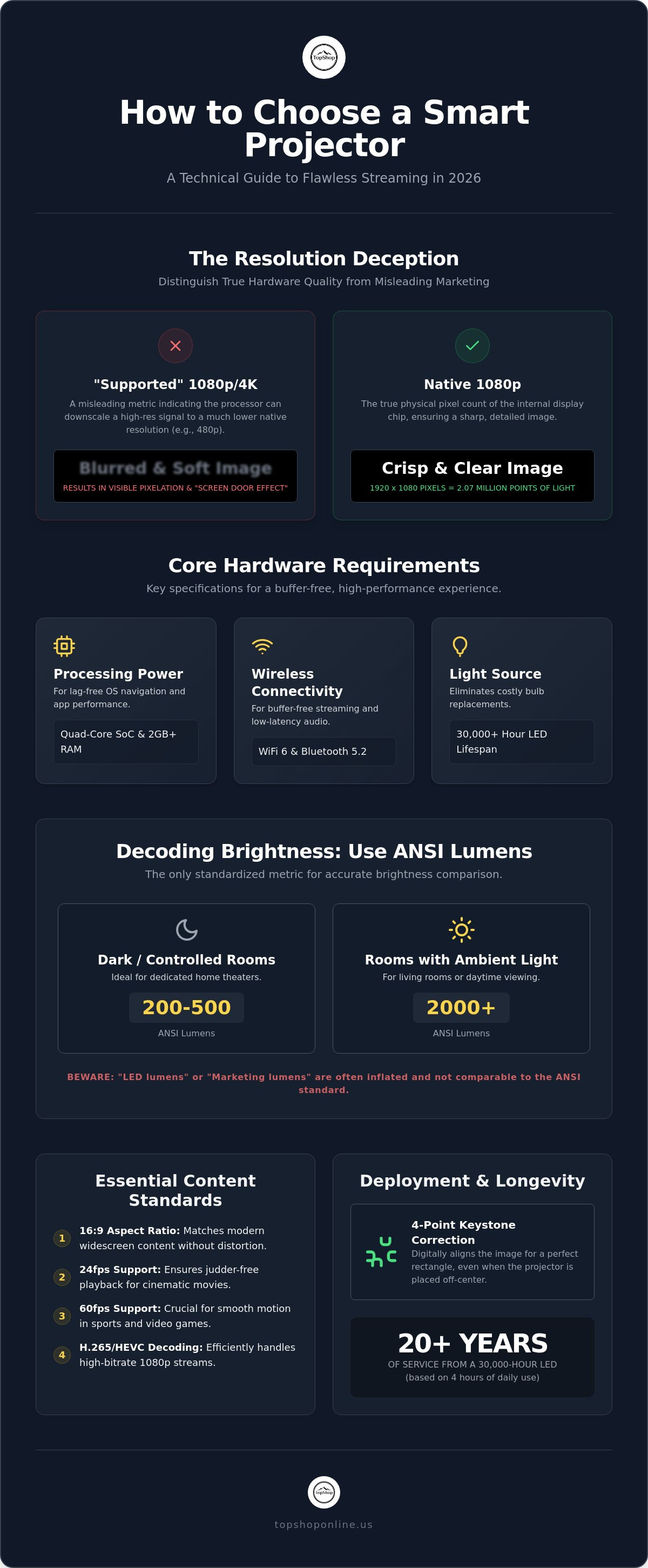
Native resolution defines the fixed physical pixel count of the internal display chip; it's the primary hardware constraint when evaluating how to choose a smart projector for streaming. Unlike "supported" resolution, which indicates the maximum input signal the internal processor can downscale, native resolution represents the actual output quality. A native 1080p projector utilizes a physical array of 1920 x 1080 pixels, totaling 2.07 million individual points of light. This hardware-level density is required to prevent the blurred, soft imagery common in upscaled 480p or 720p units marketed as "1080p compatible."
The underlying Video projector technology typically utilizes either Digital Light Processing (DLP) or Liquid Crystal Display (LCD) engines. DLP systems employ a mirror-based micro-electromechanical system (MEMS) for high-speed switching and superior contrast ratios. 3LCD systems use three dedicated panels to produce high color brightness and accuracy. For high-utility portable applications, DLP is often preferred due to its compact optical engine and sealed light path, which prevents dust accumulation on the internal display chip. Maintaining high pixel density is essential for projection sizes ranging from 80-inch to 120-inch displays, where low-resolution hardware reveals a visible "screen door effect."
Optical Resolution vs. Digital Scaling
DMD (Digital Micromirror Device) chip size directly influences optical performance. A 0.47-inch DMD chip provides a larger physical surface area compared to 0.33-inch variants, allowing for better light throughput and sharper 1080p native output. Understanding these hardware-level constraints is fundamental to how to choose a smart projector for streaming that maintains visual integrity at large scales. High-transparency multi-element glass lens assemblies are required to preserve this sharpness, as plastic lenses often warp under heat, causing focus drift during extended streaming sessions.
Aspect Ratio and Frame Rate Compatibility
Streaming hardware must align with modern content standards to ensure a seamless viewing experience. Most platforms utilize the standard 16:9 widescreen aspect ratio; hardware that deviates from this creates letterboxing or distorted proportions. Compatibility with various frame rates is also critical:
- 24fps Support: Matches the native cinema standard for movies, eliminating judder during playback.
- 60fps Support: Necessary for smooth motion in live sports and gaming content.
- H.265 (HEVC) Decoding: Hardware-level support for this codec allows for high-bitrate 1080p streaming with lower bandwidth consumption.
Integrated SoCs (System on a Chip) must handle these decoding tasks without thermal throttling. Efficient hardware ensures that high-definition data streams are processed instantly, providing a lag-free experience for high-speed home theater deployment.
Lumen Output and Contrast Ratio Specifications
Brightness determines image visibility and color saturation across different lighting conditions. When researching how to choose a smart projector for streaming, you'll encounter various lumen ratings. ANSI lumens provide an objective measurement of total light output. "LED lumens" or "Marketing lumens" often inflate numbers by factoring in perceived brightness from color saturation. Dedicated home theaters with controlled lighting require 200 to 500 ANSI lumens. Environments with ambient light require 2000+ ANSI lumens to prevent image washout. High-utility hardware balances these brightness levels with heat dissipation to maintain consistent performance during extended use.
Contrast ratio measures the luminance difference between the brightest white and the darkest black. High contrast ratios are vital for streaming dark cinematic content. Shadow details remain visible rather than appearing as flat gray blocks. Modern solid-state projectors utilize LED light sources for superior longevity. These light sources maintain 30,000+ hours of operational life. This effectively eliminates the need for bulb replacements. If you use the projector for 4 hours daily, the light source lasts over 20 years. You can find detailed performance comparisons in expert projector reviews to see how these metrics translate to real-world viewing.
Hardware like the Smart Projector Wifi Portable 1080P balances these specifications to provide a high-utility streaming solution for varied environments.
Standardizing Brightness Metrics
ANSI lumens represent the industry standard for measuring light output from a projection lens, utilizing a standardized 9-point white screen average. Manufacturers often use "Lux" to measure light at a single point. This doesn't account for brightness uniformity across the entire screen. The 9-point average ensures edge-to-edge visibility. It prevents the "hot spot" effect where the center of the image is significantly brighter than the corners.
Dynamic Contrast and Color Gamut
Static contrast refers to the fixed capabilities of the display chip. Dynamic contrast adjusts light output based on scene content. Accurate content reproduction requires high percentage coverage of the Rec.709 color space, the global standard for high-definition television. Support for HDR10 and HLG metadata allows the projector to interpret expanded dynamic range signals. This provides more detail in highlights and shadows. Integrated chips must process these metadata layers in real-time to ensure consistent visual output across different streaming apps like Netflix or Disney+.
Integrated Smart OS Hardware and App Compatibility
The internal System on a Chip (SoC) dictates the processing speed and multitasking capabilities of a streaming unit. When evaluating how to choose a smart projector for streaming, the hardware architecture is as critical as the optical engine. In 2026, 2GB of DDR4 RAM is the minimum requirement for fluid user interface navigation and high-bitrate video buffering. Lower memory capacities lead to application crashes and interface latency during high-load tasks. Advanced top-rated projectors utilize dedicated graphics processing units (GPUs) alongside the CPU to handle complex video decoding without taxing the primary system resources.
Digital Rights Management (DRM) licensing determines the maximum resolution available for specific streaming services. High-utility devices like the Smart Projector Wifi Portable 1080P prioritize Widevine L1 certification. This specific hardware-level security protocol is necessary to stream Netflix, Prime Video, and Disney+ content in native 1080p. Without this certification, streaming applications often default to 480p Standard Definition regardless of the projector's physical pixel count. Choosing an Android TV-based operating system over proprietary Linux variants ensures broader app availability and native support for Google Play Store updates.
Internal Processor and Memory Architecture
Quad-core ARM Cortex CPUs provide the necessary computational power for H.265 and AV1 codec decoding. Internal eMMC storage, typically 16GB or 32GB, serves as a repository for application data and system caching. This local storage reduces reliance on external servers for UI elements, speeding up navigation. Effective thermal management is vital for sustained processor performance. High-efficiency heat sinks and low-noise cooling fans, ideally rated below 30dB, prevent thermal throttling during extended playback. Efficient cooling ensures the SoC maintains peak clock speeds without reducing performance to protect internal components.
App Ecosystem and User Interface
Native integration with the Google Play Store provides access to verified versions of streaming applications. This ecosystem supports consistent security patches and feature updates via Over-the-Air (OTA) firmware delivery. Hardware support for mirroring protocols includes:
- Miracast: Direct wireless connection for Windows and Android device screen sharing.
- AirPlay: Native protocol support for iOS and macOS content streaming.
- DLNA: Local network media sharing for home server integration.
These protocols allow for flexible content deployment when native apps are unavailable. Reliable OTA capabilities ensure the device remains compatible with evolving streaming service requirements and security standards through 2026.
Wireless Connectivity and Port Configurations
Data throughput requirements for high-definition streaming demand advanced wireless protocols. When researching how to choose a smart projector for streaming, prioritize WiFi 6 (802.11ax) hardware. This standard supports higher data rates and improved efficiency in congested network environments compared to Dual-Band WiFi 5. Bluetooth 5.2 integration is equally vital; it provides low-latency audio transmission for external speakers or headphones. This version specifically addresses synchronization issues, ensuring that audio remains aligned with the projected video signal. High-utility portable units also feature USB-C Power Delivery (PD) ports. This allows operation via 65W or higher power banks, removing the need for a constant AC wall connection during outdoor use.
High-Speed Data Transmission Standards
Physical ports provide the stability needed for high-bitrate 1080p or 4K content. HDMI 2.0 and 2.1 ports are the current standards for connecting external media players or gaming consoles. HDMI ARC (Audio Return Channel) or eARC (Enhanced Audio Return Channel) enables a single-cable setup to transmit high-quality audio to external soundbars or receivers. WiFi 6 reduces interference in environments with multiple connected devices by utilizing Orthogonal Frequency Division Multiple Access (OFDMA) to partition channels into smaller sub-channels. Wireless audio latency should ideally stay below 40ms to avoid lip-sync issues during cinematic playback. Stable data transmission ensures that high-definition streams don't suffer from buffering or resolution drops.
Input/Output Versatility
A comprehensive port inventory extends the utility of the hardware beyond basic streaming. USB 3.0 ports facilitate fast data transfer from external hard drives for local media playback. Users can integrate RGB mechanical gaming keyboards to navigate complex OS menus or input search queries more efficiently than a standard remote control. For audio, a 3.5mm AUX or digital optical output provides reliable alternatives to integrated 5W-10W speakers. These connections are essential for deploying a full home theater audio system. For stationary setups, ensure your hardware has access to consistent energy by using a power strip with 6 AC outlets to manage the projector and all peripheral devices safely.
Integrated port configurations allow for a modular approach to home entertainment. Combining high-speed wireless standards with versatile physical inputs ensures the device remains compatible with both legacy hardware and 2026-standard peripherals. Proper port selection prevents the need for external adapters, maintaining the portability and streamlined profile of the smart projector system.
Portable Projector Deployment and Environment Optimization
Deployment efficiency relies on spatial geometry and mounting stability. Understanding how to choose a smart projector for streaming involves calculating the throw ratio to ensure the image fits the intended surface. A 1.2:1 throw ratio specifies that for every 1 foot of screen width, the projector must be placed 1.2 feet away. For an 80-inch wide screen, this requires a distance of approximately 8 feet. Hardware like the Smart Projector Wifi Portable 1080P utilizes 4-point digital keystone correction to adjust image corners independently. This technology is more versatile than basic automatic vertical alignment, as it allows for off-center placement while maintaining a perfect rectangular geometry. Most high-utility portable units feature a universal 1/4-inch tripod socket for compatibility with standard floor stands or ceiling mounting hardware.
Positioning and Image Geometry
Digital zoom allows for image resizing without moving the physical hardware, though it slightly reduces effective pixel density compared to optical zoom. In hybrid spaces, utilizing an adjustable laptop stand for bed provides a stable, ventilated platform for temporary theater setups. This positioning prevents vibration and maintains alignment during long playback sessions. The projection surface material also impacts visual output. A standard matte white wall with a gain of 1.0 provides a neutral viewing experience, while specialized high-gain screens (1.1 to 1.3) reflect more light to compensate for lower ANSI lumen ratings in ambient light environments. Accurate positioning ensures the light path remains unobstructed by furniture or occupants.
Technical Infrastructure and Power Management
Stable electricity is mandatory for high-bitrate streaming processing and internal cooling. Connecting the projector to a power strip 6 outlet 6 usb ensures consistent voltage while supporting peripheral soundbars or external streaming devices. For permanent ceiling installations, utilize cable management for home office strategies to secure HDMI and power lines against the mounting surface. This prevents accidental cable tension that can damage internal ports. Thermal clearance is the final requirement for 24/7 reliability. Projectors need at least 10 to 15 centimeters of unobstructed space around intake and exhaust vents. Proper airflow prevents heat buildup, ensuring the internal fans don't exceed their 30dB noise rating and protecting the 30,000-hour LED lifespan from thermal degradation.
Optimizing the environment is the final step in how to choose a smart projector for streaming that delivers consistent performance. By aligning physical mounting hardware with digital correction tools, you create a professional-grade theater experience in any multi-functional space. Secure power delivery and organized cabling complete the setup, ensuring long-term hardware durability and peak technical performance.
Optimizing Home Theater Deployment with 2026 Hardware Standards
Reliable streaming performance depends on the precise intersection of native optical resolution, standardized ANSI lumen output, and integrated SoC processing power. Technical hardware selection requires a focus on 1080p physical pixel counts and Widevine L1 certification for native app compatibility. Determining how to choose a smart projector for streaming involves evaluating these measurable specifications alongside WiFi 6 connectivity and low-latency Bluetooth 5.2 audio standards. High-utility portable units ensure consistent playback through 30,000-hour LED lifespans and efficient thermal management systems. It's essential to prioritize hardware that supports high-bitrate codecs like H.265 to maintain image integrity during peak network usage.
TopShop provides high-density technical hardware specifications through durable utilitarian designs built for 2026 technology standards. You can access fast national shipping across the United States for all inventory items including high-capacity power strips and ergonomic mounting stands. Browse our catalog to Shop the TopShop Smart Projector Wifi Portable 1080P and Accessories for your specific deployment needs. Secure your technical infrastructure and upgrade your viewing experience today.
Frequently Asked Questions
What is the difference between native and supported resolution in smart projectors?
Native resolution represents the fixed physical pixel count of the internal display chip. Determining how to choose a smart projector for streaming requires identifying this native output rather than the "supported" resolution, which only indicates input signal compatibility. Hardware with 1080p native resolution provides 2.07 million physical pixels for high-definition clarity. This physical pixel array ensures a sharp image at projection sizes ranging from 80 to 120 inches without digital blurring.
How many ANSI lumens do I need for a projector in a bright room?
Environments with high ambient light require a minimum of 2000 ANSI lumens to maintain image visibility and color saturation. This light output level prevents the projection from appearing washed out by external light sources during daytime use. For dark, controlled home theaters, 200 to 500 ANSI lumens is the standard requirement for comfortable viewing. Standardizing brightness measurements using ANSI data ensures an objective comparison between different hardware models during the selection process.
Can I watch Netflix and Disney+ directly on a smart projector?
Direct streaming of Netflix and Disney+ is possible on projectors featuring an integrated Android OS and Widevine L1 certification. This specific DRM license allows the hardware to stream protected content in native 1080p resolution directly from the internal app ecosystem. Devices without this certification often default to 480p standard definition playback due to security restrictions. Integrated OS hardware eliminates the need for external streaming sticks or secondary media players for content deployment.
What is the lifespan of an LED projector light source?
Modern solid-state LED projector light sources have an operational lifespan of 30,000+ hours. This longevity removes the requirement for periodic bulb replacements common in legacy lamp-based units. If used for four hours daily, the hardware maintains its original brightness and color performance for over 20 years. Solid-state technology also runs cooler, reducing the fan noise required for thermal management during extended home theater playback sessions. It's a durable solution for long-term use.
Do I need an external speaker for a portable smart projector?
Portable projectors include internal 5W to 10W speakers for standalone operation, though external audio systems provide superior soundstage depth. Low-latency Bluetooth 5.2 or 3.5mm AUX connections facilitate the integration of external soundbars, subwoofers, and headphones. High-utility setups often utilize the HDMI ARC or eARC port for a single-cable digital audio connection. While internal speakers are functional for travel, external hardware is essential for cinematic audio immersion and higher volume levels.
What is throw ratio and how do I calculate it?
Throw ratio is the numerical relationship between the distance from the projector lens to the screen and the width of the projected image. You calculate it by dividing the throw distance by the screen width. A 1.2:1 ratio means the projector must be placed 1.2 feet away for every 1 foot of image width. Understanding this specification is vital for spatial planning and determining if your room dimensions support your desired screen size without physical obstructions.
Is WiFi 6 necessary for a smart streaming projector?
WiFi 6 (802.11ax) isn't strictly required but is highly beneficial when researching how to choose a smart projector for streaming in high-density residential areas. It provides higher data throughput and reduces interference from other connected household devices through improved channel efficiency. This standard ensures stable, buffer-free 1080p video playback even when other devices occupy the network. WiFi 6 hardware also improves the stability of wireless screen mirroring and high-bitrate data transmissions.
How do I connect my smartphone to a portable WiFi projector?
Smartphones connect to portable WiFi projectors via integrated screen mirroring protocols such as Miracast for Android and AirPlay for iOS devices. These wireless standards allow for direct content transmission and screen sharing without physical cables. The projector and smartphone must occupy the same local network for successful data pairing and discovery. Most smart projectors include a dedicated settings menu to enable these protocols for high-speed wireless media deployment. It's an efficient method for mobile content sharing.