

The obvious choice for hidden home monitoring might actually be the wrong one for your specific room layout. When comparing a mini security camera vs light bulb camera, most buyers default to whichever unit looks smaller or cheaper, without accounting for the hardware constraints that determine real-world performance: power source compatibility, fixture clearance dimensions, and lens field-of-view geometry.
That instinct is understandable. Both camera types advertise wireless connectivity and 1080P HD resolution, so the specs sheet looks nearly identical at first glance. The critical differences live in the physical deployment layer, not the image sensor.
This guide delivers a direct technical breakdown of what actually separates these two form factors. You'll identify which unit integrates with your existing electrical fixtures without modification, understand the measurable difference between 360° panoramic coverage and a fixed-lens field of view, and determine whether onboard MicroSD storage or cloud-based recording better fits your monitoring workflow. Power requirements, mounting constraints, WiFi pairing variables, and coverage geometry are all covered in full, giving you the specification data needed to make a hardware decision that holds up past the unboxing.
Key Takeaways
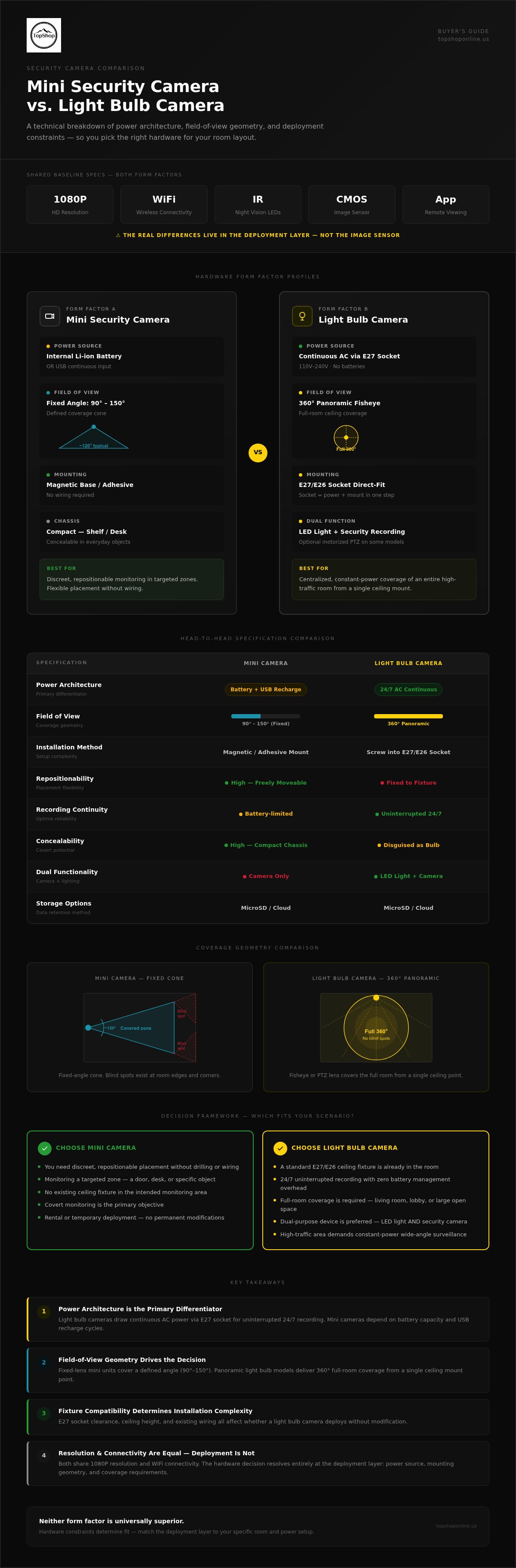
- Power architecture is the primary differentiator: light bulb cameras draw continuous AC power via E27 socket integration for uninterrupted 24/7 recording, while mini cameras depend on internal battery capacity and USB recharge cycles.
- The mini security camera vs light bulb camera decision hinges on field-of-view geometry — fixed-lens mini units cover a defined angle, whereas panoramic light bulb models deliver 360° full-room coverage from a single ceiling mount point.
- Fixture compatibility determines installation complexity before any other variable: E27 socket clearance, ceiling height, and existing wiring all affect whether a light bulb camera deploys without modification.
- Covert monitoring and flexible repositioning favor the mini camera form factor; high-traffic areas requiring constant-power coverage and wide-area visibility favor the light bulb camera architecture.
- Both the 1080P HD Wireless Mini Security WiFi Camera and the 360° Panoramic Hidden Light Bulb Wifi Camera share 1080P resolution and wireless WiFi connectivity — the hardware decision resolves at the deployment layer, not the image sensor spec.
Defining Hardware Form Factors: Mini vs. Light Bulb Security Cameras
Both camera types operate on the same foundational IP security camera technology — CMOS image sensors, infrared LED arrays for low-light capture, and onboard WiFi modules for network transmission. What separates them isn't the imaging chain. It's the physical chassis, power architecture, and deployment geometry built around that shared core.
Understanding the hardware profile of each form factor is the first step in any mini security camera vs light bulb camera evaluation. The specs sheet convergence at 1080P resolution and wireless connectivity makes the comparison look simpler than it is. The real divergence starts at the enclosure level.
Mini Camera Technical Profile
The mini security camera is defined by its compact chassis dimensions, typically small enough to sit behind a book, inside a shelf recess, or mounted flush against a wall bracket without drawing attention. Mounting options generally include magnetic bases for repositionable placement on metal surfaces and adhesive mounts for fixed installation on non-ferrous materials.
Power input splits into two configurations: internal lithium-ion battery for fully wire-free deployment, or continuous USB power input for fixed installations where an outlet is accessible. Battery-powered operation trades placement flexibility for recharge dependency. Lens geometry is fixed-angle, with field-of-view values typically ranging from 90° to 150° depending on the lens assembly. That fixed angle defines a specific coverage cone rather than a full-room sweep.
- Chassis footprint: Compact enough for concealed shelf, desk, or bracket placement
- Power options: Internal lithium-ion battery or USB continuous input
- Lens FOV: Fixed angle, typically 90° to 150°
- IR LEDs: Short-range infrared array for low-light and night recording
Light Bulb Camera Technical Profile
The light bulb camera integrates directly into a standard E27 or E26 socket, drawing continuous AC power from the fixture's existing wiring. No batteries. No recharge cycles. The socket connection handles both power delivery and physical mounting simultaneously, which eliminates the need for any secondary bracket or adhesive hardware.
Optics in this form factor use fisheye lens assemblies to achieve 360° panoramic coverage from a single ceiling-mounted position. Some models incorporate motorized Pan-Tilt-Zoom mechanisms for directional control via app. The enclosure also integrates LED lighting elements, giving the unit dual-purpose functionality as both an active security device and a functional light source. That combination is what makes it viable in high-traffic rooms where a dedicated ceiling fixture already exists.
- Socket base: E27/E26 standard for direct fixture integration
- Power source: Continuous AC via socket, no battery dependency
- Optics: 360° fisheye or motorized PTZ lens assembly
- Dual function: Active LED illumination plus security recording
The deployment logic follows directly from these hardware profiles. Discreet, repositionable monitoring in targeted zones favors the mini camera's flexible chassis. Centralized, constant-power coverage of an entire room favors the light bulb camera's overhead socket architecture. Neither form factor is universally superior; the hardware constraints determine fit.
Power Supply and Installation Architecture
Power architecture is where the mini security camera vs light bulb camera comparison stops being theoretical and becomes a practical constraint. The voltage source, the physical mounting method, and the WiFi propagation path all interact at the deployment layer. Getting any one of these wrong produces a camera that either runs out of power at the wrong moment or drops its network connection from a position that looked ideal on paper.
AC Power vs. Battery Management
The light bulb camera draws continuous AC power directly from the E27 socket, operating at standard 110V-240V input. That voltage range covers virtually every residential and commercial fixture in North America and Europe without any adapter hardware. The practical result: uninterrupted recording with no scheduled downtime, no recharge windows, and no dependency on battery capacity estimates. For high-traffic monitoring zones where a recording gap creates a coverage liability, this architecture is the more reliable choice.
Mini cameras operate on a different power model entirely. USB input runs at 5V DC, which means a wall adapter or power bank sits in the deployment chain. Battery-powered configurations introduce runtime constraints that vary with recording mode. Motion-triggered recording extends battery life significantly compared to continuous capture, but runtime estimates depend on trigger frequency, IR LED activation cycles, and ambient temperature. A heavily trafficked area can drain an internal lithium-ion cell faster than the spec sheet suggests under continuous-trigger conditions. Recharge logistics also require physical access to the unit, which disrupts concealed placement setups.
One critical installation detail that compact product listings frequently omit: a light bulb camera requires the controlling light switch to remain in the on position at all times. If the switch is toggled off, AC power to the socket cuts, and the camera loses both power and network connectivity instantly. Households with multiple-switch circuits or smart switch configurations need to account for this before installation.
Connectivity and Range
Both camera types rely on 2.4GHz WiFi for primary connectivity. The 2.4GHz band offers longer range and better wall penetration than 5GHz, which matters for cameras positioned at ceiling height or inside fixture housings. Verify 5GHz compatibility directly against your specific model's spec sheet before assuming dual-band support, as not all units in this category include it. For broader hardware context on how form factor affects signal performance across camera categories, the CNET security camera hardware guide provides useful reference data on placement and connectivity tradeoffs.
Fixture housing introduces a specific attenuation variable. The metallic or ceramic shell of a light socket enclosure can partially obstruct the camera's internal WiFi antenna, reducing effective signal strength compared to an open-air mini camera deployment at the same distance from the router. Overhead ceiling mounting compounds this: the camera transmits downward through floor materials toward a router typically positioned at a lower level, and concrete or reinforced ceiling structures create dead zone risks that wall-mounted or shelf-positioned units don't encounter at equivalent ranges.
Installation mechanics follow directly from the power architecture. Light bulb cameras require no drill points, no adhesive mounts, and no secondary brackets. The E27 socket handles both physical support and power delivery in a single connection. Mini cameras use magnetic bases for repositionable placement on metal surfaces or adhesive mounts for fixed non-ferrous installation, giving them placement flexibility the socket-dependent form factor can't match. If your room layout includes an existing overhead fixture with accessible wiring and a switch you can leave permanently on, explore the full camera range to match the right power architecture to your specific ceiling configuration.
Optical Performance: Field of View and Resolution
Sensor parity is the baseline for modern wireless security hardware. Both the 1080P HD Wireless Mini Security WiFi Camera and the 360° Panoramic Hidden Light Bulb Wifi Camera utilize CMOS image sensors capable of 1920x1080 resolution at standard frame rates. While the pixel count remains identical, the optical delivery system creates a functional divide. The mini security camera vs light bulb camera comparison hinges on how those pixels are distributed across the monitored space through fixed lenses or panoramic optics.
Fixed Lens vs. Pan-Tilt-Zoom (PTZ)
Mini cameras utilize fixed-angle lenses. The field of view (FOV) is static, typically ranging from 90° to 150°. This hardware configuration requires precise physical alignment during installation to ensure the target zone remains within the lens's capture cone. If a subject moves outside this fixed perimeter, the camera cannot track the movement. This makes placement angle the most critical variable for mini camera deployment; a mistake in the initial mounting height or tilt results in permanent blind spots.
Light bulb cameras solve the blind spot problem through two distinct optical architectures: 360° panoramic fisheye lenses or motorized Pan-Tilt-Zoom (PTZ) mechanisms. A panoramic model uses a single ultra-wide lens to capture an entire room from a central overhead point. While this ensures total coverage, it introduces significant "fisheye" distortion at the edges of the frame. PTZ models, conversely, use motorized gears to rotate the lens assembly via a mobile app. This allows for active tracking of subjects and provides a narrower, more detailed FOV that can be redirected as needed. PTZ hardware offers superior detail for specific targets but carries the risk of the lens being pointed in the wrong direction when an event occurs elsewhere.
- Fixed Lens (Mini): Static 90°-150° FOV; requires precise manual aiming.
- Panoramic (Light Bulb): 360° total room coverage; susceptible to edge distortion.
- PTZ (Light Bulb): Active remote rotation; best for following subjects across large spaces.
Low-Light and Night Vision Specs
Night monitoring hardware differs significantly between these two form factors. Both utilize infrared (IR) LED arrays for standard grayscale night vision, typically effective up to 10 meters in total darkness. The IR count and sensor aperture size determine how much light reaches the CMOS sensor in dim environments. Larger apertures allow more light through the lens, reducing digital noise in the final 1080P output.
The light bulb camera architecture provides a secondary low-light advantage: integrated white light LEDs. These LEDs can be triggered by motion to provide full-color night vision. This is a functional upgrade over the grayscale IR-only output of most mini cameras. The activation of white light also serves as a visible deterrent, alerting intruders that they are being recorded. Mini cameras prioritize stealth, using "no-glow" 940nm IR LEDs that remain invisible to the human eye, maintaining the unit's covert profile while sacrificing the color data and deterrent effect of white light illumination.
Sensor sensitivity and optical clarity remain high across both types, but the light bulb's overhead position generally provides more uniform light distribution for the IR array. In contrast, a mini camera positioned on a shelf or in a corner may experience "IR wash-out" if the infrared light reflects off nearby surfaces like walls or furniture, overexposing the foreground and obscuring background details.
Selecting Hardware Based on Security Objectives
Security objectives split into two distinct categories: covert documentation and visible deterrence. The mini security camera vs light bulb camera decision maps directly onto this divide. One form factor is engineered for concealment; the other functions as an active presence. Matching hardware to objective before purchase eliminates the most common deployment failures.
Deployment Scenarios for Mini Cameras
The 1080P HD Wireless Mini Security WiFi Camera is the correct hardware selection when the monitoring objective requires the camera to remain undetected. Specific asset protection is the primary use case: positioning a compact unit on a shelf adjacent to a safe, aimed at a front door interior, or trained on high-value electronics provides targeted coverage of a defined zone without signaling to anyone in the room that surveillance is active.
Temporary monitoring is a second strong use case. The magnetic base and battery-powered configuration allow the unit to be repositioned between rooms, deployed in a hotel room during travel, or placed in a temporary workspace without permanent fixture modification. No drilling. No adhesive residue. Placement is reversible.
- Asset-specific coverage: Fixed-angle lens aimed at a single entry point, safe, or equipment rack
- Short-term deployment: Portable placement via magnetic base with no installation hardware required
- Covert profile: Compact chassis concealed behind objects on shelves or desks without visible hardware
For renters and apartment occupants, this form factor resolves the no-drill constraint entirely. Magnetic and adhesive mounting options produce zero wall damage, satisfying most lease agreements without negotiation. For detailed setup configurations including night vision calibration and placement geometry, see the guide on wireless mini security camera with night vision.
Deployment Scenarios for Light Bulb Cameras
The 360° Panoramic Hidden Light Bulb Wifi Camera fits high-traffic, open-plan spaces where a single camera needs to cover an entire room without blind spots. Kitchens, garages, large hallways, and open living areas are the primary targets. A central ceiling fixture provides the overhead vantage point that eliminates the corner-to-corner coverage gaps that a fixed-lens unit can't close without multiple units.
Active deterrence is a functional advantage specific to this form factor. Motion-activated white light LEDs illuminate the space and signal to anyone present that the camera has triggered. That visible response changes behavior in a way that a covert mini camera can't replicate.
One technical constraint to apply before installation: avoid enclosed metal fixtures or thick decorative glass housings. Both materials attenuate the camera's internal WiFi antenna, reducing signal strength and increasing the risk of dropped connectivity at ceiling height. An open pendant or recessed fixture with an accessible E27 socket provides the cleanest signal path.
Renters can deploy the light bulb camera without modification to any existing socket, provided the controlling switch remains permanently in the on position. No wiring changes. No landlord approval required for installation. The socket connection handles both power and physical support, leaving the fixture itself unchanged.
Match the hardware to the room layout and monitoring objective before evaluating any other specification. Browse both camera form factors to identify the unit that fits your fixture configuration and coverage requirements.
Final Verdict: TopShop Hardware Solutions for 2026
The mini security camera vs light bulb camera decision resolves cleanly once the deployment variables are mapped against the hardware constraints. Neither unit is universally superior. Each form factor solves a specific problem that the other can't address with equivalent efficiency.
TopShop Mini Camera Feature Overview
The 1080P HD Wireless Mini Security WiFi Camera delivers targeted, discreet monitoring in a compact chassis engineered for flexible placement. Core hardware specifications include:
- 1080P HD video capture: 1920x1080 CMOS output for clear identification-grade footage in a chassis small enough for shelf or desk concealment
- Magnetic base deployment: Rapid repositioning on metallic surfaces without adhesive hardware or permanent fixture modification
- Internal battery operation: Wire-free runtime capability for short-duration deployments and continued recording during brief power interruptions at USB-powered installations
This unit fits renters, travelers, and anyone monitoring a defined zone where the camera's presence needs to remain undetected. The fixed-lens FOV requires precise initial placement, but the magnetic base makes angle adjustment fast and non-destructive.
TopShop Light Bulb Camera Feature Overview
The 360° Panoramic Hidden Light Bulb Wifi Camera addresses the coverage geometry problem that no fixed-lens unit can solve from a single mount point. Key hardware specifications include:
- 360° panoramic optics: Full-room coverage from a single E27 ceiling socket with zero blind-spot geometry across open-plan spaces
- Standard E27 screw base: Direct socket integration with no secondary brackets, adhesive hardware, or wiring modifications required
- Two-way audio: Integrated microphone and speaker array for real-time remote communication via smartphone app
Continuous AC power via the socket eliminates battery management entirely, making this the correct hardware choice for kitchens, garages, and high-traffic rooms where recording gaps create coverage liability.
Storage and App Integration
Both units support local MicroSD storage for onboard recording independent of cloud connectivity. Verify maximum card capacity against your specific model before purchase, as supported limits vary. App-based remote access delivers live viewing, motion alert push notifications, and playback control from any network-connected smartphone. Two-way audio on the light bulb camera extends app functionality beyond passive monitoring into active remote communication, a capability the mini camera's form factor doesn't replicate.
WiFi pairing on both units operates on 2.4GHz, with app setup handling network credentials during initial configuration. Check your specific model's spec sheet for 5GHz dual-band support before assuming compatibility with newer router configurations.
Both products are available directly through TopShop's full camera range. Match the form factor to the fixture, the power source to the monitoring duration, and the lens geometry to the room layout. Those three variables determine which unit delivers reliable coverage in 2026.
Match the Hardware to the Room and Deploy with Confidence
The mini security camera vs light bulb camera decision comes down to three variables: power source, coverage geometry, and installation constraints. Fixed-lens mini units deliver discreet, targeted monitoring with no-drill magnetic mounting and wire-free battery operation. Light bulb cameras solve the full-room coverage problem from a single E27 socket, running on continuous AC power with zero battery management overhead.
Both form factors deliver 1080P HD video resolution and wireless remote access via smartphone app. The hardware decision doesn't live at the image sensor level. It lives at the fixture, the room layout, and the monitoring objective.
Both units support no-drill DIY installation, making either option viable for renters and temporary deployments without landlord approval or professional setup costs.
Identify your fixture configuration, map your coverage requirements, and select the form factor that fits without modification. Shop TopShop Security Cameras for Reliable Home Monitoring to compare both units side by side, with fast nationwide shipping on every order. The right hardware is one deployment decision away.
Frequently Asked Questions
Do light bulb cameras work when the light switch is turned off?
No. A light bulb camera draws all power through the E27 socket, so toggling the controlling switch to the off position cuts AC power immediately and terminates both recording and network connectivity. This is one of the most critical installation constraints in the mini security camera vs light bulb camera comparison. The switch must remain permanently in the on position for uninterrupted operation.
Households with multi-switch circuits, smart switches, or dimmer-controlled fixtures need to verify switch behavior before installation. A dimmer that reduces voltage below the camera's minimum input threshold will also interrupt operation, even if the switch isn't fully toggled off. Confirm your fixture's wiring configuration before committing to this form factor.
How long does the battery last on a wireless mini security camera?
Battery runtime varies based on recording mode, motion trigger frequency, and IR LED activation cycles. Motion-triggered recording extends battery life significantly compared to continuous capture mode, but a high-traffic area with frequent triggers can drain an internal lithium-ion cell faster than spec sheet estimates suggest. Ambient temperature also affects discharge rate, with cold environments reducing effective capacity.
For installations where recording gaps are a liability, running the mini camera on continuous USB power eliminates battery dependency entirely. Reserve battery-only operation for short-duration deployments, travel monitoring, or locations where USB cable routing isn't practical.
Can I view the footage from my mini camera on my phone while away from home?
Yes. Both the 1080P HD Wireless Mini Security WiFi Camera and the 360° Panoramic Hidden Light Bulb Wifi Camera support remote live viewing via smartphone app over any internet-connected network. The camera transmits footage through your home WiFi to the app, allowing real-time monitoring from any location. Motion alert push notifications can also be configured to trigger on your phone when the camera detects activity.
Remote access requires the camera to maintain a stable WiFi connection at its installation point. If the signal path is obstructed or the router drops connectivity, remote viewing will be interrupted until the connection restores. Verify signal strength at the exact mounting position before finalizing placement.
Do these cameras require a monthly subscription for storage?
Both units support local MicroSD card storage for onboard recording without a cloud subscription requirement. Footage records directly to the inserted card, accessible via the app or by removing the card and reading it on a separate device. This makes subscription-free operation viable for users who don't need remote cloud backup or extended offsite retention.
Cloud storage options may be available depending on the app platform associated with your specific model, but local MicroSD recording functions independently of any subscription service. Check your model's app documentation for cloud tier details if remote backup is a priority for your monitoring setup.
What is the maximum MicroSD card size supported by these security cameras?
Maximum supported MicroSD card capacity varies by specific model and firmware version. Verify the card size limit directly against your unit's specification sheet before purchase, as supported limits differ across hardware revisions and are not standardized across the mini camera and light bulb camera categories. Installing a card that exceeds the supported maximum can result in the device failing to recognize the card or recording errors during operation.
Format the MicroSD card to the file system specified in your camera's documentation before first use. Most units in this category require FAT32 or exFAT formatting; using an incompatible file system will prevent the camera from writing footage to the card even if the card size is within the supported range.
Can light bulb cameras be used outdoors in open fixtures?
Some light bulb camera models include weatherproofing ratings that permit outdoor use in covered or semi-exposed fixtures, but this is hardware-specific and not a universal feature of the form factor. Before outdoor installation, confirm the unit's IP ingress protection rating against moisture and dust. A camera without a rated IP designation isn't designed for outdoor exposure, even under a covered porch fixture.
Open outdoor fixtures also expose the camera's WiFi antenna to greater signal attenuation from distance and structural interference. Measure the distance from your outdoor fixture to the router and test signal strength at that point before committing to outdoor deployment. A weak signal at ceiling height indoors often becomes a dropped connection in an outdoor fixture at equivalent or greater distance.
Is the 1080P resolution high enough to identify faces?
1080P resolution at 1920x1080 pixels is sufficient for face identification when the subject is within the camera's effective focal range and the lens is aimed correctly. Identification quality degrades at greater distances, particularly with wide-angle or fisheye lens assemblies that distribute pixels across a larger field of view, reducing pixel density per subject. A 360° panoramic lens covering an entire room delivers lower per-subject detail than a fixed-angle lens aimed at a single entry point from close range.
For identification-grade footage at a specific chokepoint like a doorway or safe location, a fixed-lens mini camera positioned at close to medium range will deliver sharper subject detail than a panoramic unit covering the same space from a ceiling mount. Match lens geometry to the identification requirement before assuming resolution alone determines footage quality.
How many cameras can I connect to a single mobile application?
The number of cameras supported per app account depends on the specific application platform associated with your camera model, not a universal hardware limit shared across all units in this category. Most consumer-grade security camera apps support multiple simultaneous device connections under a single account, allowing a combined deployment of mini cameras and light bulb cameras to be monitored from one interface.
Check the app's device limit documentation before purchasing multiple units for a multi-room setup. Some platforms impose a per-account camera cap or require separate account tiers for larger device counts. Confirming app compatibility across different camera models in your setup also prevents connectivity conflicts during initial pairing.