

A camera can show what your pet does within its view, but it can’t explain every behavior or replace hands-on care. Start with what you need to observe, and a mini wifi camera for pet monitoring becomes easier to choose and position.
It’s reasonable to want a clear view while you’re away and to be unsure which angle will show the most useful part of a room. A wide view of a resting area may suit one setup; a view of a feeding space or doorway may suit another. The goal is useful observation, not simply a longer list of features.
This guide explains how to choose a viewing position, distinguish basic monitoring from interactive pet-camera functions, and account for WiFi reliability and privacy. It also covers what video can reveal, what it can’t, and how to use remote viewing without relying on it as a substitute for supervision or care. Once your monitoring goal and room position are clear, you can assess options such as TopShop’s 1080P HD Wireless Mini Security WiFi Camera by its confirmed category and resolution description.
Key Takeaways
- Define what you need to observe before selecting a mini wifi camera for pet monitoring.
- Use a simple setup sequence: choose a viewing area, position the camera, connect it, and test the view.
- Compare camera types by their stated functions; interaction options vary by product.
- Use a pre-use checklist to review stable placement, household consent, account access, and camera framing.
- Prioritize essential monitoring needs first, then weigh optional functions against your actual use.
Mini WiFi Camera for Pet Monitoring: Define What You Need to See
Pet monitoring means remotely viewing your pet in a defined area. It can help you check whether your pet is in its usual room, see how the room is being used, or confirm your pet is present. It isn’t continuous care: a camera can’t respond to a need, supervise every moment, or replace an in-person caregiver.
Remote viewing and interactive pet care are different. A basic camera may let you see an area, while other functions that let you respond to or engage with a pet depend on the specific camera. A mini wifi camera for pet monitoring is most useful when its view matches a specific observation goal. Decide what you need to see before comparing features.
A live view is only a partial snapshot. The camera shows what falls within its frame when you look, not everything that happened earlier or outside that view. Even clear footage can’t establish why a pet behaved a certain way or provide a veterinary diagnosis. For background on the connected-camera category, see this overview of IP camera technology.
Which pet-monitoring questions can a camera help answer?
Separate what you can observe from what you might interpret. A camera may help you check whether your cat is in its usual room or whether your dog has entered a particular area. It may also let you observe a routine during the moments you view the feed. A brief clip can’t establish a health condition or explain a change in behavior. Treat health concerns as a reason to seek appropriate veterinary advice, not as a conclusion drawn from video.
- Presence: Is your pet in the room or area you expect?
- Room use: Is your pet spending time in a designated space?
- Routine observation: What can you see during the specific viewing period?
Choose one primary question. If the camera is meant to confirm your pet is in a particular room, a view that clearly shows the relevant entrance or resting area may be more useful than a broad view of unrelated space.
When a mini WiFi camera may fit the monitoring task
A compact camera may suit a space with limited room for placement, but size alone doesn’t determine coverage or viewing angle. Match the intended view to one room or a clearly defined observation area. Then consider whether a suitable position can show that space without obstructions. Don’t assume a mini camera includes two-way audio, alerts, treat dispensing, or other interactive functions; those features depend on the product.
Describe the task in plain terms before choosing: “check the pet’s usual room” is more specific than “watch everything.” Identify what the view must include and what it can leave out. That distinction keeps the selection focused on observation needs rather than optional features. Remote video can support awareness, but it shouldn’t be treated as proof of a pet’s overall wellbeing or as a substitute for direct care.
How a WiFi Pet Camera Setup Supports Remote Viewing
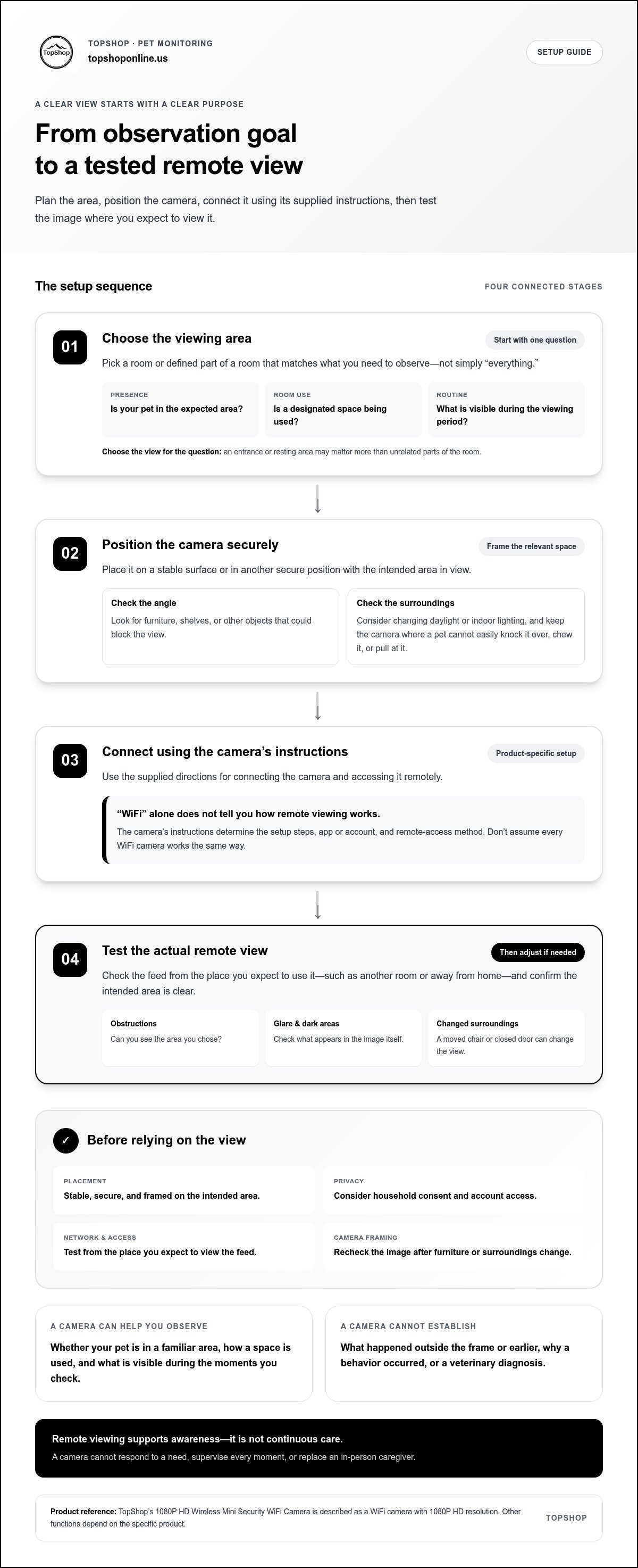
Plan the view before connecting the camera. A reliable setup starts with a defined observation area, a stable position, the camera’s own connection instructions, and a test from the place you expect to view it remotely. The WiFi label alone doesn’t specify which setup steps, app, account, or remote-access method a particular camera uses.
Remote viewing depends on the camera setup and network conditions. A camera may be connected at home, but that alone doesn’t establish how viewing works when you’re away or whether the connection will suit your intended use. Follow the instructions supplied with the specific camera rather than assuming all WiFi cameras work the same way.
- Choose a viewing area. Pick the room or defined part of a room that matches your observation goal.
- Position the camera. Set it on a stable surface or in another secure position with the intended area in view.
- Connect the camera. Use its supplied setup instructions for connecting and accessing it.
- Test the view. Check the image from your usual remote-viewing location and adjust the position if needed.
Plan the room and viewing angle before setup
Choose a familiar area where your pet spends time, then identify the part of the space you need to see. A doorway, resting spot, or open section of floor may be more relevant than the entire room. Check the angle for furniture, shelves, and other objects that could block the view. Also consider whether changing daylight or indoor lighting affects what’s visible.
Keep the camera stable and out of places where your pet could knock it over, chew it, or pull at it. A position that gives a clear view but is easy for a curious pet to reach may not be suitable. Review the image if you rearrange furniture or change the camera’s surroundings.
Connect, test, and adjust the monitoring view
Follow the camera’s supplied directions for connection and remote access. Don’t infer setup steps from the word “WiFi”; the product instructions determine the process. Once connected, view the feed from the place you expect to use it, such as another room or away from home, and check whether the intended area is clear.
Check for glare, dark areas, and obstructions in the actual image, not just from where the camera sits in the room. A moved chair or closed door can change what the camera shows. As you set up access, consider account privacy too. Mashable’s overview of pet camera privacy concerns offers context for thinking about connected-camera access.
After planning the view and setup, consider TopShop’s 1080P HD Wireless Mini Security WiFi Camera, a WiFi camera described as 1080P HD.
Compare Pet Cameras and Mini WiFi Security Cameras by Function
Camera labels can suggest an intended use, but they don’t tell you which functions a model includes. Compare your task with the functions stated for the specific camera. A basic live view may be enough to check a room; interaction or broader coverage may require additional capabilities that are specified separately.
| Camera category | Observation goal | Possible interaction | Setup considerations |
|---|---|---|---|
| Mini WiFi security camera | View a defined room or area remotely | Video viewing; other functions vary by model | Check the specified setup process and place it for the intended view |
| Pet camera focused on viewing | Observe a pet in a selected area | Viewing may be the primary function | Assess whether the camera’s stated view suits the space |
| Interactive pet camera | View a pet and use an added engagement function | May include audio, treat dispensing, or movement controls | Confirm which interaction functions are actually specified and plan placement accordingly |
The table describes broad categories, not guaranteed feature sets. Functions vary by model, and category names alone don’t establish whether a camera has pan or movement controls, audio, treat dispensing, or alerts. For a mini wifi camera for pet monitoring, compare the product’s stated specifications with your exact observation task. Don’t assume that “pet camera” means interactive or that “security camera” means video only.
Basic monitoring versus pet-specific interaction
Some cameras are intended for viewing, while others may add ways to engage with a pet. Treat each added function separately: audio doesn’t automatically mean two-way communication, and a pet-oriented label doesn’t establish treat dispensing or camera movement. TopShop’s 1080P HD Wireless Mini Security WiFi Camera is identified by its name as a WiFi camera with 1080P HD. That information alone doesn’t establish additional functions.
What 1080P HD tells you, and what it does not
1080P HD is a resolution description, commonly referring to a 1920-by-1080 image format. It doesn’t guarantee that every room, angle, or lighting condition will appear equally clear. Distance, glare, shadows, and obstructions can affect what you see. Resolution alone also doesn’t establish night vision, recording quality, or field of view.
Use a task-first comparison. Write down what the camera must show, which functions are essential, and which are optional. Then match those needs against the model’s stated specifications. If you only need to check whether your pet is in a particular area, an interaction feature may not add value. If you need a function beyond viewing, look for it in the model’s stated specifications rather than assuming it comes with the category.
Choose by required task and confirmed specifications, not category label alone.
Set Up Pet Monitoring with Privacy and Safety in Mind
A responsible setup gives the camera a clear purpose and a suitable view. Before using a mini wifi camera for pet monitoring, review where it will sit, who knows it’s there, who can access it, and whether the image shows only the intended area. These checks help protect household privacy and remind you that a camera view may be incomplete or unavailable.
Use this pre-use checklist:
- Stable placement: Put the camera on a secure surface or in a secure position where it’s unlikely to fall. Keep it away from places where a pet could knock, chew, or pull it.
- Household awareness: Tell household members where the camera is placed and how you plan to use it. Consider visitors, too.
- Account access: Keep login details private, use a strong password, and limit access to people who need it. Follow the camera’s own guidance for securing its account.
- View testing: Check the frame before use. Make sure it shows the intended pet area without capturing private spaces.
Protect household privacy when placing a camera
Frame the camera around your pet’s usual area, not broad household coverage. Avoid views into bedrooms, bathrooms, or other private areas used by household members or visitors. A narrow, purposeful view helps limit unnecessary capture of personal activity. Tell people in the home about the camera’s location and intended use, and revisit the angle if the room arrangement changes.
Account security matters as much as physical placement. Use unique login details where possible, avoid sharing access broadly, and review who can sign in. These are general account-protection practices, not claims about a particular camera’s controls. If the camera or its access arrangements change, reassess who can view it and whether the framing remains appropriate.
Use camera observations responsibly
Use brief remote checks to supplement appropriate care, exercise, and human supervision. A camera doesn’t respond to a pet’s needs, provide companionship, or ensure someone can intervene. If you’ll be away for an extended period, plan suitable in-person care rather than relying on remote video as a replacement.
Video observations cannot diagnose pain, illness, or distress. A still image or short clip shows only what’s visible at that moment, and it may not explain the cause of a behavior or change. Avoid drawing firm health conclusions from a single observation. If you notice concerning behavior or possible health changes, arrange appropriate in-person assessment or veterinary attention.
Privacy and care checks are part of choosing a monitoring setup, not optional extras. Once you’ve defined a suitable view and considered account access, you can view TopShop’s 1080P HD Wireless Mini Security WiFi Camera by its stated name and resolution description.
Choose a Mini WiFi Camera for Pet Monitoring and Take the Next Step
Make the decision in sequence: define what you need to observe, identify the functions required for that task, compare each camera’s stated specifications, then test whether its placement gives you the intended view. This keeps your selection tied to how you’ll use the camera, rather than a long feature list or category label.
For basic presence checks, viewing may be sufficient. Interactive functions are optional unless you have a specific need for them. Don’t choose added capabilities simply because they appear on a feature list. First decide what the camera must do, then separate that requirement from features that would be convenient but aren’t necessary.
Use a short checklist before choosing
Review the practical details before selecting a model. A clear checklist makes it easier to compare products without assuming a feature is included based on the camera’s name or category.
- Observation area: Identify the room or defined space you want to view and what needs to be visible within it.
- Viewing routine: Decide when and how you expect to check the view, and whether a basic visual check meets that purpose.
- Placement constraints: Consider available stable positions, nearby obstructions, and whether the camera can be kept out of your pet’s reach.
- Required functions: Decide whether you need viewing alone or a specific interaction function.
- Stated specifications: Compare only the functions and technical details explicitly stated for each individual camera.
- View test: After setup, check the image from your usual remote-viewing location and adjust the placement if the intended area isn’t visible.
These steps help distinguish an essential requirement from an optional extra. If your goal is to see whether your pet is in a defined area, prioritize a suitable view and the stated setup details. Don’t assume audio, alerts, recording, night vision, storage, or app functions are included unless they’re explicitly described for the model.
A factual next step from TopShop
TopShop’s 1080P HD Wireless Mini Security WiFi Camera is identified as a WiFi camera with 1080P HD. That description gives you a category and resolution to consider alongside your observation goal. It doesn’t establish other camera functions or guarantee how a particular room will appear on screen.
Use the checklist to decide whether the camera’s stated description aligns with your basic monitoring task, then shop TopShop’s 1080P HD Wireless Mini Security WiFi Camera.
Put Your Monitoring Plan into Practice
Set a practical standard for success before making the camera part of your routine. Decide what a useful check should show and how often you’ll rely on the view. After using a mini wifi camera for pet monitoring, consider whether the image answers your question or whether a change in placement or viewing habits would make it more useful.
Keep the setup purposeful as your household changes. Moved furniture, a different pet routine, or a new room arrangement can affect whether the camera still serves its intended role. Reassess the view periodically, and keep your expectations tied to what the camera can visibly show.
If the 1080P HD and WiFi description fits the category you’re considering, view TopShop’s 1080P HD Wireless Mini Security WiFi Camera. Use your observation goal to guide your choice, and build a setup that feels clear, useful, and appropriate for your pet.
Frequently Asked Questions
Can a mini WiFi camera be used to monitor a dog or cat remotely?
Yes, a mini wifi camera for pet monitoring can support remote viewing if its specific setup provides access away from home. For example, you might check whether your dog is resting in a designated area during a break. The view depends on placement, lighting, network conditions, and the camera’s stated functions. Test the feed in the conditions you expect to use it, and don’t assume alerts, audio, or continuous recording are included.
Does a 1080P pet camera show whether my pet is sick?
No. A 1080P HD description refers to image resolution, not medical assessment. Video might show visible movement, but it can’t reliably determine whether your pet is ill, injured, or distressed, especially if the view is brief or partly obstructed. Don’t use a camera image to rule out a health problem. If you notice a concerning change, arrange in-person observation and contact a veterinarian for health advice.
Can I leave a pet alone because I have a WiFi camera?
No. A camera can’t provide food, water, exercise, supervision, or emergency assistance. It can show a view remotely, but a person must be available to respond if something goes wrong. For example, seeing a knocked-over water bowl doesn’t enable the camera to refill it. Decide how long your pet can safely be alone based on its individual needs, and arrange suitable in-person care when needed.
What should I do if the pet camera feed stops working?
Check that the camera has power and that your home internet connection is working, then follow the camera’s instructions for restoring access. Test the feed again before relying on it. A frozen image or unavailable feed doesn’t confirm that monitoring continues in the background. If you need to check on your pet while access is down, use another appropriate method, such as asking a trusted person to check in.
Where should I place a camera to monitor a pet safely?
Choose a stable position that shows the area your pet uses while keeping the device away from chewing, pulling, or knocking hazards. Check that a door, furniture, or changing sunlight won’t block the view when you plan to check it. Avoid framing private household spaces, and tell people who share the home where the camera is. Follow the specific camera’s instructions for positioning.
Do pet cameras record continuously or save video automatically?
Not necessarily. WiFi describes a connection category, not whether a camera records or saves footage. Live viewing and saved video are different functions. Before relying on a recording, review the specific model’s documented recording and storage details, including any requirements stated by the manufacturer. Don’t assume cloud storage, a memory card, a subscription, or automatic recording is included unless the product information explicitly says so.