

A projector’s advertised resolution won’t tell you whether its picture will look sharp in your room. A portable mini projector for home theater can create a large image, but the result depends on more than a resolution label. Native image detail, room brightness, and the distance between the projector and screen all affect what you see.
If you want a compact setup without giving up a satisfying movie experience, start by checking how the projector will fit your space and viewing habits. This guide explains which specifications to verify, how to assess ambient light and throw distance, and when a TV or a larger projector may be a better fit. It also covers connections and setup details, including how to plan for video sources and audio equipment.
TopShop lists the Smart Projector Wifi Portable 1080P. The product name alone doesn’t confirm whether 1080P is the native resolution or a supported input resolution, or specify brightness and connectivity. Verify those details before comparing it with other models. The guidance below can help you assess the image and decide whether a mini projector suits your home theater.
Key Takeaways
- Evaluate a portable mini projector for home theater by its verified image performance, not its compact size or a resolution label alone.
- Check native resolution, and compare brightness figures only when their measurement methods are clear.
- Measure your room and viewing setup before choosing. Throw distance and lens specifications affect the image size a projector can create.
- Compare a mini projector with a TV or full-size projector based on room lighting, placement flexibility, and everyday viewing needs.
- Before considering TopShop’s Smart Projector Wifi Portable 1080P, verify what its resolution label means and check its brightness and connectivity details.
What Makes a Portable Mini Projector Suitable for Home Theater?
A portable mini projector is a compact projector designed to be moved or placed more flexibly than a fixed home-theater unit. Its size describes its form, not its picture quality. For home theater, the key question is whether it can produce a clear, bright-enough image at the size and distance your room allows.
Projectors can display movies and shows on a wall or screen, creating a larger viewing area in a controlled space. Unlike a television’s fixed display, a projector needs a suitable surface and enough room between its lens and that surface. Ambient light matters as well: it can wash out a projected image, while a television’s direct display is generally less affected by a bright room.
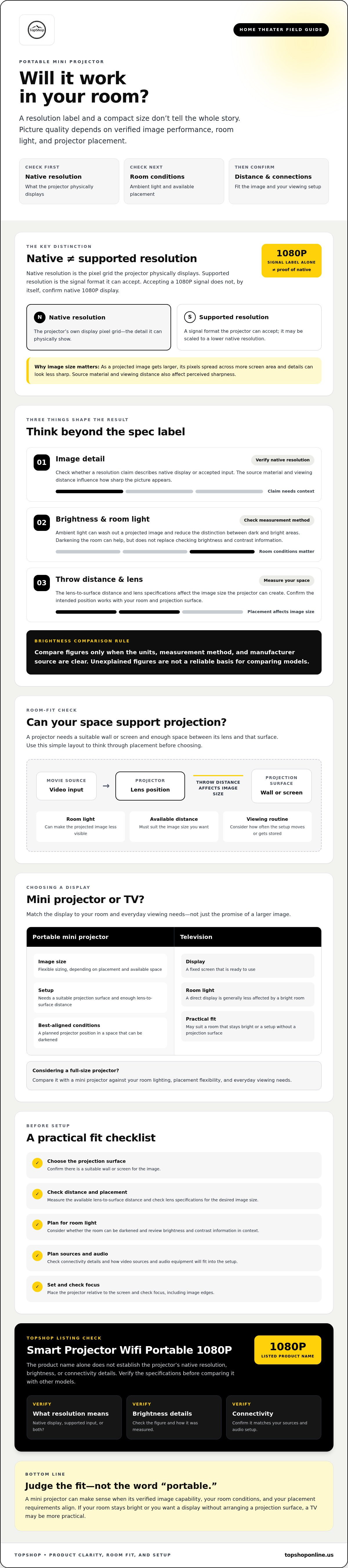
Quick definition: Native resolution is the number of pixels a projector physically displays. Supported resolution is the signal format it can accept. A projector that accepts a 1080p signal may still display it at a lower native resolution.
How Does a Mini Projector Create a Home-Theater Image?
A light source sends light through an imaging system, and a lens focuses and enlarges the resulting picture onto a wall or screen. Projectors use different imaging designs, including DLP and LCD systems, and different light sources. Video projector technology provides an overview of these approaches.
As an image gets larger, its pixels spread across more screen area, which can make details look less sharp. Perceived sharpness also depends on the source material and how far viewers sit from the image. Before comparing resolution claims, check whether they describe native display resolution or accepted input. Review brightness alongside the manufacturer’s measurement method, too. A figure without that context isn’t a reliable way to compare models.
When Is a Portable Projector a Better Fit Than a TV?
A projector offers flexible image sizing and a display you can move or put away. A television provides a fixed screen that’s ready to use. Portability may matter if you change rooms often, store the setup between uses, or want a temporary viewing arrangement. Each move still requires a usable projection surface and enough lens-to-surface distance to create the image size you want.
Choose based on the room and your viewing routine. A darkened space with a planned projector position can work well for projection. If the room stays bright, or you want a display that doesn’t require arranging a projection surface, a television may be more practical. A portable mini projector for home theater is a good fit only when its image capability, room conditions, and placement requirements align.
Which Projector Specifications Matter Most for Movie Watching?
First check what image the projector can actually display. Then assess whether its brightness and adjustment range suit your room. Specification labels are useful only when their meaning and measurement context are clear. For a portable mini projector for home theater, confirm what each claim describes before comparing it with another model.
Native Resolution, Supported Resolution, and Picture Detail
Native resolution is the pixel grid the projector uses to produce the displayed image. Supported resolution describes the signal formats it can accept. A projector that accepts a 1080p signal may scale it to a lower native resolution, so “supports 1080P” alone doesn’t establish that it displays movies in native 1080p.
Check the specification sheet or ask the seller what a resolution claim means. For TopShop’s Smart Projector Wifi Portable 1080P, the available listing information doesn’t confirm whether 1080P refers to native resolution, supported input resolution, or both.
Brightness, Contrast, and Room Light
Ambient light competes with the projected image, making it less visible and reducing the distinction between dark and bright areas. Darkening the room can help, but it doesn’t replace checking the projector’s brightness specification and contrast information.
Compare brightness only when the unit, measurement method, and manufacturer source are clear. Don’t treat different units or unexplained figures as equivalent, and don’t assume one rating guarantees a theater-quality image. Contrast claims need context, too: look for the stated ratio and how the manufacturer defines or measures it.
Focus, Keystone, and Lens Placement
Focus affects how clearly the image appears, including toward its edges. The result depends on the projector’s position relative to the screen, so check focus after placing the unit at the intended distance. Keystone correction adjusts image geometry when the projector isn’t square to the surface, but it can’t replace careful placement and may affect the usable image.
Check whether focus and keystone adjustments are manual or automatic, and confirm that the model includes them. Don’t infer either feature from a “portable” or “mini” label.
Before purchase, verify native resolution, supported input formats, brightness unit and measurement method, contrast information, focus and keystone controls, and lens-placement requirements. The screen or wall matters, too. PCMag’s guide to choosing the right projector screen discusses factors such as screen material and ambient light. To review the retailer’s listing, view TopShop’s projector listing and check any image specifications that aren’t stated.
Portable Mini Projector vs. TV or Full-Size Projector: Which Fits Your Room?
Choose a display that matches your room and routine rather than assuming one format is best for everyone. A projector’s picture depends on its specifications and the viewing environment: room light, projection distance, screen surface, and placement all affect the result. A television doesn’t require projection-distance planning, while a projector can offer a flexible image size if the room supports it.
| Factor | Portable mini projector | Television | Full-size projector |
|---|---|---|---|
| Portability | Compact and easier to move or store. | Fixed display; moving it usually takes more effort. | Generally suited to a more permanent setup. |
| Room-light needs | Best evaluated in a dimmable room; ambient light can reduce image visibility. | Often more convenient for daytime viewing in a bright room. | Depends on brightness specifications and room conditions. |
| Image-size flexibility | Image size varies with placement and lens characteristics. | Screen size is fixed. | Can project a large image, subject to its lens and installation. |
| Placement | Needs a suitable surface and enough throw distance. | Needs space for the display, but not a projection path. | May require planned or dedicated placement. |
| Everyday convenience | Useful when the setup needs to move, though positioning may be needed each time. | Ready-to-view fixed screen for routine use. | Can suit frequent viewing in a planned home-theater space. |
Mini Projector or Television for Everyday Movies?
A mini projector can suit viewers who value a variable image size or need to move or store their display. A television offers a fixed screen, so there’s no projection surface to arrange or lens-to-screen path to measure for each setup. For daytime movies, consider whether curtains or other light control can make the room dim enough for a projected image to remain visible. If the room stays bright, a TV may be more practical.
Mini Projector or Full-Size Projector for a Dedicated Room?
A compact model can be easier to store and reposition, making it useful for temporary viewing or rooms with changing layouts. A full-size projector may suit a frequent, more permanent setup, and models in that category often offer stronger image performance. However, larger hardware alone doesn’t establish picture quality. Compare each model’s resolution, brightness measurement, lens requirements, and other specifications with your room and viewing needs.
Rule of thumb: A darker room and flexible placement can make a projector a better fit. If the room stays bright or the display needs to be ready at all times, consider a television.
How to Set Up a Portable Mini Projector for Home Theater
Plan the image and connections before choosing a projector position. A portable mini projector for home theater still needs a stable location, a clear projection path, and enough space for its lens to produce the image size you want. Check the projector manual for model-specific distance, placement, and connection instructions.
Measure Throw Distance and Choose the Projection Surface
Throw distance is the space between the projector lens and the projection surface. The lens and projector design determine the image size at a given distance, so don’t assume that moving any projector farther away will create your preferred screen size. Check the manual or specifications, then test the planned image before arranging seating. A flat, plain wall can work; a screen isn’t always required.
- Choose a surface. Select a flat, uncluttered wall or screen. Consider how its color and texture may affect the image.
- Measure the placement. Use the manufacturer’s throw-distance guidance to estimate where the projector needs to sit for your intended image size.
- Position it securely. Place the projector on a stable surface and align it with the projection area. Keep vents unobstructed and route cables away from walkways.
- Connect a source. Use a compatible video input or wireless connection, if supported. Confirm the exact connection requirements first.
- Adjust the image. Set focus and make small placement corrections until the image is clear and aligned. Use keystone adjustment only if the projector provides it.
Connect Video, Audio, and Streaming Sources
Possible video sources include a laptop, streaming device, or other media player, but compatibility isn’t guaranteed. Check the product specifications for supported inputs, wireless connection requirements, and streaming limitations before planning your setup. Wireless streaming and built-in streaming apps are separate capabilities, so verify each claim independently.
For sound, confirm whether the projector has an audio output and whether it works with your intended external speaker or sound system. Don’t assume a particular port or wireless audio option is included. Test video and sound before finalizing cable routes or seating, then keep the projector ventilated and accessible for adjustments.
Review the Smart Projector Wifi Portable 1080P listing and verify its placement, input, wireless, and audio details before planning your home-theater setup.
Is TopShop’s Portable Projector the Right Home-Theater Option?
Start with your room, then compare verified projector details with how you plan to watch. A portable model may suit viewers who can dim the room, have a usable projection surface, and can position the projector at the distance its lens requires. It may be less practical if the room stays bright, placement is restricted, or you need a display that’s ready without setup.
TopShop lists the Smart Projector Wifi Portable 1080P. The product name identifies the category and includes a 1080P label, but the information available here doesn’t establish native resolution, brightness, operating system, audio, or connectivity specifications. Those details affect whether the projector fits your screen size, source devices, and viewing habits. Don’t treat the product name as confirmation of features that haven’t been verified.
What to Verify on a Product Listing Before Buying
Review the current listing and product documentation before deciding. Check what “1080P” means, how brightness is measured, and which video inputs and wireless functions are supported. Confirm audio outputs, streaming compatibility, and included accessories rather than assuming they come with the projector.
Also check the listing for current availability and applicable purchase details. These can change, so confirm them when you’re considering an order. If a specification that matters to your setup isn’t stated, seek clarification before relying on it.
Match the Listed Projector to Your Viewing Setup
Measure the available lens-to-surface distance and consider whether you can darken the room. Then compare confirmed capabilities with your intended image size, video source, and preferred audio setup. Don’t assume a connection that works with one device or streaming method will work with another.
Use a room-first test: if you can control the light, provide a stable position, and meet the projector’s placement requirements, a portable model may be worth considering. If those conditions don’t suit your space, compare a television or another projector against your everyday needs. A technical reference can help organize the comparison, but confirm that it applies to this exact listing and addresses any missing specifications.
Before ordering, review the current Smart Projector Wifi Portable 1080P listing and verify the details that determine whether it will fit your room. That check is more useful than relying on the model name alone.
Choose a Projector That Fits Your Room
A portable mini projector for home theater is a practical option when its image specifications, available placement distance, and your room’s lighting work together. Check native resolution separately from supported input resolution, compare brightness claims only when their measurement context is clear, and confirm the connections you need before planning the setup.
Portability and flexible image size can suit a room that needs a movable display. A television may be more convenient for bright spaces or everyday viewing without setup. The right choice depends on your viewing habits and the conditions you can control.
TopShop lists the Smart Projector Wifi Portable 1080P and sells consumer products online to customers nationwide across the United States. The available information doesn’t confirm the projector’s native resolution, brightness measurement, or detailed connectivity, so verify these specifications and the current listing details before deciding.
View TopShop’s portable projector listing and compare its confirmed details with your room and equipment before choosing.
Frequently Asked Questions
Is a portable mini projector good for home theater?
Yes, a portable mini projector can work for movie viewing if its verified image specifications suit the room and intended image size. Ambient light affects projected images, so consider whether you can darken the room and position the projector at the required distance. Check native resolution, brightness measurement details, focus controls, and throw distance. A compact design alone doesn’t establish picture quality or guarantee a theater-like result.
Can a mini projector be used in a bright room?
It may display an image in a bright room, but ambient light can make the picture less visible and reduce perceived contrast. The result depends on the projector’s verified brightness, image size, projection surface, and room conditions. Review the manufacturer’s brightness unit and measurement method rather than relying on an unexplained number. If the room can’t be darkened, compare a television’s suitability for your daytime viewing needs.
What does 1080P mean on a mini projector?
The 1080P label may describe native image resolution, supported input resolution, or both, so check the exact product specifications. Native resolution is the pixel grid the projector uses to display an image. Supported input resolution describes the signal formats it can accept. A projector that accepts a 1080P signal doesn’t necessarily display it natively. Check the listing or manual before comparing image detail between models.
How far should a portable projector be from the screen?
There’s no single correct distance for every projector. The lens and throw ratio determine the image size the projector can produce at a given distance. Check the manufacturer’s placement guidance and the image sizes available across those distances. Measure your room before buying, then test the planned projector position and seating. If the listing doesn’t provide throw-distance information, confirm it before assuming the model will fit.
Do mini projectors have built-in speakers?
Some mini projectors may include speakers, while others may require external audio, so check the specifications for the specific model. A speaker listing also doesn’t confirm sound quality or suitability for your room. If audio matters, verify whether the projector has an audio output, which connections it supports, and whether those work with your intended speakers or sound system. Don’t assume a particular audio feature is included.
Is a mini projector better than a TV for movies?
Neither option is better for every room. A projector can provide flexible image sizing and portable placement, but it needs a suitable projection surface and appropriate room conditions. A television offers a fixed display that’s generally less dependent on darkening the room. Compare your viewing times, ambient light, desired image size, and tolerance for setup. Then assess the projector’s verified specifications against those needs.
What should I check before buying a portable mini projector?
Check native resolution, supported input resolution, brightness units and measurement context, throw distance, focus options, and supported video and audio connections. Match those verified details to your room, source devices, preferred image size, and audio setup. Read the product listing and manual for exact specifications, especially if a headline claim is ambiguous. For TopShop’s Smart Projector Wifi Portable 1080P, verify what the 1080P label means before comparing it with other models.