

The smallest projector isn’t automatically the best fit for a compact room. A portable wifi projector for small spaces still needs enough distance to create your preferred image size, a suitable projection surface, and a stable place to sit. When floor and wall space are limited, these practical details matter more than portability alone.
Brightness and maximum screen-size claims only make sense alongside your room dimensions, projector placement, and ambient light. This guide explains what to measure and compare, including throw distance, resolution, brightness, WiFi and wired connections, audio, and power needs. You’ll also learn how your viewing habits, such as streaming or connecting a laptop, affect the setup. Use the checklist to assess whether a portable projector suits your room, then explore TopShop’s Smart Projector Wifi Portable 1080P.
Key Takeaways
- Match throw distance and target image size to the space available for projector placement.
- Compare native resolution, brightness, focus, and keystone correction using clearly defined specifications.
- Choose a portable wifi projector for small spaces by prioritizing room fit, lighting, and the connections you plan to use.
- Plan the projection surface, seating, outlets, and cable routes before settling on a setup.
- Separate essential features from optional conveniences, then use your checklist to assess TopShop’s Smart Projector Wifi Portable 1080P.
Why a Portable WiFi Projector Can Fit a Small-Space Setup
A portable WiFi projector is designed to be moved more easily and connect to a wireless network. Portability describes how it can be moved, not whether it fits every room. Room suitability depends on the distance between the projector and viewing surface, the available wall area, and where people can sit. The broader video projector technology category includes different display methods, but compact placement remains a practical concern across types.
A portable unit can suit bedroom viewing, shared living-room use, or temporary setups where a permanent display is impractical. Unlike a fixed television, a projector can be moved or stored between viewing sessions, freeing a surface or area for other uses. That flexibility has limits: the beam needs a clear path, the image needs a suitable surface, and room lighting affects visibility. A television may be more practical if you want a dedicated display that is always ready.
What makes a projector workable in a compact room?
Start with the wall or screen, then plan the viewing position and projection distance together. The image must fit the available surface from a projector position that works in your room. Check that furniture, people, or other objects won’t block the beam. A blank, unobstructed surface makes alignment simpler, while a window, artwork, or shelving can reduce the usable image area.
A compact projector body takes up little storage space, but the setup also needs room for the projected beam, a power connection, and any cables used with other devices. A small device is not automatically a short-distance projector. Compare the model’s placement requirements with the actual distance available in your room.
When does a portable projector make sense?
Portability is useful when viewing is occasional, the room serves multiple purposes, or you want to store the projector after use. For example, you might project in a bedroom at night and keep the room clear during the day. In a shared living area, a temporary viewing arrangement may work better than a permanent screen.
A fixed display can be simpler when the viewing position and screen location rarely change. Projection may require repositioning the unit and adjusting the image for the chosen surface. Light, surface quality, and placement still shape the result, so flexibility doesn’t remove the need to plan your setup.
TopShop offers the Smart Projector Wifi Portable 1080P for portable viewing. Consider how its product details fit your room layout, viewing habits, and connection needs.
Which Projector Specifications Matter Most in a Small Room?
Start with specifications that affect the image in your actual layout, not simply the largest numbers on a product page. For a portable wifi projector for small spaces, prioritize placement compatibility, then consider image detail and adjustment features.
| Specification | What it tells you | Small-room check |
|---|---|---|
| Native resolution | The image detail the projector can display directly. | Distinguish native resolution from supported input resolution. “Supports 4K” may describe an accepted signal, not a native 4K image. |
| Brightness | Light output, commonly stated in ANSI lumens. | Compare the same unit and testing basis. Room light affects how visible the projected image appears. |
| Throw distance | The distance between the projector and the projection surface. | Check the image dimensions the model produces at your available distance. |
| Focus | How the projector brings the image into sharpness. | Consider how focus is adjusted and whether the likely placement allows convenient adjustment. |
| Keystone correction | Digital adjustment for a skewed image when the projector isn’t aligned squarely with the surface. | Useful for minor alignment issues, but it doesn’t change the projector’s physical position or throw distance. |
Maximum image size alone can’t determine room suitability. The image must fit the surface at the distance and angle your room allows.
How do throw distance and image size affect placement?
Throw distance is the space from the projector’s lens to the wall or screen. As the distance changes, the projected image dimensions change according to the model’s optics. Before choosing a projector, measure from the likely position to the intended surface, accounting for furniture and the lens location. Then compare that measurement with the model’s throw information and the image width you want.
How should buyers compare brightness and resolution?
ANSI lumens provide a standardized brightness unit, but comparisons are useful only when ratings use the same units and comparable test conditions. Ambient light can make an image appear less visible, so consider whether you’ll watch in a darkened room or with light present. Native 1080p means the projector displays an image with 1080 horizontal lines of resolution. It doesn’t determine perceived clarity on its own, which also depends on image size, content, and viewing distance.
Digital keystone correction reshapes the image to compensate for angled placement. It can help with alignment, but it isn’t a substitute for choosing a model whose throw suits your available distance. Compare these criteria with TopShop’s Smart Projector Wifi Portable 1080P and its product details. Explore the portable projector option.
WiFi, HDMI, and Audio: Compare Connections Before Choosing
Connection labels describe different functions. WiFi connects a projector to a network for wireless features, such as streaming or casting. HDMI carries audio and video directly from a compatible device, such as a laptop or streaming player. One doesn’t replace the other. A portable wifi projector for small spaces should suit the devices you plan to use and the way you want to watch.
Built-in apps can reduce the need for a separate streaming device, but app access and supported services vary by model. A WiFi connection alone doesn’t guarantee access to a particular streaming app. If you rely on a phone or laptop, check supported casting methods and device compatibility. For a wired connection, confirm that the projector has the required input and plan where the cable will run.
Will a WiFi projector connect to a phone or laptop?
Wireless casting sends content from a compatible device over a supported network or casting method. HDMI creates a direct wired connection and may be simpler when a device supports video output through that port. These methods aren’t interchangeable in every setup, so check both ends of the connection, including device compatibility, supported casting methods, and any required adapters.
- Identify the source device and how it outputs video.
- Choose wireless casting or a direct HDMI connection based on compatibility and preference.
- Check the projector’s listed inputs and supported casting methods. Don’t assume a port or feature is included.
- For built-in streaming, verify that the apps and services you use are supported.
Do portable projectors need separate speakers?
Not necessarily. A projector’s built-in speaker may suit simple viewing, while an external speaker offers another audio option. Bluetooth can connect compatible devices wirelessly, but Bluetooth support and speaker compatibility vary. A wired speaker connection also depends on the projector’s available audio outputs. Review the product details to see which connections suit your setup.
Factor audio into the room layout. Place an external speaker where it can be heard clearly without blocking the image, and allow space for its power cord or audio cable if needed. Wireless audio can reduce cable routing, while wired audio may require a clear path between devices.
Use your device list and preferred audio setup to decide which features matter in TopShop’s Smart Projector Wifi Portable 1080P. View the portable projector option.
Measure and Set Up a Projector in a Small Space
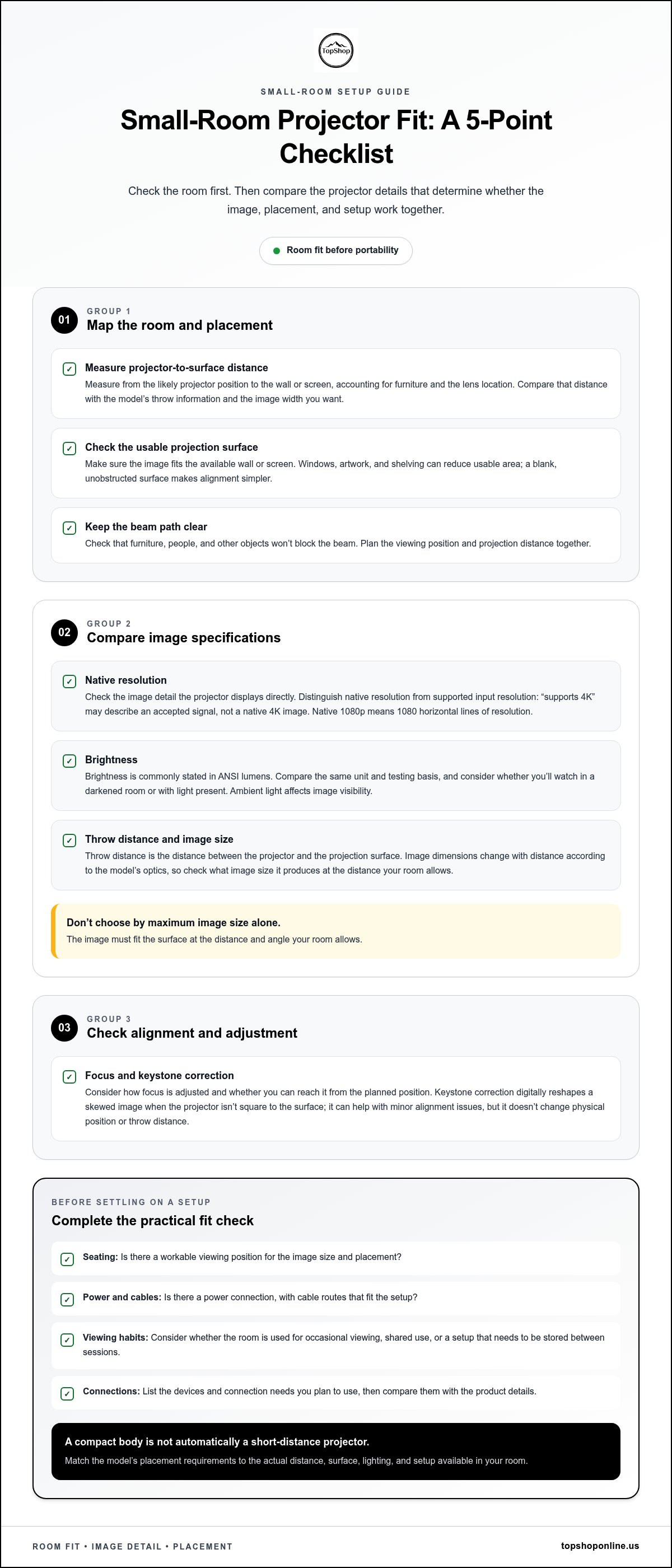
Measure the room before comparing models. A suitable setup needs a usable projection surface, a projector position that matches its throw requirements, a clear path for the image, and a practical route to power and source devices. This sequence helps you determine whether a portable wifi projector for small spaces can work without relying on digital adjustments to compensate for a poor layout.
What should you measure before buying?
Record the usable width and height of the wall or screen, the distance from possible projector positions to that surface, and the viewing distance from the seats. Note furniture, shelves, windows, and walkways that could obstruct the image or limit placement. Check outlet locations, then map cable routes so cords don’t cross seating or foot traffic.
- 1. Select the surface. Identify a clear wall or screen area and measure its usable dimensions. Account for windows, artwork, shelves, and nearby furniture.
- 2. Measure placement distance. Mark practical projector positions, such as a table or shelf, and measure from each position to the projection surface. Compare these measurements with the model’s throw information and your preferred image dimensions.
- 3. Check seating. Confirm that viewers have a comfortable line of sight and that heads, furniture, or room traffic won’t block the beam. Include actual seating positions in your layout, not just the wall and projector.
- 4. Plan connections. Locate outlets and map power, HDMI, or other required cables between the projector and source devices. Allow enough cable reach without creating a trip hazard.
How can you reduce setup compromises?
Use a clear projection path and a stable, level support surface. Digital keystone adjustment may correct some image skew, but it won’t move the projector, create more throw distance, or remove an obstruction. Begin with suitable physical placement, then use correction for alignment where needed. If ambient light is a problem, consider curtains or another room-darkening option for viewing.
Compare tabletop placement with shelf or ceiling placement only when each option is practical for your room. A table may simplify repositioning but occupy useful space. A shelf may clear the floor, but it still needs a suitable angle, stable support, and reachable power. Don’t choose a mounting position solely to free floor area if it compromises placement.
Quick check: Surface measured, projector-to-wall distance recorded, seating and obstructions mapped, lighting considered, outlet located, cable route planned. Use this list before narrowing down models, including TopShop’s Smart Projector Wifi Portable 1080P. Explore the portable projector and compare its product details with your room measurements.
Choosing a Portable WiFi Projector for Your Small-Space Needs
The right choice depends on how your room is used, not just how compact the projector is. Start with placement and viewing conditions, then match connection features to your devices. For a portable wifi projector for small spaces, treat throw and required inputs as essentials when your layout or equipment depends on them. Features such as Bluetooth audio or built-in apps are conveniences if your setup works without them.
Which features are essential for your room?
| Room or use case | Prioritize | Optional convenience |
|---|---|---|
| Limited placement options | Verified throw information and adjustment features that suit the available projector position. | Automatic setup functions, if provided. |
| Frequent storage between uses | Published dimensions, weight, and handling details that fit your storage plan. | A carrying accessory, if included. |
| Room with ambient light | Brightness information stated in a consistent unit, considered alongside your viewing conditions. | Flexible setup for reducing light during viewing. |
| Wireless viewing | Supported WiFi or casting methods that match the devices you use. | Built-in apps, if they support your preferred services. |
| External audio or wired sources | Required audio connections and video inputs, such as HDMI, if applicable. | Bluetooth audio, if compatible with your speaker. |
How to assess the TopShop portable projector option
TopShop offers the Smart Projector Wifi Portable 1080P as a portable WiFi projector. Use its product details to evaluate how it fits your room measurements, viewing conditions, and connection needs. Compare its throw information with your available placement distance, and match its inputs and supported features to the devices you plan to use.
Keep the decision practical: mark which requirements are necessary for your room, then separate them from features that would simply make setup more convenient. For additional product-reference context, see the Smart WiFi projector specifications guide. Then View TopShop's portable WiFi projector and compare its details with your priorities.
Choose a Setup That Fits Your Room
A successful small-room setup starts with fit, not a portability claim. Measure the projection surface, available distance, seating position, and cable routes before comparing models. Match throw requirements and image size to your layout, then assess brightness and resolution in context rather than relying on headline figures alone.
Check connection needs separately. WiFi supports network features, while HDMI provides a direct wired connection. App access, device compatibility, and audio options vary by model. For a portable wifi projector for small spaces, prioritize the specifications your room and viewing habits require. Treat conveniences such as built-in apps or Bluetooth audio as optional unless they’re essential to your setup.
TopShop offers the Smart Projector Wifi Portable 1080P for portable viewing. Compare its product details with your measurements and connection checklist, then Shop TopShop's portable WiFi projector. With a clear plan for placement, viewing, and connections, you can choose a setup that makes practical use of your space.
Frequently Asked Questions
Is a portable WiFi projector suitable for a small room?
Yes, a portable WiFi projector can suit a small room if its placement requirements match the available space. Measure the distance from possible projector positions to the wall or screen, then compare it with the model’s throw specifications and the image size you want. Also consider seating, ambient light, and a clear projection path. Portability makes storage or repositioning easier, but it doesn’t guarantee room fit.
How far away does a projector need to be from the wall?
The required distance depends on the projector’s optics and the image dimensions you want, so there’s no single distance that applies to every model. Check the manufacturer’s throw information for your target image size. Before buying, measure from a practical placement point, such as a table or shelf, to the projection surface. Remember to account for the lens position and furniture that could block the beam.
Can a WiFi projector connect to a phone?
It can connect wirelessly if the projector and phone support a compatible casting method. Check the projector’s listed casting methods and your phone’s video-sharing options, since WiFi alone doesn’t guarantee compatibility. A wired connection may also be possible if both devices support the necessary video output and adapter. Built-in streaming apps are separate from phone casting, and their availability varies by projector model.
What brightness is best for a small-room projector?
There’s no single brightness level for every small room. The right choice depends on ambient light, image size, and viewing conditions: a darkened room generally needs less light output than a room with daylight or lamps. Compare ratings stated in the same unit, such as ANSI lumens, and avoid treating different measurement methods as directly equivalent. Closing curtains or reducing room light can also help visibility.
Do portable projectors work without WiFi?
Some can play video without WiFi through a compatible wired input or another supported local source, but this depends on the projector’s connections and playback features. HDMI can carry video from a compatible laptop or streaming device without using the projector’s WiFi, though the source may still need internet access for online content. Check the model’s inputs and supported playback methods before planning an offline setup.
Can a projector replace a TV in an apartment?
A projector can replace a television for some viewing habits, especially when a movable or storable display suits the room better than a permanent screen. It may be less convenient if you want an always-ready setup or regularly watch with ambient light. Consider the projection surface, placement distance, connection needs, and how often you’re willing to set up or reposition the unit before choosing it as your main display.
What should I measure before buying a projector for a small space?
Measure the usable wall or screen width and height, the distance from possible projector positions to that surface, and the viewer-to-screen distance. Note seating, furniture, windows, and other obstructions that could interfere with the beam. Locate nearby power outlets and plan routes for power and signal cables. Compare those measurements with the projector’s throw information and connection requirements to identify practical placement options.