

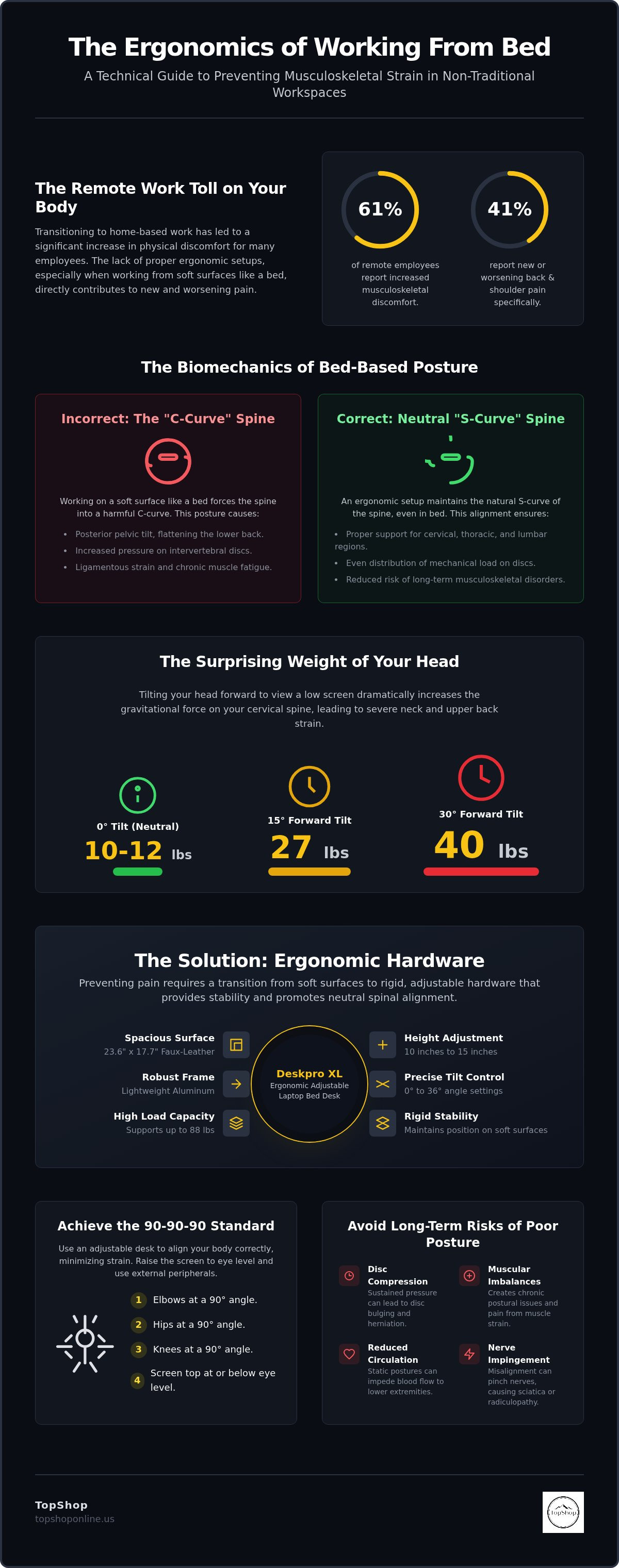
Research indicates that 61% of remote employees experience increased musculoskeletal discomfort, with 41% specifically reporting new or worsening back and shoulder pain since transitioning to home-based environments. You likely recognize the physical cost of using a soft mattress as a primary workspace; it often results in immediate lower back stiffness and acute neck strain from improper viewing angles. Preventing back pain while working in bed requires a transition from soft, non-adjustable surfaces to rigid, ergonomic hardware that maintains neutral spinal alignment. This guide provides a technical overview of the hardware specifications and postural requirements necessary to eliminate musculoskeletal strain. We focus on the utility of the Deskpro XL Ergonomic Adjustable Laptop Bed Desk, featuring a 23.6 inch by 17.7 inch faux-leather surface, aluminum frame construction, and an 88-pound load capacity. You will learn how to utilize height adjustments between 10 and 15 inches and tilt settings from 0 to 36 degrees to achieve optimal monitor placement. This technical breakdown ensures your bed-based workstation meets the precise dimensions and stability requirements required for long-term spinal health.
Key Takeaways
- Analyze the biomechanical impact of C-curve posture on lumbar discs and learn to maintain neutral spinal alignment in non-traditional workspaces.
- Identify the essential hardware specifications, including rigid support surfaces and adjustable height stands, critical for preventing back pain while working in bed.
- Implement the 90-90-90 postural alignment standard by calibrating workstation height and tilt settings to individual torso measurements.
- Minimize repetitive musculoskeletal strain and twisting motions through the integration of centralized power strips with high-density AC and USB ports.
- Utilize the Deskpro XL Ergonomic Adjustable Laptop Bed Desk to facilitate stable monitor positioning and precise height-adjustable leg configurations.
The Biomechanics of Bed-Based Work and Spinal Strain
Neutral spine alignment involves the maintenance of the natural S-curve of the vertebral column, specifically the cervical, thoracic, and lumbar regions. In a bed-based environment, the absence of structural support typically results in a sustained C-curve posture. This deviation from neutral alignment places excessive mechanical load on the intervertebral discs. Ergonomics research indicates that improper spinal positioning leads to ligamentous strain and muscular fatigue. Preventing back pain while working in bed requires an understanding of how soft surfaces alter the body's center of gravity and pressure distribution. Without rigid intervention, the spine remains in a state of constant flexion, increasing the risk of long-term musculoskeletal disorders.
Cervical Spine Pressure and Screen Height
The human head weighs between 10 and 12 pounds in a neutral, 0-degree upright position. Tilting the head forward to view a laptop screen placed directly on the lap dramatically increases the gravitational force exerted on the cervical spine. Research shows that a 15-degree forward tilt increases the effective weight to 27 pounds. At a 30-degree angle, the load reaches 40 pounds. This sustained tension causes cervical spine compression and upper back muscle strain. Eye-level monitor placement is necessary to maintain a neutral neck position. Using a laptop on a lap forces a downward gaze, leading to chronic neck pain and thoracic kyphosis. Raising the hardware to eye level eliminates the need for extreme cervical flexion.
Lumbar Instability on Soft Surfaces
Mattresses lack the structural rigidity required to provide counter-pressure for the lower back during sitting tasks. This surface instability allows for posterior pelvic tilt, where the top of the pelvis rotates backward. This rotation flattens the lumbar curve and initiates a "slump" mechanism. The result is increased pressure on the anterior portion of the lumbar discs. Soft bedding fails to provide a stable base for the thoracic spine, causing the user to sink into the mattress. This lack of support triggers acute lower back stiffness and potential disc herniation over time. Effective strategies for preventing back pain while working in bed must include hardware that creates a stable, rigid platform to counteract mattress compression and support the lumbar region.
Long-term risks of unsupportive bed work include:
- Intervertebral disc compression: Sustained pressure leads to disc bulging and reduced shock absorption.
- Muscular imbalances: Overstretched back muscles and shortened chest muscles create chronic postural issues.
- Reduced circulation: Static postures on soft surfaces can impede blood flow to lower extremities.
- Nerve impingement: Improper alignment can lead to sciatica or cervical radiculopathy.
Essential Ergonomic Hardware for Bed-Based Workstations
Rigid hardware components are the primary requirement for a stable bed-based workstation. Unlike traditional desks, bed surfaces are dynamic and compress under body weight; this compression destabilizes the thoracic spine and forces the user into a compensatory slouch. Preventing back pain while working in bed is impossible on a surface that shifts during typing or mouse movement. A dedicated workstation must provide a static, non-compressible platform to maintain the 90-90-90 alignment required for spinal health. This setup requires specific hardware specifications that prioritize stability, adjustability, and thermal management.
Rigid vs. Soft Work Surfaces
Soft laptop pillows or cushions lack the structural integrity to support modern hardware loads. High-performance bed desks feature aluminum frames and reinforced surfaces with load capacities reaching 88 lbs. These dimensions, typically 23.6 inches by 17.7 inches, provide enough area for both a laptop and external peripherals. Utilizing ergonomic strategies for bed mobility involves more than just pillow placement; it requires a rigid interface that prevents the pelvic tilt mechanism described in the biomechanics section. A firm surface ensures the laptop stays at a fixed height regardless of mattress movement, which is critical for consistent eye-level viewing.
External Peripheral Integration
Integrating an external keyboard and mouse is essential for achieving optimal arm angles. When a laptop sits on an elevated stand, the built-in keyboard is positioned too high for neutral wrist alignment. A separate wireless keyboard allows the user to keep elbows at a 90-degree angle while the screen is raised 10 to 15 inches to meet the eye line. This separation is the only way to avoid the cervical spine loading caused by looking down at a lap-level screen. Mouse placement must occur on the same rigid plane as the keyboard to prevent carpal tunnel syndrome and repetitive strain. Wireless connectivity is preferred to reduce cable clutter in the compact bed environment.
Laptops generate significant heat during high-intensity processing tasks. Placing these devices directly on blankets or legs causes thermal throttling and potential skin burns. Rigid bed desks facilitate airflow through the chassis, extending hardware lifespan and ensuring user safety. The tilt functionality, often adjustable from 0 to 36 degrees, further assists in positioning the keyboard for an ergonomic strike angle without compromising the device's cooling efficiency. For users seeking a stable and thermally efficient platform, the Deskpro XL Ergonomic Adjustable Laptop Bed Desk offers the necessary technical specifications to maintain a healthy posture and prevent acute musculoskeletal strain.
- Stability: Aluminum leg construction prevents wobbling on soft mattresses.
- Height: 10-15 inch adjustment range for eye-level screen positioning.
- Tilt: 0-36 degree surface angle for neutral wrist strike.
- Capacity: 88 lb load support for laptops and ancillary hardware.
Positioning and Alignment Specifications for Bed Use
Achieving anatomical neutrality in a bed environment requires precise hardware calibration. Preventing back pain while working in bed is contingent upon replicating the 90-90-90 alignment standard typically reserved for professional office seating. This involves maintaining 90-degree angles at the elbows, hips, and knees to distribute mechanical stress evenly across the musculoskeletal system. Without a rigid, adjustable interface like the Deskpro XL, the body defaults to a kyphotic curve, leading to disc compression and muscular fatigue. Proper alignment ensures that the skeletal structure, rather than soft tissue, bears the weight of the torso and head.
The 90-90-90 Rule in Bed
Calibrating the Deskpro XL Ergonomic Adjustable Laptop Bed Desk begins with the leg height settings. The 10 to 15 inch adjustment range allows users to align the desk surface with their neutral elbow height. Elbows should remain tucked at the sides with the forearms parallel to the desk surface. If the desk is too low, the user will lean forward; if it's too high, the shoulders will shrug, causing trapezius strain. The 0 to 36 degree tilt functionality enables the keyboard to meet the hands at a natural strike angle, reducing wrist extension. For optimal cervical alignment, the top third of the laptop screen must align with the user's horizontal eye line, which is often achieved by utilizing the maximum 15 inch height extension combined with a slight surface tilt.
Lumbar Support Configuration
Mattresses fail to provide the necessary counter-force to maintain the lumbar lordosis. Effective support requires placing a high-density foam roll or a firm ergonomic cushion at the L1-L5 vertebral region. Decorative pillows are insufficient due to their low material density and high compressibility. These soft materials allow the pelvis to tilt posteriorly, which initiates the slump mechanism mentioned in the biomechanics section. A firm support maintains the natural inward curve of the lower back and prevents the flattening of the lumbar discs. This configuration ensures that the weight of the upper torso is supported by the skeletal structure rather than the soft tissues of the lower back. You'll find that maintaining this curve significantly reduces acute lower back stiffness during extended sessions.
Follow these technical steps for a bed-based workstation setup:
- Hip Placement: Position the hips firmly against the headboard or a rigid backrest to prevent sliding.
- Desk Clearance: Place the Deskpro XL over the legs, ensuring at least 2 to 3 inches of clearance to allow for incidental movement.
- Elbow Alignment: Adjust the desk height (10-15 inches) until the forearms rest flat without elevating the shoulders.
- Wrist Strike: Set the surface tilt (0-36 degrees) so the wrists remain in a neutral, straight position while typing.
- Lumbar Insertion: Place a firm support roll directly behind the lower back at the L1-L5 level to preserve the spinal S-curve.
Consistency in these measurements is the primary factor in preventing back pain while working in bed. Small deviations in height or tilt can lead to repetitive strain over several hours. By utilizing the specific adjustment increments of the Deskpro XL, you can create a repeatable, ergonomic environment that mimics the benefits of a high-end office chair within the comfort of a bed setup.
Ancillary Setup Optimization: Power and Lighting
Environmental factors significantly influence musculoskeletal health in non-traditional workspaces. Reaching for wall outlets or leaning to connect peripherals creates repetitive "micro-twists" in the thoracic and lumbar spine. These small, frequent rotations compromise the 90-90-90 alignment established in previous sections. Preventing back pain while working in bed requires a centralized power and data hub within the user's immediate reach. By eliminating the need to overextend or rotate the torso, you maintain the neutral spinal position necessary for long-term comfort. Proper environmental management includes technical specifications for power distribution and ambient lighting to prevent postural degradation.
Centralized Power Access
Integrating a power strip with usb ports allows for high-density device connectivity without leaving the ergonomic zone. A 6-outlet configuration ensures sufficient capacity for a laptop, external monitor, and ancillary hardware while integrated USB ports eliminate the need for bulky adapters. Surge protection is a critical safety standard for home office environments to prevent equipment damage from voltage spikes. Placing the power strip on a bedside table or attaching it to the bed frame ensures that all charging cables have sufficient slack. This slack prevents the tension that often pulls hardware out of alignment or forces the user to lean forward.
Cable and Environmental Management
Effective cable management for home office setups in a bedroom reduces trip hazards and equipment instability. Loose cords draped across bedding or floors create a risk of snagging, which can pull a rigid bed desk out of its calibrated position. Use cable ties or clips to secure wires along the frame of the Deskpro XL to maintain a clean workspace. Clutter-free surfaces facilitate the incidental movement required to prevent muscle stiffness. Additionally, lighting optimization is essential to prevent the "computer hunch." Insufficient ambient light forces the user to lean toward the screen to resolve text, which breaks the neutral cervical position. High-CRI (Color Rendering Index) lighting reduces eye fatigue and promotes an upright, stable posture.
Technical requirements for environmental optimization:
- Power Capacity: 6 AC outlets and 6 USB ports for simultaneous multi-device charging.
- Cord Length: Minimum 6-foot heavy-duty extension cord to reach distant wall outlets.
- Surge Protection: Integrated circuit breaker and 900+ Joule rating for hardware safety.
- Illumination: 500-700 lux at the work surface to prevent forward leaning.
Optimizing these ancillary factors ensures that the technical adjustments made to your hardware remain effective throughout the workday. For a comprehensive power solution, the Power Strip with 6 AC Outlets & 6 USB Ports provides the necessary reach and port density to support a fully ergonomic bed-based workstation without compromising spinal alignment.
Optimizing the Bed Workspace with Deskpro XL
The Deskpro XL Ergonomic Adjustable Laptop Bed Desk serves as the structural foundation for preventing back pain while working in bed. This hardware utilizes a reinforced aluminum frame to support loads up to 88 lbs, ensuring a vibration-free surface for high-intensity typing and peripheral use. The 23.6 inch by 17.7 inch faux-leather surface provides sufficient area for a standard laptop and a dedicated mouse zone, which is critical for preventing the repetitive strain associated with trackpad-only use. Unlike soft cushions, this rigid platform maintains a constant height and tilt, regardless of mattress compression or body movement. The material composition prioritizes durability and thermal dissipation, ensuring long-term reliability in a home office context.
Deskpro XL Functional Features
Height adjustment is the primary mechanism for maintaining cervical health. The Deskpro XL features a 10 to 15 inch vertical range, allowing the user to align the monitor with their horizontal eye line. This elevation eliminates the 27 to 40 pound gravitational load on the neck caused by downward viewing angles. The integrated tilt mechanism offers settings from 0 to 36 degrees to optimize wrist strike angles. This functionality reduces wrist extension and prevents the median nerve compression found in carpal tunnel syndrome. For storage in compact living spaces, the legs fold flat, and the unit includes a built-in drawer and tablet stand for organized peripheral management.
Integration into a Health-First Routine
Maintaining a pain-free environment requires combining rigid hardware with behavioral adjustments. Use the Deskpro XL as a transitional tool; its portability allows for seamless movement between bed, couch, and floor workspaces. This variety prevents the static loading of specific muscle groups and encourages postural shifts. Integrate stretching intervals every 30 to 60 minutes to reset the lumbar curve and promote circulation. Preventing back pain while working in bed is most effective when the hardware is calibrated to the user's specific torso measurements at the start of each session. Consistent use of the 90-90-90 alignment rule, supported by rigid hardware, ensures that bed-based work does not lead to chronic musculoskeletal degradation.
Final hardware checklist for bed-based ergonomics:
- Surface: Rigid, 23.6" x 17.7" platform for maximum stability.
- Height: 10-15" range for eye-level monitor placement.
- Tilt: 0-36° for neutral wrist alignment.
- Support: Firm lumbar roll at L1-L5 vertebrae.
- Power: Centralized 6-outlet strip to prevent twisting motions.
By adhering to these technical specifications and utilizing the Deskpro XL, you create a repeatable, ergonomic environment. This setup prioritizes spinal alignment and reduces the physical strain of remote work.
Implementing Technical Standards for Long-Term Spinal Health
Maintaining anatomical neutrality in bed-based environments requires a transition from compressible bedding to rigid, adjustable hardware. Preventing back pain while working in bed is achieved by adhering to the 90-90-90 alignment standard through precise height and tilt calibration. Key takeaways include the necessity of rigid support for thoracic stability and the integration of centralized power hubs to eliminate torsional strain. These technical interventions ensure intervertebral discs remain decompressed during extended sessions. It's essential to prioritize hardware that facilitates neutral posture to avoid chronic musculoskeletal degradation.
The Deskpro XL Ergonomic Adjustable Laptop Bed Desk provides the specific dimensions and 88-pound load capacity required for a stable workstation. Technical specifications include 10 to 15 inch height adjustments for eye-level alignment and a reinforced aluminum frame for maximum stability. We provide national shipping across the United States for all ergonomic hardware orders. Shop the Deskpro XL Ergonomic Adjustable Laptop Bed Desk for Spinal Support to optimize your bed-based workstation. Establishing a technically sound workspace ensures a productive and pain-free remote work experience.
Frequently Asked Questions
Is it possible to work in bed without getting back pain?
Yes, achieving a pain-free experience is possible by implementing rigid hardware and maintaining neutral spinal alignment. Preventing back pain while working in bed requires moving away from soft, unstable surfaces that cause posterior pelvic tilt. Utilizing a stable platform like the Deskpro XL ensures the spine remains in its natural S-curve. This technical setup prevents the mechanical load from shifting onto the intervertebral discs during prolonged work sessions.
How high should my laptop be when working in bed?
The top third of the laptop screen must align with your horizontal eye line to maintain a neutral cervical position. Achieving this height typically requires an adjustable stand capable of reaching 10 to 15 inches above the mattress surface. This elevation prevents the forward head tilt that increases gravitational pressure on the neck vertebrae. Proper screen height calibration is the primary factor in reducing thoracic and cervical musculoskeletal strain.
What is the best position for your back while sitting in bed?
The optimal position involves an upright posture with the hips against a rigid backrest and the lumbar curve supported by a firm roll. This configuration facilitates the 90-90-90 alignment standard where elbows, hips, and knees remain at right angles. Maintaining the natural lordotic curve at the L1-L5 vertebrae prevents the slump mechanism. This skeletal support reduces the demand on soft tissues and prevents acute lower back stiffness.
Can a laptop bed desk actually prevent neck strain?
A laptop bed desk prevents neck strain by elevating the hardware to eye level and eliminating the need for cervical flexion. Rigid desks with tilt settings between 0 and 36 degrees allow for precise screen positioning. This hardware intervention reduces the effective weight of the head on the cervical spine from 40 pounds at a 30-degree tilt to 12 pounds in a neutral position. It is a critical tool for long-term postural health.
How often should I stretch when working from a bed setup?
Stretching intervals should occur every 30 to 60 minutes to promote blood circulation and reset spinal alignment. Static postures on soft surfaces lead to muscle fatigue and reduced shock absorption in the intervertebral discs. Brief movements focusing on the hip flexors, hamstrings, and thoracic spine counteract the negative effects of prolonged sitting. Regular movement is a necessary technical supplement to ergonomic hardware for preventing back pain while working in bed.
Does using an external mouse and keyboard help with back pain in bed?
Using external peripherals is essential because it allows the screen to be raised independently of the input devices. This separation enables the user to maintain neutral wrist strike angles while keeping the monitor at eye level. If a user types directly on an elevated laptop, the shoulders must shrug, leading to trapezius strain and upper back pain. Wireless peripherals minimize cable clutter and facilitate a more stable, ergonomic bed-based workstation.
What kind of pillow is best for lumbar support while working?
High-density foam rolls or firm ergonomic cushions are superior to decorative pillows for lumbar support. Soft bedding materials compress too easily and fail to provide the counter-pressure needed to maintain the lumbar curve. A support with high material density ensures the pelvis does not tilt posteriorly during typing tasks. Proper support placement at the lower back prevents the flattening of the lumbar discs and reduces chronic musculoskeletal discomfort.
Is it better to sit or recline when using a laptop in bed?
An upright sitting position is technically superior for maintaining the 90-90-90 alignment required for spinal health. Reclining often leads to a rounded C-curve posture that places excessive pressure on the lumbar region and increases neck strain. While slight reclining is possible with specialized hardware, the most stable and ergonomic configuration involves sitting upright against a firm support. This setup ensures the skeleton bears the weight of the torso efficiently.