

A three-channel system can record more of a rideshare trip, but channel count alone won’t tell you whether cabin footage is usable after dark. Choosing a rideshare dash cam with interior recording means balancing road, passenger, and rear coverage with low-light performance, storage capacity, and a setup that fits your shifts.
Clear documentation matters, but so do passenger privacy and file management. This guide compares front-and-cabin cameras with three-channel layouts, explains which specifications affect usable footage, and covers practical considerations for passenger notice, audio settings, platform policies, and local recording rules.
You’ll also find setup and storage tips for keeping important clips accessible without letting routine recordings fill the memory card. Use these criteria to match camera coverage and daily workflow to your driving, then compare options such as the Guardian 3-Channel 4K Dash Cam against your needs.
Key Takeaways
- Match the camera layout to the views you need. Channel count describes recording angles, not footage quality.
- Compare resolution for each view, especially the cabin, rather than relying on the front-camera specification.
- Evaluate a rideshare dash cam with interior recording for low-light performance, storage, and clip-saving options.
- Consider video, audio, passenger notice, and platform requirements as separate privacy questions.
- Use a placement, power, and test-recording routine to capture the intended views without obstructing visibility or leaving cables unsecured.
What a rideshare dash cam with interior recording captures
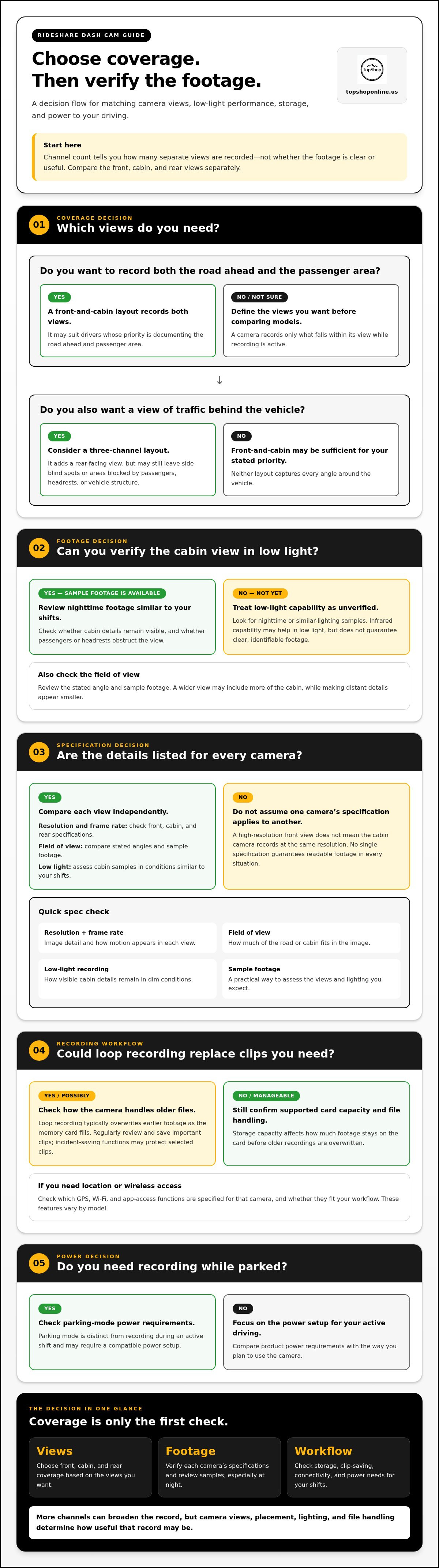
A rideshare dash cam with interior recording captures video of the road and vehicle cabin. A dual-channel layout usually records the forward road view and cabin view. A three-channel layout adds a rear-facing view. Channel count identifies the number of separate recording views, not their image quality. Resolution, lens coverage, lighting, placement, and obstructions all affect the footage. For a neutral overview of the device category, see Dashboard camera.
Cabin footage may document visible passenger activity and interactions during a recorded trip. It can provide a record to review, but it doesn’t automatically show everything that happened or independently establish fault. The camera’s field of view and the surrounding context matter.
Front-and-cabin versus front-cabin-and-rear recording
Front-and-cabin systems suit drivers whose priority is documenting the road ahead and passenger area. They may not capture following traffic. A three-channel layout adds a rear-facing view that can record vehicles behind the car, but it may still leave blind spots to the sides or areas blocked by passengers, headrests, or vehicle structure.
Choose a layout based on the coverage you want. If passenger-area documentation is your main goal, front-and-cabin may be sufficient. If you also want a view of traffic approaching or following behind, an additional rear camera provides another perspective. Neither layout captures every angle around the vehicle.
What interior recording can and cannot show
Usable footage depends on camera angle, lighting, lens view, and obstructions. A poorly aimed cabin camera may miss part of the seating area, while low light can make details harder to distinguish. Review sample footage from conditions similar to your shifts, including nighttime, before relying on a camera’s stated capabilities.
Video records what falls within the frame while recording is active. It may help clarify a sequence of visible events, but it may not capture sound, activity outside the view, or what happened before recording began. A clip can support a review without proving the full context or resolving a disagreement on its own.
Compare each view separately: forward road coverage, cabin visibility, and rear coverage. More channels can broaden the record, but matching camera views and placement to your driving is more useful than choosing a system by channel count alone.
Which rideshare dash cam features matter most when comparing models?
Compare the camera views and recording workflow, not just the headline resolution or number of channels. Channel count describes how many views a dash cam records; it doesn’t determine whether those views are clear or useful. Assess the front, cabin, and, if included, rear-camera specifications separately when choosing a rideshare dash cam with interior recording.
| Feature | What it affects | What to check |
|---|---|---|
| Resolution and frame rate | Image detail and how motion appears in each recorded view. | Check the listed resolution and frame rate for every camera, not only the front camera. |
| Field of view | How much of the road or cabin fits in the image. | Review the stated angle and sample footage. A wider view may include more of the cabin, while making distant details appear smaller. |
| Low-light recording | How visible cabin details remain in dim conditions. | Look for sample footage from nighttime or similar lighting. Infrared capability may help record in low light, but doesn’t guarantee clear, identifiable footage. |
| Loop recording and storage | How recording continues as the memory card fills. | Check supported card capacity and how the camera handles older files. Loop recording typically overwrites earlier footage; incident-saving functions may protect selected clips. |
| GPS, Wi-Fi, and app access | Location or speed data, and ways to view or transfer recordings, depending on the model. | Check which functions are specified for the camera and whether they fit your workflow. |
| Power and parking mode | How the camera receives power and whether it can record while the vehicle is parked. | Review power requirements. Parking mode is distinct from recording during an active shift and may require a compatible power setup. |
Resolution, field of view, and low-light cabin footage
Check resolution by camera. A high-resolution front view doesn’t mean the cabin camera records at the same resolution. Frame rate also affects how motion is captured. No single specification guarantees readable footage in every situation. Compare available samples, especially nighttime cabin recordings, and consider whether passengers, headrests, or other objects could block the view.
Storage, connectivity, and power features
Storage capacity affects how much footage stays on the card before older recordings are overwritten. Regularly review and save important clips so they aren’t lost to loop recording. For privacy-aware handling of rideshare recordings, consult the Future of Privacy Forum’s Privacy Best Practices for Rideshare Drivers.
Compare product specifications with your shift needs. The Guardian 3-Channel 4K Dash Cam is one option to consider when assessing a multi-view camera layout.
Does interior recording raise rideshare privacy or consent concerns?
Yes. Passenger privacy is a practical consideration when choosing and using an interior camera. Treat video, audio, passenger notice, and rideshare-platform policies as separate questions. A rule or notice practice that applies to one type of recording or location may not apply to another.
Platform guidance and state recording requirements can vary and may change. Review current policies for the platform you drive for and the rules that apply where you operate. For general camera-feature comparisons, CNET’s Best Dash Cams of 2026 offers product context, but it isn’t a substitute for privacy or legal guidance.
Video, audio, and passenger notice are separate questions
A cabin camera records images within its view. Audio is a separate function, so check whether the camera records sound and whether you can turn audio off. Review the model’s controls and specifications, along with your platform’s current dash-cam guidance and applicable state requirements for video, audio, and passenger notice.
Before recording audio, check the applicable rules in every jurisdiction where you’ll drive. Requirements can differ by location, and a visible sign or verbal notice shouldn’t be treated as universally sufficient. If you’re unsure how a rule applies, seek qualified legal guidance rather than relying on a general online summary.
A practical privacy-aware recording routine
Set a routine before accepting trips and follow it consistently. These checks can help keep recordings limited to their intended purpose:
- Review the camera angle. Aim it at the intended passenger area and road views. Avoid unnecessary views into private areas or beyond the vehicle.
- Check audio settings. Confirm whether audio is enabled, and disable it when appropriate under applicable rules and your recording policy.
- Limit file access. Know where clips are stored, who can view them, and how they can be transferred or shared.
- Set a retention routine. Decide how long to keep routine recordings and how to preserve a relevant clip without retaining unrelated footage longer than needed.
Use the same settings and handling practices across shifts, and revisit them if platform guidance or local requirements change. This makes privacy part of your regular workflow for a rideshare dash cam with interior recording, rather than an afterthought following an incident.
How to install and manage a rideshare interior-recording dash cam
A consistent setup helps a rideshare dash cam with interior recording capture its intended views and makes important files easier to find. Follow the camera’s instructions for mounting, power, and storage. Choose a mounting position and cable route that won’t block your view or interfere with vehicle controls.
Position cameras to capture the intended views
Vehicle layouts differ, so test the placement rather than assuming one mounting point works for every car. Before beginning paid trips, check the forward, cabin, and rear views included in your system. Review each recording while the vehicle is stationary, then make any needed adjustments safely.
- Plan placement. Follow the manufacturer’s guidance and consider windshield visibility, reflections, and the camera’s view of the passenger area.
- Check for obstructions. Look for headrests, passengers, mirrors, tint, or other objects that block the intended view. Confirm the rear camera can see the area it is meant to cover.
- Route power safely. Keep cables secure and away from the driver’s line of sight, moving parts, and controls. Follow the product’s power instructions rather than improvising a connection.
- Test the recording. Confirm that each camera view is saved. Review footage for framing, focus, and visibility in the lighting conditions you expect to encounter.
Manage recordings across shifts
Make file checks part of your routine. At the start of a shift, confirm that recording is active and storage is available. After an incident, preserve the relevant clip promptly using a saving or locking method supported by the camera. Follow the model’s instructions for its buttons, app, or transfer options.
Loop recording commonly reuses card space by replacing older footage when storage fills, but exact behavior and protection for saved clips vary by model. Check how your camera handles overwriting, incident files, and supported memory cards. Review storage status regularly and use verified transfer or backup methods. Store saved clips securely, limit access to people who need it, and follow a consistent retention routine.
Compare your coverage needs with the Guardian 3-Channel 4K Dash Cam. Use its product documentation to guide placement, power planning, testing, and file handling before your first shift.
Is the Guardian 3-Channel 4K Dash Cam a fit for rideshare driving?
The Guardian 3-Channel 4K Dash Cam is an option to compare against your coverage and recording priorities. Its name identifies a three-channel camera and includes a 4K label, but those labels don’t describe the resolution or performance of every camera view. Review the product information for the recorded views and specifications of each camera.
Match the documented configuration to your actual shifts. A driver focused on the road and passenger area may weigh those views differently from someone who also wants a rear-facing view of following traffic. Night driving, privacy practices, and the time available to manage recordings can also affect whether a system suits your routine.
Use a checklist to assess fit for your rideshare shifts
- Required views: Confirm whether the documented configuration covers the forward road, cabin, and rear views you need. Don’t infer the exact camera arrangement from “three-channel” alone.
- Per-camera resolution: Check the listed resolution for each view. Treat “4K” as a specification to verify by camera, not an automatic description of front, cabin, and rear recording.
- Night conditions: Review documented low-light features and sample footage, if available. Consider whether the cabin view is usable in the lighting conditions you encounter.
- Privacy routine: Decide how you’ll handle passenger notice, audio settings, file access, and retention under the rules and platform policies that apply to your driving.
- Storage and workflow: Review supported storage, clip protection, and transfer options. Choose a setup you can check consistently and use to preserve relevant recordings.
This checklist separates product specifications from general buying guidance. Use the camera’s product information to understand its configuration, then use the priorities above to decide which details matter for your driving.
Review product details and choose the next step
Compare the product specifications with your checklist before deciding. Focus on per-view resolution, cabin performance in low light, storage behavior, and recording controls. Check the product details for information about accessories, storage capacity, app functions, and other features.
If its documented views and recording workflow match your needs, View the Guardian 3-Channel 4K Dash Cam.
Choose a Setup That Fits Your Shifts
The right rideshare dash cam with interior recording balances the views you need with footage you can use and manage. Compare front, cabin, and rear coverage separately. Check each camera’s resolution and low-light performance rather than relying on channel count or a 4K label alone.
Build privacy and file handling into your routine. Review current platform guidance and applicable recording rules, decide how audio and passenger notice fit your situation, and make a consistent plan for checking storage and saving relevant clips. Before choosing a camera, consider whether its documented views, controls, and recording workflow suit your routes and shift conditions.
TopShop sells the Guardian 3-Channel 4K Dash Cam. Its product name identifies it as a three-channel 4K dash cam. Review the product details to compare its specifications with your checklist.
View the Guardian 3-Channel 4K Dash Cam and compare its product information with your coverage and workflow priorities. Use your checklist to choose a setup and recording routine that fits your shifts.
Frequently Asked Questions
Is an interior-recording dash cam useful for rideshare drivers?
Yes. It can record the passenger area alongside the road and may help document visible events during a trip. A rideshare dash cam with interior recording is most useful when its cabin view is aimed appropriately and the driver has a consistent routine for checking and saving footage. It doesn’t capture every angle or establish the full context of an incident by itself.
Do rideshare drivers need a three-channel dash cam?
No. A three-channel system adds a rear-facing view to forward-road and cabin recording, but drivers don’t all need that extra coverage. A front-and-cabin setup may suit someone prioritizing passenger-area documentation. Consider a rear view if recording following traffic is also important. Compare the actual camera views with your needs, since channel count alone doesn’t indicate footage quality.
Can a rideshare dash cam record audio inside the car?
Some dash cams include audio recording, while others may not or may provide controls to disable it. Check the specific model’s documented settings. Before recording conversations, review current platform policies and applicable state requirements for audio recording and passenger notice. Rules vary, so don’t assume one notice method or setting is appropriate everywhere you drive.
How important is infrared night vision for interior recording?
Infrared can be a useful low-light feature because it may help a cabin camera record when visible light is limited. It doesn’t guarantee that faces or other details will be clear. Camera placement, cabin lighting, image quality, and obstructions still affect what appears in the video. If available, review nighttime sample footage that resembles your usual driving conditions before choosing a model.
How much storage does a rideshare dash cam need?
There isn’t one storage capacity that suits every driver. Storage needs depend on factors such as the number of active camera views, video settings, recording hours, and how long you want routine footage retained. Check the camera’s supported memory-card capacity and how it handles loop recording. Review storage regularly, and preserve relevant clips promptly so they aren’t overwritten.
Can a dash cam record while a rideshare car is parked?
Some dash cams offer parking mode, but its behavior and power requirements depend on the model. It’s separate from recording during an active rideshare shift and may require a compatible power setup. Check the product documentation for how parking recording starts, what it captures, and how the camera receives power. Don’t assume a dash cam records while parked just because it records while driving.
Where should an interior dash cam be positioned?
Position it according to the camera’s instructions and your vehicle layout, aiming to capture the intended cabin area without obstructing the driver’s view. There’s no universal mounting location for every vehicle. Check the frame for reflections, headrests, passenger obstructions, and areas outside the intended view. Test and review a recording while parked, then adjust placement before beginning trips.
What should I compare before choosing a rideshare dash cam?
Compare the views recorded, resolution for each camera, low-light performance, supported storage, file-saving behavior, power requirements, and available controls. Review privacy needs too, including audio settings, passenger notice, platform guidance, and applicable local rules. TopShop offers the Guardian 3-Channel 4K Dash Cam. Its product name identifies a three-channel 4K dash cam, not the resolution of every camera view.