

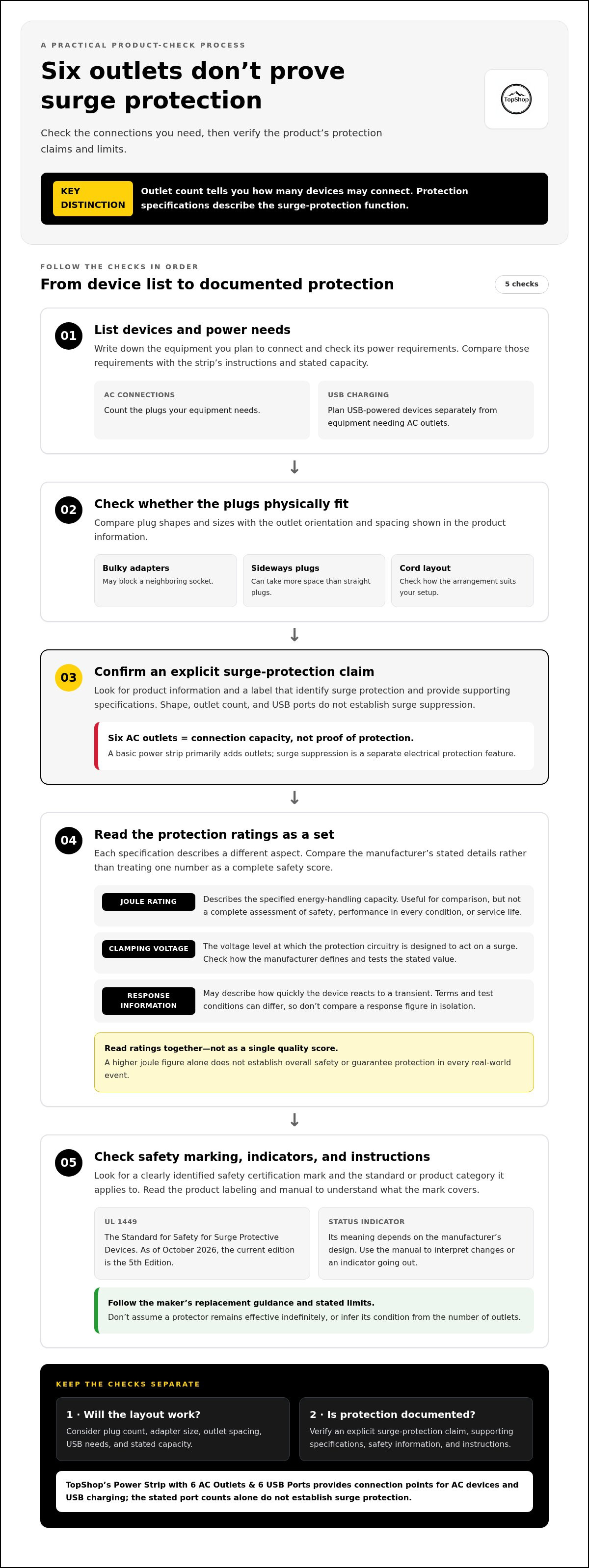
Six outlets don’t make a power strip a surge protector. A surge protector with 6 ac outlets needs documented protection specifications; the outlet count tells you how many devices can connect, not how much surge protection the unit provides.
It’s easy to confuse a basic power strip with a surge-protective device, especially when both offer several outlets and USB ports. TopShop’s Power Strip with 6 AC Outlets & 6 USB Ports provides connection points for AC devices and USB charging. Those counts alone don’t establish surge protection.
This guide explains which label details to look for, including a documented protection rating and relevant safety marking. It also covers outlet spacing, plug fit, cord layout, and capacity, so you can distinguish power distribution from surge protection and choose a setup that matches your equipment.
Key Takeaways
- Read protection labels as a set of specifications. A joule rating is one data point, not a complete assessment.
- Compare outlet spacing, plug shapes, cord layout, and USB needs to estimate how many connections you can actually use.
- When choosing a surge protector with 6 ac outlets, match its documented specifications to your devices rather than relying on outlet count.
- List your devices, check their power requirements, and follow the instructions and stated limits for both the equipment and protector.
- TopShop’s Power Strip with 6 AC Outlets & 6 USB Ports provides outlet expansion and USB charging; the stated port counts do not establish surge protection.
Surge Protector with 6 AC Outlets: What It Does, and What Outlet Count Does Not Tell You
A surge protector is designed to limit voltage spikes reaching connected equipment. A basic power strip primarily adds outlets. The distinction is functional: outlet expansion provides more connection points, while surge suppression is an electrical protection feature that must be documented separately. Outlet count tells you how many devices may connect; surge-protection specifications describe the protection function.
That difference matters when comparing products that look similar. A strip can have several AC outlets without offering surge protection. The phrase surge protector with 6 ac outlets describes the intended combination of protection and connection capacity, but the number alone doesn’t verify that a particular unit provides surge suppression. Check the product description and label for an explicit protection claim and supporting specifications.
How a surge protector differs from a basic power strip
Outlet expansion is a convenience feature. A power strip lets multiple plugs connect to one supply point, subject to the device’s stated limits. Surge protection is a separate function intended to reduce the voltage of a transient before it reaches connected equipment. The Surge protector overview describes common designs and specifications; use product-specific documentation to understand an individual unit’s claims.
Look for language that explicitly identifies surge protection rather than assuming it from a product’s shape, number of outlets, or USB ports. A listed joule rating or other protection detail can help distinguish a surge-protective model from a basic strip, but no single number is a complete safety assessment. Labels and manuals should make the stated function and limitations clear.
What a six-outlet layout can support
Six AC outlets may suit a desk arrangement with a monitor, router, computer accessories, and other peripherals, depending on their power requirements and the strip’s stated limits. The layout determines how many plugs fit in practice. A wide adapter or large power brick can cover a neighboring socket, and sideways plugs may take more space than straight plugs.
Before choosing a layout, note the plug shapes and sizes of the devices you plan to connect. Compare that list with the outlet orientation and spacing shown in the product information. Then check the devices’ power requirements against the strip’s labeled limits. Six available sockets do not mean every combination of six devices is suitable.
- Count the AC plugs you need, then account for bulky adapters that may block adjacent outlets.
- Separate USB-powered devices from equipment that needs an AC outlet when planning connections.
- Compare total device requirements with the strip’s instructions and stated capacity, not just the socket count.
These checks answer two different questions: whether the layout accommodates your plugs, and whether the product documents surge protection. Treat each as a separate purchase criterion.
How to Read Surge Protector Ratings, Labels, and Safety Information
Product labels can contain several ratings that describe different aspects of surge protection. Read them as separate data points, not as a single quality score. A joule rating, clamping voltage, response information, safety mark, and operating indicator each answer a different question. Compare the manufacturer’s stated specifications and instructions rather than relying on the number of outlets or a broad claim such as “protected.”
A higher outlet count tells you how many devices may connect, not how well the unit limits voltage surges. For a surge protector with 6 ac outlets, look for protection specifications explicitly stated for that model. If the label or product information does not identify the protection function and supporting details, the outlet count cannot fill that gap.
Joule rating and clamping voltage, in plain language
A joule rating describes the energy-handling capacity specified for a surge protector. It’s useful for comparing products, but it doesn’t by itself establish overall safety, performance in every condition, or how long a unit will remain effective. Don’t treat the largest joule figure as a complete assessment or assume a universal ideal rating without a technical basis matched to your equipment.
Clamping voltage refers to the voltage level at which the protection circuitry is designed to act on a surge. Check the manufacturer’s documentation to understand how the stated value is defined and tested. Response information may describe how quickly the device reacts to a transient, but terms and test conditions can differ. Avoid comparing a response figure in isolation or assuming it predicts protection in every real-world event.
Certification marks, indicators, and replacement guidance
Check for a clearly identified safety certification mark and the standard or product category it applies to. UL 1449 is the Standard for Safety for Surge Protective Devices; as of October 2026, the current edition is the 5th Edition. A recognizable mark tied to a stated standard is more specific than a general claim that a product is “safe” or “surge protected.” Read the product labeling and documentation to understand what the mark covers.
Some models include a status indicator, but its meaning and the action it signals depend on the manufacturer’s design. Read the manual to learn how to interpret it and what to do if it changes or goes out. Follow the maker’s replacement guidance as well; don’t assume a protector remains effective indefinitely or infer its condition from the outlet count.
- Match each rating to its stated meaning and test conditions.
- Look for a named standard and certification mark, not only broad marketing language.
- Use the manual for indicator meanings, operating limits, and replacement instructions.
For outlet expansion and USB charging, TopShop’s Power Strip with 6 AC Outlets & 6 USB Ports provides the stated connection counts. Those counts describe its outlets and USB ports, not surge-protection specifications.
Compare Six-Outlet Surge Protectors by Device Needs, Spacing, and USB Use
Start a useful comparison with your devices, not a product’s headline outlet count. List the equipment you plan to connect, note which items use AC plugs or USB, and identify any bulky adapters. Then compare the product’s stated protection details, socket layout, cord arrangement, USB output information, and indicator instructions. A surge protector with 6 ac outlets may provide six connection points, but usable capacity depends on how your devices fit and the unit’s stated limits.
| Feature | What to compare | Why it matters |
|---|---|---|
| Protection label | Explicit surge-protection claim and supporting specifications | Outlet count alone does not establish protection performance. |
| Outlet spacing | Socket distance, orientation, and placement | Large adapters can cover neighboring outlets. |
| Cord setup | Stated cord length and the direction it exits the unit | Placement and routing affect access to a wall receptacle. |
| USB ports | Port count and output details, when provided | USB charging is separate from AC-connected device protection. |
| Indicators | Indicator meanings in the maker’s instructions | Status lights need to be interpreted according to the product documentation. |
Outlet spacing, plug orientation, and cord placement
Standard-spaced outlets may suit slim plugs, while layouts with greater separation or offset sockets can make it easier to fit wider adapters. Check the product’s outlet diagram or images against the plugs you use. A sideways plug may occupy space differently from one that points straight out, and nearby furniture or a desk edge can limit access even when a socket is technically open.
Compact designs save space, but wider plug spacing can make more sockets usable with bulky adapters. Cord length and exit direction also affect placement. A short reach may restrict where the strip sits, while excess cord needs a safe, practical route that won’t be pinched or obstruct access.
USB ports and connected-device compatibility
USB ports provide a charging option for compatible devices without using an AC socket, but they’re separate from surge protection for AC-connected equipment. Compare the listed USB-port count and output information with your devices’ charging requirements. If output details aren’t stated, don’t assume every port supplies the same charging capability or that USB charging specifications describe AC surge protection.
For a closer look at USB charging considerations, consult this power strip with USB ports guide. Use its comparison points alongside your AC device list, adapter dimensions, and the protection label. This helps you choose a layout for your actual setup instead of relying on socket count alone.
How to Choose and Use a Six-Outlet Surge Protector Safely
Choose a protector for the devices you’ll connect and the conditions where you’ll use it. Six AC outlets describe connection capacity, not whether a unit fits every setup or load. Use this checklist before plugging in equipment:
- List the devices. Record each AC-powered item, including monitors, computers, routers, lamps, and peripherals. Note which use large adapters that may obstruct nearby outlets.
- Check power requirements. Review each device’s label or manual for its electrical requirements. Pay particular attention to appliances with high power demands, and consider the combined connected load rather than counting plugs alone.
- Compare labeled specifications. Match the protector’s stated capacity and surge-protection information to your planned setup. Follow its instructions and don’t assume that a six-outlet model is suitable for every combination of devices.
This process separates fit from capacity. A plug may fit the outlet while the connected equipment still exceeds the protector’s stated limits. If requirements are unclear or equipment has substantial power demands, use the equipment manufacturer’s guidance to determine an appropriate connection method.
Match the protector to the devices you plan to connect
Compare your device list with the protector’s label and manual before use. Check stated limits for the complete unit, not only individual sockets, and follow any restrictions for specific device types. Don’t add equipment simply because an outlet is available. A six-outlet layout can serve a modest desk setup, for example, but the devices’ combined requirements and the product’s ratings determine whether the arrangement is appropriate.
Placement, overloading, and signs that require attention
Position the protector on a stable, accessible surface, away from heat and moisture, and follow its placement instructions. Keep the plug, cord, and controls accessible; route cables so they aren’t pinched, pulled, or placed where they create an obstruction. This home-office cable management guide can help organize cord paths around a desk.
Don’t daisy-chain power strips by plugging one strip into another, and don’t exceed the protector’s stated ratings. Follow the instructions for connecting and using the unit, including any guidance about indicator lights. If a protector, plug, or cord is damaged, stop using the affected equipment and follow the maker’s replacement guidance rather than continuing to rely on it.
For a setup that needs additional AC connections and USB charging, TopShop’s Power Strip with 6 AC Outlets & 6 USB Ports provides those stated connection counts. They don’t establish surge-protection specifications.
TopShop's Six-Outlet Power Strip: A Clear Fit for Outlet Expansion and USB Charging
TopShop’s Power Strip with 6 AC Outlets & 6 USB Ports is an outlet-expansion and USB-charging option. Its stated features are six AC outlets and six USB ports. These counts help you assess connection capacity, but they don’t describe surge protection. Choose based on what your setup needs: AC connections, USB charging, documented surge protection, or a combination supported by a product’s stated specifications.
The distinction matters when comparing it with a surge protector with 6 ac outlets. Sharing an outlet count doesn’t make two products equivalent. Check the protection documentation for any product where surge suppression is a requirement, and compare port counts separately for everyday connection needs.
When outlet expansion and USB charging are the main needs
Count the AC-powered devices in your setup, then compare that number with the six AC outlets. For instance, list a monitor, router, and other plug-in equipment, and consider whether their plugs can fit without blocking adjacent outlets. The outlet total describes available sockets, not how many will be accessible with every plug shape.
The six USB ports offer a separate connection option for USB-powered devices. Consider how many of your devices charge through USB and whether that port count suits your arrangement. For more context on evaluating this type of setup, use the six-outlet, six-USB-port power strip guide.
The product’s stated counts are specific: six AC outlets and six USB ports. They don’t establish USB output details, AC capacity, certification, or surge-protection performance. Base your choice on the needs you can verify and the product information provided for the feature you’re comparing.
When surge-protection documentation is the deciding factor
If limiting voltage surges is a requirement, compare products that explicitly identify surge protection and provide supporting specifications. Review the label and manufacturer documentation rather than relying on a title, a high outlet count, or the presence of USB ports. Those details describe connections, not surge suppression.
TopShop’s power strip provides the stated outlet-expansion and USB-charging features: six AC outlets and six USB ports. Those facts don’t establish a surge-protection rating or capability. Keep that distinction clear when matching a product to your setup. If protection documentation is your deciding criterion, choose based on explicit protection specifications instead of assuming a six-outlet strip provides them.
For a straightforward comparison, separate your checklist into AC connections, USB charging connections, and surge-protection requirements. That makes it easier to identify which features are stated and which matter for your equipment, without treating one count as evidence of another capability.
Shop TopShop's power and electronics selection.
Choose the Right Connection Setup for What Comes Next
Before choosing a surge protector with 6 ac outlets, consider how your setup may change. New devices can alter the number and type of connections you need, so keep AC power, USB charging, and surge protection as separate requirements when comparing options. This helps you select for your actual use instead of buying by outlet count alone.
For added connections and USB charging, TopShop’s Power Strip with 6 AC Outlets & 6 USB Ports is one option to consider. Its stated features are the outlet and USB-port counts; they don’t establish surge protection. If surge suppression is essential, base that decision on a product’s explicit protection specifications.
Shop TopShop's power and electronics selection to explore connection options for your setup. A clear list of your needs makes the next choice more straightforward.
Frequently Asked Questions
Is a six-outlet power strip the same as a surge protector?
No. A six-outlet power strip may simply provide additional sockets, while a surge protector is designed to limit voltage spikes reaching connected equipment. Check the product’s label and documentation rather than relying on terms like “power strip” or the number of sockets in the title. Six AC outlets establish connection capacity, but don’t show whether surge suppression is included or what specifications apply.
What does the joule rating mean on a surge protector?
A joule rating describes the energy-handling capacity stated for the protector. Use it as one comparison point, not a standalone measure of overall safety or suitability. When comparing models, review their documented specifications and instructions rather than assuming a higher figure settles the choice. The rating also doesn’t tell you how many devices can safely connect or whether their combined power requirements fit the unit’s limits.
Can I plug a power strip into another power strip?
No. Don’t connect one power strip to another, even if the second strip has unused sockets. Doing so can make it harder to manage the total connected load and may conflict with product instructions. If you need more outlets, reassess the equipment and its power needs, then choose a suitable outlet arrangement rather than extending a chain of strips. Keep each device within the limits stated by its manufacturer.
How many devices can I connect to a six-outlet surge protector?
It depends on the unit’s ratings and the devices, not just the six sockets. Count AC plugs, account for adapters that cover neighboring outlets, and check the power requirements of every connected item. A surge protector with 6 ac outlets might accommodate fewer than six plugs if bulky chargers block sockets. Consider USB-powered devices separately, using the product’s stated USB-port information and the devices’ charging requirements.
Do USB ports provide surge protection for connected devices?
Don’t assume they do. USB ports provide charging connections, but their presence alone doesn’t establish surge protection for a USB-connected device or for equipment plugged into the AC outlets. Look for explicit protection claims and supporting specifications that identify which connections or components they apply to. A product can state a USB-port count without that count describing any protection function.
When should I replace a surge protector?
Follow the manufacturer’s replacement instructions and any guidance tied to its status indicators. Stop using a unit with visible damage to its case, plug, or cord, and follow the maker’s directions for replacement. If an indicator changes or goes out, consult the manual to understand what that means for the specific model. Don’t infer remaining protection from the number of outlets or assume an older unit is still functioning as intended.
Can a surge protector handle high-power appliances?
Only if the protector’s stated ratings and instructions support the appliance’s electrical requirements. Check the appliance label or manual and compare its requirements with the limits for the complete strip. High-demand equipment, such as a space heater or other heating appliance, deserves particular care; don’t connect it based only on an available socket. If the documentation doesn’t support the combination, don’t use that strip for the appliance.