

A WiFi security camera without monthly subscription can still limit the recording or playback features you expect. One camera may save footage to a microSD card or recorder, while another relies on cloud storage or reserves selected features for a paid plan. The purchase price alone doesn’t show what you’ll be able to review later or what ongoing costs may apply.
It’s reasonable to expect useful camera functions without a recurring fee. Whether that works for your needs depends on the storage method, app access, recording options, and any features tied to a subscription. This guide explains how those parts fit together so you can compare cameras based on how you want to record and review footage.
You’ll learn the practical differences between local storage, cloud plans, and recorder-based systems, including NVRs for IP cameras and DVRs for older analog setups. We’ll also cover which app features and alerts to consider, how recurring costs affect long-term value, and how to compare standalone cameras with multi-camera systems. TopShop sells the 1080P HD Wireless Mini Security WiFi Camera and 360° Panoramic Hidden Light Bulb Wifi Camera. Compare their product details with your storage and operating requirements before choosing.
Key Takeaways
- Separate the camera’s purchase cost from optional cloud plans, app services, and storage requirements before comparing ongoing expenses.
- Choose a wifi security camera without monthly subscription by matching its recording method and playback access to how you need to review footage.
- Compare local storage, cloud recording, and recorder-based setups for retention, access, and equipment requirements.
- Use your monitoring goal, camera placement, power source, and WiFi needs to narrow down suitable options.
- Compare TopShop’s 1080P HD Wireless Mini Security WiFi Camera and 360° Panoramic Hidden Light Bulb Wifi Camera against the coverage and operating details you require.
What a WiFi Security Camera Without a Monthly Subscription Actually Means
A subscription-free camera avoids a recurring plan for the functions you use, but that doesn’t mean every feature, storage method, or operating requirement is free. The camera purchase is one part of the cost. Depending on the model, recording may require separate storage hardware, while cloud recording or selected app services may be offered under a paid plan. The exact terms vary, so “no monthly subscription” is a starting point for comparison, not a complete feature description.
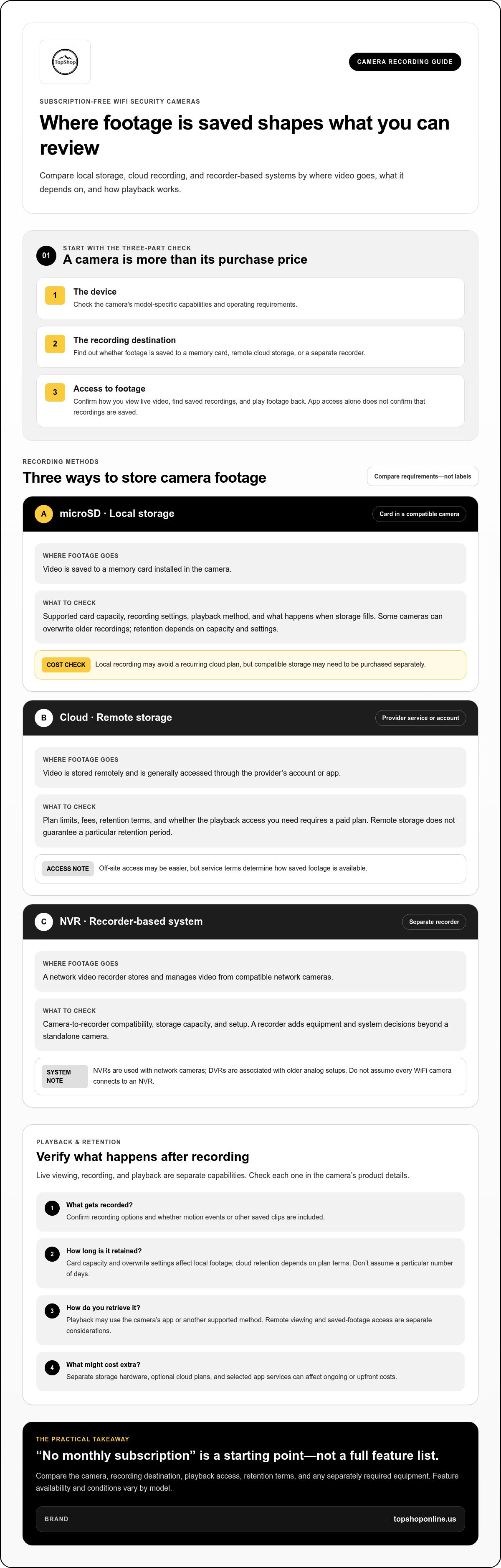
Keep three parts separate when assessing a camera: the device, the recording destination, and the way you access footage. A camera may connect to an app for setup or live viewing, but that alone doesn’t tell you whether recordings are saved, how long they’re retained, or whether playback requires a plan. Local recording may avoid a cloud subscription, but it can still depend on compatible storage, such as a memory card or recorder. Include any separately purchased equipment in your cost comparison.
This distinction also helps separate general category guidance from model-specific features. Capabilities and conditions vary, even among cameras in the same product range. Don’t assume that motion alerts, saved event clips, playback history, or advanced detection are included just because a camera is described as subscription-free. TopShop sells the 1080P HD Wireless Mini Security WiFi Camera and 360° Panoramic Hidden Light Bulb Wifi Camera. Compare each model’s product details with the recording and access features you need.
Does no monthly subscription mean all camera features are free?
No. Camera access, storage, playback, and advanced services can have separate terms. Some models provide core functions without a recurring plan but offer optional cloud storage or additional features through a subscription. Others may depend on local storage equipment, which can involve a separate purchase. Compare the included functions one by one: what you can view live, what gets recorded, where recordings are saved, and how you can play them back. The subscription label alone doesn’t answer those questions.
What should buyers expect from a WiFi camera?
WiFi describes how a camera connects to a network; it doesn’t guarantee free cloud recording or saved video. Live viewing lets you see a current feed, while recording and playback require a way to save footage and retrieve it later. Confirm those functions in the model’s product details. For a broader look at wireless camera technology, see this overview of wireless security cameras. Buyers comparing a compact model can also use the wireless mini security camera buying guide for product and connectivity context.
Local Storage, Cloud Plans, and NVRs: How Camera Recording Works
Recording method determines where video is saved, how you retrieve it, and what equipment or service is required. For a wifi security camera without monthly subscription, local storage may avoid a recurring cloud plan, provided the camera supports a suitable storage option. Cloud storage saves footage remotely and may involve plan limits or fees. An NVR stores video from compatible network cameras on a recorder connected to the system.
Local recording saves footage to equipment you control; cloud recording sends it to remote servers, which can make off-site access easier but may come with plan terms. Neither option alone guarantees a particular retention period or remote playback. Consider recording settings, storage capacity, network access, and service terms together.
- microSD: Footage is saved to a card in a compatible camera. The card’s capacity and recording settings affect how much video it can hold.
- Cloud: Footage is stored remotely, generally accessed through an account or app, subject to the provider’s plan and retention terms.
- NVR: Footage from compatible network cameras is managed and stored on a separate recorder, adding equipment and system setup.
How does microSD recording differ from cloud storage?
With microSD recording, video is stored on a card installed in the camera. Playback may be through the camera’s app or another supported method, and access can depend on the device and its connection. Cloud recording saves video off-site for access through the provider’s service. A card’s capacity and overwrite settings determine when older footage may be replaced; cloud retention depends on plan terms. Remote viewing and saved-footage access are separate capabilities, so consider both when comparing models.
Before choosing, consider what happens when storage fills. Some cameras can overwrite older recordings, while others may use different settings or require you to manage saved files. Don’t assume a card or cloud plan retains footage for a particular number of days. Compare supported capacity, recording controls, and retention rules with how often you expect to review clips.
When does an NVR make sense for a WiFi camera system?
A network video recorder (NVR) manages compatible network cameras and stores their video in one place. It can suit a multi-camera setup where centralized recording is useful, but it adds a recorder, storage capacity decisions, and setup steps beyond a standalone camera. Compatibility matters: a camera must support the NVR, so don’t assume every WiFi model can connect. Compare the device documentation before planning a recorder-based system.
A standalone camera can be simpler when monitoring one area and using its supported recording method. An NVR can make more sense when you want multiple compatible cameras managed together. Either way, map the full recording path: camera to storage, then storage to playback. For comparison, browse TopShop’s WiFi security camera options and compare the available models with your intended setup.
How to Compare Subscription-Free WiFi Security Cameras
Compare recording and access first, then assess the camera’s image and physical specifications. A high-resolution feed has limited value if the recording method doesn’t preserve footage as needed or playback isn’t available under the product’s terms. For a wifi security camera without monthly subscription, focus on the complete operating setup: recording method, app access, network requirements, power source, camera placement, and the number of locations you want to monitor.
Use product details to compare each point. A “WiFi” label doesn’t specify the supported network band, signal requirements, or whether the camera can connect reliably from its intended position. Likewise, assess a camera’s intended use against the placement you have in mind rather than assuming it suits every room or viewing angle.
Which features matter most when there is no paid plan?
Confirm whether recording, playback, and phone access are included under the model’s stated terms. Then distinguish basic motion notices from more advanced analysis, which may have separate requirements. Feature availability varies by camera, so compare the product details rather than relying on a general “subscription-free” label or assumptions about what an app includes.
Check your recording needs as a system. Identify how many cameras you plan to use and how long you need footage retained, then compare supported storage, recording settings, and any service limits. A single-camera setup and a multi-camera setup can have different equipment and management needs.
How should resolution and coverage fit into the decision?
Match resolution to the detail you need in the intended viewing area. Then consider the lens angle and camera position together: a wider view can cover more area, while placement affects how clearly particular parts of the scene appear. Resolution alone can’t establish whether a camera suits a specific room or coverage goal. The 1080p wireless mini camera technical guide offers additional resolution and connectivity context.
Use this checklist to compare models consistently. Base product-specific decisions on the relevant model’s features and operating terms.
| Criteria | Why it matters | Product-specific details to verify |
|---|---|---|
| Recording and playback | Determines whether saved footage is usable under your preferred setup. | Storage method, playback access, and any plan requirements. |
| Network and power | Placement depends on the camera’s connection and power requirements. | Supported WiFi requirements and stated power source. |
| Coverage and resolution | These work together to determine the view and level of detail. | Resolution, lens angle, and intended placement. |
| System size and retention | Helps match the setup to the number of areas monitored and footage needed. | Supported camera count, storage capacity, and retention settings. |
| TopShop camera options | Compare product form and stated operating details against your coverage needs. | 1080P HD Wireless Mini Security WiFi Camera and 360° Panoramic Hidden Light Bulb Wifi Camera: compare each model’s features with your requirements. |
Choose a Subscription-Free Camera Setup for Your Home
Choose a setup by working from the monitoring goal to the recording method, then assess whether the camera’s placement and features support that plan. A single-room camera and a multi-camera system can have different storage, power, network, and management needs. Use this decision path before selecting a model:
- Define the area to monitor. Identify the view you need, the level of detail that matters, and whether one camera can cover it from a practical position.
- Select the recording method. Decide how footage should be saved and reviewed, then confirm the camera supports that method under its stated terms.
- Check placement and operation. Compare the camera’s power requirements, WiFi needs, and intended use with the location where it will operate.
- Review features and limits. Confirm recording, playback, phone access, and any alerts you need are available as described. Don’t rely on assumptions based on a no-subscription label.
For multiple monitored areas, assess the cameras as one system. Check whether the recording approach can support the number of cameras you plan to use and the retention you need. Also consider how each camera will connect and where footage will be managed. Use product details to determine compatibility; don’t assume separate cameras can be combined just because each connects to WiFi.
What setup suits a single room or compact indoor area?
Start with the viewing area, likely camera position, nearby power access, and preferred recording method. A compact camera format may suit a limited placement area, but its viewing angle and operating requirements still need to match the room. TopShop sells the 1080P HD Wireless Mini Security WiFi Camera. Compare its product details with your intended setup to see whether it fits.
When might a panoramic camera fit the coverage goal?
A panoramic format may be worth comparing when your priority is a broad view from a single camera position. The actual area visible depends on the model’s field of view and placement, so use the product details rather than the format name alone to assess coverage. TopShop sells the 360° Panoramic Hidden Light Bulb Wifi Camera. Compare its stated field of view and recording functions with your requirements.
Plan for internet interruptions, too. Remote viewing and app-based access may be unavailable or limited without a connection. Local recording may continue only if the specific camera supports it and has compatible storage, so don’t assume recording or alerts will continue uninterrupted. Review the camera’s operating details to understand what happens if network access is lost.
Use your coverage goal and recording requirements to compare TopShop’s WiFi security camera options.
Compare TopShop's WiFi Camera Options and Take the Next Step
The right camera depends on the coverage you need and the recording setup you want, not just its format or name. TopShop sells two WiFi camera options to compare: a mini security camera and a panoramic-format camera. Assess each model’s recording method, storage, app access, and operating details against your requirements before choosing.
Which listed TopShop camera should you compare first?
Start with the 1080P HD Wireless Mini Security WiFi Camera if you’re considering a mini-camera format for your planned placement. Consider the 360° Panoramic Hidden Light Bulb Wifi Camera if a panoramic format is relevant to your coverage goal. These formats offer different starting points for comparison; use each model’s product details to assess field of view and recording performance.
| Decision point | What to compare | TopShop options |
|---|---|---|
| Coverage goal | Match the intended area and camera position to the stated view or field of view. | Compare the mini format and panoramic format using each product page’s specifications. |
| Recording setup | Check where footage is saved, which storage is supported, and how recordings are reviewed. | Compare the product’s recording and storage details. Don’t infer these from the product name. |
| App and access | Review the stated phone-access functions and any service or plan terms. | Compare the app and plan details for the model you’re considering. |
| Power and connectivity | Match the listed power requirements and WiFi details to the planned location. | Compare the operating details for each model. |
What to review before completing a camera purchase
For a wifi security camera without monthly subscription, compare the actual recording, storage, playback, and app terms rather than relying on a broad label. Check power and connectivity requirements too, then match them to the intended placement. A model should suit both the view you need and the way you plan to save and access footage.
TopShop’s 1080P HD Wireless Mini Security WiFi Camera and 360° Panoramic Hidden Light Bulb Wifi Camera are options to compare by format and operating requirements. Compare each model’s terms for recurring fees and storage, then choose the one that aligns with your coverage and operating needs.
Browse TopShop's security camera options to compare the models and choose one that suits your requirements.
Choose the Camera That Fits Your Requirements
Before choosing a wifi security camera without monthly subscription, write down the conditions your setup must meet: the view you need, where the camera can be placed, how you want to access saved video, and which operating limits you can accept. This short requirements list makes it easier to compare models consistently and avoid choosing based on one specification alone.
TopShop sells two options to evaluate: the 1080P HD Wireless Mini Security WiFi Camera and the 360° Panoramic Hidden Light Bulb Wifi Camera. Compare each model’s product details against your requirements, then choose based on the task and coverage you need.
Keep the checklist for future changes, too. If you later add cameras, check that their recording approach and access requirements fit the system you’ve chosen. A deliberate comparison keeps the decision grounded in your intended use.
Browse TopShop's security camera options and compare the models. With a clear set of requirements, you can make your next choice with confidence.
Frequently Asked Questions
Can a WiFi security camera record without a monthly subscription?
Yes, a wifi security camera without monthly subscription can record without a paid plan if its model supports local storage or another non-subscription recording option. For example, check whether the camera accepts a memory card and whether recording can be enabled without cloud service. Confirm playback terms separately: being able to view a live feed doesn’t mean the camera saves video. Product details should explain storage requirements and any software limits.
Do subscription-free security cameras still send motion alerts?
Some do, but alert availability and conditions vary by model. A basic motion notice may be included, while more detailed detection or related services may have separate plan terms. Compare what the manufacturer identifies as included and optional. Also distinguish a notification from a recording: an alert that something happened doesn’t necessarily mean a video clip was saved or that you can retrieve it later.
Can I view a WiFi security camera remotely without paying monthly?
Remote live viewing may be available without a paid plan, depending on the camera and its app terms. For example, a camera might show a live feed on your phone while saving recordings to a local card. Check whether remote access requires an account, an internet connection, or a particular app function. Don’t infer cloud recording from remote viewing; confirm where saved footage resides and how you can access it.
What happens to a WiFi camera if the internet goes out?
An internet outage can interrupt remote viewing, app notifications, or uploads to cloud storage. Local recording may continue if the specific camera supports offline recording and still has power and usable storage. Review the manufacturer’s instructions for what the camera does when its network connection drops. Don’t assume footage from an outage will upload later; that depends on the model’s documented behavior.
Is local storage safer than cloud storage for a security camera?
Neither method is automatically safer for every user. Local storage keeps footage on equipment at home, so physical access or equipment damage can affect availability. Cloud storage can allow access through an online account, but access depends on the provider’s security and account controls. Compare password and access settings, retention controls, and how footage can be deleted. Choose based on the risks and access needs you can manage.
Do I need an NVR for a subscription-free WiFi camera?
No. An NVR is only needed when the camera and recording plan use a compatible network video recorder. A standalone camera may support its own local storage, while a larger setup may use an NVR to manage several compatible cameras. Before choosing a recorder, confirm device compatibility, storage capacity, and connection requirements. For one camera, an NVR may add equipment that isn’t necessary for the intended setup.
How much storage does a subscription-free security camera need?
Storage needs depend on resolution, recording schedule, compression, and the amount of footage you want to retain. Continuous recording can use space differently from event-based recording. Compare the camera maker’s storage guidance with your recording preference. Avoid treating a card’s capacity as a guaranteed number of days: actual retention depends on camera settings and recording activity.
Are TopShop's listed WiFi cameras subscription-free?
Subscription terms depend on the specific model, so compare them alongside its recording and storage features. TopShop sells the 1080P HD Wireless Mini Security WiFi Camera and the 360° Panoramic Hidden Light Bulb Wifi Camera. Review each model’s product details for recording, storage, app access, and plan terms, then choose the option that matches your needs.