

Will a 3-channel dash cam for rideshare drivers capture the views you need, or just add another camera to manage? Three channels mean three recording views, but the channel count alone does not tell you where each lens points or what it can capture. For rideshare work, useful footage depends on coverage, placement, recording quality, and how easily you can find a clip when you need it.
Before choosing a system, decide which areas you want to record and how you will manage the footage. Consider camera angles, storage, night performance, passenger privacy, and whether the setup fits your vehicle without obstructing your view. In-cabin recording also calls for attention to passenger notification, platform policies, and state rules on audio and video recording.
This guide compares practical criteria for coverage, image quality, storage, privacy, and daily use. It also offers a setup checklist to help you assess a camera against your driving routine. TopShop’s Guardian 3-Channel 4K Dash Cam is one option to consider: its listed price is $69.99, and its product name identifies it as a 3-channel, 4K dash cam.
Key Takeaways
- Match camera views to the vehicle areas and incidents you want to document. Three channels do not guarantee a particular layout.
- Assess footage using lighting, reflections, angle, windshield placement, and motion, not resolution alone.
- Weigh added coverage against the privacy, storage, and clip-review work involved in recording more views.
- Before driving, review vehicle fit, power, storage, passenger privacy, clip retrieval, and safe mounting position.
- TopShop’s Guardian 3-Channel 4K Dash Cam is listed at $69.99. Compare its stated product details with your coverage and setup needs.
Why rideshare drivers consider a 3-channel dash cam
A three-channel dash cam records through three camera views, but the number does not identify what those views capture. A common layout includes a forward-facing view, a cabin view, and a rear-facing view. Other configurations may point the cameras elsewhere. The general Dashcam overview describes common camera types and uses. For a specific system, check its stated view layout and whether those angles cover the areas that matter to you.
Rideshare trips can create documentation needs beyond recording the road ahead. A front view may show traffic conditions or an incident in front of the vehicle. A cabin view may capture activity inside the car during a passenger trip, while a rear view may show an event behind the vehicle. These views can add context for later review, but footage cannot guarantee that a dispute will be prevented or that an insurance claim will be resolved in a particular way.
What three-channel coverage can mean in a rideshare vehicle
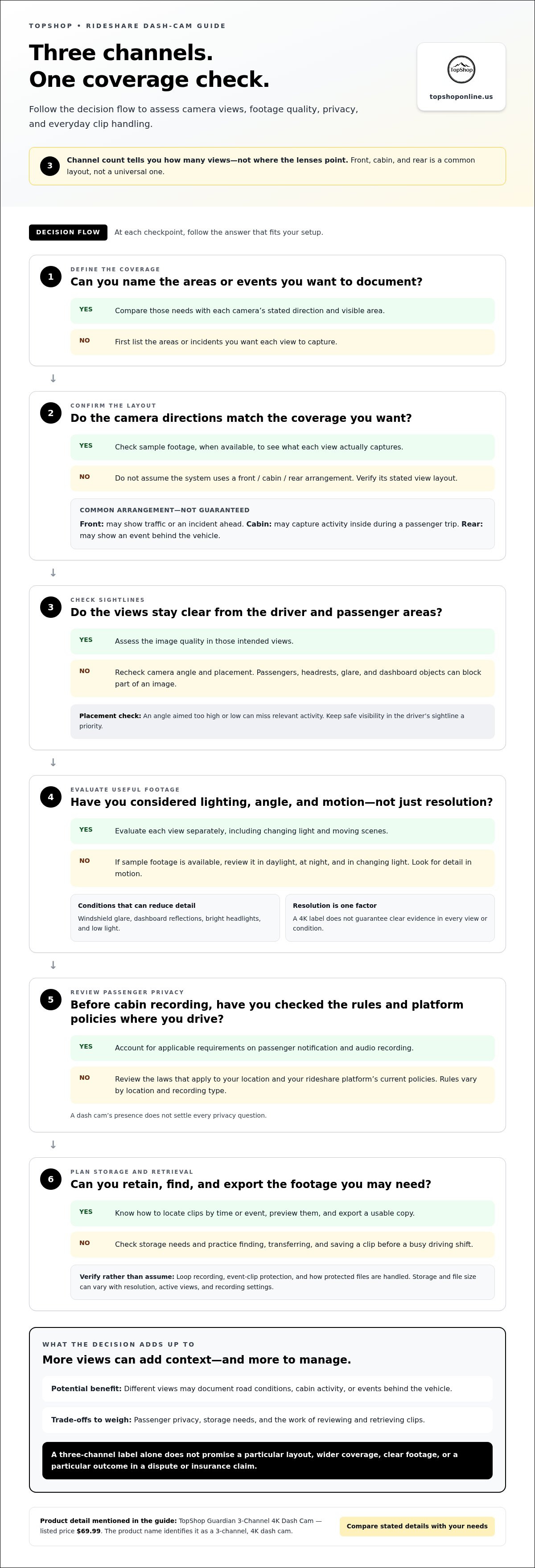
Start with the coverage you want, not an assumed camera layout. Front, cabin, and rear is one common arrangement, not a universal definition of three channels. Before choosing a 3-channel dash cam for rideshare drivers, write down the events or areas you want each view to document. Then compare that list with the camera directions and the visible areas in sample footage, when available.
Placement affects what each view records. A lens aimed too high or low may miss relevant activity. Passengers, headrests, glare, and objects on the dashboard can also block part of the image. Review the sightlines from the driver’s seat and passenger areas, and consider whether the angles still work when seats are occupied. More channels do not automatically mean wider coverage, useful angles, or clear evidence.
How rideshare driving changes the camera decision
Personal driving and passenger trips involve different recording considerations. A commute may focus on road incidents, while rideshare work can make cabin recording and reliable operation between trips more relevant. Frequent stops, changing daylight and nighttime conditions, varied routes, and passenger pickups can all affect how useful a camera is. Consider whether the views remain clear as lighting and activity change, and whether you can review footage without disrupting your routine.
Passenger-facing recording also requires a privacy review. Before recording passengers, review the laws that apply where you drive and the current policies of your rideshare platform, including requirements concerning passenger notification and audio recording. Rules can vary by location and recording type, so a dash cam’s presence does not settle every privacy question.
Choose coverage based on what you want documented, then assess the views, sightlines, and day-to-day recording process together. Channel count is a starting point, not a measure of image quality or a promise of specific capabilities.
How to evaluate recording quality and useful evidence
Resolution is useful for comparing cameras, but it does not guarantee that every frame will show readable details. A high-resolution recording may still leave a moving vehicle’s plate unclear if it is distant, blurred by motion, or recorded in poor light. For a 3-channel dash cam for rideshare drivers, evaluate each view separately. Front, cabin, and rear cameras can face different lighting conditions and capture different angles.
Resolution, lighting, and view placement
Windshield glare, dashboard reflections, and bright headlights can reduce visible detail. Low light can make faces, road markings, and objects harder to distinguish. Angle matters too: a view that captures too much sky or dashboard leaves less room for the scene you want to record. If sample footage is available, review it in daylight, at night, and in changing light. Look for detail in moving scenes, not only stationary subjects or ideal conditions.
Before relying on a recording, make sure the camera position provides the intended view without blocking your sightline. The National Highway Traffic Safety Administration provides broader vehicle-safety information. Keep safe visibility a priority when positioning any equipment in a vehicle.
Useful footage depends on resolution, placement, lighting, and retrievability. Treat a 4K label as one specification to consider, not proof that every angle will produce clear evidence in every condition.
Storage and finding the right clip
Storage capacity affects how much footage a system can retain before older files are replaced or recording stops. File size and recording duration can vary with resolution, the number of active views, and recording settings. Estimate how long you want footage available between reviews, then compare that need with the system’s storage requirements. Do not assume all three channels use the same settings or create the same file sizes.
Check whether a camera offers loop recording, which typically records over older files when storage fills, and whether it can protect important event clips. Treat these as features to verify in the product information, not capabilities to assume. Understand how protected files are handled and whether they can still be overwritten or removed.
Clip retrieval matters after an incident. Learn how to locate footage by time or event, preview it, and export a copy in a usable format. Practice the process before a busy driving shift, including how files are transferred and where copies are saved. A recording that is difficult to find, view, or preserve may be less useful when needed. Keep the original file unchanged when documenting an incident, and maintain a separate copy for review where practical.
Compare stated specifications with the footage and storage workflow you need. TopShop’s Guardian 3-Channel 4K Dash Cam is listed at $69.99. Consider its stated 3-channel and 4K descriptors alongside the practical criteria above.
3-Channel dash cam trade-offs: coverage, privacy, and complexity
A third recording view can add useful context, but it also means another angle and more footage to manage. A two-view setup may suit drivers focused on the road and cabin, while rear coverage may matter to drivers who also want to record events behind the vehicle. The right fit depends on your recording priorities, privacy responsibilities, and willingness to manage the system.
| Setup | Coverage | Potential benefit | Trade-off | Driver fit |
|---|---|---|---|---|
| Two-view | Often front and cabin, or front and rear | Focuses recording on two selected areas | Leaves another area outside the camera views | Drivers with specific, limited coverage needs |
| Three-view | May include front, cabin, and rear | Can add context across more vehicle areas | May require more setup, storage, and footage review | Drivers who value broader coverage and can manage added recording |
When additional camera views may be useful
A cabin view may help document what was visible inside the vehicle during a passenger trip. A rear view may record an event behind the car if the camera is positioned to capture it. Neither view guarantees a complete record or a particular outcome in a dispute. Drivers who mainly need a forward road view, or prefer fewer files and simpler operation, may favor a two-view setup and accept its coverage limits.
Three views also mean more footage to store, sort, and review. Consider how long it may take to locate a relevant clip, how much storage your driving schedule requires, and whether each additional angle adds information you would use. A channel that rarely contributes relevant context may add complexity without matching your priorities.
Passenger privacy and responsible recording
Cabin recording makes privacy a core part of the decision. Requirements can vary by jurisdiction, recording context, and whether audio is captured. Before recording passengers, review the rules that apply to your trips and the current policies of each rideshare platform you use. Do not assume that a camera policy covers every local consent or notice requirement.
Make recording practices clear and respectful. Where applicable rules or platform policies call for passenger notification, use a clear notice and follow the required process before recording. Consider whether audio is necessary for your intended use, and avoid capturing more information than you need. Store and share footage carefully, limit access, and retain clips according to your needs and applicable requirements.
When choosing a 3-channel dash cam for rideshare drivers, weigh broader coverage against the work of installation, storage, review, and privacy management. Select the number of views that supports your documentation needs while keeping daily use manageable.
Rideshare dash-cam checklist: fit, setup, and daily use
A consistent setup helps keep a camera useful without interfering with driving or passenger trips. Use this checklist before relying on any 3-channel dash cam for rideshare drivers, and follow the camera and vehicle instructions for installation and operation.
Before installing a camera in a rideshare vehicle
Plan the mounting position and recording workflow before attaching equipment. Check the available mounting space, windshield visibility, driver sightlines, and airbag locations. Review the vehicle and camera instructions for placement and power requirements. If a view records passengers, plan clear disclosure that follows applicable laws and platform policies.
- Confirm vehicle fit. Compare the camera dimensions and mounting position with the space available in your vehicle. Make sure the installed equipment will not obstruct visibility, interfere with airbags, or compromise safe driving sightlines.
- Map each camera view. Identify the intended coverage for every lens. Check whether a mirror, headrest, tint, or other vehicle feature blocks the view, and verify the angles from the actual mounted position.
- Review power needs. Read the camera instructions and compare its power requirements with your vehicle setup. Do not assume a power connection supports recording while parked. Parking-recording needs depend on the camera’s documented specifications and vehicle configuration.
- Plan storage. Check the supported storage method, capacity requirements, and file overwrite behavior. Estimate whether the storage workflow suits your driving schedule and the number of views being recorded.
- Set passenger privacy practices. Review applicable consent or notice rules and rideshare platform policies before recording passengers. Prepare a clear, respectful way to disclose recording when required.
- Practice clip retrieval. Learn how to locate, review, and export a recording before a trip. Know where files are saved and how to preserve a relevant clip according to the device instructions.
A repeatable recording and file-review routine
Before each shift, check recording status using the indicators described in the camera’s instructions. Do not assume the device is recording just because it has power. If an indicator shows a problem, follow the documented troubleshooting steps before beginning trips.
Make file checks part of routine vehicle upkeep. Review storage periodically, confirm that recordings open, and revisit the manufacturer’s instructions if you are unsure how to find or export a clip. After an incident, preserve relevant footage promptly, following applicable rules and device guidance. Avoid editing the original file; keep a separate copy for review when practical.
Before a rideshare shift, check vehicle fit, camera views, power, storage, passenger disclosure, recording status, and clip retrieval. TopShop’s Guardian 3-Channel 4K Dash Cam is listed at $69.99. Explore the Guardian 3-Channel 4K Dash Cam.
The Guardian 3-Channel 4K Dash Cam at TopShop
The Guardian 3-Channel 4K Dash Cam is listed at TopShop for $69.99. Its product name identifies it as a three-channel, 4K dash cam. Those descriptors tell you the channel count and resolution positioning, but do not by themselves identify the camera layout, storage method, recording modes, or other functions. Compare the product information with the coverage and daily-use requirements you have identified for your rideshare vehicle.
How the Guardian name maps to this buying guide
Apply the same criteria to this camera as to any other: determine which views you need, how image quality fits your conditions, and how you will manage footage. Do not assume three channels automatically mean front, cabin, and rear coverage. Match the product’s stated specifications to your intended setup, including mounting and power considerations for your vehicle.
Likewise, 4K is a resolution descriptor, not a guarantee that every scene will be clear or every detail readable. Consider the stated specifications alongside your use case, and review applicable recording rules and rideshare platform policies before recording passengers. Channel and resolution labels are useful starting points, not substitutes for assessing fit, privacy, and recording needs.
- Coverage: Match the stated camera views to the areas you want recorded.
- Recording needs: Compare resolution and other stated specifications with your typical driving conditions.
- Vehicle setup: Consider mounting position, visibility, power requirements, and daily operation.
- Passenger privacy: Review applicable notice or consent rules and platform policies before use.
Review the product and choose your next step
A product name can communicate key descriptors, but your decision should reflect how the complete setup will work in your car. Review the product information against your priorities. If your main concern is passenger-trip documentation, focus on whether the stated view arrangement supports that need. If you want to record multiple directions, compare the specified coverage with the areas you intend to capture.
Keep the distinctions clear: channel count describes the number of recording channels, while resolution describes an image specification. Neither alone establishes storage capacity, camera angles, night performance, connectivity, or ease of retrieving a clip. Base your decision on the product information and your recording plan, and follow the rules that apply to your trips.
The Guardian 3-Channel 4K Dash Cam gives rideshare drivers a TopShop option to assess using these criteria. View the Guardian 3-Channel 4K Dash Cam product listing.
Choose a setup you can use consistently
Turn your decision into a practical plan, not just a product comparison. Before selecting a 3-channel dash cam for rideshare drivers, note what you want recordings to help document during your shifts and which product details matter to your setup. This gives you a clear basis for judging fit instead of relying on assumptions from a product label.
After choosing a camera, learn its controls and routine before relying on recordings during busy trips. Decide how you will handle and review footage, and make passenger communication part of your regular process. A setup you understand is easier to use consistently.
TopShop serves customers nationwide through its US e-commerce store and lists the Guardian 3-Channel 4K Dash Cam for $69.99. Review the product listing against your needs, then choose a setup you can operate thoughtfully throughout your rideshare work. View the Guardian 3-Channel 4K Dash Cam.
Frequently Asked Questions
Is a 3-channel dash cam useful for rideshare drivers?
It can be useful if you want to document more than the road ahead. For example, a driver may value a cabin view for passenger-trip context and another view for surrounding traffic. The practical benefit depends on the actual camera layout and whether you can manage the extra recordings. If you mainly need one perspective, a simpler setup may better suit your routine.
Is it legal to record rideshare passengers with a dash cam?
Recording rules depend on where you drive and what you record, especially if audio is captured. Rideshare platforms also set policies for dash-cam use and passenger notification. Before recording passengers, review the applicable state and local requirements and your platform’s current rules. Do not treat a visible camera as a substitute for notice or consent steps that may apply to your situation.
Does a 3-channel dash cam record the front, cabin, and rear?
Not necessarily. “Three-channel” indicates three recording channels, but the view arrangement can differ between systems. One model may use front, cabin, and rear views; another may direct its cameras differently. Read the product’s stated camera layout rather than inferring views from the channel count. If a specific area matters, such as the rear window, verify that the listed configuration covers it.
Does 4K dash-cam video make license plates readable?
Not in every recording. 4K describes resolution, but plate legibility also depends on distance, motion, lighting, glare, focus, and camera angle. A plate on a fast-moving vehicle at night may remain unclear even in high-resolution footage. If plate capture is important, review sample recordings in conditions similar to your routes and consider whether the camera’s field of view includes the relevant traffic area.
How much storage does a rideshare dash cam need?
There is no single capacity that fits every driver. Storage use depends on recording duration, resolution, number of active channels, and file settings. Estimate how many hours you want to retain between file reviews, then compare that need with the camera’s supported storage and overwrite behavior. Check how protected clips affect available space, since saved event files may reduce room for new recordings.
Can a dash cam record while a rideshare car is parked?
Only if the camera supports parked or parking-mode recording and the vehicle’s power setup can support it. The exact behavior may depend on the camera’s specifications, power connection, and vehicle configuration. Read the operating instructions before relying on recording with the engine off. Also consider battery drain and how the device starts or stops recording when the car is parked and restarted.