

The switch variant matters more than the keyboard name alone when comparing Razer BlackWidow vs. ROG Strix Flare mechanical switch feel. The ROG Strix Flare PNK LTD is available with Cherry MX RGB Red, Brown, or Blue switches, each with a different feel and sound. A useful comparison also considers key layout and how the keyboard’s construction affects typing acoustics.
Switch response, key spacing, and sound all shape the typing experience. A familiar brand name alone won’t tell you how a specific model feels under your fingers. Compare switch behavior, layout, and case acoustics, then match those details to your typing preferences. Before weighing a BlackWidow against a Strix Flare, identify the exact model and switch variant for each.
Key Takeaways
- Identify the exact switch variant before comparing typing feel; the ROG Strix Flare PNK LTD comes with Cherry MX RGB Red, Brown, or Blue switches.
- Compare key placement and layout against your usual typing habits to assess how easily you can move between keys.
- Separate switch-generated clicks and keystroke sounds from the noise influenced by a keyboard’s construction and the surface beneath it.
- Use the sound and tactile characteristics you prefer, not the brand name alone, to guide your choice.
- Review the article’s practical comparison to see which details are most relevant to your typing setup.
Typing acoustics and sound-dampening construction
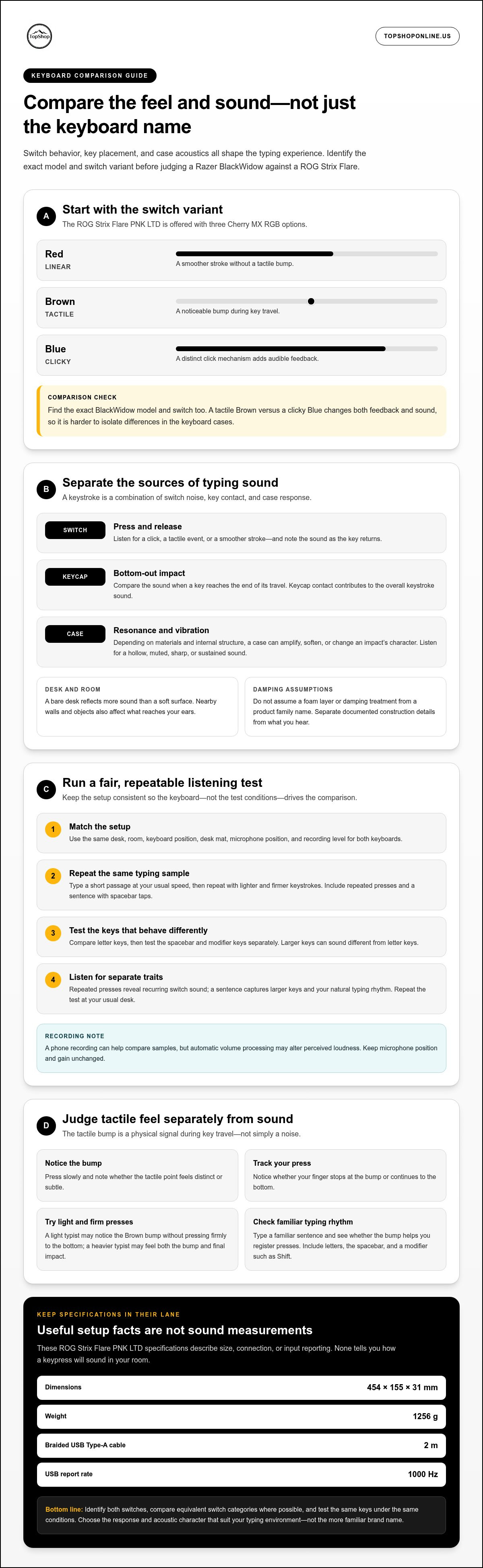
Typing sound comes from more than the switch. A keystroke can produce switch noise, keycap impact, and case resonance. Compare the exact Razer BlackWidow and ASUS ROG Strix Flare models, not just their names. The ROG Strix Flare PNK LTD, for example, is available with Cherry MX RGB Red, Brown, or Blue switches, which can produce different acoustic and tactile results.
Switch design is one part of a keyboard’s sound profile. Linear switches move without a tactile bump, tactile switches provide a bump during travel, and clicky switches add a distinct click mechanism. Cherry MX RGB Blue is clicky, Brown is tactile, and Red is linear. These differences affect the sound of a press, but don’t account for every noise: keycap contact and the case also contribute.
Construction affects how vibration travels after a key bottoms out. Depending on its materials and internal structure, a case may amplify, soften, or change the character of an impact. Don’t assume either keyboard has a particular foam layer or damping treatment based on its product family. Separate documented construction details from what you hear in a consistent test. Even a quieter switch can sound sharp on a hard desk.
Use the same typing sample on both keyboards. Type a short passage at your usual speed, then repeat it with lighter and firmer keystrokes. Keep the desk, room, microphone position, and recording level the same. Compare repeated presses with a sentence that includes spacebar taps. Repeated presses reveal the switch’s recurring sound, while the sentence captures larger keys and your natural typing rhythm.
Listen for separate acoustic traits instead of labeling one keyboard simply loud or quiet:
- Press sound: Note whether the switch produces a click, a tactile event, or a smoother stroke.
- Bottom-out: Compare the sound when a key reaches the end of its travel.
- Release sound: Listen for noise as the key returns after each press.
- Case resonance: Check whether impacts sound hollow, muted, sharp, or sustained.
- Large keys: Test the spacebar and modifier keys separately from letter keys.
Room conditions can change the comparison. A bare desk reflects more sound than a soft surface, and nearby walls and objects affect what reaches your ears. Keep each keyboard in the same position and use the same desk mat. For recordings, keep the microphone position and gain setting unchanged. A phone recording can help compare samples, but automatic volume processing may alter perceived loudness.
The ROG Strix Flare PNK LTD measures 454 x 155 x 31 mm and weighs 1256 g. Its 2m braided USB Type-A cable is a practical setup detail, not proof of quieter typing. The keyboards have a 1000Hz USB report rate, which describes input reporting rather than acoustic output. Keep these specifications separate from sound comparisons; neither measurement tells you how a keypress will sound in your room.
Before interpreting a recording or review of the Razer BlackWidow, identify its exact model and switch type. The BlackWidow name covers product variations, and the switch determines much of the press sound. Compare equivalent switch categories where possible. For example, comparing a tactile Brown switch with a clicky Blue switch changes both feedback and sound, making it harder to isolate differences in the cases.
Follow a simple process: identify each keyboard’s switch, test the same keys, and listen separately for switch noise and case resonance. Repeat the test at your usual desk. This gives the Razer BlackWidow vs. ROG Strix Flare comparison a practical basis: choose the switch response and acoustic character that suit your typing environment, not the more familiar name.
Tactile mechanical
Tactile feel is the feedback you notice during a keypress, not just the sound. A tactile switch has a noticeable bump during travel, giving your finger a physical signal before the key bottoms out. The ROG Strix Flare PNK LTD is available with Cherry MX RGB Brown switches, as well as linear Red and clicky Blue options. For a Razer BlackWidow vs. ROG Strix Flare mechanical switch feel comparison, identify the exact BlackWidow model and switch variant first. The product name alone doesn’t tell you which switch behavior you’re comparing.
The bump’s position and character affect how a switch feels while typing. A defined bump can make a press easier to register by touch, while a smoother stroke has less tactile interruption. Your typing style matters, too. A light typist may notice the Brown switch bump without pressing each key firmly to the bottom. A heavier typist may feel both the bump and the final impact. Assess these sensations separately rather than treating “tactile” as a complete description.
Compare equivalent switch categories whenever possible. A tactile BlackWidow variant and the ROG Strix Flare’s Cherry MX RGB Brown offer a more direct feel comparison. If the BlackWidow uses a linear or clicky switch, the keyboards differ in switch behavior as well as construction. Note each exact model and variant beside your observations so you don’t mistake one BlackWidow configuration for every version.
Use the same test on both keyboards. Press a few keys slowly, then type a familiar sentence at your usual pace. Include letters, the spacebar, and a modifier such as Shift. Note when resistance changes, how distinct the bump feels, and whether your finger continues to the bottom. Repeat with lighter presses to see how clearly you detect tactile feedback during both deliberate tests and ordinary typing.
Track these characteristics during the comparison:
- Bump clarity: Note whether the tactile point feels distinct or subtle during a slow press.
- Key consistency: Compare letter keys with the spacebar and Shift, which differ in size and use.
- Typing rhythm: Check whether the bump helps you register presses in a familiar sentence.
- Press habit: Notice whether you stop at the bump or continue to the end of travel.
- Comfort: Compare how your hands feel after using the same typing sample on each keyboard.
Sound and tactility overlap, but one doesn’t prove the other. Cherry MX RGB Brown provides tactile feedback without the separate click mechanism of Cherry MX RGB Blue. You may still hear key movement or impact, so assess sound separately from the bump. A recording captures noise, not the physical feedback under your fingers. In a Razer BlackWidow vs. ROG Strix Flare mechanical switch feel comparison, weigh tactile response against your usual typing style.
The RGB Mechanical Gaming Keyboard - ROG Strix Flare is relevant if you’re considering the Strix Flare. Review its configuration alongside the BlackWidow model you’re evaluating. Choose according to the specific switch variant, your press style, and whether tactile feedback supports your regular tasks. Explore the ROG Strix Flare mechanical gaming keyboard as one option in that comparison.
Mechanical keyboard
A mechanical keyboard has individual switches beneath its keys, giving each press a distinct mechanical response. For this comparison, separate the switch mechanism from the layout, case dimensions, and connection details. Those factors shape everyday use, but don’t determine a switch’s tactile or acoustic profile. The ROG Strix Flare PNK LTD is available with Cherry MX RGB Red, Brown, or Blue switches. Since the BlackWidow name covers different models, identify the precise model and switch before comparing specifications.
Start with the physical key layout. Check the letter block, navigation cluster, arrow keys, number pad, and function row against your usual typing or gaming tasks. Someone who regularly enters figures may prefer a number pad, while a compact desk setup may call for a smaller footprint. Don’t assume models in the same product family have identical layouts. Check the exact model’s key arrangement against your current keyboard.
The ROG Strix Flare PNK LTD measures 454 x 155 x 31 mm and weighs 1256 g. Use those dimensions to assess how much desk space it occupies and whether its position suits your setup. The measurement describes this named variant, not every keyboard carrying the Strix Flare name. Compare dimensions only with the exact BlackWidow model under consideration. Place both keyboards in their intended positions, then check access to the mouse, desk controls, and frequently used keys.
Switch type remains central to mechanical keyboard feel. Cherry MX RGB Red is linear, Brown is tactile, and Blue is clicky. These categories describe different press characteristics, not a ranking. A linear switch offers an uninterrupted stroke, a tactile switch provides a bump, and a clicky switch adds an audible click. Consider which traits suit your regular tasks: repeated gaming inputs and long-form typing may call for different feedback.
Use a consistent comparison sequence to avoid judging the keyboards by appearance alone:
- Record each exact model name and its switch variant.
- Compare the key arrangement with your current typing and gaming habits.
- Use the same short text and repeated keypresses on each keyboard.
- Check whether the dimensions fit your desk and hand position.
- Review connection and reporting specifications separately from switch feel.
Both keyboards have a USB report rate of 1000Hz. That figure describes how often the keyboard reports input to the connected system. It does not measure typing comfort, switch travel, acoustic output, or key layout. Keep performance specifications in their own category. A matching report rate does not mean two keyboards will feel alike, just as different switch types do not establish which model better fits your desk.
The Strix Flare PNK LTD has a 2m braided USB Type-A cable. Cable length and connector type can affect placement around a desk, but they don't determine mechanical feedback. Check that cable routing reaches your intended setup without pulling the keyboard out of position. Then consider the keyboard’s footprint alongside nearby equipment. A clear desk arrangement makes the key clusters easier to reach and keeps the intended typing position consistent.
Mechanical keyboard selection works best as a model-specific decision. Compare layout and dimensions first, then weigh switch type against the tasks you perform. Keep the 1000Hz report rate and 2m cable in the setup category, not the feel category. If the ROG Strix Flare’s configuration matches your preferences, consider the RGB Mechanical Gaming Keyboard - ROG Strix Flare as a relevant option for your setup.
TopShop: 10M/20M USB Christmas Tree LED String Lights
TopShop offers 10M/20M USB Christmas Tree LED String Lights for seasonal decorating, a separate home-use option from choosing a mechanical keyboard. The keyboard comparison helps you assess switch feel and sound; these lights address a different need. Consider them when you’re planning Christmas tree lighting and want to compare the listed length options. TopShop also offers the Wireless Keyboard for PS5 Controller, a separate keyboard category for PS5 controller use, rather than a direct substitute for the Razer BlackWidow or ROG Strix Flare comparison. Browse TopShop’s offerings for the product that matches your task. Visit topshoponline.us to explore the available products.
Choose for the Setup You Want Next
Choose based on how you use your keyboard each day. A model that fits your typing habits and desk arrangement is more useful than one chosen for brand familiarity. For a Razer BlackWidow vs. ROG Strix Flare mechanical switch feel comparison, focus on the exact version you’re considering and the feedback you prefer. That gives you a practical basis for deciding what to try next.
TopShop offers the RGB Mechanical Gaming Keyboard - ROG Strix Flare for readers considering that model. Its other listed products include 10M/20M USB Christmas Tree LED String Lights, a 1080P HD Wireless Mini Security WiFi Camera, and a Wireless Keyboard for PS5 Controller. These products serve different needs, so choose according to the task you’re shopping for.
Contact TopShop for help exploring its offerings. Take the next step with a clear idea of what suits your setup.
Frequently Asked Questions
Which Razer BlackWidow and ASUS ROG Strix Flare versions are being compared?
This comparison identifies the ASUS ROG Strix Flare PNK LTD but not a specific Razer BlackWidow model. Identify the exact BlackWidow model and switch variant to make a direct comparison.
How do keycap shape, stabilizers, and keyboard construction affect switch feel?
Keycap contact and case construction can contribute to keystroke sound, and the case affects how vibration travels after a key bottoms out. No details are provided here about keycap shape or stabilizers.