

Can a smaller surge protector fit your desk without leaving your computer and other equipment underprotected? A compact surge protector for home office use needs to do more than fit behind a desk or beside a wall outlet. Space and crowded plugs matter, but so do the unit’s documented protection ratings and the devices you plan to connect.
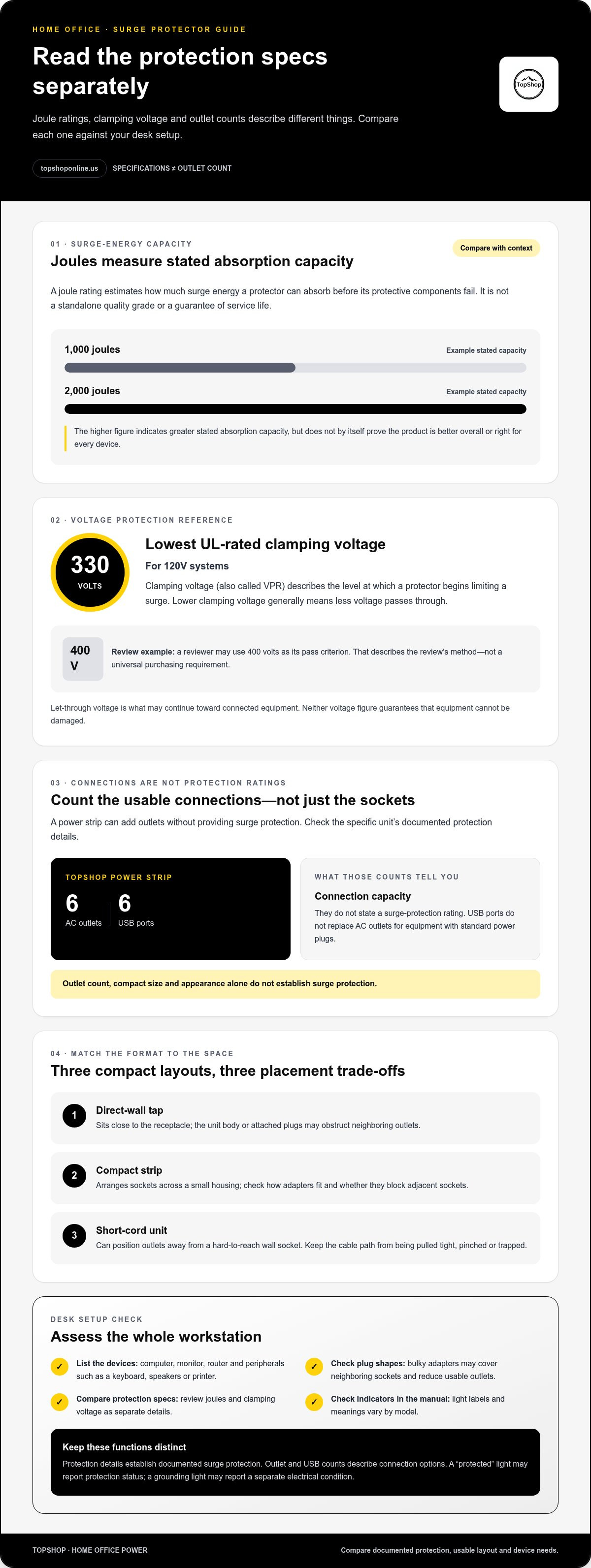
Outlet count is easy to confuse with surge protection. A power strip can add sockets without providing surge protection, so check the product’s specifications rather than relying on its size or layout. Joule ratings indicate energy-absorption capacity, while clamping voltage describes the voltage allowed through to connected devices. For 120V systems, the lowest UL-rated clamping voltage is 330V.
This guide explains how to compare those ratings, look for independent safety certification, and assess outlet spacing, plug orientation, dimensions, and USB charging needs. You’ll also learn how to match capacity to your home-office setup, interpret protection indicators, and distinguish a compact surge protector from an outlet-expansion strip.
Key Takeaways
- Choose a compact surge protector for home office use by matching documented protection details to your devices, not by size or outlet count alone.
- Use joule ratings and clamping voltage as separate specifications. Neither is a complete measure of protection on its own.
- Compare usable AC outlet spacing, plug or cord design, dimensions, and USB output specifications with your desk setup.
- List your devices, measure available space, and check outlet access before comparing layouts.
- Keep outlet expansion separate from surge protection. Multiple outlets don’t establish that a power strip protects against surges.
Why a Compact Surge Protector Matters in a Home Office
A compact footprint can make a home-office setup easier to fit behind a desk or beside a wall outlet, but smaller dimensions may also mean fewer outlets and tighter spacing. Bulky power adapters can cover neighboring sockets, leaving fewer usable connections than the outlet count suggests. Choose for your actual desk layout, not just the size shown on a package.
A surge protector is designed to limit transient voltage reaching connected equipment. That function is separate from adding outlets: a multi-outlet power strip can expand access without establishing surge protection. Appearance, outlet count, and compact design don’t prove that protection is built in. Look for protection details stated for the specific unit. The Surge protector overview explains the basic role of these devices and related specifications.
A typical desk setup may include a computer, monitor, router, and peripherals such as a keyboard, speakers, or printer. Those devices can use several outlets, while chargers may compete for space or block adjacent sockets. Keep frequently used plugs accessible and avoid forcing adapters into a crowded cluster. Count the devices and consider the shape of each plug before deciding how many outlets you need.
Which home-office devices need surge protection?
Prioritize sensitive electronics and equipment used together in the workspace, such as a computer, display, and router. Protection needs depend on the equipment’s value, role, and configuration, not device count alone. Grouping connected devices helps you assess the desk as a setup rather than treating every plug alike. A surge protector can limit certain voltage transients, but it can’t promise protection from every kind of electrical damage.
Compact wall tap, mini strip, or short-cord unit?
A direct-wall tap keeps the unit close to the receptacle, but its body or attached plugs may obstruct neighboring outlets. A compact strip arranges sockets across a small housing, while a short-cord unit can place outlets away from a hard-to-reach wall socket. Compare plug orientation and spacing with your adapters. The right format depends on wall access, desk position, and a cable path that won’t be pulled tight, pinched, or trapped behind furniture.
Compare outlet expansion and documented protection as separate features. TopShop’s power strip has 6 AC outlets and 6 USB ports, which describes its connection capacity, not a surge-protection rating. USB ports also don’t replace AC outlets for equipment with standard power plugs. Review each function separately, then match the unit’s usable layout to your devices and available space.
How Surge Protection Works: Joules, Clamping, and Indicator Lights
Protection specifications describe different things. A joule rating estimates how much surge energy a protector can absorb before its protective components fail. Clamping, or let-through, voltage describes the voltage that may pass toward connected equipment during a surge. Neither figure tells you everything about a unit’s performance, so compare the full documented specifications rather than treating one number as a complete score.
Documented surge protection is established by protection specifications, not by outlet count or USB ports. Extra sockets and charging ports describe connection options. They don’t establish the presence or performance of surge-protection components.
What does a joule rating tell you?
Use the joule figure to compare stated surge-energy absorption capacity, not as a guarantee of service life or a standalone quality grade. A higher rating generally indicates greater absorption capacity, but it doesn’t show clamping voltage, outlet layout, or whether the unit suits your desk. Compare products only when their documentation makes the ratings and test conditions clear.
For example, ratings of 1,000 joules and 2,000 joules communicate different stated capacities. The second number alone doesn’t prove the product is better overall or appropriate for every device. Consider your equipment and setup, then review the unit’s other documented protection details. Don’t apply a single joule minimum to every home-office arrangement.
How should you interpret clamping voltage?
Clamping voltage, also called Voltage Protection Rating or VPR, indicates the level at which a protector begins limiting a surge. Let-through voltage is what may continue toward connected devices. Lower clamping voltage generally means less voltage passes through. For 120V systems, the lowest UL-rated clamping voltage is 330V. Treat this as a rating reference, not a guarantee that connected equipment can’t be damaged.
A review’s test threshold needs context too. If a reviewer uses 400 volts as its pass criterion, that figure describes the review’s chosen method. It doesn’t automatically establish a universal purchasing requirement for every compact surge protector for home office use. Check how a rating is defined and compare like with like.
What do protection and grounding indicators mean?
Indicator lights provide status information, but labels and functions vary by model. A “protected” light may report that the device’s protection status is active; a grounding light may indicate a separate electrical condition. Neither indicator proves protection against every electrical fault. Read the manufacturer’s manual to understand each light and what its status means.
If the manual says protection has ended, stop relying on the unit for surge protection and follow its replacement or disposal instructions. For outlet expansion, TopShop’s power strip with 6 AC outlets and 6 USB ports describes connection capacity only; those details don’t establish a surge-protection rating. Keep that distinction clear while comparing protection specifications and desk connections.
How to Compare Compact Surge Protectors for a Desk Setup
Compare compact units by usable layout and documented electrical details, not by outlet count alone. A small housing may still leave adjacent sockets inaccessible when plugs or power bricks overlap. Before choosing a compact surge protector for home office use, map your equipment plugs to the outlet pattern and check that the stated ratings suit the devices and electrical supply.
Compare AC outlet count and spacing, plug or cord design, overall dimensions, voltage and current compatibility, joule rating, let-through voltage, and documented safety certification. Dimensions and plug orientation are useful only when reliable product documentation provides them. Don’t infer missing measurements or protection details from a product photo.
| Format | Outlet layout and spacing | Plug or cord design | Protection details to compare |
|---|---|---|---|
| Direct-wall tap | Check whether its body or plugs block nearby receptacles. | Confirm the orientation suits the wall outlet and desk position. | Look for stated surge-protection specifications, not just multiple sockets. |
| Compact multi-outlet strip | Compare AC outlet positions with the width of adapters and power bricks. | Review cord placement and the documented unit dimensions. | Compare the stated joule and let-through information. |
| Short-cord unit | Check whether connected plugs remain accessible at the intended location. | Ensure the cord reaches without tension, pinching, or obstructing furniture. | Review the same protection and certification details as other formats. |
Match outlet layout to devices and adapters
Count the AC plugs required by your computer, monitor, router, and other equipment. Include the physical width of each adapter: a unit with enough sockets on paper may offer fewer usable outlets if a power brick covers its neighbor. Sketch the outlet layout beside the wall socket and planned equipment positions. USB ports provide charging connections, but they don’t replace AC outlets for devices with standard power plugs.
Compare electrical ratings and protection details
Check the protector’s stated voltage and current compatibility against the product label and connected devices’ requirements. Then compare joule ratings and let-through or clamping voltage as separate specifications. Neither should stand in for the other. If either figure is missing or unclear in product documentation, don’t fill the gap with assumptions based on the unit’s size, appearance, or outlet count.
Certification claims need to be specific. Look for an explicitly named independent safety certification, such as UL or ETL, and verify the mark and listing against the certifier’s information. A brand name, general safety statement, or image of a certification symbol isn’t equivalent to independently verifiable documentation. Note what the product materials state, then compare candidates using the same criteria.
For outlet expansion, distinguish AC sockets from USB ports and note any stated USB output specifications separately. This keeps charging capacity, available plug space, and surge protection as three distinct comparison points. A side-by-side review makes it easier to find a layout that fits your desk without treating extra connections as evidence of electrical protection.
Plan Placement, Connections, and Cable Routing Before Buying
Plan the desk layout before choosing a compact surge protector for home office use. A unit that fits the receptacle may still sit too close to furniture, leave adapters blocking nearby outlets, or require a cable route that pulls against its plug. Follow these steps to check the physical setup before comparing product layouts.
- List the devices. Write down every connection needed at the desk, separating equipment that uses AC plugs from devices charged through USB. Include wide power adapters, since their size can affect access to adjacent outlets.
- Measure the available space. Check clearance around the wall receptacle, desk, baseboards, and nearby furniture. Compare measurements with product dimensions only when documentation supplies them for that specific model.
- Check outlet access. Note the receptacle’s position and orientation, along with obstructions such as furniture edges or other plugs. Consider whether a wall-mounted unit or corded format can sit without blocking a neighboring outlet.
- Compare layouts and cable paths. Match the unit’s outlet positions to your devices, then trace how each cable will reach the desk. Leave enough slack for normal positioning without putting tension on plugs or trapping cords behind furniture.
Measure the available desk and wall space
Measure more than the width of the receptacle. Allow for the plug body, protector housing, and adapters that will connect to it. A large adapter may cover a nearby socket even if the unit’s overall dimensions appear suitable. If a product page doesn’t provide a particular measurement, don’t estimate it from a photograph. Compare documented dimensions with your available clearance.
Route cables along the desk edge or another path where they won’t cross a walkway, catch on a chair, or become pinched by furniture. Avoid tightly bundling power cords together. For practical routing and workspace organization, use this home-office cable management guidance as a planning reference.
Separate protection needs from outlet expansion
A multi-outlet strip adds connection points, but its outlet count alone doesn’t establish surge protection. Keep the two needs separate in your notes: record the number and type of outlets required, then assess surge protection from the product’s explicit documentation. USB ports serve a different function from AC sockets, so count them separately when mapping your devices.
TopShop’s power strip has 6 AC outlets and 6 USB ports. Those details help describe an outlet and charging layout, but they don’t establish a surge-protection rating. For connection planning, review the power strip specifications separately from any protector’s documented protection details. Compare TopShop’s power-strip option for outlet expansion as you plan your desk layout.
Choose the Right Compact Surge Protector and Complete Your Desk Setup
A suitable choice should meet two separate requirements: it must fit the workspace, and its documentation must establish the protection function you need. A compact surge protector for home office use isn’t suitable just because it has enough sockets or fits behind a desk. Check the stated electrical ratings and protection status, then confirm that the format works with your wall outlet, adapters, and cable paths.
Use a final-fit checklist before selecting a unit
Review the product documentation first, then match its physical layout to your equipment. Use this checklist to compare candidates consistently:
- Suitable format: Choose a direct-wall, strip, or short-cord design that fits the outlet location and desk position.
- Enough usable outlets: Count the AC plugs you need, including wide adapters that may cover adjacent sockets. Count USB connections separately.
- Compatible ratings: Compare the unit’s stated voltage and current with the electrical requirements of the connected equipment.
- Documented protection: Look for explicit surge-protection information, including stated joule and let-through details, rather than relying on appearance or socket count.
- Clearance and reach: Recheck plug orientation, documented dimensions, cord reach, and furniture clearance before placing the unit.
If an outlet pattern seems to fit only when adapters are forced together, treat it as a layout mismatch. Choose a configuration with accessible sockets for the plugs you actually use. A cord should reach the planned position without pulling on the wall plug, passing through a pinched gap, or getting trapped under furniture. Base your decision on usable connections and documented fit, not the maximum number printed beside a product image.
When a power strip is a separate workspace need
Sometimes the immediate problem is too few places to connect equipment, not a need for surge protection. A power strip can address outlet expansion, but adding AC sockets or USB charging ports doesn’t establish that the strip protects connected devices from surges. Keep its connection capacity separate from a protector’s documented function.
TopShop’s listed power strip has 6 AC outlets and 6 USB ports. Those features make it an outlet-expansion option to consider when planning a desk’s plug and charging layout; they are not a surge-protection claim. For more on connection arrangements, consult the power strip with USB ports guide.
Use the checklist to match protection, electrical compatibility, and physical fit before setting up your workspace. To compare outlet-expansion options for your desk, browse TopShop’s home-office power accessories.
Set Up Your Workspace with Clear Priorities
Make the final choice around the workspace you have. Before connecting equipment, lay out the devices and cables, confirm each plug has a clear route, and keep the unit accessible so you can check its status according to the manufacturer’s instructions. This makes it easier to spot a blocked outlet or strained cable before it becomes part of your daily routine.
A compact surge protector for home office use should meet your desk’s physical needs and have clearly documented protection details. Keep that standard separate from the need for extra charging or outlet access. TopShop’s online store serves shoppers nationwide, with home-office power accessories for workspace planning.
Browse TopShop for home-office power accessories to compare outlet-expansion options for your setup. Choose connections that fit your equipment, keep the layout accessible, and plan your workspace around clear specifications.
Frequently Asked Questions
Is a compact surge protector enough for a home office?
Yes, a compact model can suit a small setup if its documented electrical ratings match the equipment and its outlets accommodate the plugs you need. For example, a desk with a computer, display, and router may fit a smaller unit if adapters don’t block sockets. The keyword “compact surge protector for home office” describes a form factor, not a protection level. Verify the specific model’s documentation before relying on it.
Can I plug a computer and monitor into the same surge protector?
Often, yes, if the protector is rated for the combined electrical demand and both devices’ requirements match its specifications. Check the computer and monitor labels for their electrical input details, then compare them with the protector’s stated limits. Don’t judge capacity by the number of empty outlets. Avoid adding another strip to create more connections, and follow the equipment and protector manufacturers’ instructions for placement and use.
Can you plug one surge protector into another?
No. Avoid daisy-chaining surge protectors or power strips, since connected units can create an overloaded or poorly managed setup and may conflict with their instructions. Use one appropriately rated device with enough outlets for the intended equipment. If its outlet pattern doesn’t work for your plugs and adapters, reconsider the layout or select a suitable single unit rather than stacking extenders.
What happens if a surge protector takes a major surge?
A major surge may use some of the unit’s protective capacity, and the protector may no longer limit voltage as intended. What happens depends on its design and condition; it may not be obvious from whether connected equipment still receives power. Check the manual for indicator meanings and post-surge guidance. If the unit shows damage or signals that protection has ended, stop relying on it and follow the manufacturer’s instructions.
Do surge protectors need to be replaced after a power surge?
Not necessarily after every event. The effect depends on the surge and the protector, so use the model’s manual and status indicators rather than assuming it remains protective or needs immediate replacement. After a suspected surge, inspect the unit for visible damage and check its protection status. A protector can continue supplying electricity even if its surge-protection function has ended, so power flowing through it isn’t proof of protection.
Is a surge protector the same as a UPS?
No. A surge protector is intended to limit transient voltage, while an uninterruptible power supply (UPS) includes a battery that can provide temporary power during an outage. Choose based on the task: surge protection for voltage transients, battery backup for time to save work or shut down equipment, or a device whose documentation explicitly supports both functions. Don’t infer battery backup from a surge-protection label alone.