

An “XL” label doesn’t guarantee enough room for your laptop, mouse, and accessories. Choosing an extra large laptop bed tray table by its outside dimensions alone can leave you with less usable workspace than expected, especially when listings describe size and compatibility differently. The fit depends on the tray’s actual work surface, your laptop’s footprint, and how you plan to use it.
Before choosing, compare the usable area with your device and everyday setup. A mouse needs space beside the laptop. A charger, phone, or drink may need room too. Stability, height and angle adjustment, and how easily the tray folds, carries, or stores also affect whether it suits your routine.
This guide explains how to assess surface area, check laptop fit, and compare rigid, cushioned, and adjustable designs using practical criteria. It also covers which specifications to verify before ordering, including dimensions, weight capacity, materials, and included features. You can evaluate the Deskpro XL Ergonomic Adjustable Laptop Bed Desk against the same checklist, using its current listing to confirm product details.
Key Takeaways
- “Extra large” isn’t a standard size, so compare listed usable dimensions rather than relying on the label.
- Measure your laptop’s width and depth, then allow space for the mouse and other items you plan to use.
- Compare rigid, cushioned, and adjustable designs by support, portability, storage, and where you’ll use the tray.
- Check the base, legs, hinges, and supporting surface to assess stability and positioning needs.
- Before ordering an extra large laptop bed tray table, verify its dimensions, adjustment features, weight capacity, materials, and included accessories in the current listing.
What Makes an Extra Large Laptop Bed Tray Table Different?
An extra-large bed tray is a lap or bed work surface designed to hold a larger device or more of a complete setup. Its useful size depends on what you need to place on it, not simply on the “XL” label. A tray for occasional laptop use may need room for the computer and mouse, while a surface for reading or writing may need space for a book or notebook instead.
“Extra large” isn’t a standardized dimension across listings. Compare each product’s stated width and depth, then check what those measurements describe. Screen size is not the same as laptop footprint: screen size measures the display diagonally, while the computer occupies a physical width and depth. Those body dimensions, including any unusually large chassis or attached accessories, determine whether the laptop fits.
How to interpret “extra large” in product listings
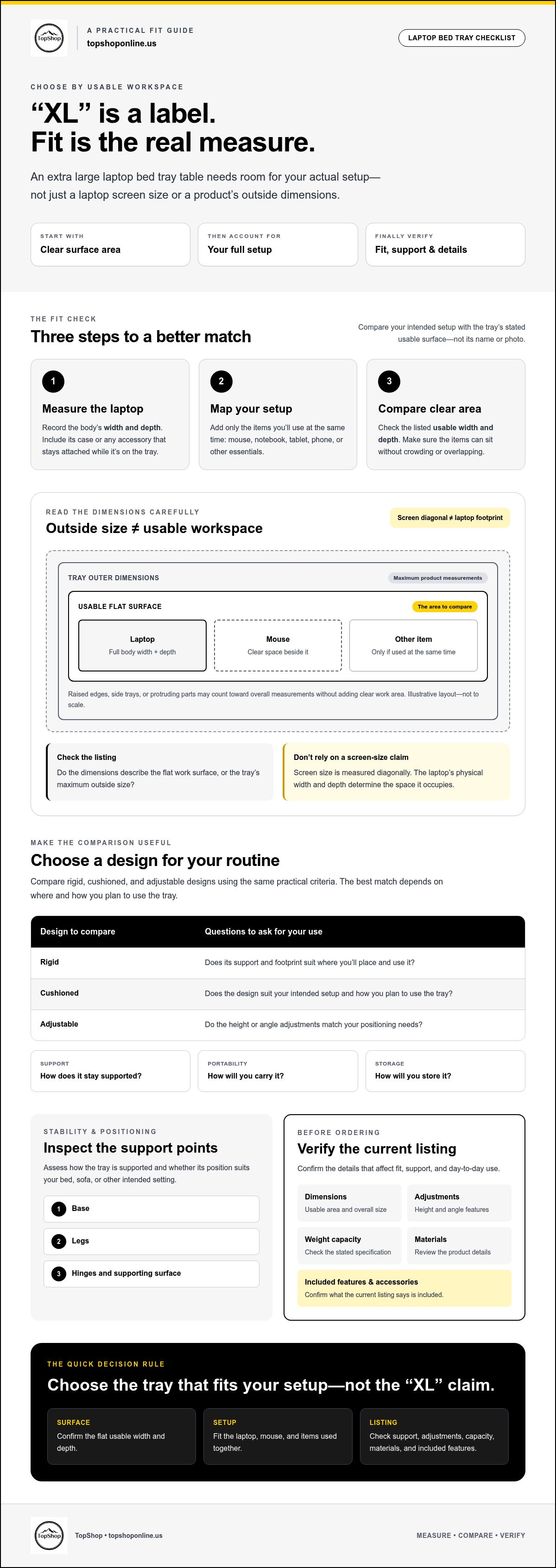
Look for the dimensions of the flat, usable work surface, not just the tray’s overall width and depth. Outer dimensions describe the product’s maximum measurements; usable workspace is the uninterrupted flat area available for placing items. Raised edges, side trays, or other protruding parts may count toward the outer measurements without adding clear work area. If a listing doesn’t distinguish between these dimensions, check its diagrams and product details before assuming your setup will fit.
Don’t treat a laptop-fit claim based on screen size as proof that the tray leaves room for accessories. A model described as suitable for a large-screen laptop may fit the computer but leave little space beside it. Compare the laptop’s actual width and depth with the usable area, and consider how the device will sit on the tray.
What belongs on the tray besides a laptop?
List everything you expect to use at the same time, such as a mouse, notebook, tablet, or phone. Each item needs a clear place that won’t cover the laptop, block access to its keyboard, or crowd the edges. If you use a mouse, check whether there’s enough flat area on your preferred side. A tray that fits the laptop alone may not accommodate your working arrangement.
- Laptop: Allow for its full width and depth, not only its screen size.
- Mouse: Reserve usable space beside the computer for movement.
- Notebook, tablet, or phone: Check that each can sit without overlapping essential laptop space.
Bed and sofa use, reading, writing, and short laptop sessions all create different space needs. A stable, appropriately sized surface can make a setup more practical, but comfort also depends on positioning and how the tray fits the user. Ergonomics considers how people interact with designed equipment, so assess both the arrangement of your devices and the way you sit or recline. Choose an extra large laptop bed tray table based on the workspace your routine requires, not its label alone.
How to Measure for an Extra Large Laptop Bed Tray Table
Use a three-step fit check before comparing products: measure the laptop, map the items you’ll use with it, then compare that footprint with the tray’s stated usable surface. This is more reliable than judging by an “XL” label or product photo. For an extra large laptop bed tray table, the key question is whether the clear surface accommodates your whole setup, not just the computer.
Measure the device and its working footprint
Measure the laptop body’s width and depth, not just its advertised screen diagonal. Include any case or attached accessory that will stay on while the computer is on the tray. If a connected peripheral needs to sit beside the laptop, include its footprint in your layout too. A large chassis can take up more room than its screen size suggests.
Compare those measurements with the seller’s stated usable surface dimensions. Check the product specifications for surface width and depth, and confirm that they refer to the flat area available for work. If the listing gives only overall dimensions, look for a diagram or ask the seller to clarify the usable area before ordering. Photos can help illustrate the layout, but perspective and staged products make them unreliable for measuring.
Allow room for accessories and positioning
Decide where the mouse will go. If you’ll use it beside the laptop, measure the mouse and allow enough clear surface to move it. If it sits elsewhere, you don’t need to count that area as part of the tray. Add a notebook, tablet, or phone only if it will be on the surface at the same time. Arrange the items on paper or another flat surface to check their positions and make sure they don’t overlap.
- Measure: Record laptop width and depth, including its case.
- Map: Arrange the laptop and intended accessories in their working positions.
- Compare: Check the complete layout against the listed usable surface, then verify the dimensions in the product specifications.
Consider where the charging cable will run so it doesn’t cross the mouse area or catch on the tray’s edge. The home office cable management guide offers related ideas for organizing a temporary workstation. For additional buying criteria, PCWorld explains how to pick the best one.
Compare your measurements with the current listing for the Deskpro XL Ergonomic Adjustable Laptop Bed Desk. Confirm its surface dimensions and other specifications in the listing rather than assuming details from the product name.
Rigid, Cushioned, or Adjustable: Compare Large Bed Tray Designs
Design affects where a tray can rest, how it supports a laptop, and how easily it can be stored. Compare construction and function rather than assuming every product labeled “bed tray” works the same way. An extra large laptop bed tray table may have a rigid top, a cushioned base, adjustable legs, or a combination of features. Each design has practical trade-offs.
| Design | Surface support | Portability and storage | Cleaning | Bed or sofa use |
|---|---|---|---|---|
| Rigid bed tray | Firm top supported by legs or a frame | Check whether legs fold and how much space the frame takes when stored | Depends on the top material and care instructions | Can stand over a bed or sofa; check leg placement and the supporting surface |
| Cushioned lap desk | Hard work surface rests on a cushion base | Often has no legs; consider cushion bulk and where it can be stored | Check whether the cushion cover is removable and how it should be cleaned | Rests on the user’s lap, so fit and comfort depend on the user and seating position |
| Adjustable or foldable design | May use a firm panel with adjustable supports | Folding can help with storage, but check folded dimensions and weight | Review care details for each surface and component | Useful when height or tilt changes matter; confirm the mechanism suits the intended setup |
Rigid tray versus cushioned lap desk
A rigid tray provides a firm surface supported by legs or a frame. A cushioned lap desk places a hard work surface over a cushion and rests directly on the user’s legs. The rigid option may need enough room to position its base; the cushioned option may be easier to move but still needs to fit the user and seating area. For either type, compare product images with written specifications. Check construction, dimensions, and care details instead of inferring them from appearance.
Holders, wrist rests, and dedicated mouse surfaces are optional features, not standard components. Verify each one in the current listing, including whether it reduces the clear area available for your laptop or other items.
When adjustability or foldability matters
Adjustability can help match the setup to a particular position, but the listing should identify the mechanism, adjustment range, and locking method. Foldability can simplify storage, but it doesn’t confirm that the tray will feel stable when open. Check how the supports lock in place and whether the stated setup suits a bed or sofa. Ergonomic wording alone doesn’t establish fit or guarantee posture benefits. If powered accessories are part of your temporary workstation, use this USB power strip buying guide to consider power needs alongside cable placement.
Will an Extra Large Bed Tray Be Stable and Practical to Use?
A larger surface can provide room for a laptop and accessories, but it can also take up more space on a bed or sofa and require more storage room when not in use. Stability depends on the design and the surface supporting it, not on the “extra large” label. Check the product details for construction and capacity, then consider how the tray will fit your usual setup.
Check support, capacity, and setup surface
Review the base, legs, hinges, and contact points shown in the listing. For a tray with legs, look for details about how they attach, fold, or lock. For a cushioned design, check how the cushion supports the work surface and whether the product is intended to rest on a lap. Product photos can help clarify the construction, but written specifications should confirm it.
Verify the stated weight capacity and what it applies to. Don’t infer capacity from a thick-looking top, a wide base, or the product’s appearance. If the listing omits capacity, hinge details, or other information you need to assess your setup, confirm those details with the seller before ordering. Consider whether the legs or cushion suit your bed, sofa, or lap, and whether the tray can sit in position without blocking movement or access to nearby items.
Fit and support are product-selection questions, not medical assurances. A tray’s ergonomic wording doesn’t prove it will improve posture or relieve pain. Consider how you’ll position the device and yourself, and treat an extra large laptop bed tray table as a temporary work surface rather than a substitute for a suitable desk setup.
Balance workspace with storage and portability
Plan where the tray will go between uses. Measure the intended storage space and compare it with the product’s listed weight and folded dimensions, if provided. Don’t estimate those specifications from a photo. A folding design may reduce storage footprint, but check how it opens and secures before deciding whether it suits your preferred setup.
- More workspace: A larger top can accommodate more items, but needs enough room to position and use.
- More to store: A larger or rigid design may be harder to carry or put away; verify weight and folded dimensions.
- Setup trade-off: Legs, hinges, and cushions affect how the tray rests, so match the design to your support surface.
Use these checks to assess the Deskpro XL Ergonomic Adjustable Laptop Bed Desk against your intended workspace. Its current listing is where to confirm capacity, dimensions, construction, and storage details before deciding whether it fits your needs.
Choose a Large Laptop Bed Tray Table and Verify the Listing
Use the same fit and feature checks for every option. An extra large laptop bed tray table is a suitable match only if its usable surface, support design, and storage requirements work for your actual setup. Treat the listing as the source for product specifications. A product name or promotional image alone doesn’t confirm a particular dimension or feature.
A pre-purchase checklist for extra large bed trays
- Usable dimensions: Confirm the flat work surface dimensions, not just the tray’s outer measurements. Check whether edges or attached sections affect clear workspace.
- Laptop footprint: Compare the usable area with your laptop’s measured width and depth, including its case or attached accessories.
- Intended accessories: Account for the mouse, notebook, tablet, or phone you plan to use at the same time. Check that each has space without obstructing the laptop.
- Product type and support: Confirm whether it’s a rigid legged tray, a cushioned lap desk, or an adjustable design. Make sure its support method suits your intended bed, sofa, or lap setup.
- Capacity and positioning: Check the stated weight capacity and whether the tray can be positioned without blocking movement or access to nearby items.
- Adjustment and storage: Verify any adjustment range and locking method. If it folds, check the listed folded dimensions and weight, then compare them with your storage space.
- Materials and included features: Confirm the listed materials and whether holders, wrist rests, mouse surfaces, or other accessories are included or sold separately.
Evaluate the Deskpro XL against your requirements
The Deskpro XL Ergonomic Adjustable Laptop Bed Desk is a product TopShop sells. Its dimensions, usable surface area, materials, adjustment range, weight capacity, and included accessories should not be inferred from its name. Check the current listing for each specification, then compare the details it provides with the checklist you use for other options.
If a detail you need isn’t listed, seek clarification before ordering rather than treating it as included or supported. Verify fit and features from the product information before making your decision.
For more buying criteria, the TopShop product range can be reviewed alongside the same checklist.
Choose by Fit, Support, and Verified Details
The right extra large laptop bed tray table is the one that fits your complete setup, not simply the one with the biggest label. Measure your laptop’s physical footprint, plan space for the accessories you’ll use, and compare that layout with the listed usable surface. Then weigh the design trade-offs: rigid, cushioned, adjustable, and foldable options differ in support, positioning, and storage needs.
Before ordering, verify dimensions, stated weight capacity, materials, adjustment details, and included accessories in the current product listing. TopShop sells the Deskpro XL Ergonomic Adjustable Laptop Bed Desk, but check its specific measurements and features in the listing instead of inferring them from its name.
Use the checklist above to compare fit and verified product details before choosing a tray for your space and routine.
Frequently Asked Questions
How large should an extra large laptop bed tray table be?
Choose a surface that fits your laptop and the other items you’ll use alongside it. Measure the laptop body’s width and depth, then account for a mouse, notebook, or other accessories that need to share the surface. Compare that total footprint with the tray’s stated usable dimensions, not only its outside measurements. “Extra large” isn’t standardized, so confirm the exact usable width and depth in the product listing before ordering.
Will an extra large lap desk fit a 17-inch laptop?
A 17-inch screen label alone can’t confirm that the laptop will fit. Laptops with the same screen diagonal may have different body widths and depths, so measure the device itself and compare those dimensions with the tray’s usable surface. Check whether the listing states a maximum compatible device size, but don’t rely on that claim to establish accessory space. Allow additional room if a mouse or other items will sit beside the laptop.
Are extra large laptop bed trays adjustable?
Some models have adjustable components, while others have a fixed surface or folding legs without height or angle adjustment. Don’t assume a tray is adjustable because the listing calls it “ergonomic” or a “bed desk.” Check for the adjustment mechanism, stated range, and locking details. If these specifications aren’t provided, ask the seller to clarify them or compare options with more complete product information before ordering.
Are cushioned lap desks or rigid bed trays better for laptops?
The suitable design depends on where and how you plan to use it. A rigid tray typically relies on a firm top and a supporting base or legs, while a cushioned lap desk rests on the user’s lap. Compare construction, dimensions, intended setup surface, and storage needs. Review listing details rather than assuming either design is universally more stable or comfortable, and check whether you need a dedicated mouse area or folding storage.
Can an extra large laptop tray hold a mouse and accessories?
It can if the usable surface has enough clear area for the laptop and each item you’ll use at the same time. Measure the laptop body, then account separately for a mouse, notebook, or phone and arrange them in their intended positions. Product photos may illustrate a layout, but they don’t confirm exact space. Check the stated surface dimensions and verify whether any advertised accessory areas are included in the product.
What should I check before buying an adjustable laptop bed desk?
Confirm the usable width and depth, adjustment mechanism and range, support design, stated weight capacity, and storage requirements. Check the listing for materials and which accessories are included, rather than relying on product photos or broad labels. Compare those verified specifications with your measured laptop and intended setup. If an important detail is missing, contact the seller for clarification before ordering. Don’t infer capacity or adjustment features from appearance alone.
Does a larger laptop bed tray improve posture?
A larger surface may provide room for a laptop and accessories, but size alone doesn’t establish that the tray will improve posture or relieve discomfort. Fit, positioning, and how you use the tray also matter. Treat posture or pain-relief language in product listings cautiously, and don’t regard a bed tray as a replacement for an appropriate desk and chair setup. For persistent discomfort, consult an appropriate health professional.