

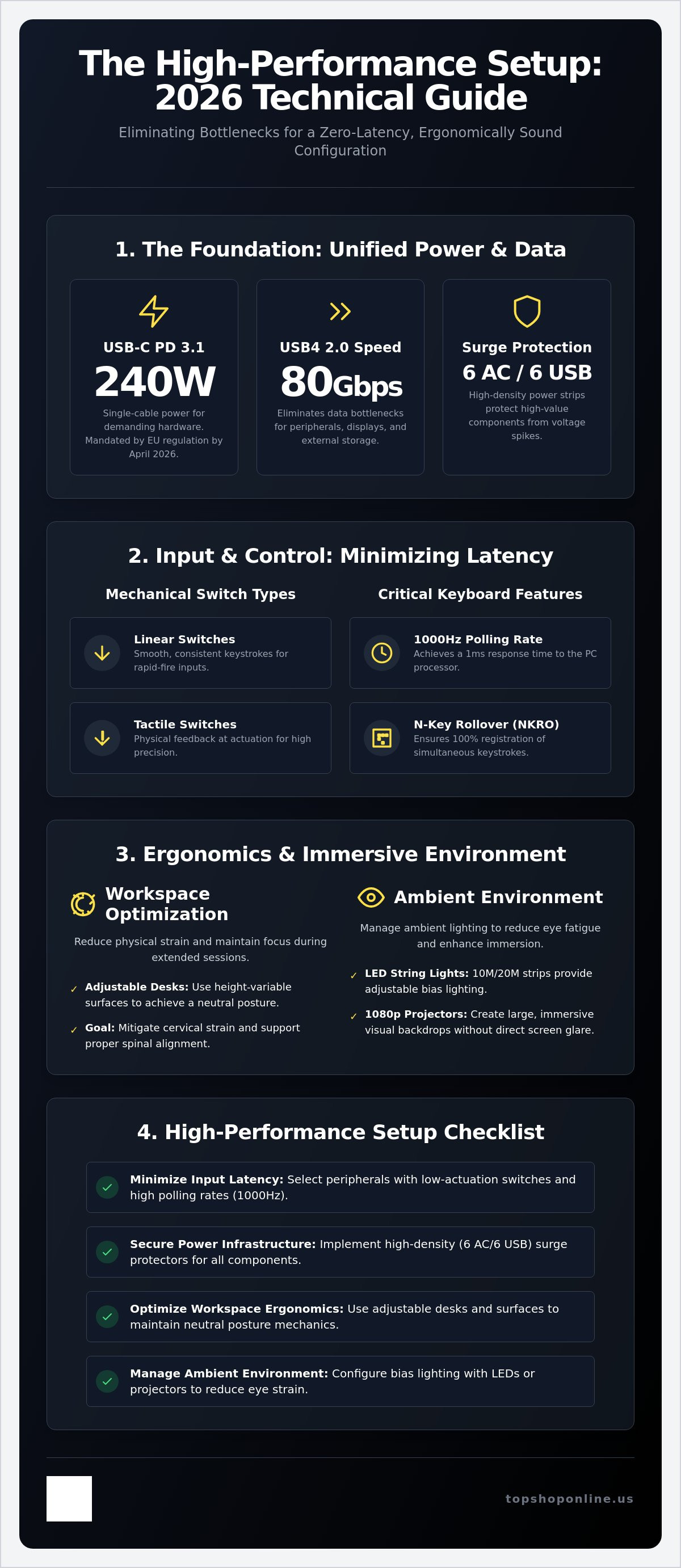
Can a single USB-C cable really replace your entire proprietary power brick and data hub in 2026? With the April 2026 EU mandate requiring USB-C charging and the adoption of the 240W USB Power Delivery 3.1 standard, this is now a technical reality. You've likely realized that identifying the right gaming setup essentials is no longer about aesthetic choice; it's about technical infrastructure and measurable hardware output.
You probably understand that a high-performance environment requires more than just raw processing power. Building a professional station often leads to frustrations with cable clutter, input lag from unoptimized peripherals, and physical strain during extended sessions. This guide provides a comprehensive technical analysis of the components required to eliminate these bottlenecks and achieve a zero-latency, ergonomically sound configuration.
We'll examine the latest USB4 2.0 data standards supporting 80Gbps speeds, factory-pre-lubed mechanical switches like the Akko U1 series, and high-density 6-port AC power strips with integrated USB charging. This overview ensures your hardware choices prioritize reduced latency, improved organization, and physical well-being according to current 2026 ergonomic standards.
Key Takeaways
- Analyze mechanical switch actuation specifications and peripheral polling rates to minimize input latency using high-performance hardware like the ROG Strix Flare RGB keyboard.
- Implement high-density power management infrastructure with integrated surge protection and 6 AC/6 USB port distribution to secure high-value electronic components.
- Optimize workspace ergonomics using adjustable laptop desks and height-variable surfaces to reduce cervical strain and maintain neutral posture mechanics.
- Configure immersive environment hardware including 10M/20M LED string lights and 1080P portable projectors to manage ambient bias lighting and reduce eye strain.
- Verify all gaming setup essentials against technical requirement checklists to ensure proper power load calculation and maximum hardware responsiveness.
RGB Mechanical Gaming Keyboards: Functional Specifications and Input Speed
High-performance gaming environments prioritize input speed and hardware reliability. Modern Keyboard technology centers on mechanical switch actuation points to minimize signal processing delay. These switches provide a physical contact point that triggers the electrical circuit before the key reaches the bottom of its travel. This reduces total input latency. Selecting a keyboard with a low actuation force and a short travel distance is a core component of gaming setup essentials.
Hardware durability remains a critical technical metric. High-end peripherals utilize N-key rollover (NKRO) and anti-ghosting specifications to ensure 100% registration of simultaneous keystrokes. Programmable macro keys and on-board memory allow users to store complex command sequences directly on the device. This hardware-level storage eliminates the need for background software, reducing system resource consumption during high-load gaming sessions. RGB backlit functionality serves a technical purpose beyond aesthetic customization. It provides visual feedback for in-game cooldowns, health levels, or specific key assignments in low-light environments.
Technical features often include:
- Linear Switches: Smooth, consistent keystrokes for rapid-fire inputs.
- Tactile Switches: Physical feedback at the actuation point for precision typing.
- Double-Shot PBT Keycaps: High-density material resistant to wear and surface shine.
- 1000Hz Polling Rate: 1ms response time between the keyboard and the PC processor.
Mechanical Keyboard Hardware: The ROG Strix Flare
The ROG Strix Flare RGB Mechanical Gaming Keyboard features dedicated media keys positioned on the top-left for rapid volume and playback adjustment during active gameplay. It includes a built-in USB pass-through port for direct connection of high-polling-rate mice or headsets. The hardware supports per-key RGB illumination and includes a customizable acrylic light badge for identification. This model integrates into high-speed competitive environments by providing consistent tactile feedback and stable 1000Hz polling rates across all keys.
Multi-Platform Integration: Wireless Keyboard for PS5
Hybrid setups require peripherals that bridge PC and console environments. The Wireless Keyboard for PS5 Controller utilizes a low-power Bluetooth pairing protocol to maintain connection stability without significant battery drain. These attachments fit directly onto the DualSense controller, providing a full QWERTY layout for fast communication and menu navigation. Technical efficiency is maintained through 2.4GHz wireless transmission or standard Bluetooth 5.0 profiles. For detailed installation steps, refer to our How to Use a Wireless Keyboard for PS5: Setup and Hardware Guide 2026.
Power Management Infrastructure: Surge Protection and USB Charging Integration
Power management infrastructure serves as the primary defense layer for high-value PC hardware. While internal components like GPUs and CPUs receive significant attention, the external electrical foundation remains one of the most overlooked gaming setup essentials. Surge protection hardware utilizes metal oxide varistors to divert transient voltage spikes away from sensitive circuitry. This prevents catastrophic component failure during electrical fluctuations or lightning events. A robust setup requires a balance between high-voltage AC outlets for monitors and PCs and low-voltage USB ports for peripheral charging.
Managing high-density environments involves calculating total amperage draw. Standard 15-amp circuits support a maximum of 1800 to 1875 watts. Exceeding these limits triggers circuit breakers. Modern power strips prioritize a 6 AC outlet and 6 USB port distribution to accommodate various hardware types simultaneously. This configuration reduces the need for multiple wall adapters, streamlining the physical footprint of the station. For detailed selection criteria, consult our Power Strip with USB Ports: 2026 Buying Guide for Modern Workspaces.
High-Capacity Power Strip Specifications
Technical specifications for high-capacity strips focus on total wattage capacity and per-port USB output. USB ports typically provide 5V/2.4A output to ensure efficient charging for wireless headsets, mice, and controllers. Integrated smart-charging chips identify connected devices to deliver the optimal current, preventing overcharging and thermal damage. For high-performance gaming laptops, it's vital that the power delivery system supports USB PD 3.1 specifications capable of delivering up to 240W over a single certified cable. Review the Power Strip 6 Outlet 6 USB: Technical Specifications and Hardware Reference Guide 2026 for specific load data.
Cable Management for Technical Organization
Organized cabling reduces electromagnetic interference (EMI) and improves thermal performance by removing airflow obstructions. Effective cable management is a cornerstone of gaming setup essentials in 2026. Hardware solutions include under-desk trays, adhesive clips, and braided sleeves for high-density routing. Proper organization facilitates faster hardware troubleshooting. It also prevents accidental cable tension. While managing power is critical for hardware, ergonomic workspace optimization is equally vital for user health. Technical infrastructure components available at TopShop support these high-density power requirements. Further details are available in our Cable Management for Home Office: Technical Organization Guide 2026.
Ergonomic Workspace Optimization: Adjustable Stands and Portable Desk Hardware
Posture mechanics dictate long-term health and performance in high-density gaming environments. Maintaining a screen height that aligns with eye level reduces cervical strain and prevents chronic musculoskeletal issues. Identifying ergonomic risk factors in gaming is a critical step in building a sustainable station. These gaming setup essentials focus on maintaining a 100 to 110-degree backrest recline to minimize spinal pressure. According to 2026 ergonomic best practices, users should follow the 20-8-2 rule; sit for 20 minutes, stand for 8 minutes, and move for 2 minutes to maintain optimal circulation.
Thermal management is a secondary but vital hardware consideration for laptop-based setups. High-performance gaming laptops generate significant heat that can lead to thermal throttling if airflow is obstructed. Elevated stands or adjustable desks provide the necessary clearance for intake fans. Solid surfaces without ventilation often trap heat, reducing the CPU and GPU clock speeds during intensive load sequences. Hardware airflow optimization ensures consistent frame rates and extends the lifespan of internal electronic components. Material composition, such as heat-dissipating aluminum or ventilated high-grade polymers, is a key technical specification to evaluate when selecting support hardware.
Deskpro XL Ergonomic Adjustable Laptop Bed Desk
The Deskpro XL Ergonomic Adjustable Laptop Bed Desk provides a versatile platform for space-constrained or multi-purpose environments. It features a multi-angle tilt mechanism and variable height settings to accommodate different seated or reclined positions. The surface utilizes high-friction material to maintain peripheral stability, ensuring that mice and keyboards don't slide during rapid movements. This hardware is optimized for couch-based gaming or as a secondary monitor support in a primary desk configuration. The reinforced leg structure provides stability on uneven surfaces, which is essential for maintaining a consistent input environment.
Ergonomic Hardware Comparison
Rigid stands offer high stability but lack the positional flexibility of adjustable portable desks. Technical specifications for these surfaces prioritize max load weight and surface area dimensions. A portable desk must support at least 10kg to accommodate high-performance gaming laptops and external peripherals without structural deflection. Statistics from 2025 studies indicate that optimized ergonomic settings result in a 6% increase in productivity and a 15% improvement in overall well-being. These gaming setup essentials directly influence sustained performance by delaying the onset of physical fatigue. You can find these ergonomic solutions at TopShop to optimize your physical workspace and reduce ergonomic risk.
Surface area dimensions are equally critical. A technical workspace must accommodate the laptop footprint plus additional space for a mousepad and external controller. Rigid stands typically offer a smaller footprint, making them suitable for dedicated desks, while portable desks like the Deskpro XL provide the surface area required for a full peripheral suite. Choosing between these options depends on the primary use case: a fixed high-performance station or a flexible, multi-location environment.
Immersive Environment Hardware: LED String Lighting and Projector Specifications
Environmental hardware serves a functional role in reducing ocular fatigue. Bias lighting involves placing light sources behind the primary display to reduce the contrast between the screen and the surrounding room. This technical application is a core part of gaming setup essentials. It stabilizes the pupils and minimizes eye strain during high-contrast gaming sequences. Large-format display alternatives are increasingly achieved through portable projection hardware rather than traditional monitors. This shift requires specific technical considerations regarding input latency and lumen output to maintain performance standards.
Smart WiFi Projector 1080P: Technical Overview
The Smart Projector Wifi Portable 1080P delivers native high-definition resolution suitable for secondary gaming surfaces or immersive cinematic experiences. Technical requirements for low-latency gaming include high-speed wireless connectivity protocols and optimized image processing engines. This hardware supports stable 1080P output and integrates with WiFi environments for streamlined content delivery. Wireless connectivity utilizes 2.4GHz or 5GHz bands to ensure high-bandwidth data transmission, which is necessary for 1080P streaming without frame drops. Lumen output is calibrated for varied lighting conditions, though dark environments remain optimal for color accuracy. For specific data on throw distance and hardware compatibility, view the Smart WiFi Projector 1080P Portable: Technical Specifications and Hardware Reference Guide 2026.
LED String Lighting for Ambient Setups
USB-powered 10M/20M LED string lights provide high-density illumination with minimal power draw. These units operate on a standard 5V USB interface, allowing for direct connection to the power management infrastructure discussed in previous sections. High-density LED strings require efficient heat dissipation to maintain longevity and prevent thermal buildup behind furniture or displays. The 20M configuration provides sufficient coverage for large-scale desk wraps or wall-mounted accent lighting.
Integration features include:
- Voltage: 5V DC via USB-A interface for universal compatibility.
- Length Options: 10-meter or 20-meter configurations for varied desk perimeters.
- Power Efficiency: Low wattage consumption per meter of LED density reduces electrical load.
- Control: Compatibility with centralized power strips for unified setup management.
Centralizing control through a 6-port power strip ensures that ambient lighting activates simultaneously with primary hardware. This creates a cohesive gaming setup essentials ecosystem that prioritizes both immersion and energy management. You can acquire these environmental hardware components at TopShop to complete your technical station and optimize your visual environment.
Gaming Setup Checklist: Technical Requirements for High-Performance Environments
Technical verification marks the final phase of hardware integration. A high-performance station requires a systematic audit of all gaming setup essentials to ensure peak operational efficiency. This process involves measuring peripheral polling rates, calculating total electrical load, and confirming ergonomic alignment. Failure to verify these metrics often results in intermittent signal loss, circuit overloads, or physical fatigue. Connectivity audits must confirm the use of USB4 2.0 standards for 80Gbps data transfer and USB Power Delivery 3.1 for high-wattage charging requirements.
Systematic verification includes these technical checkpoints:
- Peripheral Polling Rate: Confirm 1000Hz or higher report rates to ensure 1ms response times.
- Input Latency: Measure end-to-end system latency using high-speed camera verification or software-based latency analyzers.
- Power Load Calculation: Sum the peak wattage of the PC, monitors, and peripherals to ensure the total draw remains below 80% of the circuit's 15-amp or 20-amp capacity.
- Ergonomic Alignment: Verify the monitor's top third is at eye level and the keyboard height allows for a neutral 90-degree elbow angle.
- Signal Integrity: Check for electromagnetic interference (EMI) near unshielded cables that might disrupt wireless 2.4GHz peripheral signals.
Peripheral Integration Checklist
Mechanical keyboard switch functionality requires testing for consistent actuation and debounce timing. Users should verify that N-key rollover is active to prevent ghosting during complex input sequences. Wireless peripherals, such as those used in a hybrid PS5 and PC setup, require battery cycle verification to maintain long-term charge capacity. Firmware update requirements for smart projectors, mechanical keyboards, and high-density power strips must be checked monthly to ensure compatibility with 2026 software environments and security protocols.
Final Setup Hardware Summary
Building a professional station requires a consolidated suite of high-specification hardware. This 2026 guide identifies the following gaming setup essentials as the technical foundation for competitive play and content creation. Each component must meet current voltage, data, and material standards to ensure system longevity.
- Input Hardware: ROG Strix Flare RGB Mechanical Gaming Keyboard for sub-millisecond response.
- Power Infrastructure: 6 AC/6 USB Power Strip with integrated surge protection and smart-charging chips.
- Ergonomic Support: Deskpro XL Ergonomic Adjustable Laptop Bed Desk for positional flexibility and thermal management.
- Visual Environment: 10M/20M USB LED string lights for bias lighting and 1080P Smart Projectors for large-format display.
Technical compatibility check: All connected hardware must support USB-C charging mandates and PD 3.1 specifications where applicable. To finalize your environment, browse technical gaming setup hardware at TopShop for certified infrastructure components.
Technical Infrastructure Implementation for 2026
Achieving a high-performance environment requires the precise integration of validated hardware and infrastructure. This guide has detailed the technical specifications of gaming setup essentials including sub-millisecond input latency, high-density power distribution, and ergonomic posture mechanics. Transitioning from a recreational station to a professional-grade environment depends on these measurable hardware upgrades and technical verifications. You've now identified the core components needed to eliminate input lag, manage high-density power loads, and maintain physical well-being during intensive sessions.
Implementing high-density 6 AC/6 USB power strips provides essential hardware protection against voltage fluctuations and transient spikes. The ROG Strix Flare RGB Mechanical Keyboard ensures low-latency input through optimized switch actuation and 1000Hz polling rates. Maintaining neutral spinal alignment is facilitated by adjustable Deskpro XL ergonomic stands with variable tilt settings. These components form the stable, high-capacity infrastructure required for sustained technical performance in competitive or creative environments. Optimize your gaming environment with technical hardware at TopShop to ensure your station meets the rigorous hardware standards of 2026. Your station is now prepared for high-load operational demands and peak efficiency.
Frequently Asked Questions
What are the technical advantages of an RGB mechanical gaming keyboard?
Mechanical keyboards utilize individual physical switches to provide precise actuation and reduced input latency compared to membrane alternatives. RGB backlighting serves as a functional tool for identifying key assignments or monitoring in-game cooldowns in low-light environments. These devices typically include N-key rollover and anti-ghosting specifications to ensure 100% registration of simultaneous keystrokes during high-speed competitive sessions.
How does an ergonomic laptop bed desk improve gaming performance?
An ergonomic desk optimizes screen height and tilt to align the display with the user's eye level, which reduces cervical strain. This physical alignment allows for longer gaming sessions by delaying the onset of muscle fatigue and musculoskeletal discomfort. Stable surfaces like the Deskpro XL provide a consistent friction level for mouse tracking, making them gaming setup essentials for maintaining high input accuracy.
Why is a 6-port USB power strip essential for a modern gaming setup?
High-density setups require simultaneous power for multiple low-voltage peripherals such as wireless mice, headsets, and controllers. A 6-port USB power strip centralizes charging and eliminates the need for multiple wall adapters, which reduces cable clutter. Integrated smart-charging chips deliver the optimal current to each device. This protects internal batteries from thermal damage and overcharging while maintaining a highly organized workspace.
Can a 1080P portable projector be used for competitive gaming?
Portable 1080P projectors are suitable for large-format immersive experiences, though they often exhibit higher input latency than dedicated gaming monitors. Users must verify the projector's specific response time and refresh rate before implementation in high-speed competitive environments. For casual or cinematic gaming, a smart portable projector provides native high-definition resolution and flexible deployment across varied surfaces without the need for fixed mounting hardware.
What is the difference between surge protection and a standard power strip?
Surge protectors include metal oxide varistors designed to divert transient voltage spikes away from connected electronics, while standard power strips only provide additional outlets. This technical safeguard is critical for protecting high-value PC components from electrical damage during grid fluctuations. Standard strips offer no protection against overvoltage. This makes surge-protected hardware one of the gaming setup essentials for ensuring equipment longevity.
How do LED string lights help reduce eye strain during gaming?
LED string lights used as bias lighting increase the ambient light level behind the primary monitor. This reduces the contrast between the bright screen and the dark room. This stabilization prevents the pupils from constantly adjusting to varying light intensities, which minimizes ocular fatigue. Using 10M or 20M USB-powered strings allows for consistent environmental lighting that supports long-term visual comfort during extended play sessions.
Is a wireless keyboard compatible with the PS5 controller?
Dedicated wireless keyboards attach directly to the PS5 controller using specialized brackets and Bluetooth pairing protocols. These peripherals provide a full QWERTY layout for rapid text communication without requiring the user to disconnect from the console's primary input device. Compatibility is maintained through standard Bluetooth 5.0 profiles. This ensures low-latency data transmission and high battery efficiency for hybrid console and PC environments.
What technical specifications matter most when choosing a laptop stand?
Key technical metrics include maximum weight-bearing capacity, adjustable height ranges, and thermal management features. A stand must support the weight of a high-performance gaming laptop without structural deflection. Ventilation cutouts or heat-dissipating materials like aluminum are necessary to prevent thermal throttling. These features ensure unobstructed airflow to the laptop's intake fans while the system is operating under high-load sequences.