

A 360-degree vehicle surveillance system is only as reliable as its physical wiring integrity and power management configuration. Integrating three separate 4K lenses requires precise cable routing and stable voltage regulation to prevent system failure or battery depletion. You likely recognize that managing three distinct video feeds while maintaining a clean, factory-look interior is a complex technical challenge. This hardware setup guide provides a methodical procedure on how to install a 3 channel dash cam to ensure comprehensive coverage and reliable parking mode functionality.
This technical walkthrough covers the installation of the Guardian 3-Channel 4K Dash Cam, focusing on mounting orientations, pillar-safe cable management, and fuse box integration. You will find specific instructions for routing the rear and cabin lenses without obstructing side-curtain airbags or compromising signal quality. By following these hardware-centric steps, you can achieve a professional-grade installation with hidden wiring, optimized viewing angles, and a high-efficiency power setup designed for 2026 vehicle electronics.
Key Takeaways
- Utilize high-bitrate U3 or V30 rated MicroSD cards to support simultaneous 4K data streams from the Guardian 3-Channel 4K Dash Cam modules.
- Learn how to install a 3 channel dash cam using a systematic routing sequence that prioritizes cable concealment and airbag safety protocols.
- Optimize 360-degree monitoring by positioning front, rear, and interior lenses to eliminate blind spots and capture full cabin activity.
- Evaluate power source options between 12V auxiliary ports for basic operation or hardwire kits for continuous 24/7 parking mode protection.
- Execute final system calibration through internal MicroSD formatting and app-based lens alignment for precise field-of-view accuracy.
3-Channel Dash Cam Hardware and Tool Requirements
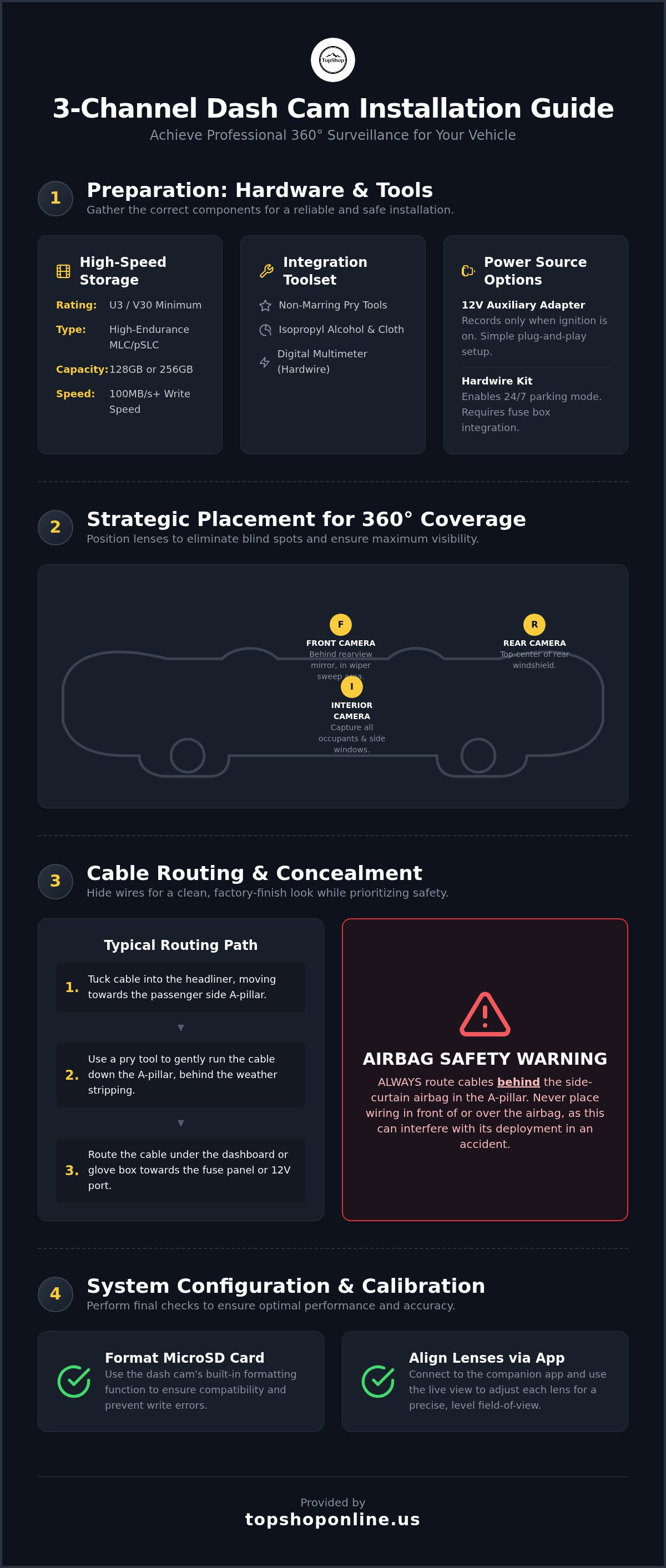
Successful deployment of a multi-lens vehicle surveillance system requires precise hardware synchronization. The Guardian 3-Channel 4K Dash Cam serves as the central processing unit, managing simultaneous front, rear, and interior optical inputs. Mastering how to install a 3 channel dash cam necessitates a comprehensive inventory of technical components, including high-speed storage media, specialized trim tools, and voltage-regulated power kits. Modern Dashboard camera technology relies on these integrated parts to maintain system stability during high-temperature operation and continuous write cycles.
Technical Specifications for Storage Media
Multi-channel 4K recording generates substantial data volumes, requiring specific MicroSD card performance tiers to prevent system lag or write errors. Standard Class 10 cards lack the necessary throughput for the Guardian 3-Channel 4K Dash Cam. Use the following specifications for reliable data retention:
- Write Speed Rating: Minimum U3 (UHS Speed Class 3) or V30 (Video Speed Class 30) is mandatory.
- Card Architecture: High-endurance MLC or pSLC NAND flash cards designed for 24/7 loop recording.
- Storage Capacity: 128GB or 256GB cards provide adequate overhead for three separate high-bitrate video streams.
- Sustained Throughput: Verify 100MB/s minimum write capability to handle 4K front footage combined with dual 1080P secondary feeds.
Essential Toolset for Interior Integration
A professional-grade installation relies on specialized tools to ensure cable concealment without damaging vehicle surfaces. You'll need non-marring plastic pry bars for removing A-pillar covers and headliner edges safely. Prepare a 70% isopropyl alcohol solution and a microfiber cloth for degreasing glass surfaces before applying adhesive mounts. This step ensures long-term bond strength in high-heat environments. If you're performing a hardwire installation for parking mode, a digital multimeter or circuit tester is required to identify constant and ignition-switched fuse slots.
Power Source Components and Options
Power delivery determines the operational modes of the 3-channel system. The Guardian 3-Channel 4K Dash Cam supports two primary connection types:
- 12V Auxiliary Adapter: A direct plug-and-play solution that activates the camera only when the vehicle ignition is on.
- Hardwire Kit: A three-wire connection (Battery, ACC, Ground) that enables 24/7 parking mode recording.
- Voltage Protection: Hardwire kits must include an adjustable low-voltage cutoff to prevent total vehicle battery depletion.
Selecting the correct power source is the final step in the hardware preparation phase before beginning the physical mounting process. Having these tools and components ready ensures the process of how to install a 3 channel dash cam remains efficient and prevents damage to the vehicle's electrical system.
Strategic Placement for 360-Degree Coverage
Achieving total surveillance requires precise geometric alignment of all three lenses. When learning how to install a 3 channel dash cam, the primary objective is to eliminate blind spots while maintaining a clear line of sight for the driver. The Guardian 3-Channel 4K Dash Cam requires specific mounting coordinates to leverage its wide-angle optics effectively. Improper placement can lead to restricted fields of view or legal compliance issues regarding windshield obstructions.
Mount the main front unit directly behind the rearview mirror. This position maximizes the field of view across the hood while hiding the device from the driver's direct line of sight. Ensure the lens sits within the sweep of the windshield wipers to maintain visibility during precipitation. Avoid placing the unit too low, as this creates a significant blind spot in the driver's peripheral vision and may violate local traffic regulations.
Optimizing the Interior Cabin View
The interior lens serves as a primary liability protection tool by recording cabin activity and side-window perspectives. Align this lens to capture all occupants and a portion of the front door windows. For SUVs, a slightly steeper downward angle is required compared to sedans to account for the higher roofline. Ensure the infrared (IR) sensors remain unobstructed by the mirror housing; these sensors are vital for high-definition recording in total darkness. Verifying this alignment during the initial setup of the Guardian 3-Channel 4K Dash Cam prevents the need for adhesive replacement later.
Rear Windshield Mounting Protocol
The rear lens should be located at the top-center of the rear glass for the highest vantage point. Avoid placing the adhesive pad directly over defroster heating elements. Excessive heat from these lines can degrade the adhesive bond over time, causing the camera to detach.
- Thoroughly degrease the glass with isopropyl alcohol to ensure long-term stability.
- Position the lens within the rear wiper's reach for clear footage in wet or snowy conditions.
- Orient the cable connector toward the passenger side to align with the main wiring harness path.
Environmental factors like window tints and ceramic coatings can interfere with 4K clarity. High-performance ceramic tints often contain particles that might degrade GPS signal reception if the antenna is integrated into the mount. Always test the video feed through the mobile app before final adhesive application to ensure the image isn't distorted by factory glass coatings or aftermarket films. This verification step is a critical part of how to install a 3 channel dash cam for professional-grade results.
Cable Routing and Concealment Procedures
Systematic cable management ensures both aesthetic cleanliness and operational safety. When executing the process of how to install a 3 channel dash cam, always initiate routing from the primary front unit toward the power source and peripheral lenses. This sequence allows you to consolidate excess wire length at the termination points rather than at the camera mounts. Maintaining connection integrity requires that all mini-USB and USB-C connectors are fully seated into their respective ports. Utilize strain-relief loops to prevent vibration-induced disconnects during vehicle operation.
Safety protocols dictate that cables must never obstruct side-curtain airbag deployment zones. In modern vehicles, these safety systems often reside within the A-pillar and roofline. Failure to route wires behind the airbag canister can lead to projectile hazards or system failure during an accident. To maintain a high standard of organization, you can apply cable management for home office principles to group and secure the multi-lens harness, ensuring a professional finish without loose slack.
Routing through the Headliner and A-Pillar
Tuck the front power and secondary lens cables into the seam between the windshield glass and the headliner material. Use a plastic pry tool to create a temporary gap, inserting the wire deeply enough to prevent it from sagging over time. Upon reaching the A-pillar, remove the plastic trim cover to expose the underlying frame and airbag module. Route the harness along existing factory wiring looms, securing it with zip ties or adhesive clips. This method ensures the wires remain stationary and do not interfere with the vehicle's safety mechanisms.
Extending the Rear Camera Harness
The rear camera cable requires a longer path, typically following the upper roofline or the lower door sills. For hatchback and SUV architectures, routing along the roofline is often more efficient. Avoid sharp metal edges within the pillar structures to prevent insulation abrasion. When transitioning from the main cabin to the rear hatch, leave approximately 3-5 inches of slack at the hinge point. This allows the trunk or hatch to open fully without putting tension on the cable or the connector. Verifying this range of motion is a vital part of how to install a 3 channel dash cam to prevent long-term hardware damage.
Power Source Integration and Configuration
3-channel 4K systems demand higher current than traditional single-lens units. The Guardian 3-Channel 4K Dash Cam utilizes high-performance image processors that generate significant thermal energy and electrical load during simultaneous multi-feed recording. When planning how to install a 3 channel dash cam, verify that the power supply can sustain a 3.0A peak load. Standard 1.0A or 2.1A USB ports found in older vehicle consoles are insufficient and will cause system instability or loop recording failures.
Total power consumption for 2026-tier three-lens hardware typically ranges from 12.5W to 15W. Insufficient amperage leads to intermittent restarts, MicroSD card corruption, or secondary camera signal loss. Use only high-gauge copper wiring and voltage-regulated adapters to maintain the 5V/2.5A to 3A requirement across the entire harness length.
Hardwire Kit Installation for Parking Mode
Hardwiring is the optimal method for 24/7 surveillance and clean interior integration. A standard three-wire hardwire kit connects directly to the vehicle's internal fuse box. Use a digital multimeter to identify the following connection points:
- Constant Power (Yellow Wire): Identify a fuse that maintains 12V power when the ignition is completely off, such as the hazard lights or central locking system.
- ACC/Switched Power (Red Wire): Locate a fuse that only receives power when the ignition is in the 'On' or 'Accessory' position, such as the radio or auxiliary ports.
- Ground (Black Wire): Secure this to an unpainted metal chassis bolt to complete the circuit and prevent electrical interference.
Most 2026-compliant hardwire kits include an adjustable low-voltage cutoff switch. Set this to 12.0V or 12.4V to ensure the vehicle battery retains enough cold-cranking amps to start the engine after extended parking sessions.
OBD-II and 12V Adapter Alternatives
For users seeking a non-invasive constant power source, the OBD-II adapter provides a plug-and-play alternative to fuse box tapping. This adapter utilizes the diagnostic port's constant power pin and includes an integrated voltage regulator to protect the vehicle's ECU. If you choose a 12V auxiliary adapter, ensure the plug is fully seated within the socket. Vibrations during driving can loosen standard plugs, causing power interruptions that may corrupt video files. While a power strip with usb ports is effective for managing cabin peripherals, the dash cam requires a dedicated, high-amperage connection to maintain 4K signal integrity across three channels.
Order the Guardian 3-Channel 4K Dash Cam to secure a high-resolution monitoring solution with integrated power management features.
System Configuration and Final Calibration
Completion of the physical wiring phase transitions the project into the software initialization stage. Correct configuration is necessary to ensure the high-bitrate data from the Guardian 3-Channel 4K Dash Cam is processed and stored without errors. When finalizing how to install a 3 channel dash cam, the first technical step is formatting the MicroSD card within the unit's system menu. This action optimizes the NAND flash file structure for simultaneous triple-stream recording, preventing the write-speed bottlenecks common with PC-formatted media.
Lens calibration requires the use of the manufacturer's mobile application to access a real-time digital viewfinder. Adjust the vertical tilt of the front, interior, and rear modules until the horizon line sits at the center of the frame. This 50/50 sky-to-road ratio ensures the auto-exposure sensors calculate light levels accurately, preventing underexposed footage of the pavement or overexposed captures of the sky. Verify that the interior lens captures the full width of the cabin, including the B-pillars, to maximize liability coverage during side-impact events.
Firmware Updates and App Synchronization
System stability for 2026-specification hardware depends on the latest firmware patches. Download the manufacturer's app and synchronize it with the camera via the 5GHz WiFi band for faster data transfer. Perform a firmware check immediately; these updates often include critical logic improvements for power management and file recovery. During this phase, configure the auto-download settings for emergency-locked files to ensure critical impact footage is backed up to your mobile device instantly. You should also update the WiFi SSID and password to prevent unauthorized access to the camera's live stream or stored data.
Guardian 3-Channel 4K Dash Cam Optimization
Optimizing the sensor output is vital for 360-degree liability protection. Enable Wide Dynamic Range (WDR) to balance high-contrast environments, such as driving from direct sunlight into a dark tunnel. This feature is particularly important for the interior lens to capture clear facial details despite bright light from the side windows. For additional insights on sensor alignment, review the wireless mini security camera with night vision guide, which details similar calibration techniques for infrared-equipped optics.
Finalize the setup by adjusting the G-sensor sensitivity across the X, Y, and Z axes. Set the sensitivity to 'Medium' to ensure the system locks footage during collisions without filling the storage card with false 'Event' files caused by speed bumps or potholes. Set the loop recording interval to 3 minutes. This duration provides a balanced file size for 4K video, making it easier to manage and transfer during a technical review of the system's performance. Once these settings are confirmed, you've successfully mastered how to install a 3 channel dash cam for professional-grade vehicle monitoring.
Securing 360-Degree Vehicle Surveillance
Executing a professional hardware integration requires strict adherence to technical protocols regarding power stability and cable concealment. This guide has detailed the necessity of 3.0A power delivery, the importance of V30-rated storage media, and the geometric alignment required for total cabin and exterior monitoring. By following these methodical instructions on how to install a 3 channel dash cam, you'll ensure that your vehicle's monitoring system operates with maximum reliability and safety.
Achieving comprehensive coverage depends on utilizing high-specification hardware designed for continuous multi-stream data processing. Purchase the Guardian 3-Channel 4K Dash Cam for Complete Vehicle Security to access 4K Ultra HD front resolution alongside integrated interior and rear monitoring. This hardware supports high-capacity MicroSD storage to maintain extended footage retention across all three channels. Properly executed hardware integration results in a stable, non-obstructive monitoring environment that provides consistent data for liability protection.
Frequently Asked Questions
How long does it take to install a 3-channel dash cam?
A standard installation typically requires 90 to 180 minutes of labor depending on the vehicle's interior complexity and the chosen power source. Hardwiring the Guardian 3-Channel 4K Dash Cam for parking mode increases the time requirement due to fuse box testing and cable concealment. Sedan architectures generally allow for faster routing compared to full-size SUVs or vans where longer cable runs and rear hatch transitions are necessary for complete integration.
Will installing a 3-channel dash cam void my vehicle warranty?
Installing a dash cam does not void a vehicle warranty in the United States under the Magnuson-Moss Warranty Act. The manufacturer can only deny warranty claims if they prove the aftermarket installation directly caused a specific electrical failure. Using a non-invasive power source or a properly fused hardwire kit minimizes this risk. Always verify that fuse taps are seated correctly to maintain the integrity of the vehicle's power distribution center and electrical safety.
Can I install a 3-channel dash cam myself or do I need a professional?
You can successfully perform the installation yourself using standard technical tools and this guide. TopShop focuses on direct e-commerce sales of hardware and does not provide professional installation services. Most users find the process of how to install a 3 channel dash cam manageable with plastic pry tools and a digital multimeter. Self-installation allows for precise control over cable routing paths, component placement, and final calibration within the cabin for optimal coverage.
What is the best way to hide the wires for a rear dash cam?
The most effective method for concealing rear camera wires involves routing them through the headliner gap or behind the plastic door sill plates. Use non-marring trim tools to tuck the cable into the weatherstripping seams along the roofline. For vehicles with a rear hatch, route the wire through the existing rubber grommets to maintain a factory appearance and protect the cable from environmental exposure or mechanical pinching during door movement.
Do I need a special battery pack for 3-channel parking mode?
A dedicated dash cam battery pack is not mandatory but is recommended for extended 24/7 parking mode. 3-channel 4K systems have a higher power draw that can deplete a standard lead-acid vehicle battery faster than single-lens models. A hardwire kit with an integrated low-voltage cutoff provides a secondary solution by terminating power to the camera once the vehicle battery reaches a specific threshold, such as 12.0V or 12.4V, to ensure the engine starts.
How much power does a 3-channel 4K dash cam consume?
A 3-channel 4K system typically consumes between 12.5W and 15W during active recording cycles. This translates to a stable current requirement of 5V/2.5A to 3A. The Guardian 3-Channel 4K Dash Cam requires this high amperage to support the simultaneous processing of three high-bitrate video feeds. Using low-output USB adapters or thin-gauge wiring can result in system crashes, file corruption, or the loss of secondary camera signals during operation.
Can I route the dash cam wires near the airbags?
You must route cables behind the side-curtain airbag modules to ensure safety. Positioning wires across the path of an airbag deployment zone creates a significant projectile hazard and may prevent the airbag from inflating correctly during a collision. Use adhesive clips to secure the harness to the vehicle's metal frame, ensuring the path remains clear of all explosive safety mechanisms. This is a critical safety step when learning how to install a 3 channel dash cam correctly.
What happens if the rear camera cable is too short for my vehicle?
If the provided rear harness is insufficient for the vehicle's length, you must utilize a compatible extension cable. Ensure the extension matches the original connector type, such as a 4-pin or 5-pin mini-USB, to maintain signal integrity and voltage stability. Using an incompatible or low-quality extension can cause voltage drops that prevent the rear camera from functioning. Verify the total cable length before beginning the routing process to avoid hardware tension at hinge points.