

A 20-millisecond delay in switch actuation frequently dictates the margin between competitive victory and hardware-induced failure in high-intensity 2026 gaming environments. Most operators recognize that input lag, key ghosting, and rapid hardware degradation are direct consequences of using substandard interface equipment. Analyzing the technical specifications of mechanical vs membrane gaming keyboards is necessary to optimize input speed and hardware lifecycle. This comparison examines the fundamental differences between individual mechanical switch precision and cost-effective membrane circuit-based architecture.
This report provides a technical breakdown of switch architecture, actuation metrics, and durability ratings to determine the optimal keyboard interface for gaming and high-volume data entry. We present quantifiable actuation data, durability comparisons via keystroke ratings, and acoustic profile analysis for shared workspace environments. The following analysis includes a selection framework based on specific use cases, referencing high-durability hardware such as the RGB Mechanical Gaming Keyboard and wireless console-integrated options for PS5. This data-driven overview transitions from broad hardware categories to granular technical specifications to support efficient, evidence-based procurement decisions.
Key Takeaways
- Assess structural architectural differences between individual spring-loaded mechanical switch housings and three-layer pressure-sensitive silicone dome membrane systems.
- Contrast hardware component longevity via industry-standard keystroke ratings, comparing 100 million click mechanical durability against standard membrane lifecycles.
- Analyze actuation metrics, travel distances, and signal registration speeds to distinguish performance tiers within mechanical vs membrane gaming keyboards.
- Evaluate acoustic profiles and haptic feedback loops to select linear, tactile, or clicky switch types based on environmental noise constraints and tactile accuracy requirements.
- Implement a technical selection framework to calculate 5-year hardware ROI for high-performance mechanical units and console-specific wireless controller interfaces.
Technical Architecture: Mechanical Switches vs. Membrane Domes
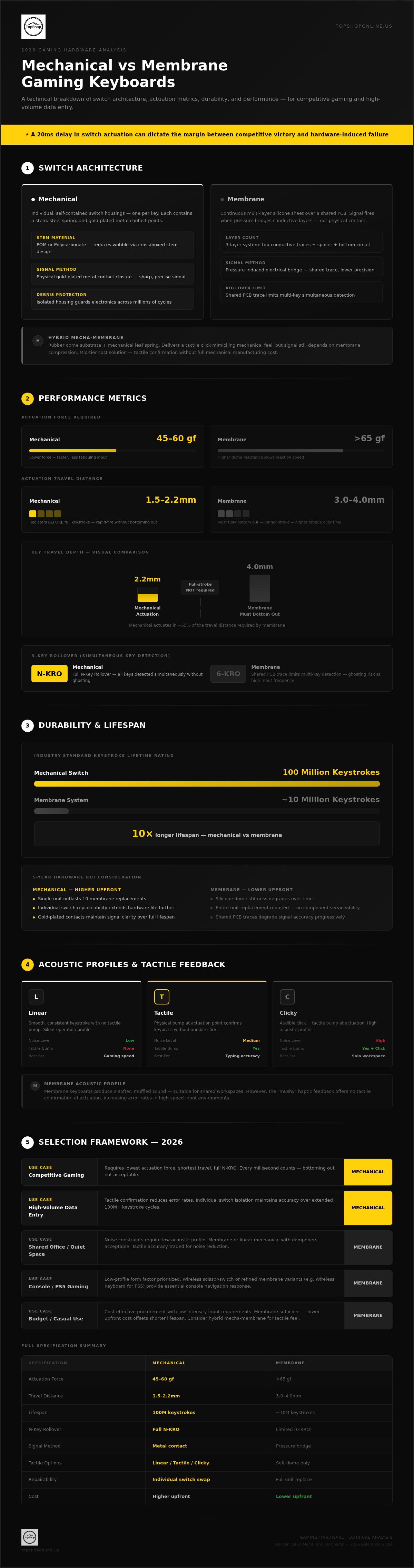
Keyboard performance relies on the underlying circuit activation method and physical housing construction. The primary distinction in mechanical vs membrane gaming keyboards involves the isolation of input signals. Mechanical systems utilize discrete, self-contained switch units for every keycap. Membrane systems employ a continuous, multi-layer silicone sheet over a shared printed circuit board (PCB). This architectural choice determines signal accuracy, reset speed, and hardware reliability during high-frequency input sequences.
Individual Switch Housing Mechanics
High-performance mechanical units, such as the RGB Mechanical Gaming Keyboard - ROG Strix Flare, feature individual housings containing a stem, steel spring, and metal contact points. The stem, often composed of self-lubricating Polyoxymethylene (POM) or high-impact Polycarbonate, slides vertically within the housing to ensure linear or tactile movement. Gold-plated metal contacts provide the electrical bridge. This physical contact closure prevents the "mushy" resistance found in dome-based systems. Key attributes include:
- Stem Design: Cross-shaped or boxed stems stabilize keycaps against horizontal wobble.
- Spring Tension: Consistent resistance levels, measured in grams-force, ensure uniform feedback across the entire layout.
- Contact Integrity: Individual housing protects internal electronics from debris, maintaining signal clarity over millions of cycles.
Membrane Circuitry and Rubber Dome Layers
Standard membrane architecture consists of three distinct layers. A top membrane layer features conductive traces, a middle spacer layer provides separation, and a bottom membrane layer completes the circuit upon physical compression. A rubber or silicone dome sits above these layers to provide rebound force. Signal transmission occurs through pressure-induced electrical bridges rather than physical metal contact. This shared circuit design often limits N-key rollover capabilities, as the PCB struggle to distinguish multiple simultaneous signals on the same trace line. Portable options like the Wireless Keyboard for PS5 Controller utilize refined membrane or scissor-switch variants to maintain a low-profile form factor while providing essential tactile response for console navigation.
Mecha-Membrane Hybrid Integration
Hybrid mecha-membrane designs integrate a standard rubber dome membrane substrate with a supplemental mechanical leaf spring. This configuration generates a crisp tactile click upon actuation, mimicking the sensory profile of a mechanical switch. However, the signal registration still depends on the compression of the conductive membrane layers. It's a specific mid-tier solution for users requiring tactile confirmation without the higher manufacturing cost of full mechanical arrays. This results in a hybrid tactile experience that retains the cost-effective PCB layout of traditional membrane units while enhancing the user's haptic confirmation.
Performance Metrics: Actuation Force, Travel Distance, and N-Key Rollover
Performance optimization in mechanical vs membrane gaming keyboards is defined by measurable actuation metrics and signal registration speed. Actuation force refers to the specific grams-force (gf) required to trigger a keystroke. Standard mechanical switches typically operate between 45gf and 60gf. Membrane systems often require higher initial force to overcome silicone dome resistance, often exceeding 65gf. This disparity impacts millisecond-level reaction speeds during competitive play.
Actuation vs. Bottoming Out
Actuation depth is the physical distance a key travels before the computer registers the input. Mechanical switches offer a shallow actuation point, usually between 1.5mm and 2.2mm. Membrane keyboards require a full 3.0mm to 4.0mm travel distance because the circuit only closes when the key is fully depressed. This requirement is known as bottoming out. Mechanical users can execute rapid-fire commands without completing the full stroke. This reduces finger fatigue and improves input frequency. High-performance units like the RGB Mechanical Gaming Keyboard - ROG Strix Flare utilize these shorter pre-travel distances to maximize responsiveness in fast-paced titles.
Anti-Ghosting and Signal Clarity
Ghosting occurs when a keyboard fails to register multiple simultaneous inputs due to shared circuit paths in low-cost membrane matrices. Most membrane setups are limited to 2-key or 6-key rollover. Mechanical architecture utilizes individual diodes for every switch. This allows for N-Key Rollover (NKRO), where every single keypress is registered independently regardless of how many are pressed at once. This technical advantage is critical for complex MOBA or RTS macros where four or more inputs occur simultaneously. Signal clarity remains consistent because each key operates on its own dedicated electrical path.
Debounce Time and Signal Processing
Debounce time is the millisecond delay required for a mechanical switch to stop vibrating after a press, preventing double-input errors. Modern mechanical controllers use advanced firmware to minimize this delay to under 5ms. Membrane systems don't suffer from physical contact bounce but face latency from the material reset time of the silicone dome. For console users, the Wireless Keyboard for PS5 Controller provides a balanced signal processing rate suitable for integrated chat and navigation without the bulk of full-sized mechanical arrays. Selecting the right interface requires balancing these technical actuation requirements against specific gaming genre demands.
Durability and Lifespan: Keycap Composition and Switch Ratings
Hardware longevity remains a primary differentiator in the mechanical vs membrane gaming keyboards technical comparison. Mechanical units provide significantly higher lifecycle data because each key operates as an independent mechanical assembly. Membrane systems rely on a unified silicone or rubber sheet that suffers from uniform material degradation. While standard membrane hardware provides 5 to 10 million keystrokes, high-performance mechanical switches are rated for 50 to 100 million cycles. This 10x increase in operational life directly impacts the total cost of ownership over a 5-year hardware lifecycle.
Switch Fatigue and Spring Resistance
Mechanical switches utilize high-tensile steel springs that maintain consistent resistance levels throughout their functional life. These springs resist tension decay, ensuring the 45gf or 60gf actuation force remains stable. Membrane domes utilize silicone compounds that undergo physical thinning and loss of elasticity after repeated compression. This results in a "mushy" feel where the key fails to return to its original position with sufficient speed. Mean Time Between Failures (MTBF) for mechanical switches represents the statistically predicted time a component functions before requiring replacement under standard operational conditions. The RGB Mechanical Gaming Keyboard - ROG Strix Flare utilizes these high-rated components to ensure long-term input consistency for competitive users.
Keycap Material and Laser Etching
Keycap composition determines the surface resilience against friction and skin oils. Acrylonitrile Butadiene Styrene (ABS) is a common thermoplastic that develops a glossy "shine" as the material wears down. Polybutylene Terephthalate (PBT) is a technically superior alternative with higher density and chemical resistance. PBT keycaps maintain a textured finish and resist yellowing over time. Integrating these high-durability peripherals with other gaming setup essentials prevents premature hardware replacement. Double-shot injection molding ensures legends never fade; the character is a separate molded plastic layer rather than a surface-printed ink.
Environmental Resilience and Maintenance
Maintenance capabilities differ based on architectural accessibility. Mechanical keyboards frequently feature hot-swappable PCBs, allowing users to pull and replace individual switches without soldering. This modularity extends the device life if a single switch fails. Membrane units use fixed, multi-layer sheets that don't allow for individual repairs. Environmental protection is often measured by Ingress Protection (IP) ratings. Many mechanical designs include drainage ports and internal coatings to achieve IP32 or higher moisture resistance. Conversely, while membrane sheets provide some inherent liquid protection, debris trapped under the dome is difficult to remove without compromising the silicone seal.
User Experience: Acoustic Profiles and Tactile Feedback
User experience in the mechanical vs membrane gaming keyboards technical comparison is defined by acoustic output and haptic response. Membrane systems operate via silicone compression, producing a muted acoustic profile typically measuring between 30 and 40 decibels. Mechanical switches offer three primary profiles: linear, tactile, and clicky. Linear switches provide a smooth travel path without physical interruption. Tactile switches feature a pre-actuation "bump" for haptic confirmation. Clicky switches generate a secondary audible snap to verify signal registration.
Mechanical Sound Signatures
The acoustic signature of blue-style mechanical switches results from a specialized "click" leaf or a sliding jacket within the switch housing. As the stem descends, the jacket is released, striking the bottom of the housing to produce a 50-60 decibel snap. Operators in shared environments often utilize dampening techniques to mitigate this output. Silicone O-rings installed on the keycap stems or internal Poron foam layers within the chassis absorb vibration and reduce the "clack" caused by the stem hitting the top or bottom of the housing.
Tactile Precision and Error Reduction
Haptic feedback loops are critical for reducing input errors in high-stakes environments. The tactile bump in specific switch types signals the user's nervous system that the actuation point's been reached, often before the keycap reaches the bottom of its travel. This physical resistance allows for "feathering" the keys, which reduces the total force applied and minimizes finger fatigue. The RGB Mechanical Gaming Keyboard provides significantly more distinct feedback than standard office peripherals, which often rely on a soft, non-linear dome collapse.
Ergonomic efficiency is influenced by switch weight, measured in grams-force (gf). Light switches (35gf-45gf) facilitate rapid movement but increase the probability of accidental signal registration. Heavy switches (60gf-80gf) require intentional force, providing a more deliberate typing experience that prevents misclicks in RTS or MOBA titles. Selecting an interface based on these acoustic and haptic requirements ensures long-term comfort and operational accuracy. For users prioritizing maximum tactile response and durability, browse our high-performance mechanical hardware inventory to find the optimal switch weight for your setup.
Selection Framework: Choosing the Right Interface for 2026
Selecting between mechanical vs membrane gaming keyboards requires a technical evaluation of return on investment (ROI) over a projected 5-year hardware lifecycle. High-frequency operators should prioritize mechanical assemblies due to the 50 to 100 million keystroke ratings established in previous sections. This durability eliminates the 12 to 18 month replacement cycle typical of silicone-based membrane units, which suffer from dome fatigue and signal degradation. Final procurement decisions must account for actuation speed, environmental noise constraints, and system-specific compatibility requirements.
Gaming vs. Productivity Profiles
Competitive gaming profiles demand linear mechanical switches to achieve low-latency actuation and consistent force curves. These switches facilitate rapid-fire inputs without the reset delay inherent in membrane domes. Casual users or those in shared professional environments benefit from the 30 to 40 decibel acoustic profile of membrane systems, which minimizes environmental noise. Managing a high-performance peripheral ecosystem requires stable power delivery. Utilizing a power strip with usb ports ensures consistent voltage for charging wireless units and powering high-draw RGB controllers within a modern workspace.
Console Integration and Cross-Platform Use
System compatibility is a critical factor for 2026 hardware standards. While wired USB connections provide the highest signal reliability for PC workstations, console users require specialized interfaces. The Wireless Keyboard for PS5 Controller provides a compact, integrated solution for communication and navigation without the footprint of a full-sized desktop unit. For dedicated competitive play, the RGB Mechanical Gaming Keyboard remains the standard for wired 1,000Hz polling rates and 100% anti-ghosting capabilities. 2.4GHz wireless mechanical options now offer parity with wired latency, though they require more frequent power management than their passive membrane counterparts.
Final Selection Criteria
Determine the optimal interface by mapping hardware specifications to the following data density requirements:
- High-Intensity Gaming: Prioritize mechanical units with linear switches, PBT keycaps, and N-key rollover for maximum input precision.
- High-Volume Data Entry: Select tactile mechanical switches to utilize the haptic bump for error reduction and reduced finger fatigue.
- Shared Workspace/Budget: Opt for high-grade membrane systems to maintain low acoustic signatures and minimize upfront capital expenditure.
- Console-Specific Setup: Utilize dedicated wireless controller keyboards to maintain ergonomic integration with existing gamepads.
Technical data confirms that while membrane systems offer a lower entry cost, the mechanical interface provides superior measurable performance and long-term hardware stability.
Optimizing Peripheral Performance for 2026 Hardware Standards
Technical analysis of mechanical vs membrane gaming keyboards confirms that hardware selection is a function of actuation requirements and long-term durability metrics. Mechanical switches provide a 10x increase in keystroke lifespan compared to silicone dome counterparts. These individual switch housings ensure signal clarity and prevent the input lag associated with shared membrane circuit paths. Users requiring millisecond-level reaction speeds and N-key rollover must prioritize mechanical architecture to maintain competitive performance levels across all high-intensity gaming sessions.
TopShop maintains an inventory of 2026-ready gaming essentials designed for high-intensity data density and rapid execution. Every peripheral includes comprehensive technical specifications to support informed procurement decisions. National US shipping ensures rapid delivery of heavy mechanical units and console-integrated wireless options for PS5 setups. It's efficient to upgrade to hardware that matches your specific performance data. View High-Performance RGB Mechanical Gaming Keyboards at TopShop to secure a reliable, high-durability interface for your workstation configuration. Selecting the correct hardware interface ensures consistent input accuracy and operational stability for years of high-volume use.
Frequently Asked Questions
Is a mechanical keyboard better for gaming than a membrane one?
Mechanical keyboards are technically superior for competitive gaming due to individual switch actuation and N-key rollover capabilities. These units offer 1.5mm to 2.2mm actuation points, reducing input delay compared to membrane systems. The ability to register every keypress independently prevents signal ghosting during complex macros. While membrane options are cost-effective, they lack the precision and rapid reset speeds required for professional-tier FPS or MOBA gameplay.
How long does a membrane gaming keyboard typically last?
Membrane gaming keyboards typically last between 5 million and 10 million keystrokes before material failure occurs. The silicone or rubber dome layers lose tactile resistance and elasticity over time, leading to inconsistent signal registration. This hardware degradation is uniform across the entire circuit sheet. In contrast, mechanical units provide 50 million to 100 million cycles, representing a significantly higher hardware lifecycle and better long-term ROI for high-frequency operators.
Can I use a mechanical keyboard with a PS5 or Xbox?
Mechanical keyboards are compatible with PS5 and Xbox consoles via standard USB-A ports or 2.4GHz wireless adapters. Wired units like the RGB Mechanical Gaming Keyboard provide plug-and-play functionality for supported titles. For users requiring integrated chat and navigation, the Wireless Keyboard for PS5 Controller offers a console-specific form factor. Standard HID compliance ensures that most modern mechanical hardware functions across PC, Mac, and current-generation console ecosystems.
What are the loudest mechanical keyboard switches?
Blue-style clicky switches are the loudest mechanical keyboard switches due to the internal click leaf or sliding jacket mechanism. These switches generate a sharp audible snap measuring between 50 and 60 decibels upon actuation. This acoustic profile provides secondary confirmation of signal registration but may be disruptive in shared workspaces. Operators seeking quieter performance should utilize linear red switches or install silicone O-ring dampeners to reduce the impact noise of the stem hitting the housing.
Do membrane keyboards have more input lag?
Membrane keyboards exhibit higher input lag because they require a full 3.0mm to 4.0mm travel distance to complete the electrical circuit. This requirement increases the time between physical intent and signal registration. Mechanical switches actuate mid-stroke, significantly reducing this delay. Additionally, the slower material reset time of silicone domes limits the speed of repeated inputs. In the technical comparison of mechanical vs membrane gaming keyboards, mechanical units consistently demonstrate lower latency.
Are mechanical keyboards worth the extra cost for non-gamers?
Mechanical keyboards provide significant value for non-gamers engaged in high-volume data entry or professional writing. Tactile switches offer physical confirmation of every keystroke, which reduces typing errors and finger fatigue. The consistent resistance of steel springs ensures a uniform experience across the entire layout. While the initial investment is higher, the 50 million keystroke durability and superior ergonomic feedback justify the cost for users prioritizing long-term productivity and hardware reliability.
What is the difference between red, blue, and brown switches?
The technical differences between red, blue, and brown switches involve their internal stem architecture and acoustic profiles. Red switches are linear, providing smooth travel with a 45gf actuation force. Blue switches are clicky, featuring a 60gf force and a distinct audible snap. Brown switches are tactile, offering a physical bump without the loud click. These variations allow users to select an interface based on specific noise constraints and the desired level of haptic feedback.
Can you replace individual keys on a membrane keyboard?
Individual keycaps can be removed for cleaning on membrane keyboards, but the underlying switch mechanism is not replaceable. Because membrane units utilize a unified, three-layer silicone sheet over a shared PCB, damage to a single dome often requires replacing the entire unit. Mechanical keyboards feature modular, self-contained switch housings. This architecture allows for the replacement of individual faulty switches or the installation of custom keycaps, significantly improving the maintenance and repairability of the hardware.