

An input lag measurement exceeding 40ms eliminates the technical viability of any portable projector for competitive gaming applications. High-latency hardware and low-lumen output frequently result in unplayable frame delays and washed-out images in environments with ambient light. Understanding how to choose a portable projector for gaming requires a strict focus on measurable hardware performance, specifically targeting sub-30ms response times and native 1080P resolution over upscaled alternatives. This data-driven approach ensures that your hardware maintains parity with modern console and PC output standards.
This guide provides a technical evaluation framework for selecting portable gaming hardware based on input lag, refresh rate, and connectivity protocols. The analysis includes critical specifications such as the 120Hz refresh rate standard for PS5 and Xbox Series X, 500 to 1000+ ANSI lumen brightness requirements, and HDMI 2.1 bandwidth capabilities. The framework identifies the differences between native and supported resolutions while verifying hardware compatibility with external peripherals like the RGB Mechanical Gaming Keyboard - ROG Strix Flare. This overview covers integrated Android OS features, Miracast wireless standards, and the physical mounting requirements necessary for small-space configurations in 2026. Data points include 4.2ms low-latency modes and 240Hz refresh rate availability for high-end PC builds.
Key Takeaways
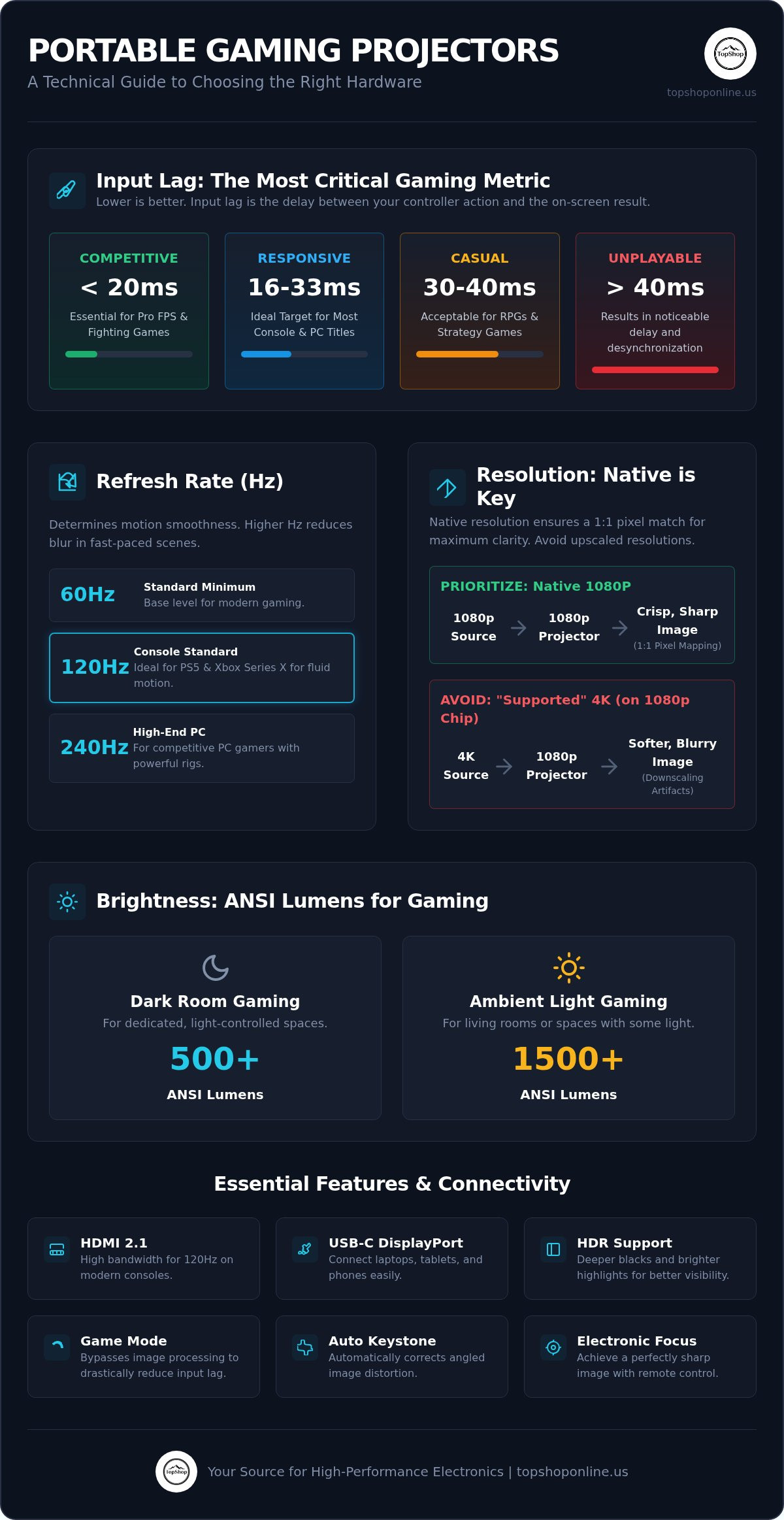
- Target hardware with input lag between 16ms and 33ms to ensure competitive responsiveness in fast-paced titles.
- Learn how to choose a portable projector for gaming by prioritizing native 1080P resolution, as seen in the Smart Projector Wifi Portable 1080P, over supported scaling.
- Evaluate brightness using ANSI lumen standards, requiring at least 500 lumens for dark environments and 1500+ lumens for rooms with ambient light.
- Verify HDMI 2.1 or USB-C DisplayPort Alt Mode compatibility for high-bandwidth data transmission from consoles and mobile devices.
- Select units featuring auto-keystone correction and electronic focus sensors for rapid hardware deployment in temporary or small-scale spaces.
Input Lag and Refresh Rate Requirements for Gaming Performance
Input lag represents the temporal delay measured in milliseconds between a user's physical controller input and the subsequent visual execution on the projection surface. For high-speed competitive titles, hardware must maintain an input lag threshold between 16ms and 33ms to prevent gameplay desynchronization. Identifying how to choose a portable projector for gaming involves evaluating these specific latency benchmarks alongside the physical limitations of video projector technology found in compact chassis. Excessive image processing features, such as motion smoothing and digital keystone correction, often increase total system latency by 20ms or more. Users should prioritize units that offer a direct signal path to the internal display engine.
Low Latency Standards for Console and PC
Millisecond benchmarks vary across gaming genres. First-person shooters (FPS) and fighting games require sub-20ms response times for frame-perfect execution. Role-playing games (RPG) and strategy titles remain functional within the 30ms to 40ms range. Most high-performance portable projectors include a dedicated Game Mode. This hardware bypass disables non-essential digital processing to reduce internal latency. Pairing a low-latency projector with high-speed input devices, such as an RGB Mechanical Gaming Keyboard - ROG Strix Flare or a Wireless Keyboard for PS5 Controller, creates a unified high-response environment. These peripherals ensure that the bottleneck doesn't shift from the display to the input hardware.
Refresh Rates and Frame Consistency
Refresh rate, measured in Hertz (Hz), dictates how many times per second the projector updates the displayed image. A 60Hz refresh rate is the standard minimum for modern portable hardware, providing 60 updates per second. High-motion sequences benefit from 120Hz or 240Hz capabilities, which reduce visible motion blur and ghosting. Portable LED light sources often face thermal and power limitations when operating at extreme refresh rates. This can result in brightness fluctuations or reduced color accuracy during high-speed pixel response scenarios. Modern portable chipsets now incorporate frame synchronization technology to align the projector's output with the variable frame rates of gaming consoles. This synchronization prevents screen tearing and ensures a consistent visual experience during rapid camera movements. When determining how to choose a portable projector for gaming, verify the native Hz support rather than software-interpolated rates.
Resolution, Aspect Ratio, and Contrast Ratio Specifications
A 1920x1080 native resolution standard ensures one-to-one pixel mapping for modern gaming consoles. This specification eliminates the blur and visual artifacts associated with digital downscaling. Native 1080P hardware provides the sharpness necessary for reading small user interface (UI) text and identifying distant in-game objects. When researching how to choose a portable projector for gaming, verify the physical pixel count rather than the maximum input signal compatibility. Reviewing native specifications like those of the Smart Projector Wifi Portable 1080P ensures hardware compatibility with high-definition assets without the degradation caused by resolution interpolation.
Native Resolution vs. Supported Resolution
Native resolution refers to the fixed physical pixel array of the internal display chipset. Supported resolution indicates the maximum signal the projector can receive and process before downscaling to its native output. High-density pixel arrays are essential for 100-inch projections to avoid the screen-door effect. This phenomenon occurs when the space between pixels becomes visible to the human eye. Maintaining a 16:9 aspect ratio is standard for console and PC gaming to prevent image stretching or letterboxing. Hardware with 1080P native output maintains text legibility and fine detail in complex gaming environments. Users should avoid 480P or 720P native units for gaming; these resolutions lack the pixel density required for modern graphical fidelity.
HDR and Dynamic Contrast Parameters
High Dynamic Range (HDR) support, specifically HDR10 and HLG, allows for an expanded color gamut and improved shadow detail. This technology is critical for visibility in dark game environments where standard dynamic range (SDR) hardware crushes black levels. Contrast ratio metrics define the depth of black levels and the peak brightness of whites. Technical evaluations distinguish between two primary measurements:
- Static Contrast: The ratio of brightest to darkest values within a single static frame.
- Dynamic Contrast: A software-driven measurement that adjusts the light source intensity based on scene brightness.
For gaming in rooms with ambient light, a high static contrast ratio is more valuable than inflated dynamic figures. Color accuracy standards like Rec.709 ensure that in-game colors match the developer's intent. Higher-end portable units targeting DCI-P3 coverage provide more vibrant and saturated tones. Accurate color reproduction and deep contrast ratios are essential for maintaining visual immersion in titles with high-contrast art styles. Identifying how to choose a portable projector for gaming requires balancing these optical specifications against the physical portability of the hardware.
Brightness Levels and Ambient Light Management
Standardized light output measurement is a critical variable when determining how to choose a portable projector for gaming. ANSI lumens represent the industry standard measurement protocol, derived from a nine-point average of brightness across the entire projection surface. Many manufacturers utilize non-standardized metrics such as "LED lumens" or "Lux" to inflate performance specifications. These marketing figures often exceed the actual ANSI rating by 300% or more, leading to poor visibility in real-world conditions. High-utility hardware must provide enough luminous flux to maintain the contrast ratios established in the previous section, especially when projecting onto non-specialized surfaces.
ANSI Lumens vs. Marketing Lumens
The ANSI lumen standard requires measuring white light output at nine specific points on a projected grid. This ensures that the brightness is consistent from the center to the corners of the image. Marketing terms like "LED lumens" factor in the Helmholtz-Kohlrausch effect, which describes how the human eye perceives highly saturated colors as brighter than they actually are. While this perception exists, it doesn't change the physical measurable light hitting the screen. Users should prioritize hardware that explicitly lists ANSI ratings to ensure the device can overcome environmental light pollution.
Environmental lighting conditions dictate the necessary brightness threshold for playable frame rates. Dedicated dark rooms or nighttime outdoor environments function effectively with hardware providing 500 to 800 ANSI lumens. Conversely, spaces with uncontrolled ambient light or daytime use require a minimum of 1500 ANSI lumens to prevent image washout. When you evaluate how to choose a portable projector for gaming, consider the primary usage location. If the intended space has windows or overhead lighting, a low-lumen portable unit will struggle to render dark game textures and shadow details.
Light Source Longevity and Efficiency
Modern portable hardware, including the Smart Projector Wifi Portable 1080P, utilizes solid-state LED light engines instead of traditional high-pressure mercury lamps. LEDs offer a significant advantage in life cycle durability, typically rated between 20,000 and 30,000 hours of operation. This eliminates the maintenance requirements associated with lamp-based units, which often require replacement every 3,000 to 5,000 hours. LED sources also provide instant on/off capabilities, reaching full brightness without the warm-up periods required by older technology.
Power consumption efficiency is another primary benefit of LED-based projection. These light engines consume less wattage per lumen than traditional bulbs, making them ideal for battery-powered or portable configurations. This efficiency allows for longer gaming sessions when drawing power from portable stations or internal cells. Color stability remains high throughout the lifespan of the LED, whereas traditional lamps often shift toward yellow or green spectrums as they age. This consistency ensures that the color accuracy standards mentioned previously remain intact over several years of heavy use.
High-brightness operation generates internal heat that requires active thermal management. Compact chassis designs utilize high-RPM fans and copper heat sinks to dissipate thermal energy from the light engine and processing chipsets. Efficient cooling is necessary to prevent hardware throttling or premature component failure. Users should check the acoustic output ratings of the cooling system. Fan noise exceeding 35dB can become intrusive during quiet gameplay sequences if the projector is positioned near the player's seating area. Balanced thermal designs maintain peak brightness while keeping operational noise at manageable levels.
Connectivity Hardware and Wireless Interface Standards
High-bandwidth physical interfaces and low-latency wireless protocols determine the functional compatibility of portable hardware with modern consoles and peripherals. When evaluating how to choose a portable projector for gaming, users must verify the specific versioning of HDMI and USB ports to ensure support for high frame rates and HDR metadata. Physical connectivity remains the most reliable method for maintaining the sub-30ms input lag benchmarks established in earlier technical evaluations.
Wired Interface: HDMI and USB-C
Physical port density and standard compliance are mandatory for connecting high-performance hardware like the PlayStation 5, Xbox Series X, and Nintendo Switch. HDMI 2.0 supports 4K resolution at 60Hz, while HDMI 2.1 provides the 48Gbps bandwidth necessary for 4K at 120Hz and Variable Refresh Rate (VRR). USB-C DisplayPort Alt Mode integration allows for direct, single-cable connections from laptops and mobile devices, providing both video signal and power delivery in specific configurations. Audio Return Channel (ARC) or Enhanced Audio Return Channel (eARC) functionality is necessary for soundbar integration, ensuring high-fidelity audio without additional cabling. Integrating these ports into a comprehensive Gaming Setup Essentials 2026 build minimizes cable clutter and signal interference.
Wireless Protocols and Smart OS Integration
Wireless connectivity performance has advanced with the implementation of WiFi 6 (802.11ax) and Bluetooth 5.0+ standards. WiFi 6 utilizes Orthogonal Frequency Division Multiple Access (OFDMA) to reduce congestion and latency, making it the preferred standard for cloud gaming platforms like Xbox Cloud Gaming or NVIDIA GeForce NOW. Bluetooth 5.0 provides the bandwidth and range necessary for low-latency audio synchronization with external speakers or headsets, preventing the desynchronization common in older 4.2 protocols. Standalone functionality is provided through integrated Android OS, allowing for direct execution of streaming applications without external source devices. This hardware configuration is detailed in the Smart WiFi Projector 1080P Portable Guide. For mobile gaming, hardware-level support for AirPlay and Miracast ensures stable screen mirroring from iOS and Android devices. To build a high-utility mobile setup, browse certified 1080P portable projectors with integrated smart features and high-speed wireless modules.
Portable Ergonomics and Mounting Hardware Configuration
Rapid deployment in temporary environments requires automated optical adjustment hardware. Manual calibration increases setup time and reduces the utility of mobile gaming configurations. When determining how to choose a portable projector for gaming, prioritize units with integrated sensors that handle geometry correction without user intervention. Compact dimensions, typically under 3 lbs (1.36 kg), and small cubic volumes are essential for transportability in standard backpacks or carrying cases. Most high-utility units include a standard 1/4-inch tripod socket on the base for secure mounting on surfaces like the Deskpro XL Ergonomic Adjustable Laptop Bed Desk, which provides a stable, elevated platform for temporary setups. This physical versatility ensures that the hardware functions in diverse spatial constraints without requiring permanent installation.
Auto-Keystone and Focus Correction Sensors
Automated alignment systems utilize Time-of-Flight (ToF) sensors and CMOS cameras to measure the distance and angle between the lens and the projection surface. This hardware enables instant autofocus, eliminating the need for manual dial adjustments. 4-point corner correction allows for horizontal and vertical keystone alignment, permitting the projector to sit at an offset angle relative to the screen. Digital zoom functionality provides a method to reduce the image size without physically moving the hardware, which is critical in constrained spaces. These sensors ensure a perfectly rectangular 1080P image regardless of the mounting surface or device position. Advanced firmware handles these calculations in under three seconds, maintaining the efficiency required for rapid gaming setup. It's a critical feature for players who move their equipment between different rooms or travel frequently.
Battery Capacity and Power Consumption
Internal power management is defined by Watt-hour (Wh) and milliamp-hour (mAh) ratings. High-utility portable projectors require sufficient capacity for continuous gaming sessions, typically exceeding 2.5 hours of runtime on a single charge. Support for USB-C Power Delivery (PD) enables charging via external power banks, extending untethered play in outdoor or remote locations. Integrated audio hardware usually consists of dual 3W or 5W speakers with a frequency range optimized for mid-to-high frequencies. While these speakers provide standalone utility, the Bluetooth 5.0 protocols discussed in the previous section remain the primary method for high-fidelity audio output. Total power draw varies based on brightness settings; operating at maximum ANSI lumens will reduce battery life significantly compared to eco-modes. Verify that the internal chipset supports rapid charging to minimize downtime between sessions. It doesn't matter how powerful the light engine is if the battery capacity can't sustain a full match or mission. Selecting hardware with high-efficiency LED sources and robust mAh ratings remains the standard for mobile performance in 2026.
Optimizing Portable Gaming Hardware Configurations
Selecting a high-performance display requires balancing millisecond response times with optical clarity and environmental light management. Key technical benchmarks for 2026 include sub-30ms input lag, native 1080P pixel arrays, and at least 500 ANSI lumens for controlled lighting environments. Understanding how to choose a portable projector for gaming involves verifying these physical hardware specifications against manufacturer marketing claims. Integrated sensors for focus and keystone correction further ensure rapid deployment in diverse spatial configurations. It's essential to prioritize hardware that supports high-bandwidth interfaces like HDMI 2.1 for current-generation console compatibility. These features prevent the desynchronization and visual degradation common in low-tier mobile hardware.
For hardware meeting these rigorous standards, View the Smart Projector Wifi Portable 1080P at TopShop. This unit features native 1080P hardware resolution, integrated smart WiFi connectivity, and a high-density technical specification design optimized for modern gaming consoles. Maintaining a spec-driven approach ensures consistent frame delivery and visual fidelity across all mobile gaming applications. Utilizing verified data points allows for the creation of a reliable, high-performance gaming environment in any temporary location.
Frequently Asked Questions
Can I use a portable projector for competitive gaming?
Yes, provided the hardware meets the sub-30ms input lag benchmark. Competitive play requires rapid frame delivery and high refresh rates to maintain parity with opponents. Hardware like the Smart Projector Wifi Portable 1080P supports these requirements through low-latency display engines. Users must prioritize units with a dedicated Game Mode to bypass internal image processing. Without these specific hardware features, competitive desynchronization occurs during high-speed gameplay sequences.
What is the minimum ANSI lumen rating for a gaming projector?
The minimum requirement depends on environmental light pollution. For dedicated dark rooms, 500 to 800 ANSI lumens provide sufficient brightness for clear image reproduction. Environments with ambient light require a minimum of 1500 ANSI lumens to prevent washed-out textures. Determining how to choose a portable projector for gaming involves matching this rating to the intended usage space. Standardized ANSI measurements ensure consistent performance across the entire projection surface.
Does a 1080P portable projector work with a PS5 or Xbox?
Yes, 1080P portable projectors are fully compatible with PS5 and Xbox consoles via HDMI 2.0 or 2.1 interfaces. While these consoles support 4K output, they automatically downscale the signal to match the projector's native resolution. This configuration maintains high frame rates and HDR metadata transmission. Using high-speed cables ensures the 1080P signal remains stable during high-motion sequences. Hardware like the Smart Projector Wifi Portable 1080P provides the necessary physical ports for these connections.
What is the difference between native and supported resolution in projectors?
Native resolution identifies the physical pixel array of the internal chipset, such as a 1920x1080 grid. Supported resolution refers to the maximum signal resolution the device can receive before downscaling it to the native output. For gaming, only the native resolution dictates the final image sharpness. Hardware with low native resolution will produce blurry images even if it supports 4K input. Always verify the physical pixel count to ensure visual fidelity during gameplay.
How do I reduce input lag on a portable projector?
Reduce input lag by activating the dedicated Game Mode in the hardware settings. This mode disables digital processing features like motion smoothing, noise reduction, and advanced keystone correction. Use a wired HDMI connection instead of wireless mirroring to eliminate transmission delays. Additionally, ensure the source device output matches the projector's native refresh rate. These steps minimize the temporal delay between controller input and on-screen execution for more responsive hardware performance.
Is a battery-powered projector bright enough for outdoor gaming?
Battery-powered units are optimized for nighttime outdoor use where ambient light is minimal. Most portable LED projectors provide 500 to 800 ANSI lumens, which is insufficient for daylight operation. Outdoor gaming requires a controlled, dark environment to maintain visible contrast ratios. High-capacity mAh batteries sustain these brightness levels for approximately 2 to 3 hours. For extended sessions, connecting the device to a power bank via USB-C PD maintains peak light output throughout the session.
Do I need a special screen for a portable gaming projector?
A specialized projector screen is not mandatory but improves visual performance. High-gain screens reflect more light toward the viewer, increasing perceived brightness and contrast. Simple matte white surfaces or light-colored walls function effectively for casual use. However, dedicated screens eliminate surface textures that can distort fine 1080P details. For mobile setups, a portable pull-up screen or a tensioned fabric screen provides a consistent, flat surface for optimal image geometry and clarity.
Can I connect a wireless gaming keyboard to a smart projector?
Yes, wireless gaming keyboards connect via Bluetooth 5.0 or integrated USB ports. Smart projectors with integrated Android OS recognize HID-compliant devices for navigational and gaming inputs. Peripherals such as the RGB Mechanical Gaming Keyboard - ROG Strix Flare or a Wireless Keyboard for PS5 Controller enhance the user interface experience. These devices provide lower latency and better tactile feedback than standard remote controls. Verify the projector's Bluetooth version to ensure stable, low-latency connectivity with external peripherals.