

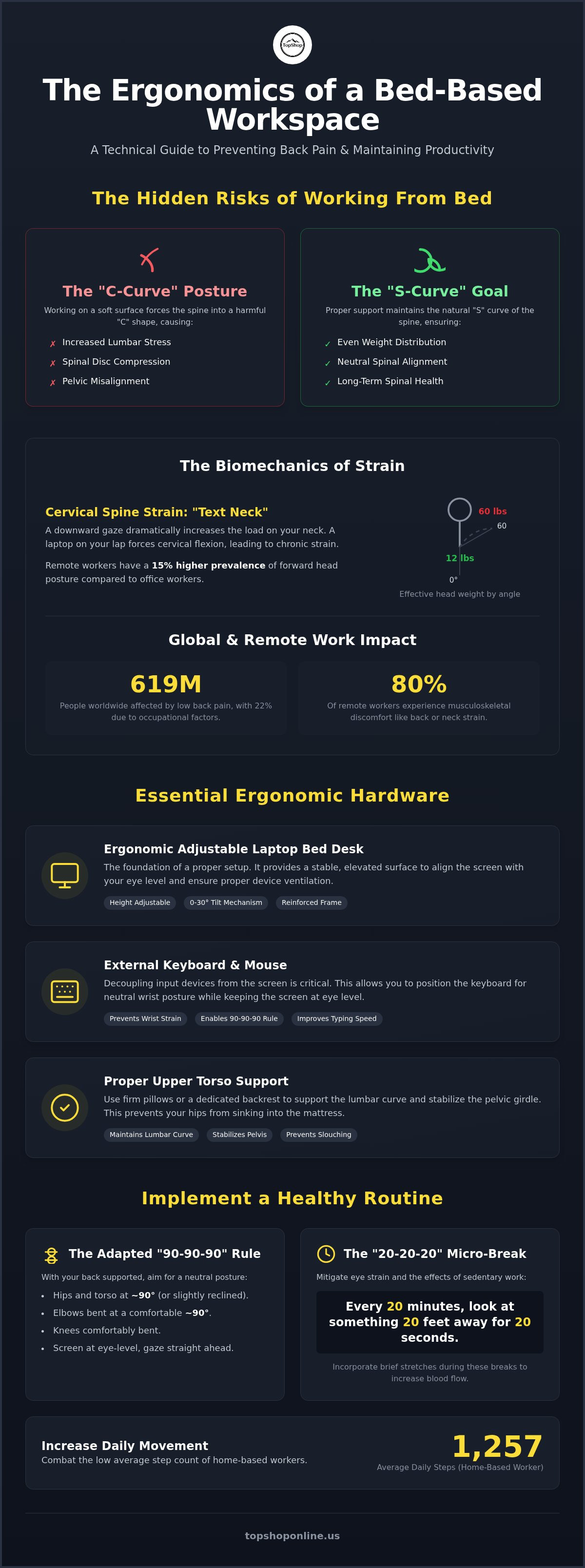
Occupational ergonomic factors account for 22% of the disability burden from low back pain, a condition currently affecting over 619 million people worldwide. Recent 2025 data shows that 80% of remote workers experience musculoskeletal discomfort, often manifesting as lower back stiffness or neck strain from unoptimized screen angles. Effectively preventing back pain while working from bed is a technical challenge that requires specific hardware configurations and precise postural alignment. You've likely experienced the physical fatigue associated with prolonged laptop use on soft, non-supportive surfaces and require a method to maintain professional productivity without compromising spinal integrity.
This guide provides the technical requirements and physical adjustments necessary to maintain long-term spinal health in a bed-based workspace. You'll learn to utilize the Deskpro XL Ergonomic Adjustable Laptop Bed Desk, a reinforced, multi-angle, height-adjustable workstation, to achieve optimal screen elevation and wrist positioning. We'll examine the integration of external mechanical keyboards, multi-outlet high-density power strips, and interval-based movement routines designed to mitigate spinal compression and increase daily step counts from the current 2025 home-based average of 1,257.
Key Takeaways
- Identify the biomechanical risks of "C-curve" posture and cervical spine strain to prevent long-term lumbar disc compression.
- Utilize the Deskpro XL Ergonomic Adjustable Laptop Bed Desk for precise screen elevation and tilt adjustments when preventing back pain while working from bed.
- Apply the adapted "90-90-90" alignment rule and proper upper torso support to maintain a neutral spinal position during extended sessions.
- Establish a 20-20-20 micro-break routine and specific stretching intervals to mitigate the physical effects of sedentary work.
- Configure a complete mobile workstation using external wireless keyboards and multi-outlet power strips to separate input devices from display heights.
The Biomechanics of Spinal Strain When Working From Bed
The human spine is engineered to maintain a natural S-curve, which facilitates even weight distribution across the vertebral discs. Working from a bed often forces the body into a "C-curve" or kyphotic posture. This occurs because mattresses lack the structural density of ergonomic seating. Without a firm base, the pelvis tilts posteriorly, causing the lumbar spine to lose its inward arch. This misalignment increases mechanical stress on the lower back. Successfully preventing back pain while working from bed requires a technical understanding of how these soft surfaces destabilize the musculoskeletal system.
Lumbar Support and Pelvic Alignment
The lumbar region requires specific resistance to maintain a neutral arch. Standard bedding materials, including memory foam and spring mattresses, are designed for weight distribution during sleep, not for vertical support. Pillows used for lumbar support often compress under the weight of the torso, providing inconsistent pressure. This leads to hip misalignment. When the hips sink deeper than the knees, it creates a chain reaction of tension that travels through the spinal column to the upper back. Proper Ergonomics in a bed environment necessitates a rigid, adjustable support system to stabilize the pelvic girdle and preserve the lumbar curve.
Cervical Spine and Eye Level Mechanics
Laptops placed directly on lap surfaces or low tables force the user into a sustained downward gaze. This cervical flexion creates the "text neck" phenomenon. While a human head weighs approximately 10 to 12 pounds in a neutral position, the effective load on the neck increases significantly as the head tilts forward. At a 60-degree angle, the cervical spine must support a force equivalent to 60 pounds. This leads to chronic strain in the neck and shoulder stabilizers. Visual fatigue also increases when the screen is not aligned with the natural eye level, forcing the ocular muscles to work harder. Preventing back pain while working from bed involves elevating the display to minimize this cervical load.
Long-term physiological effects of these postural errors include reduced intervertebral disc hydration and chronic spinal compression. 2025 studies show that 82.7% of office workers exhibit forward head posture, with remote workers showing a 15% higher prevalence. Consistent compression of the spinal discs can lead to nerve impingement and permanent changes in muscle length. Technical solutions like the Deskpro XL Ergonomic Adjustable Laptop Bed Desk provide the necessary height and tilt adjustments to counteract these biomechanical risks.
Essential Hardware for an Ergonomic Bed Workspace
Preventing back pain while working from bed requires a transition from standard soft surfaces to specialized ergonomic hardware. A primary technical requirement is a stable, non-porous working surface that isolates the laptop from heat-trapping bedding. Standard mattresses and blankets impede fan intake, which leads to thermal throttling and potential hardware failure. A dedicated workstation surface ensures constant airflow, maintaining device performance and user safety. High-density materials and rigid frames are necessary to provide the resistance that soft pillows cannot offer.
The Role of Adjustable Laptop Bed Desks
The Deskpro XL Ergonomic Adjustable Laptop Bed Desk serves as the primary structural foundation for a mobile office. It features a high-strength aluminum and composite frame with independent height adjustment legs. These specifications allow the user to elevate the laptop screen to align with their horizontal line of sight, which is essential to prevent back problems and reduce cervical spine load. The integrated tilt mechanism supports a variable surface angle from 0 to 30 degrees. This specific tilt facilitates neutral wrist extension, preventing the repetitive strain associated with typing on flat surfaces while in a reclined or semi-seated position.
Integrating External Peripherals and Power
Proper bed-based ergonomics requires decoupling the input device from the display unit. Utilizing a laptop's integrated keyboard often necessitates a lowered screen height, leading to the cervical strain discussed in previous sections. Integrating external peripherals, such as the RGB Mechanical Gaming Keyboard - ROG Strix Flare, allows the laptop to remain elevated on the Deskpro XL while the keyboard is positioned for optimal forearm support. This separation is the only way to achieve the 90-degree elbow angle required for long-term comfort and joint health.
Managing a multi-device setup in a confined bed space requires organized power distribution and safety protocols. A Power Strip with 6 AC Outlets & 6 USB Ports provides the necessary capacity for laptops, smartphones, and peripheral lighting without overloading single wall sockets. To ensure safety, users must implement cable management for home office standards by securing cords away from the mattress edges. Using a dedicated power strip with usb ports eliminates the need for multiple wall adapters, reducing bulk and heat generation near flammable bedding materials. Organizing these tools is a key component of preventing back pain while working from bed. For those building a professional mobile workstation, TopShop provides the essential integrated hardware solutions required for a high-performance home office.
Proper Body Alignment and Posture Techniques for Bed Use
Applying the 90-90-90 ergonomic standard within a bed environment requires specific modifications to account for the lack of a traditional seat pan. This framework dictates that the hips, knees, and elbows should maintain 90-degree angles to minimize joint pressure. Achieving this in bed necessitates placing high-density foam wedges or firm pillows under the knees to prevent the legs from lying flat, which can lead to lower back strain. Proper alignment is a fundamental requirement for preventing back pain while working from bed, as it stabilizes the kinetic chain from the sacrum to the skull.
Upper torso support must be rigid and consistent. Standard headboards often lack the necessary verticality for productive work, leading to a slouched or reclined position that encourages posterior pelvic tilt. Utilizing a flat wall surface or a dedicated ergonomic backrest provides the resistance needed to maintain an upright posture. This stability ensures that the shoulder blades remain retracted and the chest open, reducing the risk of thoracic kyphosis. Users should position themselves so the lower back is flush against the support surface to prevent or reduce back pain during long sessions.
The Seated Bed Posture Framework
Maintaining a neutral pelvis is the primary goal of the seated bed configuration. The Deskpro XL Ergonomic Adjustable Laptop Bed Desk should be adjusted so the height of the work surface aligns with the user's natural elbow height when seated upright. This prevents shoulder shrugging or reaching, which are common causes of upper back tension. Forearms must remain parallel to the surface, with wrists in a neutral, non-extended position to avoid repetitive strain on the carpal tunnel. Circulation is maintained by ensuring that the edge of the bed desk does not press against the thighs or restrict blood flow to the lower extremities.
Optimizing the Viewing Triangle
The viewing triangle consists of the relationship between the eyes, the screen, and the keyboard. To minimize cervical strain, the top third of the laptop screen must be at horizontal eye level. This positioning eliminates the need for downward head tilt. The focal distance should be maintained between 20 and 30 inches to reduce ocular fatigue. Adjusting the tilt functionality of the Deskpro XL helps eliminate glare from overhead lighting, which often forces users into awkward leaning positions to see the display clearly. Precise hardware adjustment is a critical step in preventing back pain while working from bed. For high-performance setups, integrating a professional-grade bed desk ensures these postural requirements are met consistently.
Routine Movement and Stretching Intervals for Remote Work
Static positioning, even when utilizing specialized ergonomic hardware, leads to cumulative spinal compression and reduced blood flow. Preventing back pain while working from bed requires a dynamic approach to movement that counteracts the physical stagnation of home-based environments. The 20-20-20 rule serves as a baseline for ocular and musculoskeletal resets. Every 20 minutes, users must focus on an object 20 feet away for 20 seconds. This interval also functions as a prompt to perform micro-movements that redistribute mechanical load across the vertebral discs. Maintaining these frequent resets is a technical requirement for long-term spinal health.
Standing and walking for five minutes every 30 minutes is a mandatory protocol for maintaining metabolic and musculoskeletal function. A 2025 study found that home-based workers average only 1,257 steps during the workday, compared to 2,800 steps for office-based employees. This reduction in movement contributes to venous stasis and hip flexor shortening. Specific stretches for the iliopsoas are necessary to counteract the sustained hip flexion inherent in bed work. Chest opening exercises, such as retracting the scapulae against a flat wall, reverse the internal shoulder rotation caused by prolonged laptop use. These movements ensure that the "hunched" bed posture does not become a permanent physiological adaptation.
The 30-Minute Movement Protocol
Digital reminder configuration is essential for consistent postural resets. Users should set automated alerts to trigger seated spinal twists, which facilitate intervertebral disc hydration by promoting nutrient exchange through movement. Neck glides and shoulder rolls address cervical tension and prevent the forward head posture observed in 82.7% of workers. Implementing these intervals ensures the technical benefits of your hardware are not undermined by physical stagnation. For hardware that supports these movement protocols, browse the full range of ergonomic workstation tools at TopShop.
Strengthening the Posterior Chain
Core stability serves as the primary defense against lumbar disc herniation. Strengthening the transverse abdominis and multifidus muscles provides a functional internal brace for the lower back. The gluteus maximus and medius act as critical stabilizers for the pelvic girdle, preventing the posterior tilt common in soft-surface environments. A strong posterior chain increases endurance for bed-based work and reduces the risk of compensatory movements that lead to injury. Maintaining this physical readiness is essential for preventing back pain while working from bed and ensuring the efficacy of your ergonomic setup.
Implementing a Professional Bed-Office Setup
Transitioning from a casual "laptop in lap" configuration to a structured environment is the final requirement for preventing back pain while working from bed. Casual setups encourage the C-curve posture and cervical strain analyzed in previous sections. A professional bed-office requires the same level of technical organization as a corporate workstation. This involves the systematic deployment of hardware designed to isolate the user from the destabilizing effects of soft bedding. By treating the bed as a primary workspace, users can implement the precise adjustments necessary for long-term musculoskeletal health.
Technical Checklist for Bed Ergonomics
Verification of the setup ensures all biomechanical requirements are met. The Deskpro XL Ergonomic Adjustable Laptop Bed Desk must be locked into a stable position with the monitor height adjusted so the top third of the display meets the horizontal line of sight. Keyboard tilt should be configured to maintain neutral wrist extension. Lumbar resistance must be verified to ensure the posterior pelvic tilt is minimized. A structured checklist includes:
- Screen Elevation: Align the top of the monitor with eye level to eliminate neck flexion.
- Joint Angles: Ensure elbows and hips maintain 90-degree angles to distribute weight evenly.
- Lumbar Integrity: Utilize rigid back support to maintain the natural inward arch of the spine.
- Surface Stability: Confirm the bed desk legs are locked and level to prevent device shifting.
Expanding the Setup with Essential Accessories
A professional setup extends beyond the desk surface to include power management and peripheral integration. High-output power strip 6 outlet 6 usb units are required to support multi-device configurations without creating cable hazards. These units provide the necessary AC and USB capacity for laptops, external monitors, and mobile devices. Selecting low-profile peripherals, such as an external wireless keyboard, reduces reach and muscular strain. This separation of input and display is the most effective method for preventing back pain while working from bed.
Lighting and environmental clutter significantly impact both focus and physical posture. Indirect lighting reduces on-screen glare, which prevents users from leaning forward into kyphotic positions to improve visibility. Maintaining a clutter-free bed surface promotes mental clarity and prevents accidental hardware obstruction. These final adjustments complete the transition to a pain-free, technically optimized workspace. Implementing these standards ensures that the bed functions as a reliable, ergonomic station that supports professional productivity without compromising spinal integrity.
Optimizing Long-Term Spinal Health in Bed-Based Workspaces
Maintaining a professional mobile workstation requires a transition from soft-surface reliance to technical hardware integration. Successfully preventing back pain while working from bed is achieved through the precise application of the 90-90-90 alignment rule, the elevation of monitors to horizontal eye level, and the consistent implementation of 30-minute movement intervals. These protocols directly counteract the "C-curve" spinal slouching and cervical load analyzed in previous chapters.
The Deskpro XL Ergonomic Adjustable Laptop Bed Desk provides the structural foundation for this optimized environment. It's engineered specifically for stability on soft mattress surfaces and features full height and tilt adjustability to ensure neutral wrist and neck positioning. Integrating this desk with high-density power solutions for multi-device setups creates a stable, efficient office environment that rivals traditional desk configurations.
Upgrade your bed workspace with the Deskpro XL Ergonomic Adjustable Laptop Bed Desk to secure your spinal integrity and maintain peak productivity. A technically sound setup ensures you don't compromise your physical health for professional flexibility. You now have the technical knowledge required to build a sustainable and pain-free home office.
Frequently Asked Questions
Is it possible to work from bed without getting back pain?
Yes, it's possible to maintain spinal health while utilizing a bed as a workspace if you implement rigid ergonomic supports. You must transition from a soft, unsupportive mattress surface to a stable, adjustable desk. This setup allows for the separation of the display and input devices, which is the primary technical requirement for maintaining a neutral spine. Without these hardware adjustments, the body naturally defaults to a kyphotic curve that increases pressure on lumbar discs.
What is the best position to sit in bed with a laptop?
The optimal position involves sitting upright with your lower back flush against a headboard or wall for maximum resistance. Your hips and knees should maintain 90-degree angles, which often requires placing a firm bolster under the knees to stabilize the pelvis. Your elbows should remain at your sides at a 90-degree angle while typing on a tilted surface. This configuration distributes your body weight evenly across the seat and prevents localized muscle fatigue.
How high should a laptop bed desk be for proper ergonomics?
A laptop bed desk must be high enough to position the top third of the screen at your horizontal eye level. This height varies based on your seated torso length and the size of your display. Proper elevation eliminates the need for cervical flexion, which reduces the effective load on your neck stabilizers. Utilizing a desk with independent leg adjustments, such as the Deskpro XL, allows for precise height calibration on uneven or soft surfaces.
Does working from bed cause long-term spinal damage?
Chronic use of unoptimized bed workspaces is linked to long-term spinal compression and reduced intervertebral disc hydration. Statistics from 2025 show that over 80% of remote workers report musculoskeletal pain due to sedentary habits and poor ergonomics. Preventing back pain while working from bed is essential because repetitive strain can lead to permanent postural changes, such as thoracic kyphosis or nerve impingement. Consistent use of adjustable hardware and movement protocols mitigates these physiological risks.
Can I use pillows instead of a laptop bed desk for support?
Pillows are insufficient for long-term ergonomic support because they lack the necessary material density to provide consistent spinal resistance. While they offer temporary comfort, pillows compress under the weight of the torso, leading to posterior pelvic tilt and lumbar strain. Additionally, placing a laptop directly on a pillow blocks air intake vents, causing thermal throttling. A dedicated bed desk provides the rigid foundation required for both spinal health and device performance.
How often should I stretch when working from a bed?
You should perform postural micro-breaks every 20 minutes and full movement resets every 30 minutes. These intervals are necessary to counteract the physical stagnation inherent in bed-based environments. Stretches should focus on opening the chest and lengthening the iliopsoas muscles, which often shorten during prolonged sitting. Setting digital reminders ensures you maintain this protocol, which is a key component of preventing back pain while working from bed in a remote setting.
What are the first signs of back strain from poor bed posture?
Initial indicators of strain include localized dull aches in the lower back and tightness across the shoulders or neck. You may also experience visual fatigue or symptoms like headaches originating at the base of the skull. These signs suggest your current hardware configuration is failing to support your spinal S-curve. Addressing these symptoms immediately by adjusting your monitor height or lumbar support prevents the progression of minor discomfort into chronic pain.
Are adjustable laptop desks better than lap pillows?
Adjustable laptop desks are technically superior to lap pillows because they offer precise height and tilt control. Lap pillows provide a fixed, usually low surface that forces the user into a sustained downward gaze. In contrast, an adjustable desk allows the screen to be elevated to eye level while keeping the keyboard at a neutral wrist angle. This hardware versatility is essential for maintaining the biomechanical standards required for a productive and healthy home office.