

Most vehicle owners assume their dash cam records every incident while parked, yet improper configuration often leads to depleted batteries or overwritten evidence. Understanding dash cam g-sensor and parking mode operations is essential for maintaining a reliable digital witness. You likely recognize the need for constant surveillance but struggle with the technical nuances of 3-axis accelerometer triggers and voltage cut-off thresholds. This 2026 technical guide provides a functional breakdown of g-sensor hardware and stationary surveillance modes for comprehensive vehicle security.
We'll detail specific sensitivity settings to prevent memory card bloat, identify the optimal parking mode for your battery capacity, and explain how to ensure critical incident footage is locked and saved. This analysis focuses on hardware implementations like the Guardian 3-Channel 4K Dash Cam, which utilizes multi-channel monitoring and integrated impact detection to provide front, rear, and interior coverage. By the end of this article, you'll possess the technical data required to configure a high-performance, battery-safe monitoring system.
Key Takeaways
- Identify 3-axis accelerometer hardware specifications for precise physical force measurement and automated emergency video file locking.
- Configure sensitivity threshold settings for understanding dash cam g-sensor and parking mode operations to prevent SD card saturation and footage overwrites.
- Evaluate hardwire kit installation requirements, including fuse tap connections and low-voltage cut-off protection, for sustained stationary power delivery.
- Differentiate between optical motion detection, time-lapse recording, and impact-triggered standby modes to maximize surveillance efficiency.
- Implement multi-channel 4K monitoring for simultaneous front, rear, and interior cabin surveillance using high-resolution hardware specifications.
Dash Cam G-Sensor and Parking Mode Functional Overview
A G-sensor is a core hardware component utilizing 3-axis accelerometer technology to detect physical force, gravitational shifts, and sudden impacts. For vehicle owners, understanding dash cam g-sensor and parking mode synergy is vital for maintaining a reliable digital record of road incidents. This hardware-software integration allows the camera to distinguish between standard driving vibrations and significant mechanical shocks. The primary objective is the automated isolation of critical footage during collisions, hit-and-runs, or vandalism. High-specification devices use solid-state micro-electromechanical systems (MEMS) to ensure precision in these measurements. These sensors are calibrated to ignore minor road imperfections while remaining sensitive to structural impact forces. The G-sensor acts as the primary trigger for the device's file protection system, ensuring that high-G events are prioritized over routine driving data. By measuring the rate of change in velocity, the sensor identifies incidents that require immediate data preservation. This prevents the loss of crucial evidence that might otherwise be deleted by the camera's standard loop-recording algorithm.
The Role of the G-Sensor in Active Driving
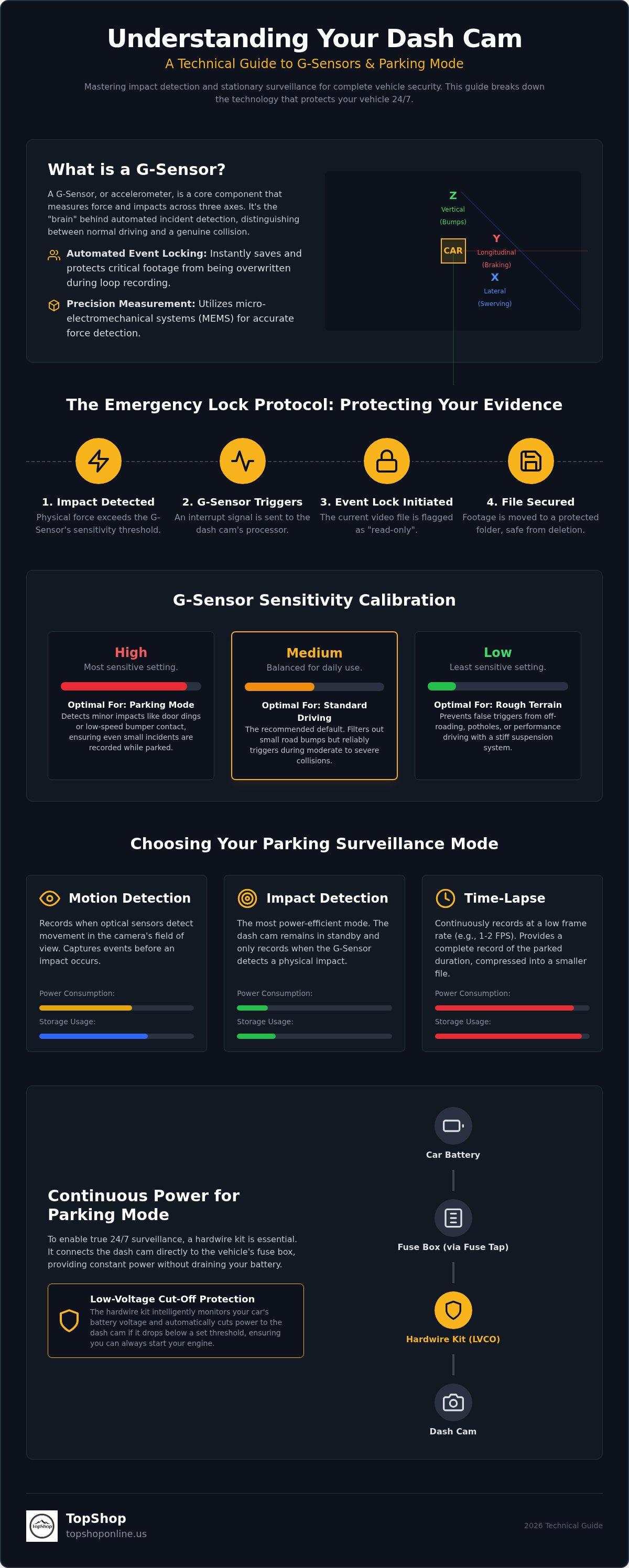
During active operation, the G-sensor monitors kinetic data across longitudinal (X), lateral (Y), and vertical (Z) axes. High-speed sensors detect rapid velocity changes, such as sudden braking or sharp swerving, alongside direct physical impacts. When pre-set force thresholds are exceeded, the device initiates an Event Locking protocol. This flags the current video file as read-only and relocates it to a dedicated folder on the microSD card. This mechanism prevents loop-recording cycles from overwriting collision data, ensuring a permanent record remains accessible for insurance claims or legal review. Dash cam hardware doesn't just record; it analyzes. Without this feature, critical evidence could be lost within minutes of a crash due to continuous file overwriting.
Defining Parking Mode Surveillance
Parking mode is a low-power firmware state facilitating vehicle monitoring after ignition deactivation. It prioritizes power efficiency and storage optimization, requiring a continuous 12V supply from a hardwire kit or auxiliary battery pack. The Guardian 3-Channel 4K Dash Cam leverages this state to monitor the front, rear, and interior cabin simultaneously. Understanding dash cam g-sensor and parking mode settings allows users to select between passive standby and active motion detection. Passive mode records only upon physical impact detection, while active mode uses optical sensors to trigger recording when movement enters the frame. These settings prevent battery drain while securing the vehicle against stationary threats like door dings or attempted theft. It's a critical safety feature for long-term stationary surveillance.
G-Sensor Sensitivity and Impact Detection Specifications
The integrated 3-axis gravitational sensor operates as a micro-electromechanical system (MEMS) measuring force across three distinct planes. Longitudinal (Y) axis sensors detect forward and backward deceleration, identifying head-on or rear-end collisions. Lateral (X) axis sensors monitor side-to-side movement, which is essential for documenting sideswipe incidents. Vertical (Z) axis sensors measure up-and-down oscillations, typically associated with road surface irregularities. Understanding dash cam g-sensor and parking mode technicals requires a grasp of how these axes interact to create a comprehensive force profile. When the hardware detects a force exceeding the pre-defined threshold, it sends an immediate interrupt signal to the camera processor. This hardware-level communication ensures that the recording system prioritizes the current video segment before any data loss occurs. Precise calibration is necessary to ensure that the device distinguishes between a legitimate vehicle impact and standard operational vibrations.
Calibrating G-Sensor Thresholds
G-sensor threshold is the specific milligravitational force required to trigger an event lock. Most high-specification dash cams offer three primary configuration levels:
- High Sensitivity: This setting triggers at low force levels. It's the optimal configuration for parking mode surveillance where detecting minor door dings or low-speed bumper contact is the priority.
- Medium Sensitivity: A balanced setting designed for standard urban driving. It filters out minor vibrations while remaining responsive to moderate collisions.
- Low Sensitivity: Recommended for heavy-duty vehicles, off-road driving, or regions with poor road infrastructure. This prevents the system from flagging potholes or speed bumps as emergencies.
Event File Protection Mechanism
Once a force threshold is breached, the firmware applies a read-only attribute to the current video metadata. This digital flag instructs the file management system to bypass this specific segment during the standard loop recording cycle. Locked files are typically moved to a separate "Event" or "Emergency" partition on the SD card to prevent accidental deletion. While automated G-sensor triggers provide hands-free security, most devices also include a manual emergency lock button for incidents that don't involve a physical impact. Understanding dash cam g-sensor and parking mode storage management is critical because these locked files do not self-delete. If too many files are locked due to high sensitivity settings, the available space for routine loop recording decreases. This can lead to shorter overall recording histories and necessitates periodic manual formatting of the memory card to maintain optimal system performance.
Parking Mode Operation Modes: Time-Lapse vs. Motion Detection
Selecting an appropriate stationary surveillance mode requires a technical evaluation of power consumption versus capture reliability. When a vehicle is stationary, the dash cam transitions from continuous loop recording to specialized firmware states designed to protect the battery and optimize storage. Understanding dash cam g-sensor and parking mode configurations is essential for matching the device's behavior to the specific environment where the vehicle is left. These modes differ in how they utilize the image sensor, processor, and G-sensor hardware, creating distinct profiles for energy efficiency and data density. Choosing the wrong mode in a high-traffic area can lead to a depleted car battery or a microSD card filled with non-essential footage within hours.
Impact vs. Motion Triggering
Impact Detection Mode is the most energy-efficient configuration for long-term monitoring. In this state, the dash cam enters a deep sleep where the image sensor and processor are deactivated, leaving only the G-sensor energized. When a physical shock is detected, the system initiates a rapid boot sequence to capture the incident. This mode is ideal for street parking or long-term airport storage where power conservation is the priority. Conversely, Motion Detection keeps the image sensor active to monitor for pixel changes within the field of view. While this consumes more power, it captures non-impact events such as vandalism or theft attempts. High-specification hardware like the Guardian 3-Channel 4K Dash Cam often utilizes buffered recording in this mode. This feature saves 5 to 10 seconds of footage prior to the trigger, ensuring the lead-up to an incident is preserved for insurance analysis.
Time-Lapse Surveillance Benefits
Time-lapse recording provides a continuous visual record by capturing video at a significantly reduced frame rate, typically between 1 and 5 frames per second (fps). During playback, these frames are stitched together into a standard 30 fps file, creating a fast-forward effect that summarizes hours of parking into a few minutes. This mode offers several technical advantages over trigger-based systems:
- No Capture Gaps: Because the camera is always recording, there is no risk of missing an event due to a failed motion or impact trigger.
- Storage Efficiency: Recording at 1 fps reduces the file size by approximately 96% compared to standard 30 fps recording, allowing for multi-day surveillance on a single SD card.
- Consistency: It is the superior choice for high-traffic urban environments where frequent pedestrian or vehicle movement would cause motion detection to trigger constantly.
Hardwiring and Power Supply Requirements for Parking Surveillance
Standard 12V cigarette lighter sockets in most vehicles are switched circuits. These ports deactivate when the ignition is turned off, which terminates the power supply to the dash cam. Constant power is a prerequisite for understanding dash cam g-sensor and parking mode capabilities in a stationary vehicle. To achieve 24/7 monitoring, a hardwire kit is required to bridge the gap between the camera and the vehicle's internal battery. This hardware configuration allows the device to remain in a low-power standby state, ready to transition into active recording upon a G-sensor trigger or motion detection event. Without a dedicated power link, the camera cannot function once the engine stops.
A standard hardwire kit consists of three primary components. The Battery (VCC) wire connects to a constant power fuse to provide a continuous current. The ACC wire connects to a switched fuse, allowing the camera to sense when the vehicle is running or parked. Finally, the ground wire attaches to the metal chassis to complete the circuit. This setup ensures the camera knows exactly when to switch from continuous loop recording to the parking surveillance modes discussed in previous sections. It's the technical foundation for any reliable automotive security system.
Installing a Hardwire Kit
Installation begins with identifying "Always-On" versus "Switched" fuses using a digital multimeter. Always-on fuses maintain power even when the key is removed, while switched fuses only show voltage when the ignition is in the accessory or run position. Proper grounding is equally critical; an unstable ground connection can lead to intermittent power cycles or corrupted video files. Organizing the resulting wire loom is essential for safety. You can apply the same principles found in a cable management for home office guide to your vehicle. Tucking wires behind A-pillars and headliners prevents obstruction of the driver's view and ensures the cables don't interfere with side-curtain airbag deployment.
Battery Discharge Prevention
Modern hardwire kits incorporate a voltage cut-off protection module. This hardware prevents the dash cam from draining the vehicle's starter battery to a level where the engine cannot turn over. Common user-selectable thresholds include 11.8V, 12.0V, or 12.4V. When the battery voltage hits the selected limit, the kit automatically severs the connection to the camera. Cold weather significantly reduces battery capacity, often causing voltage to drop faster during winter months. For users who want to avoid vehicle battery strain entirely, external dash cam battery packs are a viable alternative. These packs can be pre-charged using a power strip with usb ports at home or in the office before installation. This non-invasive method provides dedicated power for up to 24 hours of continuous surveillance without touching the car's electrical system. For high-performance power management hardware, explore the options available at TopShop.
Guardian 3-Channel 4K Dash Cam: Integrated Security Features
The Guardian 3-Channel 4K Dash Cam serves as a high-performance hardware solution for 24/7 vehicle surveillance. It utilizes a 4K Ultra HD front-facing CMOS sensor with 3840 x 2160 pixel resolution to ensure maximum clarity in impact logs and license plate identification. This resolution is paired with advanced G-sensor integration that facilitates 360-degree event locking. When the 3-axis accelerometer detects a force threshold breach, the firmware triggers a synchronized lock across all three video streams. This ensures that the context of an incident is preserved from every angle. Understanding dash cam g-sensor and parking mode synchronization is simplified through the Guardian's unified firmware interface, which manages front, rear, and interior data streams simultaneously. Superior night vision capabilities, driven by high-sensitivity optical components, maintain visibility in low-light parking environments where standard cameras often fail.
Full Vehicle Coverage with 3-Channel Hardware
The 3-channel configuration provides comprehensive spatial awareness. The interior-facing camera documents cabin security and captures side-impact events through its wide-angle lens, while the rear camera monitors for tailgating and rear-end collisions. This multi-point monitoring is more complex than a standard wireless mini security camera with night vision, as it requires high-speed data bus architecture to process three simultaneous high-definition feeds. The interior camera is particularly useful for commercial drivers or those requiring proof of cabin activity during a G-sensor event. By recording the vehicle's interior alongside the exterior, the Guardian creates a holistic evidence package that leaves no blind spots during stationary or active operation.
Configuring the Guardian for Parking Mode
User configuration is handled through a streamlined menu system where G-sensor sensitivity and parking mode parameters are defined. You can select between impact-only standby, motion detection, or time-lapse recording based on your specific power and storage requirements. Because 4K 3-channel recording generates significant data volumes, high-endurance microSD cards with U3 or V30 speed ratings are mandatory. These cards handle the high-bitrate write cycles required for simultaneous front, rear, and interior streams without data corruption. Proper understanding dash cam g-sensor and parking mode settings ensures that the device provides maximum protection without prematurely filling the storage media. Optimize your vehicle security with the Guardian 3-Channel 4K Dash Cam to ensure your vehicle is protected by industry-leading 3-channel surveillance technology.
Implementing High-Specification Vehicle Surveillance
Effective automotive security relies on the precise calibration of 3-axis accelerometer hardware and the selection of appropriate power management protocols. Understanding dash cam g-sensor and parking mode configurations allows for the automated isolation of collision data without compromising vehicle battery health. By utilizing voltage cut-off protection and high-endurance storage media, you ensure that your digital witness remains operational during critical stationary intervals. The integration of multi-channel recording provides a comprehensive force and visual profile across longitudinal, lateral, and vertical planes. These technical foundations transform a standard recording device into a robust security system.
The Guardian 3-Channel 4K Dash Cam delivers 360-degree coverage with 4K resolution for forensic-level detail in every log. This hardware provides simultaneous front, rear, and interior monitoring to eliminate blind spots during impact detection. We provide fast national shipping across the United States to facilitate immediate hardware deployment. Secure your vehicle with the Guardian 3-Channel 4K Dash Cam and maintain a reliable, high-definition record of all road and parking incidents. Proper hardware selection and configuration ensure your vehicle is protected by the most advanced surveillance technology available.
Frequently Asked Questions
What is the difference between a dash cam G-sensor and motion detection?
A G-sensor measures physical force through a 3-axis accelerometer, while motion detection uses the image sensor to identify pixel changes. Impact sensors react to mechanical shocks like collisions or door dings. Optical motion detection triggers when movement enters the lens field of view. Understanding dash cam g-sensor and parking mode differences is essential for optimizing storage and power consumption. Impact detection is generally superior for battery conservation.
Will parking mode drain my car battery?
Parking mode will deplete a vehicle battery unless managed by a hardwire kit with an integrated voltage cut-off module. These modules sever the power connection when the battery drops to a pre-set threshold like 12.0V. Using an external battery pack provides a non-invasive alternative that avoids vehicle battery strain entirely. Without these safeguards, continuous surveillance eventually prevents the engine from starting.
How do I know if my dash cam has a G-sensor?
Check the device settings menu for labels such as "Gravity Sensor," "G-Sensor," or "Impact Detection." Most modern hardware includes this as a standard feature for automated file protection. You can also verify the technical specifications in the user manual or product listing. If the camera automatically locks video files during sudden braking, a functional 3-axis accelerometer is present and active.
Can I use a dash cam G-sensor without hardwiring the device?
You can use a G-sensor without hardwiring if the dash cam has an internal battery or is connected to an external power bank. Internal batteries typically provide only 5 to 15 minutes of standby time. For sustained surveillance, a hardwire kit or dedicated dash cam battery pack is necessary. This ensures the 3-axis accelerometer remains energized and ready after the ignition is turned off.
What is the best sensitivity setting for a dash cam G-sensor?
Medium sensitivity is the optimal setting for most standard driving conditions to avoid false positives from speed bumps. High sensitivity is recommended for parking mode to ensure the camera detects minor door dings or low-speed impacts. Low sensitivity should only be used for heavy-duty vehicles or off-road environments where structural vibrations are constant. Understanding dash cam g-sensor and parking mode calibration prevents SD card saturation.
Does parking mode record all the time or only when something happens?
Recording frequency depends on the selected parking mode firmware setting. Impact Detection and Motion Detection only record when a physical or optical trigger occurs. Time-lapse mode records continuously at a reduced frame rate, such as 1 frame per second. Continuous low-bitrate recording also provides a constant stream but at lower video quality to preserve storage space and vehicle battery life during long intervals.
What happens to the SD card when the G-sensor is triggered?
Triggered G-sensor events cause the firmware to flag the current video segment with a read-only attribute. This prevents the loop recording cycle from overwriting the file when the SD card reaches capacity. These files are usually moved to a protected "Event" or "Emergency" folder. Users must periodically format the card because these locked files accumulate and reduce the space available for routine recording.
Is hardwiring a dash cam safe for my vehicle's electrical system?
Hardwiring is safe for a vehicle's electrical system when performed using a fused hardwire kit. These kits include dedicated fuse taps that protect the camera and the vehicle's circuits from power surges. The integrated voltage cut-off module ensures the starter battery is never drained below functional levels. Professional installation or careful adherence to fuse box diagrams prevents interference with other critical vehicle electronics.