

Polished hardwood surfaces act as high-performance mirrors for infrared light, rendering standard night vision sensors functionally useless without specific angular compensation. Many homeowners find that high-gloss flooring creates significant glare and visibility barriers for low-angle pet monitoring or general security. A successful wireless mini security camera for hardwood floor home setup requires precise hardware calibration and strategic placement to bypass these environmental optical interferences. Standard 1080P HD Wireless Mini Security WiFi Camera hardware must be positioned to account for surface reflectivity and light bounce to ensure clear image capture.
This 2026 technical guide provides the necessary specifications and deployment strategies to achieve 1080P high-definition monitoring with stable remote smartphone access. It's essential to address the hardware requirements for maintaining signal integrity and discreet placement in open floor plans. We examine lens tilt adjustments, cable concealment techniques using high-capacity power strips, and the use of 360 Panoramic Hidden Light Bulb Wifi Camera units as overhead alternatives. The following sections detail the exact technical parameters for optimizing indoor surveillance hardware in reflective environments.
Key Takeaways
- Mitigate infrared glare and the "white-out" effect on polished oak or cherry surfaces by calculating specific lens tilt angles for high-reflectivity environments.
- Optimize your wireless mini security camera for hardwood floor home setup using 1080P HD resolution and 150-degree wide-angle lenses for precise facial and pet monitoring.
- Utilize the 360 Panoramic Hidden Light Bulb Wifi Camera as a ceiling-mounted alternative to eliminate floor-level blind spots and surface reflections.
- Execute rapid system integration through AP mode or QR code scanning to establish stable smartphone remote access and real-time motion alerts.
- Maintain continuous power for multi-device security hubs by integrating high-capacity power strips with dedicated USB ports for discreet cable management.
Hardwood Floor Monitoring Challenges: Light Reflectivity and IR Glare
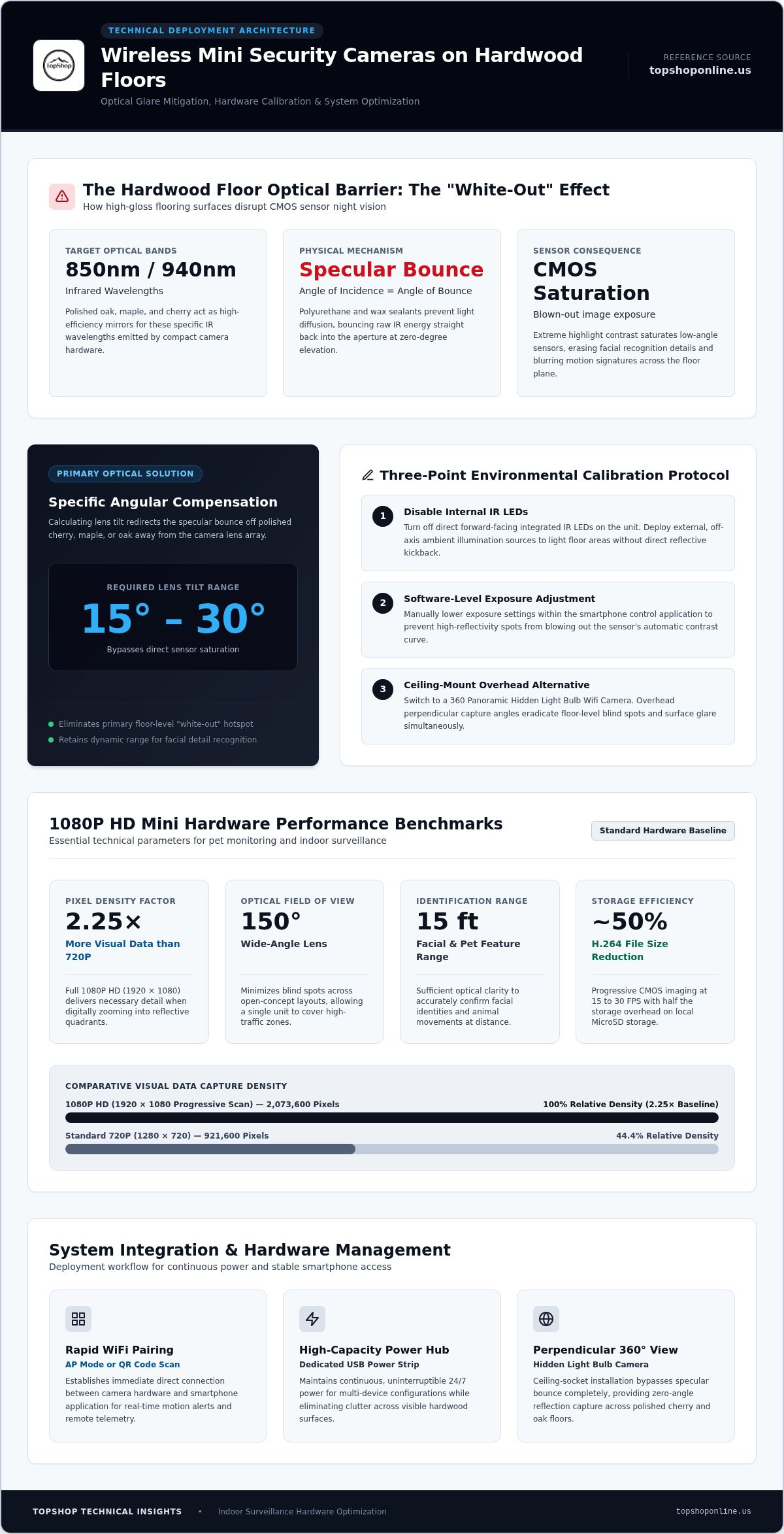
Hardwood finishes create specular reflection, where light bounces off the surface at the same angle it hits. Polished oak, maple, and cherry surfaces act as mirrors for the 850nm or 940nm infrared wavelengths used by mini cameras. This interaction causes the "White-Out" effect. The camera's CMOS sensor becomes saturated by the intense reflected light, resulting in a blown-out image that lacks detail. A wireless mini security camera for hardwood floor home setup must account for these material properties to maintain usable high-definition footage. Standard placement often results in a bright glare that obscures objects moving across the floor plane.
Surface Reflectivity and Sensor Saturation
Polished wood finishes, particularly those treated with high-gloss polyurethane or wax, significantly increase the light reflection coefficient. Darker woods like cherry absorb more visible light but still reflect IR light efficiently. CMOS sensors in compact hardware often struggle with the high dynamic range required for these environments. When natural light hits dark wood during the day or IR light hits it at night, the sensor must balance extreme highlights and deep shadows. Low-quality sensors fail this transition, leading to digital noise or complete loss of facial recognition detail. It's necessary to select hardware with high sensitivity to manage these contrast shifts without losing image clarity.
Mitigation Strategies for Night Vision
Effective placement involves a specific angular tilt between 15 and 30 degrees. This positioning redirects the primary IR bounce away from the lens, preventing direct sensor saturation. High-definition hardware, such as the 1080P HD Wireless Mini Security WiFi Camera, provides the necessary pixel density to compensate for light-induced noise. Users should review wireless security camera specifications and transmission standards to understand how different hardware configurations handle data throughput and signal stability in high-interference indoor settings. Direct floor-level placement requires software calibration to avoid the glare from integrated LEDs.
Additional strategies for optimizing a wireless mini security camera for hardwood floor home setup include:
- Disabling internal IR LEDs: Use external, off-axis ambient light sources to illuminate the floor area without creating direct reflections into the lens.
- Software-level exposure adjustment: Manually lowering the exposure setting in the smartphone application helps manage hotspots on polished surfaces.
- Ceiling-mount alternatives: Utilizing a 360 Panoramic Hidden Light Bulb Wifi Camera removes the floor-level reflection issue by capturing footage from a perpendicular angle.
These technical adjustments ensure that the 1080P monitoring remains clear despite the environmental challenges posed by reflective flooring materials. Proper hardware integration relies on understanding these optical interactions before final deployment.
Technical Specifications of 1080P Wireless Mini Security WiFi Cameras
1080P HD resolution (1920 x 1080 pixels) provides the pixel density required for identifying facial features or pet behaviors at distances up to 15 feet. Compared to 720P standards, 1080P sensors capture 2.25 times more visual data. This increased detail is critical when zooming into specific quadrants of a room. The 150-degree wide-angle lens offers a broad field of view (FOV), minimizing blind spots in large, open-concept living areas. This expansive coverage is a core component of an effective wireless mini security camera for hardwood floor home setup. It allows a single unit to monitor entire high-traffic zones without requiring multiple hardware installations.
Imaging Hardware and Sensor Performance
The 1080P CMOS imaging chips utilize progressive scanning to maintain image clarity during motion. Frame rates typically range from 15 to 30 frames per second (FPS). Higher FPS settings ensure fluid motion capture for active pets. H.264 video compression efficiency reduces file sizes by approximately 50 percent compared to older standards. This allows for longer recording durations on local MicroSD cards. Users can review recorded segments via smartphone applications without significant latency. The combination of high resolution and efficient compression maintains clear evidence logs for security purposes.
Connectivity and Bandwidth Requirements
Stable remote streaming requires a minimum upload speed of 2 Mbps per camera. The 2.4GHz WiFi frequency provides superior penetration through interior walls and hardwood flooring structures compared to 5GHz bands. It's vital to follow CISA home network security guidelines to protect data transmission. Implementing WPA2 or WPA3 encryption prevents unauthorized access to the video feed. Signal interference from other smart home devices can be mitigated by optimizing router placement. A dedicated 2.4GHz SSID often improves connection stability for mini surveillance hardware.
Storage architecture supports local MicroSD cards for decentralized data management. This avoids monthly subscription fees associated with cloud services. Continuous operation requires a steady 5V/1A USB power supply. While internal batteries provide short-term backup, long-term monitoring relies on permanent power connections. Integrating a 1080P HD Wireless Mini Security WiFi Camera into a multi-device hub is simplified by using high-capacity power strips with dedicated USB ports. This setup ensures the camera remains active during critical monitoring periods. Local storage remains accessible even if the external internet connection is temporarily interrupted.
Placement Strategies: Optimizing Coverage for Hardwood Layouts
Effective deployment of a wireless mini security camera for hardwood floor home setup requires balancing vertical height with the lens's field of view. Standard 150-degree wide-angle lenses capture broad horizontal areas but create a nadir blind spot directly beneath the camera when mounted high. Conversely, floor-level placement increases proximity to reflective surfaces, which necessitates precise angular adjustments. Optimal motion detection triggering relies on a distance-to-subject ratio of approximately 10 to 15 feet. At this range, passive infrared sensors effectively distinguish between environmental movement and target subjects without excessive false triggers from light reflections off polished wood.
Step-by-Step Installation for Floor Monitoring
Identify high-traffic hardwood corridors and primary entry points before finalizing hardware placement. Set the mounting height between 3 and 5 feet. This specific range provides a neutral perspective optimized for pet monitoring and facial identification. Execute night-vision testing via the smartphone app interface to verify that the floor reflection does not saturate the CMOS sensor. Adjust the lateral angle to cover the entire width of the path while maintaining the 15 to 30-degree vertical tilt required to mitigate glare. Secure the 1080P HD Wireless Mini Security WiFi Camera using the provided magnetic or adhesive mounts to ensure stability during operation.
Alternative Mounting: The Panoramic Bulb Approach
The 360 Panoramic Hidden Light Bulb Wifi Camera offers a technical solution for total room visibility without floor-level interference. Integrating into standard E27 light sockets, this hardware utilizes a top-down perspective to eliminate common blind spots associated with wall-mounted units. This orientation ensures that the reflective properties of hardwood flooring do not impact the sensor's dynamic range, as the light source and lens are positioned perpendicularly to the floor. The panoramic lens captures a full hemispheric view, providing comprehensive coverage of open floor plans. This method is particularly effective for monitoring large areas where multiple mini cameras would otherwise be required to cover the same square footage.
Strategic placement ensures maximum utility from your hardware. For multi-room setups, combine floor-level mini cameras with overhead panoramic units to create a redundant surveillance grid. This configuration provides high-detail facial recognition at eye level and broad situational awareness from the ceiling. Monitoring hardwood environments successfully depends on these specific height and angle calculations to bypass the inherent optical challenges of polished wood surfaces.
Configuration and Remote Access: WiFi System Integration
Hardware initialization for a wireless mini security camera for hardwood floor home setup requires a stable 2.4GHz network connection. The 1080P HD Wireless Mini Security WiFi Camera supports two primary pairing protocols: AP mode and QR code scanning. AP mode establishes a direct peer-to-peer connection between the mobile device and the camera's internal broadcast signal. QR code scanning involves the camera lens reading encrypted network credentials from the smartphone screen. Both methods ensure rapid integration into the local surveillance network. Successful pairing is indicated by a steady status LED and immediate visibility within the centralized mobile application.
Network Setup and Troubleshooting
Consistent remote access depends on reliable network identification. Assigning a static IP address through the router's DHCP reservation table prevents device disconnection during lease renewals. This technical step is critical for maintaining a stable link to the 1080P HD video stream. Managing router port forwarding or utilizing peer-to-peer (P2P) cloud tunneling allows for external viewing through the smartphone app when the user is off-site. Latency issues in 1080P streams are often resolved by adjusting the router's wireless channel to avoid interference from neighboring networks. Reducing the distance between the camera and the access point improves data throughput and minimizes frame drops during real-time playback.
Mobile App Functional Overview
The smartphone application serves as the primary control interface for hardware management. Users can set motion detection sensitivity zones to focus specifically on hardwood floor paths while ignoring peripheral movement. This granular control reduces the frequency of false alerts triggered by environmental light shifts. Scheduling recording intervals allows for efficient MicroSD storage management by targeting specific hours of the day. The app dashboard facilitates the integration of multiple devices, including the 1080P HD Wireless Mini Security WiFi Camera, into a single monitoring screen. This centralized approach provides comprehensive situational awareness across different zones of the home.
Security protocols involve multi-user access management where primary administrators grant restricted viewing permissions to secondary users. Firmware update procedures are essential for maintaining hardware stability and addressing emerging security vulnerabilities. Updates are typically pushed through the mobile app and require the camera to be connected to a continuous power source, such as a high-capacity power strip. Regular maintenance of the software environment ensures that features like real-time push notifications and remote playback remain functional. This systematic configuration process establishes a secure and efficient surveillance infrastructure for the modern home environment.
Hardware Integration: Power and Discreet Cable Management
Continuous 1080P monitoring requires a permanent 5V DC power supply to avoid the operational limitations of internal batteries. While labeled as "wireless" due to WiFi data transmission, these units depend on consistent voltage for sensor readiness and signal stability. A robust wireless mini security camera for hardwood floor home setup integrates permanent power cabling to ensure 24/7 surveillance capability. This integration demands strategic hardware placement near existing AC outlets or the use of extended USB cables. Centralizing power distribution prevents cluttered floor plans and minimizes the visibility of electronic components in open living areas.
Power Distribution for Security Hubs
Maintaining multiple camera units requires a centralized energy management system. Utilizing a Power Strip with 6 AC Outlets & 6 USB Ports provides the necessary infrastructure for a multi-device security hub. This hardware ensures voltage stability and surge protection for sensitive CMOS sensors. Standard WiFi cameras consume approximately 1A to 2A of current. Dedicated USB ports eliminate the need for bulky AC adapters, allowing for a more compact footprint. A centralized hub supports constant operation and simplifies the connection of peripheral devices such as routers or local storage servers.
Physical Concealment and Organization
Visible wires compromise the aesthetic and security of a home surveillance system. Adhering to Cable Management for Home Office standards is the most efficient way to organize security wiring. On hardwood floors, users should employ floor-matched cable raceways or run wires along baseboards to maintain a discreet profile. These raceways prevent tripping hazards and protect cables from physical damage. Positioning hardware within the 1080p Wireless Mini Security Camera with Night Vision parameters ensures that the power source does not interfere with the lens's field of view.
Integrating power with existing home office hardware provides a natural concealment method. Desk-mounted cameras can draw power from under-desk hubs, while floor-level units can be hidden behind furniture or decorative elements. This technical approach to a wireless mini security camera for hardwood floor home setup prioritizes functionality and environmental integration. Organized cable paths ensure that the surveillance system remains operational without disrupting the visual continuity of the living space. Proper cable management also facilitates easier hardware maintenance and troubleshooting by keeping inputs clearly labeled and accessible.
Optimizing Indoor Surveillance for Reflective Environments
Implementing a wireless mini security camera for hardwood floor home setup requires precise angular calibration to counteract high surface reflectivity and IR glare. Successful deployment depends on utilizing 1080P HD resolution for clear facial recognition and maintaining stable WiFi remote access for real-time monitoring through a smartphone interface. By following the technical placement strategies detailed in this guide, such as the 15 to 30-degree tilt or overhead panoramic mounting, users can effectively eliminate infrared "white-out" effects and low-angle blind spots. These methods ensure that high-gloss oak or maple surfaces don't compromise image clarity during night-vision operation.
Proper hardware integration involves more than lens positioning; it requires continuous power solutions and organized cable management. Utilizing high-capacity power strips with dedicated USB ports ensures voltage stability for 24/7 operation while keeping the compact discreet design hidden from view. This technical approach transforms a standard surveillance unit into a high-performance security hub capable of providing reliable data logs. View 1080P HD Wireless Mini Security WiFi Camera Specifications to begin your hardware deployment today. Achieving professional-grade monitoring in complex indoor environments is possible with the correct technical specifications and a methodical installation approach.
Frequently Asked Questions
How do I stop my mini camera from reflecting off my hardwood floor?
Tilting the lens at a 15 to 30-degree angle redirects infrared light away from the sensor to prevent glare on polished wood surfaces. These finishes act as mirrors for IR LEDs, causing a white-out effect. Disabling internal night vision and using external ambient lighting also improves image clarity. This technique is essential for a wireless mini security camera for hardwood floor home setup. Positioning the lens higher on a wall reduces the direct bounce of light into the sensor.
Does the 1080P Wireless Mini Security WiFi Camera require a subscription?
No subscription is required for the 1080P HD Wireless Mini Security WiFi Camera. The hardware utilizes local MicroSD storage for data management, which avoids recurring monthly fees. Remote access and real-time alerts are provided through the dedicated smartphone application at no additional cost. This decentralized storage model ensures that video data remains under the user's control. Users simply install a compatible memory card to begin recording and archiving high-definition footage immediately. It's a one-time hardware investment.
Can I view the camera footage on multiple smartphones simultaneously?
Multiple smartphones can access the camera feed simultaneously through the multi-user sharing feature in the mobile application. The primary administrator grants viewing permissions to secondary accounts via a unique ID or QR code. This allows family members to monitor the 1080P HD stream from different locations. Bandwidth requirements increase with each active viewer. A stable 2.4GHz WiFi connection with at least 2 Mbps upload speed per camera is recommended for stable concurrent streaming and playback.
What is the maximum MicroSD card size supported for local recording?
The 1080P HD Wireless Mini Security WiFi Camera typically supports MicroSD cards with capacities up to 128GB for local video storage. Users should select Class 10 or UHS-I cards to ensure write speeds are sufficient for high-definition video data. High-capacity cards allow for several days of continuous recording before the loop-recording feature begins overwriting the oldest files. Formatting the card to FAT32 or exFAT within the camera application ensures optimal hardware compatibility and file system stability.
How do I hide the power cord for a mini camera in the middle of a room?
Hiding power cords in open floor plans involves using floor-matched cable raceways or low-profile cord covers that blend with the hardwood finish. These raceways protect the cable and prevent tripping hazards. For more discreet installations, routing the wire along baseboards or utilizing a Power Strip with 6 AC Outlets & 6 USB Ports near a furniture hub is effective. This setup centralizes power distribution for a wireless mini security camera for hardwood floor home setup while maintaining a clean aesthetic.
Does the 360 Panoramic Hidden Light Bulb WiFi Camera work with standard sockets?
Yes, the 360 Panoramic Hidden Light Bulb Wifi Camera is designed to fit into standard E27 light sockets. It draws continuous power directly from the light fixture, eliminating the need for external USB cables or battery replacements. This hardware provides a total hemispheric view of the room from a top-down perspective. It's a technical solution for environments where floor-level reflections prevent clear monitoring. The unit remains functional as long as the light switch remains in the "on" position.
Will the camera record if the WiFi connection is lost?
The camera continues to record footage to the local MicroSD card even if the WiFi connection is lost. While remote access and real-time alerts require an active internet connection, the internal recording process operates independently of the network. Once the WiFi signal is restored, users can access the recorded files through the smartphone application. This redundancy ensures that critical security events are captured during network outages. Continuous power must be maintained for the recording process to persist during these gaps.
How many hours of 1080P footage can fit on a 64GB MicroSD card?
A 64GB MicroSD card can store approximately 60 to 70 hours of continuous 1080P HD footage using H.264 video compression. Actual storage duration varies based on the frame rate and the complexity of the visual environment. Enabling motion-activated recording significantly extends this timeframe by only saving data when activity is detected. Once the card reaches full capacity, the loop-recording function automatically overwrites the oldest footage to ensure the system never stops capturing new events and data.