

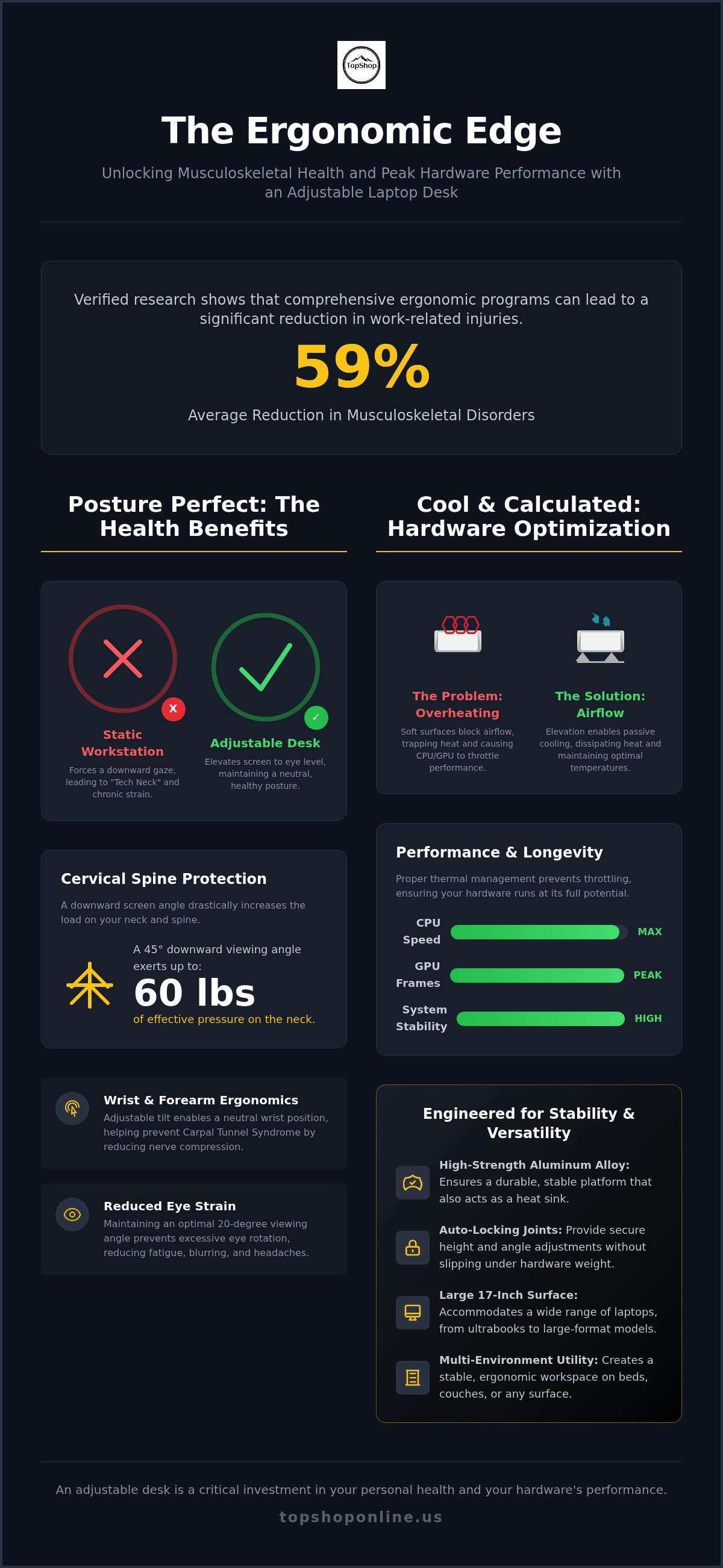
Ergonomic programs can reduce musculoskeletal disorders by an average of 59% according to verified research. Chronic neck tension and shoulder strain are frequent outcomes of static, non-adjustable workstations that force users into a downward-looking posture. Understanding the technical benefits of an adjustable laptop desk is essential for maintaining musculoskeletal health and hardware efficiency. This guide analyzes how height-adjustable surfaces facilitate posture correction, thermal management, and multi-environment productivity. We focus on the Deskpro XL Ergonomic Adjustable Laptop Bed Desk as a benchmark for stability and multi-angle utility.
It's likely you've encountered the physical fatigue of "tech neck" or the thermal throttling of an overheating laptop during intensive processing tasks. This analysis provides a comprehensive review of ergonomic solutions to eliminate these specific pain points. We preview hardware longevity improvements, airflow optimization, and versatile workspace configurations. The following sections detail the technical specifications and measurable advantages of implementing professional-grade adjustable desk solutions in home and hybrid settings.
Key Takeaways
- Postural correction: Elevating hardware to eye level reduces cervical spine pressure and mitigates chronic neck and shoulder tension.
- Thermal management: Passive cooling through increased airflow prevents thermal throttling and maintains optimal CPU clock speeds during intensive operation.
- Environmental versatility: Analyze the technical benefits of an adjustable laptop desk for establishing stable, ergonomic workstations on beds and couches.
- Structural integrity: High-strength aluminum alloy construction and auto-locking joints ensure platform stability and hardware security across multiple height increments.
- Capacity specifications: The Deskpro XL features a 17-inch surface and multi-level height adjustments to support large-format laptops in varied seating and lying positions.
Ergonomic Alignment and Musculoskeletal Health Benefits
One of the primary benefits of an adjustable laptop desk is the mechanical correction of user posture to prevent long term musculoskeletal damage. Standard laptops usually force a downward viewing angle because the screen and keyboard are attached. This misalignment leads to chronic tension in the trapezius and deltoid muscles. By utilizing a platform like the Deskpro XL Ergonomic Adjustable Laptop Bed Desk, users can elevate the device to eye level. This adjustment maintains a neutral shoulder position and aligns the screen with the user's horizontal line of sight. It eliminates the need for slouching or leaning forward during extended work sessions.
Cervical Spine Protection and "Tech Neck" Prevention
Looking down at a screen at a 45-degree angle significantly increases the effective weight of the head on the cervical spine. Research indicates this posture can exert up to 60 pounds of pressure on the neck. Height adjustment is critical for maintaining the natural curve of the spine. Consistent use of standing and adjustable desks prevents the development of "tech neck," a condition characterized by repetitive strain injuries (RSI) and vertebrae misalignment. Proper elevation ensures the head remains balanced over the shoulders rather than protruding forward. The Deskpro XL features auto-locking joints that maintain this height without slipping under the weight of the hardware.
Wrist and Forearm Ergonomics
Typing on a flat surface often results in wrist hyperextension. This position compresses the median nerve and increases the risk of Carpal Tunnel Syndrome. The mechanical benefits of an adjustable laptop desk include the ability to modify surface tilt to maintain a neutral wrist position during data entry. Forearm support is equally vital. The Deskpro XL provides a stable, high-density surface that allows the forearms to rest comfortably, reducing the load on the upper extremities. Proper tilt adjustment facilitates a downward slope for the keyboard, which mimics the natural resting angle of the hands. This mechanical advantage reduces the muscular effort required for typing and mouse operation.
Screen height also impacts ocular health. Maintaining a 20-degree viewing angle reduces eye strain and fatigue by preventing excessive downward eye rotation. This configuration supports sustained productivity without the onset of headaches or visual blurring. When the screen is positioned correctly, the eyes focus more naturally. This setup lowers the blink rate reduction typically associated with computer use and improves overall visual comfort during intensive tasks.
Thermal Regulation and Hardware Performance Optimization
High-performance laptops generate significant heat during intensive processing tasks. One of the critical technical benefits of an adjustable laptop desk is the facilitation of passive thermal management. Unlike soft surfaces like blankets or pillows, which act as insulators and block intake vents, a rigid adjustable platform ensures the device remains within its optimal operating temperature range. This regulation is essential for maintaining hardware integrity and preventing system-level performance degradation.
Passive Airflow vs. Active Cooling
Elevating a laptop chassis creates a chimney effect for heat dissipation. When the underside of the device is exposed to open air, convection currents carry heat away from internal components more effectively than when the device sits on a flat, non-conductive surface. Aluminum or ventilated ABS surfaces provide a technical advantage over solid wood by acting as a heat sink. These materials possess higher thermal conductivity, which assists in drawing heat away from the laptop’s base. Maintaining lower surface temperatures directly impacts internal component reliability and prevents the cooling fans from operating at maximum RPM for extended periods. This reduction in fan load also minimizes dust accumulation within the internal heat pipes and fins.
Software Efficiency and Hardware Longevity
There is a direct correlation between temperature management and system stability. Modern CPUs and GPUs utilize thermal throttling to prevent permanent hardware damage. When internal sensors detect temperatures exceeding safe thresholds, the system automatically reduces clock speeds. This results in dropped frame rates during gaming or increased rendering times in creative software. Utilizing the Deskpro XL Ergonomic Adjustable Laptop Bed Desk provides the necessary clearance to maintain peak performance without these forced interruptions. Furthermore, keeping the internal temperature low extends the functional lifespan of lithium-ion battery cells, which are highly sensitive to heat-induced chemical degradation. While thermal regulation preserves the machine, users also experience reduced musculoskeletal discomfort when hardware is positioned at a correct ergonomic height.
Rigid surfaces are mandatory for professional hardware maintenance. Soft environments often lead to fabric-based insulation that can cause rapid overheating and emergency system shutdowns. By adopting a stable platform, you ensure consistent airflow to the primary intake and exhaust ports. If you require a stable, ventilated surface for mobile work, you can view the Deskpro XL specifications to see how its high-density material construction supports hardware cooling. Consistent thermal management is among the most overlooked benefits of an adjustable laptop desk for power users and remote professionals alike.
Structural Engineering and Material Specification Analysis
Mechanical reliability in a portable workspace depends on material composition and assembly tolerances. One of the core technical benefits of an adjustable laptop desk is the utilization of high-strength aluminum alloy. This material provides an optimal strength-to-weight ratio, ensuring the unit remains portable while supporting heavy-duty hardware. Aluminum offers superior corrosion resistance and structural rigidity compared to low-grade plastics or composite woods. Integration of non-slip silicone padding on the primary platform and leg bases prevents chassis abrasion and stops the desk from shifting during high-speed typing or data entry tasks.
Joint Integrity and Locking Mechanisms
Precision engineering of 360-degree rotating legs allows for thousands of configuration options to suit different furniture heights. High-quality desks utilize auto-locking joints that engage at specific degree increments. This mechanism ensures the platform remains stable at various height settings and doesn't collapse under the weight of a 17-inch laptop. Spring-loaded adjustment systems are preferred over manual screw-locks for speed and consistency. These joints undergo durability testing to withstand repeated repositioning. Stability on uneven surfaces, such as mattresses or plush couches, is achieved through a wide-base leg design that distributes weight evenly. This prevents the "wobble" effect common in lightweight, non-engineered stands.
Surface Material and Texture
The choice between high-density ABS plastic and metal surfaces involves a trade-off between weight and thermal conductivity. ABS plastic provides a lightweight solution for users who prioritize portability, while metal platforms assist in heat dissipation as discussed in previous sections. A matte-finish texture is technically superior to glossy surfaces because it increases friction. This prevents device slippage at high tilt angles. Professional models often integrate dedicated mouse pads or peripheral trays to maintain a unified workflow. These additions are secured via reinforced mounting points to prevent vibration during use.
Load capacity is a critical differentiator between consumer-grade stands and professional-grade desks. While basic stands may only support 5 to 10 pounds, heavy-duty desks like the Deskpro XL Ergonomic Adjustable Laptop Bed Desk are engineered to handle larger laptops and additional peripherals. This structural integrity is vital for users who employ external cooling fans or heavy gaming rigs. The high-density material construction of the Deskpro XL ensures it meets these rigorous weight requirements without structural failure. Understanding these material specifications is central to evaluating the long-term benefits of an adjustable laptop desk for professional or personal use.
Multi-Environment Utility: Bed, Couch, and Mobile Workspaces
Establishing a productive workspace in environments without dedicated office furniture requires hardware that adapts to existing surfaces. One of the primary benefits of an adjustable laptop desk is its ability to transform non-standard seating areas into ergonomic workstations. This versatility is critical for hybrid employees in high-density urban environments where space optimization is mandatory. Portable desks eliminate the need for permanent furniture installations while providing a stable, high-density surface for high-performance computing. These units support multi-environment productivity by bridging the gap between recreational furniture and professional utility.
The Bed and Couch Office Setup
Using a laptop on soft surfaces requires specific structural considerations to maintain stability. Leg width is a primary metric; a wider stance prevents the desk from tipping on uneven upholstery. The Deskpro XL Ergonomic Adjustable Laptop Bed Desk utilizes a wide-span leg configuration that accommodates the user's body while resting securely on soft materials. Users can adjust the multi-angle joints to match a reclining or upright seated position. This ensures the screen remains at eye level regardless of the furniture's incline. Integrated peripheral space is also a technical requirement. Professional models provide sufficient surface area for an external mouse and power adapter, preventing these items from being lost in bedding or couch cushions.
Standing Desk Conversion
Adjustable laptop desks function as temporary standing desk converters on standard-height tables or kitchen counters. By extending the legs to their maximum height, users achieve eye-level screen positioning while standing, which facilitates neutral spinal alignment. Alternating between sitting and standing during the workday reduces static load on the lower back and improves circulation. For users maintaining a mobile setup, organizing peripherals is essential to prevent clutter. You can find technical details in our Cable Management for Home Office guide to ensure your portable workspace remains efficient.
Fold-flat dimensions are a critical portability specification for storage and travel. High-quality adjustable desks collapse into a slim profile that fits behind furniture, under beds, or inside standard luggage. This makes them ideal for professionals who move between different home environments or travel frequently. The engineering allows for a 17-inch surface to be stored in a footprint only marginally larger than the laptop itself. This level of space efficiency is essential for maintaining an organized living area. If you require a versatile solution that adapts to any furniture configuration, order the Deskpro XL to upgrade your mobile workspace today.
Optimizing Your Setup with the Deskpro XL Ergonomic Desk
The Deskpro XL Ergonomic Adjustable Laptop Bed Desk functions as a high-capacity platform for professional and personal computing. It's engineered with a 17-inch surface area that supports large-format laptops while providing additional space for external input devices. One of the primary benefits of an adjustable laptop desk in this configuration is the multi-level height adjustment system. This mechanism allows the user to transition between seated, standing, and lying positions without requiring secondary furniture. The technical design prioritizes stability across all height increments, ensuring that hardware remains secure during high-speed data entry or gaming sessions.
Technical Features of the Deskpro XL
Measurement specifications for the Deskpro XL focus on maximizing utility within a portable footprint. The adjustment range is governed by high-density auto-locking joints that withstand daily, high-volume usage cycles. These joints allow for precise angle control, which is essential for maintaining the optimal viewing angles discussed in previous ergonomic sections. Rapid deployment is a core feature; the legs unfold and lock into position in seconds. This speed of setup is vital for hybrid workers who must frequently transition between different home environments. When the workday concludes, the compact folding design reduces the unit to a slim profile for storage in drawers or under furniture.
Final Implementation Checklist
Achieving peak efficiency requires integrating the desk into a broader hardware ecosystem. For continuous operation, users should integrate a Power Strip with USB Ports to manage the power requirements of laptops, smartphones, and peripherals. It's necessary to verify that all hardware cables have sufficient length to accommodate the desk at its maximum height setting. This prevents port strain and accidental disconnections during height adjustments. Cable slack should be measured against the desk's maximum vertical extension to ensure safe operation.
Optimizing the workspace also involves environmental considerations. Position the Deskpro XL relative to windows or overhead lighting to minimize screen glare. Glare reduction is a critical metric for preventing ocular fatigue during extended sessions. For power users, combining this platform with Gaming Setup Essentials ensures that high-performance peripherals have a stable and organized foundation. This holistic approach to workspace configuration maximizes the technical benefits of an adjustable laptop desk while extending the functional lifespan of the hardware itself.
Advancing Ergonomic Standards for Mobile Workstations
Implementing high-performance ergonomic tools is a technical requirement for maintaining long-term musculoskeletal health and hardware efficiency. Precise height adjustments mitigate cervical spine pressure while rigid platforms facilitate passive cooling for internal components. These features ensure that CPUs maintain peak clock speeds and lithium-ion batteries avoid heat-induced degradation. Structural stability provided by high-density material construction and auto-locking joints remains the benchmark for professional-grade mobile workstations.
Understanding the comprehensive benefits of an adjustable laptop desk allows users to optimize non-standard environments like beds and couches for maximum productivity. The Deskpro XL Ergonomic Adjustable Laptop Bed Desk represents a utilitarian solution for these specific requirements. It's designed with a 17-inch surface and multi-angle utility to support large-format hardware in any configuration. You can View the Deskpro XL Ergonomic Adjustable Laptop Bed Desk at TopShop to secure a durable, high-efficiency platform for your home office. We provide fast national shipping across the US to ensure your setup is upgraded without delay. Establishing a stable and ergonomic workspace is a proactive step toward sustainable professional performance.
Frequently Asked Questions
How much weight can an adjustable laptop desk typically hold?
Portable adjustable desks generally support loads between 10 and 22 pounds depending on material composition. Metal alloys offer higher structural integrity than lightweight plastic alternatives. The Deskpro XL features high-density material construction to maintain stability under the weight of professional-grade hardware. Users should avoid exceeding the rated capacity to prevent joint failure or platform tilting. Verifying the weight of your specific laptop and peripherals ensures the locking mechanisms remain secure during high-volume usage.
Can I use an adjustable laptop desk for gaming?
High-performance gaming laptops require stable platforms and significant thermal management. One of the technical advantages of using these desks is providing the necessary clearance for intake fans to prevent thermal throttling during intensive GPU tasks. The Deskpro XL offers a 17-inch surface area, which is sufficient for large gaming rigs and external mouse operation. Using a rigid surface instead of a soft one ensures consistent frame rates by maintaining optimal internal temperatures during long sessions.
Do adjustable laptop desks work on soft surfaces like a mattress?
Adjustable desks are specifically engineered for stability on soft surfaces like mattresses or couches. Wide-span leg designs distribute hardware weight evenly to prevent the unit from sinking or tipping. The Deskpro XL utilizes multi-angle adjustment joints to compensate for the incline of bedding or upholstery. This configuration maintains a level work surface even when the base rests on uneven materials. Auto-locking joints ensure the platform doesn't shift during movement or typing sessions.
Is an adjustable laptop stand the same as a laptop desk?
A laptop stand is a compact accessory designed to elevate hardware on an existing table or desk. In contrast, an adjustable laptop desk features integrated legs that allow for independent use in various environments like beds or couches. While both provide ergonomic elevation, the desk offers greater environmental versatility for hybrid workers. Desks typically include larger surface areas for peripherals and more complex joint systems for height and tilt customization to suit different seating positions.
How do I know if my laptop will fit on the Deskpro XL?
The Deskpro XL features a 17-inch primary surface area designed to accommodate standard and large-format laptops. Users should measure the width and depth of their hardware chassis to ensure it sits within the platform boundaries. Most 13-inch to 17-inch devices fit securely with additional space for a mouse or external drive. Non-slip silicone padding on the surface provides friction to prevent the device from shifting even when the desk is set at a high tilt angle.
Can an adjustable laptop desk help with back pain?
Analyzing the benefits of an adjustable laptop desk reveals a direct correlation between screen elevation and reduced tension in the lumbar and cervical regions. Correcting workstation height directly impacts spinal alignment. Elevating the screen to eye level prevents the forward-leaning posture that strains the back. Research indicates that ergonomic programs incorporating adjustable furniture can reduce musculoskeletal disorders by 59% on average. By maintaining a neutral spine, users experience less muscular fatigue and tension.
Are these desks portable enough for travel?
High-quality adjustable desks utilize a fold-flat design for maximum portability during storage or travel. The Deskpro XL collapses into a slim profile that fits easily behind furniture or inside standard luggage. Aluminum alloy construction minimizes overall weight without compromising structural rigidity. This makes the unit suitable for professionals who move between home offices and external work environments. Its compact dimensions allow for rapid deployment and breakdown, facilitating a mobile workspace that adapts to varying configurations.
Does using a laptop desk prevent the battery from overheating?
Using a dedicated platform prevents the battery from overheating by ensuring unobstructed airflow to the laptop's intake vents. Soft surfaces like blankets trap heat, which accelerates the chemical degradation of lithium-ion battery cells. Rigid desks allow for passive cooling through convection, keeping the internal temperature within safe operating limits. This thermal management extends the functional lifespan of the battery and prevents emergency system shutdowns. Lower temperatures are essential for preserving the long-term health of portable electronics.