

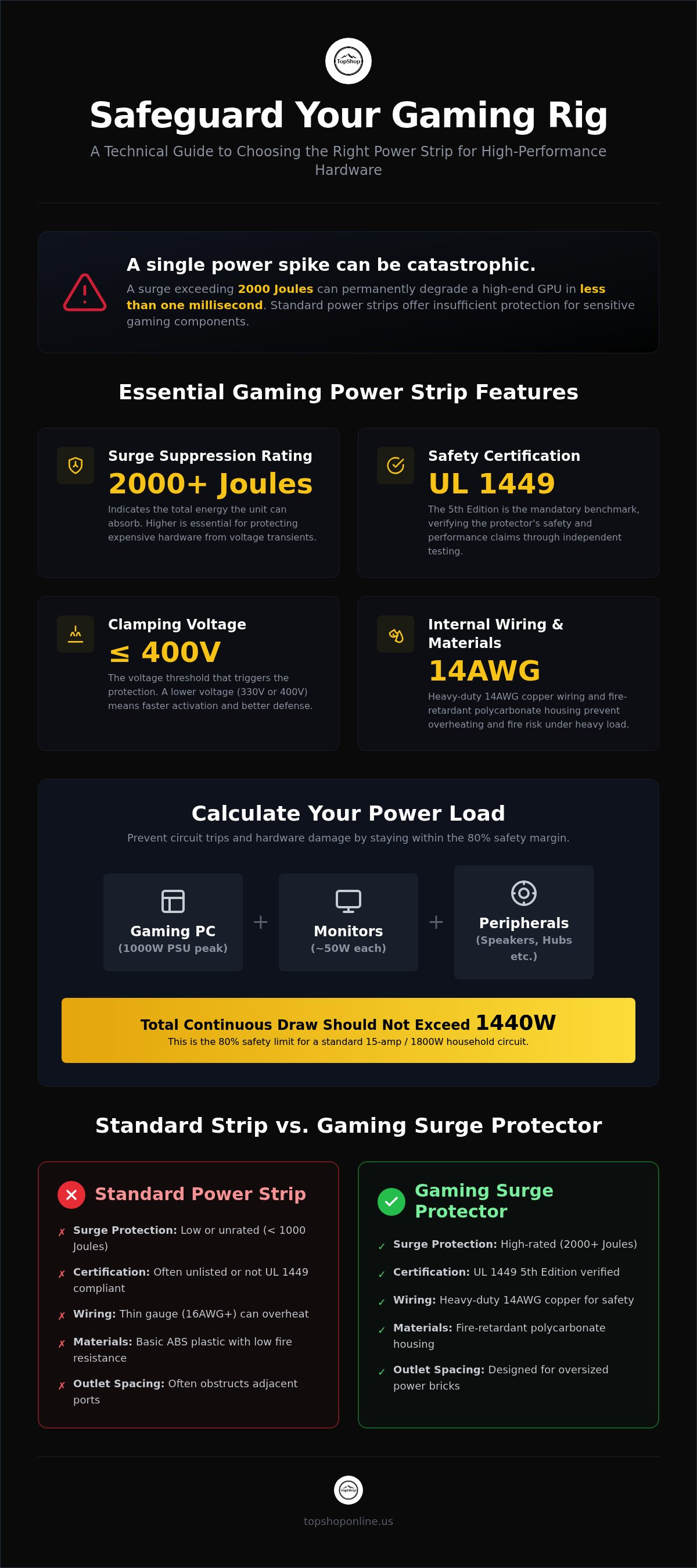
A single power spike exceeding 2000 Joules can permanently degrade the silicon architecture of a high-end GPU in less than one millisecond. Identifying the best power strip for gaming setup configurations requires a technical assessment of surge suppression capacity, electrical load distribution, and UL 1449 5th Edition safety compliance. You recognize that standard household power strips offer insufficient protection for sensitive 2026 hardware components. This guide provides a detailed analysis of the specifications necessary to safeguard expensive desktop builds from voltage transients while reducing cable congestion.
We offer a comprehensive technical breakdown of clamping voltages, energy absorption ratings, and the utility of high-density hardware like the Power Strip with 6 AC Outlets & 6 USB Ports. You'll gain precise data on calculating necessary Joule ratings for multi-monitor arrays and high-wattage power supplies. Our review covers the integration of USB-C Power Delivery and physical layout designs optimized for oversized transformer bricks. This overview ensures your gaming station maintains peak electrical efficiency and organized cable management through verified hardware performance data.
Key Takeaways
- Calculate total system wattage draw for 1000W power supply units and peripheral arrays to ensure electrical load distribution remains within safe hardware operating limits.
- Identify the best power strip for gaming setup requirements by prioritizing surge suppression ratings of 2000 Joules or higher to prevent permanent semiconductor degradation.
- Analyze integrated USB charging specifications including total amperage and port variety to consolidate up to twelve devices into a single high-density power source.
- Verify UL 1449 5th Edition safety compliance and specific clamping voltage thresholds to ensure immediate protection activation during transient voltage spikes.
- Evaluate physical hardware dimensions and 14AWG heavy-duty cord lengths to facilitate clean cable management and secure integration with under-desk mounting trays.
Technical Specifications for Gaming Power Distribution Units
Standard residential extension cords lack the internal gauge and thermal management necessary for modern 2026 gaming hardware. A dedicated surge protector designed for high-performance computing prioritizes 15-amp circuit capacity and heavy-duty 14AWG copper wiring. These specifications ensure voltage stability under high-load scenarios, preventing the micro-fluctuations that degrade delicate GPU and CPU capacitors over time. Selecting the best power strip for gaming setup environments requires moving beyond basic power distribution to units capable of handling sustained 1800-watt loads without heat-induced resistance.
Calculating Total Power Load
Accurate power budgeting prevents circuit breaker trips and hardware damage. A high-end build featuring a 1000W power supply unit (PSU) doesn't consume 1000W continuously, but peak draw during intensive 4K rendering or ray-tracing must be accounted for. Add approximately 50W per LED monitor, 30W for active desktop speakers, and 10W for peripheral hubs. Totaling these values provides the aggregate wattage. Adhering to the 80% safety margin is critical; a standard 15-amp circuit supports 1800W, meaning your continuous draw shouldn't exceed 1440W. High-draw components like active subwoofers or laser printers should be isolated or factored into this limit to avoid overloading the internal bus bars.
Outlet Density and Configuration
Physical layout determines the practical utility of the best power strip for gaming setup designs. Modern hardware often utilizes oversized transformer bricks that obstruct adjacent ports on linear strips. High-density units, such as the Power Strip with 6 AC Outlets & 6 USB Ports, utilize wide-spaced configurations to accommodate these connectors without sacrificing outlet availability. Consolidating 12 devices into a single hub improves airflow and organization. For more on optimizing your workspace, consult our Gaming Setup Essentials 2026 guide. This 6 AC outlet standard provides the necessary clearance for core hardware while the integrated USB ports manage low-voltage peripherals independently, ensuring a streamlined, high-performance power distribution strategy.
Surge Protection and Hardware Safety Standards
High-performance gaming PCs represent a significant financial investment in silicon and circuitry. Protecting these components requires more than a simple outlet expander. The best power strip for gaming setup integration must feature a surge suppression rating of at least 2000 Joules. This energy absorption metric indicates the total electrical stress the unit can divert before internal components fail. Units with lower ratings often fail to protect against the high-energy transients common in residential power grids during 2026.
Clamping voltage is the specific threshold at which the surge protector begins to divert excess electricity to the ground wire. For modern hardware, a clamping voltage of 330V or 400V is the professional standard. Response time is equally critical. Quality units activate in less than one nanosecond. This rapid intervention prevents transient voltage from reaching the sensitive 12V rails of a PC power supply. Verified testing, such as that seen in Wirecutter's best surge protectors, emphasizes that UL 1449 5th Edition certification is the mandatory benchmark for safety and performance validation.
The Science of Surge Suppression
Most modern protectors utilize Metal Oxide Varistors (MOVs). These components act as pressure-relief valves for electricity. MOVs are sacrificial. Every surge they absorb reduces their remaining capacity. Integrated LED indicator lights provide a visual status of this protection. When the "Protected" light extinguishes, the internal MOVs have been exhausted and the unit must be replaced. Detailed insights on these sacrificial mechanisms are available in our guide on Surge Protector with USB Charging Ports: Safety Standards.
Fire Safety and Material Composition
Material choice directly impacts fire resistance. While basic models use standard ABS plastic, professional-grade units utilize fire-retardant polycarbonate housing. This material withstands higher thermal loads without igniting. Additionally, look for integrated overload protection switches. These mechanical breakers trip automatically if the total current draw exceeds the 15-amp limit. Grounding indicators are also essential. They verify that the wall outlet is correctly wired to a dedicated ground, allowing the surge protector to function as intended. For users managing multiple high-draw peripherals, the Power Strip with 6 AC Outlets & 6 USB Ports includes these safety features within a compact, heat-dissipating chassis. You can browse our full range of certified hardware at TopShop to secure your desktop environment.
USB Charging Capabilities for Gaming Peripherals
Modern gaming peripherals require consistent DC power for lithium-ion battery maintenance and optimal performance. The best power strip for gaming setup integration utilizes dedicated USB circuitry to bypass the lower amperage limits of standard PC chassis ports. Motherboard USB 2.0 or 3.0 ports often output between 0.5A and 0.9A, which is insufficient for the rapid charging requirements of high-capacity wireless headsets or PS5 DualSense controllers. Integrated charging ports on a power distribution unit provide 2.1A to 2.4A per port, significantly reducing charging cycles for 2026 hardware.
USB-A ports remain the primary standard for legacy peripherals, while newer USB-C integration supports Power Delivery protocols for fast-charging mobile devices and tablets. Total USB output is measured in aggregate amperage, such as 3.4A or 4.8A shared across the bus. This aggregate limit dictates how many high-draw devices can charge at peak velocity simultaneously. Transitioning to integrated USB ports eliminates "wall-wart" transformer clutter behind the desk, allowing the 6 AC outlets to remain available for high-wattage hardware like monitors and consoles. This configuration ensures that Xbox battery packs and wireless headsets remain at full capacity without occupying primary electrical sockets.
Smart Charging Technology
Integrated circuits in high-density power strips feature automatic device detection to negotiate optimal current delivery. This negotiation prevents overcharging and thermal stress on sensitive electronics, such as the internal batteries found in a Wireless Keyboard for PS5 Controller. Precise voltage regulation ensures that low-draw components, including mechanical keyboards and optical sensors, receive stable power without the fluctuations that cause input lag. Technical data on these electrical tolerances is detailed in our guide on Power Strip with USB Ports: Amperage and Voltage Specs.
The 6-USB Port Advantage
Managing a high-density workstation involves powering multiple wireless inputs alongside mobile hardware. The Power Strip with 6 AC Outlets & 6 USB Ports configuration allows for the simultaneous connection of a smartphone, tablet, and four gaming peripherals. This hardware density removes the need for external, PC-connected USB hubs that often introduce data latency or power instability. Dedicated USB ports also provide the consistent 5V supply required for RGB desk lighting and external cooling fans. This setup ensures that secondary accessories don't compete with the primary PC power supply for energy, maintaining the overall stability of the best power strip for gaming setup environments.
Cable Management and Physical Setup Integration
Physical dimensions dictate the feasibility of integrating power distribution into modern gaming workstations. High-performance desks often feature integrated under-desk trays or narrow cable raceways that require a compact form factor. The best power strip for gaming setup deployments must balance a high port density with a chassis width that fits these restrictive spaces. Selecting a unit like the Power Strip with 6 AC Outlets & 6 USB Ports ensures that 12 separate power lines are consolidated into a single, manageable hub. This prevents the "octopus" effect of tangled cables behind the monitor array and maintains clear airflow pathing for PC exhaust fans.
Cord length and gauge are critical for electrical safety and setup flexibility. Heavy-duty 14AWG cables are the baseline requirement for 15-amp loads, providing the necessary thickness to prevent overheating during peak power draw. For sit-stand desks, a 10ft cord is preferred to accommodate the vertical travel of the desktop without straining the wall outlet. 6ft cords are sufficient for static setups where the power source is in close proximity. High-quality units also incorporate keyhole slots on the rear of the housing, allowing for secure mounting to the underside of the desk or onto a wall to keep floor space clear of dust and debris.
Ergonomic Power Access
Positioning the power source affects the daily utility of peripheral charging. Desktop placement provides immediate access to the six integrated USB ports for headsets and controllers, whereas floor placement is better suited for high-wattage AC bricks. You'll find more detailed strategies in our Cable Management for Home Office: Technical Organization Guide 2026. Effective organization involves separating data cables from power lines to minimize electromagnetic interference. It's an easier task when using a wide-spaced outlet configuration designed for oversized transformer bricks.
Durability and Build Quality
Build quality ensures long-term reliability in high-traffic desk environments. Impact-resistant polycarbonate casing protects internal bus bars from accidental kicks or pressure. Heavy-duty strain relief at the cord entry point prevents internal wire fraying over thousands of desk adjustments. Flat-plug designs are particularly useful for setups where the desk sits flush against a wall, as they require only 0.5 inches of clearance. Secure your workstation by choosing the Power Strip with 6 AC Outlets & 6 USB Ports at TopShop to ensure your hardware stays organized and powered.
Choosing the Best Power Strip for Gaming Hardware
The 6 AC and 6 USB configuration represents the current technical benchmark for high-density hardware environments. Standalone surge protectors often require additional external hubs for low-voltage charging, which increases electrical resistance and cable congestion. Integrated charging hubs consolidate power distribution into a single internal PCB (Printed Circuit Board) architecture, reducing the number of potential failure points in the circuit. For users operating multi-device ecosystems, these high-density solutions offer the highest return on investment by eliminating the need for redundant secondary adapters. Selecting the best power strip for gaming setup configurations involves verifying that the unit can handle the aggregate load of a PC, monitors, and various console hardware simultaneously.
A final technical checklist for hardware selection includes:
- Surge Suppression: Minimum 2000 Joule rating for high-end silicon protection.
- Port Density: 6 AC outlets and 6 USB ports to manage up to 12 devices.
- Cord Specification: 14AWG heavy-duty copper wiring for 15-amp circuit stability.
- Safety Standard: UL 1449 5th Edition certification for verified clamping voltages.
- Physical Design: Wide-spaced outlets to accommodate oversized transformer bricks.
TopShop Power Strip with 6 AC Outlets & 6 USB Ports
The Power Strip with 6 AC Outlets & 6 USB Ports provides a 12-device capacity within a single fire-retardant polycarbonate housing. Its technical breakdown includes six wide-spaced AC outlets for high-wattage hardware like 1000W PSUs and 4K monitors. The six integrated USB ports deliver dedicated current for peripherals such as wireless headsets and controllers. The compact form factor is specifically optimized for gaming desk organization, fitting into standard cable management trays or mounting directly to desk undersides. This hardware is particularly suited for combined PC and console setups where multiple high-draw devices share a single power source.
Final Implementation Steps
Final implementation requires a functional verification of the grounding and surge indicator LEDs immediately upon installation. If the grounding light doesn't illuminate, the residential wall outlet wiring is insufficient for proper surge diversion. Periodic inspection of the 14AWG heavy-duty cord for heat accumulation, physical wear, or insulation fraying ensures long-term operational safety. You should replace the hardware every three to five years, or immediately following a significant electrical surge event, to maintain peak protection levels. You can View the Power Strip with 6 AC Outlets & 6 USB Ports at TopShop to complete your workstation hardware upgrade.
Optimizing Desktop Electrical Infrastructure for 2026
Securing high-performance hardware requires a transition from basic extension cords to specialized power distribution units. Effective electrical management hinges on high-joule surge suppression and a 15-amp circuit baseline to maintain voltage stability across multi-monitor arrays. Identifying the best power strip for gaming setup environments involves prioritizing units with UL 1449 5th Edition compliance and wide-spaced outlet designs to prevent transformer obstruction. These technical features ensure that sensitive silicon components remain protected from transient voltage spikes while maintaining a streamlined workstation layout.
Consolidating your hardware into a single, high-density hub provides the necessary electrical headroom for modern 1000W power supplies and high-draw peripherals. The Power Strip with 6 AC Outlets & 6 USB Ports offers a 12-device total capacity and heavy-duty safety construction to meet these rigorous demands. You'll maintain peak system performance and organized cable management by utilizing integrated high-speed USB ports for all secondary gaming accessories. Secure Your Setup with the Power Strip with 6 AC Outlets & 6 USB Ports at TopShop. Investing in verified electrical hardware ensures your desktop station remains stable and operational through intensive gaming sessions.
Frequently Asked Questions
How many Joules do I need for a high-end gaming PC?
High-end gaming PCs require a surge protection rating of at least 2000 Joules to ensure adequate safety for expensive silicon components. This energy absorption capacity allows the unit to divert significant electrical transients before they reach the power supply. For the best power strip for gaming setup configurations, higher Joule ratings provide a longer operational lifespan since internal Metal Oxide Varistors degrade less rapidly over multiple minor surge events.
Can a power strip handle a PC and a gaming console simultaneously?
A high-quality power strip can support both a PC and a console provided the total wattage doesn't exceed 1800W. A typical 1000W PSU and a 200W console stay within the 80% safety margin of a standard 15-amp circuit. Consolidating these devices into a Power Strip with 6 AC Outlets & 6 USB Ports ensures stable electrical distribution while maintaining a compact form factor for desk integration.
Is it safe to charge a PS5 controller from a power strip USB port?
Charging a PS5 controller via an integrated USB port is safe and efficient when the port provides a standard 5V output. Most modern power strips deliver 2.1A to 2.4A per port, which exceeds the charging speed of standard PC motherboard ports. This setup prevents the controller from drawing power from the console’s internal supply, allowing for independent charging of accessories like the Wireless Keyboard for PS5 Controller without occupying primary AC outlets.
What is the difference between a power strip and a surge protector?
A standard power strip acts only as a multi-outlet expansion unit without internal protection mechanisms. Conversely, a surge protector includes Metal Oxide Varistors to divert excess voltage to the ground wire. Identifying the best power strip for gaming setup needs requires checking for UL 1449 5th Edition certification, which verifies that the unit functions as a protective device rather than a simple electrical extension cord.
Why does my power strip have a 'Protected' and 'Grounded' light?
The 'Protected' light indicates that the internal surge suppression circuitry is active and capable of diverting voltage spikes. If this light turns off, the internal components are exhausted. The 'Grounded' light verifies that the wall outlet is correctly connected to the building's electrical earth. Without a proper ground connection, the surge protector can't safely discharge excess energy, leaving your gaming hardware vulnerable to permanent electrical damage.
Can I plug a power strip into another power strip (daisy-chaining)?
Daisy-chaining power strips is a violation of UL safety standards and creates a significant fire hazard. Plugging one strip into another increases electrical resistance and can cause the primary cord to overheat or melt. For high-density setups, it's safer to use a single unit with high port counts, such as a Power Strip with 6 AC Outlets & 6 USB Ports, to manage up to 12 devices from one wall outlet.
How often should I replace my gaming power strip?
You should replace your gaming power strip every three to five years under normal operating conditions. Surge protection components are sacrificial and lose effectiveness over time as they absorb minor fluctuations in the power grid. If your area experiences a major lightning strike or a significant power surge event, you must replace the unit immediately, as the internal components are likely compromised despite the light status.
What cord gauge (AWG) is best for gaming setups?
A 14AWG cord is the professional standard for gaming setups involving high-draw hardware. This heavy-duty thickness supports a full 15-amp load without excessive heat buildup or voltage drop. While thinner 16AWG or 18AWG cords are common in basic household extensions, they aren't suitable for 1000W power supplies or multi-monitor arrays. Always verify the gauge printed on the cable jacket to ensure maximum electrical throughput and safety.