

A standard power strip is a single point of failure for a high-performance gaming rig. Relying on basic, low-joule outlet extenders to protect expensive GPUs and multi-monitor arrays often results in catastrophic hardware loss during minor voltage spikes. Finding the best power strip for gaming setup requires a rigorous technical evaluation of surge suppression thresholds, clamping voltages, and thermal safety ratings. Most consumer-grade hardware fails to meet the 1000-joule minimum requirement for sensitive electronic components.
You likely recognize that unstable power delivery and behind-desk cable management clutter compromise both system reliability and physical organization. This guide analyzes technical specifications, joule ratings, and port configurations to identify optimal power distribution solutions for high-performance gaming environments. We preview 2000-joule protection standards, UL-listed safety certifications, and integrated high-output USB-C 20W Power Delivery fast-charging ports. The following sections detail high-density 6-AC/6-USB configurations, fire-resistant housing materials, and smart-home Matter integration for 2026 hardware standards.
Key Takeaways
- Distinguish between basic multi-outlet expansion and surge protectors utilizing Metal Oxide Varistors for active voltage diversion and hardware safety.
- Identify the best power strip for gaming setup by prioritizing Joule ratings between 2000 and 3000 to protect high-wattage internal components.
- Analyze clamping voltage thresholds and safety certifications to ensure rapid suppression of electrical transients and prevent thermal damage.
- Implement high-density configurations featuring integrated USB ports to provide simultaneous peripheral power while reducing behind-desk cable clutter.
- Select specific cord lengths and mounting solutions to maintain electrical connectivity during ergonomic desk height adjustments and layout changes.
Power Strip vs. Surge Protector: Defining Gaming Requirements
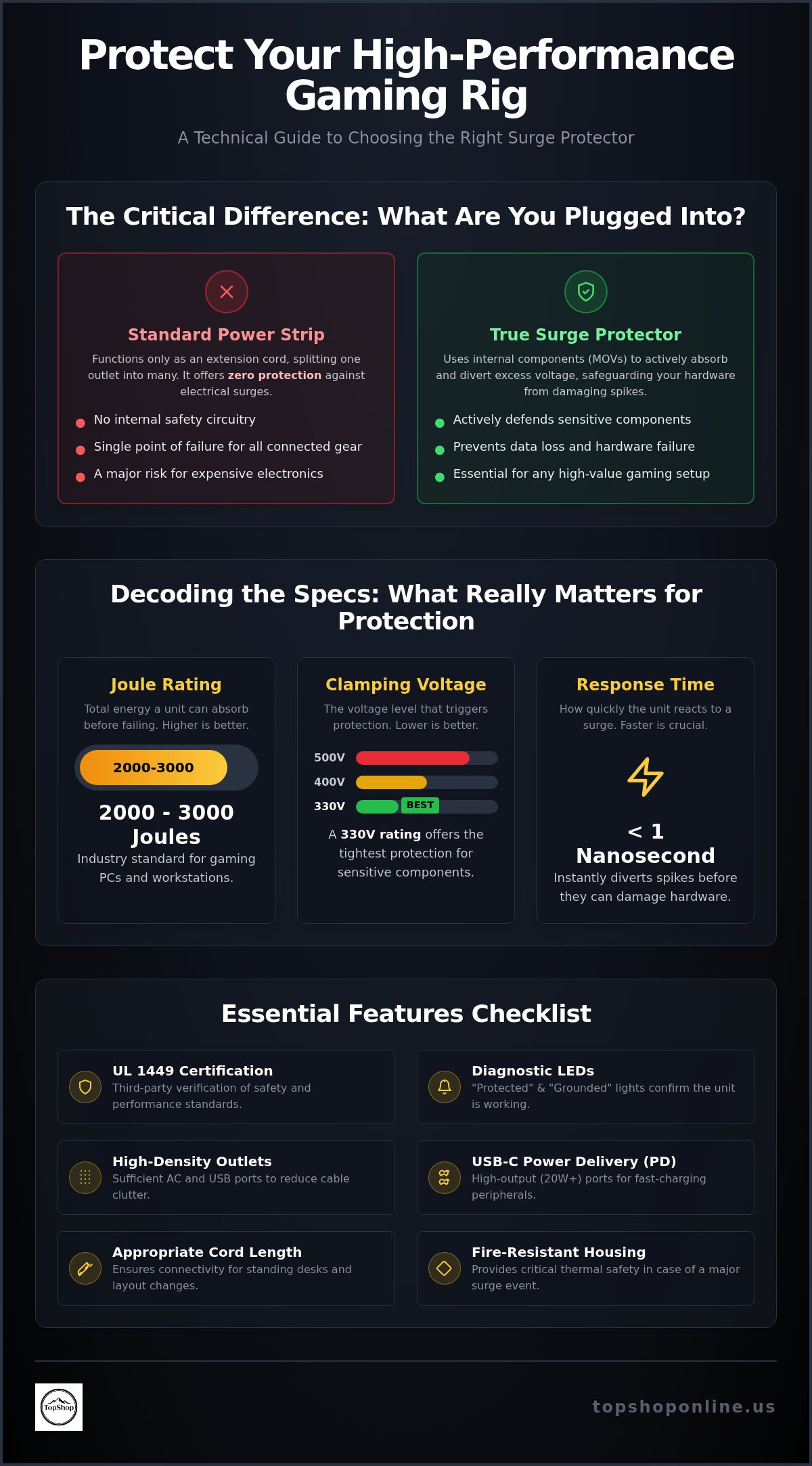
A basic power strip serves exclusively as a physical expansion of a single wall outlet into multiple receptacles. It contains no internal circuitry for voltage regulation, noise filtration, or transient suppression. Conversely, a dedicated surge protector utilizes Metal Oxide Varistors (MOVs) to provide active defense. These semiconductor components act as pressure-relief valves for electricity. When incoming voltage exceeds the designated clamping threshold, MOVs divert the excess energy safely to the ground wire. This mechanism prevents high-voltage transients from reaching sensitive internal circuitry. For consumers evaluating the best power strip for gaming setup, verifying the UL 1449 certification is mandatory. This Underwriters Laboratories standard confirms the device has undergone rigorous testing for surge current capacity and thermal safety.
The Vulnerability of High-End Gaming Hardware
High-performance gaming PCs frequently utilize power supply units (PSUs) rated for 850W or higher. These units are engineered for high efficiency but remain vulnerable to rapid voltage fluctuations. Power spikes can cause immediate instability in GPU and CPU voltage regulator modules (VRMs). This results in system crashes, blue-screen errors, or gradual silicon degradation. NVMe SSDs are particularly susceptible to power-related failures; abrupt voltage changes during write operations often lead to unrecoverable data corruption or complete drive failure. The investment in a certified surge protector provides essential mitigation against the high cost of hardware replacement for systems valued at $2,000 or more.
Identifying True Surge Protection
Identifying a functional surge protector requires inspecting the unit for specific diagnostic features. Most reliable models include Protected and Grounded LED status indicators. A lit Protected light confirms the internal MOVs are active and capable of suppressing surges. Users must understand that surge protection is a consumable feature. Every diversion of excess voltage degrades the MOVs. Once their capacity is exhausted, the unit no longer provides defense, even if the outlets still provide power. Devices lacking a Joule rating on the technical specification label or diagnostic LEDs are simply extension cords. For the best power strip for gaming setup, prioritize units with clear status indicators and high Joule ratings to ensure long-term hardware safety.
Technical Specifications: Joule Ratings and Clamping Voltage
Selecting the best power strip for gaming setup requires a detailed analysis of three primary electrical metrics: Joule rating, clamping voltage, and response time. These specifications determine the longevity and effectiveness of the surge suppression circuit. Understanding these values allows users to move beyond generic marketing claims and evaluate hardware based on measurable protection thresholds.
Decoding Joule Ratings for PC Enthusiasts
A Joule rating measures the total amount of energy a surge protector can absorb before its internal components fail. In a gaming context, a rating between 2000 and 3000 Joules is the established industry standard for high-performance workstations. Higher ratings correlate directly with a longer hardware lifespan because the Metal Oxide Varistors (MOVs) can withstand more frequent, smaller transients over several years. MOVs function as consumable parts; every surge event reduces the remaining Joule capacity. A 3000-Joule unit might survive one massive strike or hundreds of minor 10-Joule spikes. Setups involving dual 4K monitors, a high-wattage PC, and a console require this elevated capacity to handle the cumulative electrical load of multiple high-draw devices.
Clamping Voltage and Response Time
Clamping voltage is the specific voltage level that triggers surge diversion. Lower values are technically superior for sensitive electronics; a 330V or 400V rating ensures the protector activates quickly enough to prevent semiconductor damage. Response time is the speed at which this diversion occurs. The most effective units react in less than one nanosecond. Delayed response times allow high-voltage spikes to penetrate the power supply, leading to micro-fractures in silicon components or immediate motherboard failure. UL 1449 ratings often categorize clamping levels into 330V, 400V, and 500V. A 330V rating is the lowest available and provides the tightest protection for delicate NVMe controllers and GPU VRMs.
High-draw components like 1000W PSUs and high-refresh-rate monitors can push standard 15A circuits to their limit. A built-in circuit breaker with an 1875W capacity prevents overheating of the power strip's internal wiring. Most residential circuits in the US are rated for 15 Amps. If a gaming setup draws 12 Amps and additional peripherals are added, the integrated circuit breaker must trip to prevent fire hazards. Monitoring these technical thresholds ensures the distribution solution remains stable under full load. For users seeking a balance of high-density connectivity and electrical safety, the TopShop 6 AC and 6 USB port power strip provides a streamlined hardware profile for modern desk environments.
Outlet Architecture and USB Port Integration for Peripherals
A significant challenge in selecting the best power strip for gaming setup involves managing the diverse power requirements of primary hardware and peripheral accessories. High-density configurations featuring integrated USB ports reduce the reliance on external AC-to-USB adapters. This hardware integration maximizes available desktop space by consolidating power delivery into a single chassis. The inclusion of multiple USB-A or USB-C interfaces allows for simultaneous charging of wireless headsets, RGB controllers, and mobile devices without occupying high-voltage AC receptacles. Identifying the best power strip for gaming setup involves checking these amperage specs to ensure fast-charge compatibility for all connected gear.
USB Power Delivery for Gaming Accessories
Effective peripheral management requires analyzing the total amperage capacity of the USB bus. Most wireless gaming mice and keyboards require consistent 5V power at 2.1A or 2.4A for optimal charging speeds. Utilizing a Power Strip with 6 AC Outlets & 6 USB Ports eliminates the need for multiple 5W or 10W wall bricks that clutter the desk surface. This high-density configuration provides dedicated charging lanes for PS5 or Xbox controllers while maintaining sufficient amperage for high-draw peripherals like wireless VR base stations or streaming lights. Per-port output regulation ensures that connecting a second or third device doesn't degrade the charging performance of the primary accessory. This stability is critical for gamers who maintain multiple wireless devices in a standby charging state.
Physical Layout and Plug Compatibility
Physical outlet orientation determines the actual utility of the device. Standard linear spacing often renders adjacent outlets unusable when connecting bulky 'wall wart' transformer bricks common in monitor, router, and external drive power supplies. Transformer-spaced outlets provide additional clearance between receptacles to accommodate these oversized adapters without sacrificing port density. Integrated 45-degree angled flat plugs allow the power strip to connect to wall outlets located behind desks or cabinets without blocking the second wall socket or forcing furniture away from the wall. Managing high-density connectivity in a small-footprint desktop power strip requires a balance of AC spacing and USB port proximity. This architecture facilitates clean cable management for dual-monitor setups where multiple AC and USB power sources must converge in a restricted area.
Integrating Power Strips into Gaming Desk Cable Management
Proper physical integration of the best power strip for gaming setup requires coordinating technical specifications with desk ergonomics. Standing desks featuring motorized height adjustments necessitate cord lengths between 6ft and 10ft to maintain tension-free connectivity at maximum elevation. Short 3ft cables risk pulling the plug from the wall or damaging internal copper wiring during upward transitions. For advanced routing techniques and technical organization, refer to the cable management for home office guide. High-wattage hardware generates significant thermal energy; placing power strips inside enclosed, unventilated cable management boxes creates fire risks due to heat accumulation. Open-air under-desk trays or perforated metal baskets facilitate essential airflow for cooling internal surge suppression components.
Cord Management and Safety
High-amperage gaming setups require heavy-duty 14 AWG or 12 AWG power cords to handle the electrical load of 1000W PSUs and multiple high-refresh monitors. Daisy-chaining, the practice of plugging one power strip into another, is a hazardous technical failure that bypasses safety ratings and increases fire risks. This practice often triggers circuit breakers or causes thermal melting of plastic housings. Utilizing industrial-grade velcro straps or nylon cable ties ensures organized peripheral power routing without crimping the insulation. Organized bundles prevent accidental disconnections during foot movement and reduce electromagnetic interference (EMI) near audio cables. Correct cable tensioning prevents mechanical stress on the power strip's internal solder joints.
Strategic Placement for Accessibility
Determining the best power strip for gaming setup location depends on device swapping frequency. Desktop-mounted strips with adhesive backing or clamp-on brackets provide immediate access for charging wireless peripherals or connecting temporary hardware. Conversely, floor-based surge protectors serve as stable distribution hubs for permanent equipment like PCs, subwoofers, and primary displays. This dual-zone approach separates high-voltage AC lines from low-voltage data cables. Integrating these power solutions is a core component of gaming setup essentials for maintaining a clean, functional environment. For a streamlined distribution solution featuring high port density and integrated safety features, consider the TopShop 6-outlet 6-USB power strip to consolidate your hardware power requirements.
TopShop 6-Outlet 6-USB Power Strip: Technical Overview
The TopShop Power Strip with 6 AC Outlets & 6 USB Ports functions as a high-density power distribution unit (PDU) engineered for complex gaming workstation environments. It provides a technical solution for users seeking the best power strip for gaming setup by consolidating multiple high-voltage and low-voltage connections into a single, compact chassis. This model eliminates the need for secondary expansion hubs or external USB wall chargers, maintaining a streamlined hardware profile on or under the desk. The integrated circuit architecture supports the simultaneous operation of high-wattage PCs and multiple peripherals without compromising electrical stability.
High-Density Power Distribution Specs
The 6 AC receptacles support simultaneous power delivery for high-draw components, including 1000W PSUs, dual 4K monitors, and next-generation consoles. The integrated 6-port USB charging hub delivers regulated 5V power with a high total amperage capacity, facilitating the rapid charging of wireless mice, mechanical keyboards, and headsets. Constructed with fire-resistant, high-impact polycarbonate materials, the unit withstands the mechanical stress of frequent plug cycles and various under-desk mounting configurations. Internal copper bus bars ensure low electrical resistance and minimal heat generation during peak electrical loads. This durable housing design is optimized for long-term placement in high-performance environments where thermal management is a primary concern.
Optimizing Your Gaming Transaction
This model integrates into the wider power strip 6 outlet 6 usb ecosystem, providing a standardized hardware reference for 2026 gaming environments. The consolidated design significantly reduces cable management complexity by centralizing power routing for up to 12 separate devices into a single footprint. TopShop facilitates rapid hardware deployment through a streamlined e-commerce platform featuring secure checkout procedures and fast national shipping across the United States. This direct distribution model ensures competitive pricing and consistent inventory availability for professional gaming setups and high-end home office workstations. The efficiency benefits of this model are particularly evident in setups requiring high port density within a restricted physical area.
Space-saving chassis dimensions ensure compatibility with small-footprint gaming stations, compact cable trays, and ergonomic standing desks. The unit’s technical profile aligns with the requirements for stable power delivery and high-speed peripheral charging analyzed in previous sections. By centralizing 12 distinct power points, this hardware solution provides the reliability necessary for high-performance environments while maintaining a clean, professional aesthetic. It remains the optimal technical recommendation for users prioritizing port density and safety certifications in their search for the best power strip for gaming setup. National shipping ensures that this technical solution is accessible for gaming environments throughout the US market.
Secure Your High-Performance Gaming Distribution Solution
Hardware protection for 2026 gaming environments relies on verified surge suppression metrics and efficient port architecture. Transitioning from basic extension cords to certified surge protectors with high-joule ratings prevents catastrophic damage to high-wattage power supplies and sensitive NVMe storage components. Consolidating AC and USB power delivery into a single high-density unit reduces cable clutter while maintaining consistent charging amperage for wireless peripherals. Proper cord length selection and strategic mounting further ensure that your setup remains ergonomic and safe during intense sessions.
Identifying the best power strip for gaming setup involves balancing Joule ratings, clamping voltages, and physical outlet spacing. These technical factors determine the longevity of your hardware and the efficiency of your desk organization. You can now implement a professional-grade power solution that supports dual-monitor configurations and multiple wireless accessories simultaneously. Shop the 6-Outlet 6-USB Power Strip at TopShop to access a high-density 6 AC / 6 USB configuration with an integrated peripheral charging hub. National US shipping is available for all technical hardware orders to ensure rapid deployment. Establishing a stable power foundation allows for uninterrupted performance and complete hardware security in any high-stakes gaming environment.
Frequently Asked Questions
What is the minimum Joule rating for a gaming PC surge protector?
A gaming PC surge protector requires a minimum rating of 1000 Joules for basic safety. For high-end systems with expensive GPUs, a rating of 2000 Joules or higher is suggested to provide enhanced protection. This capacity ensures the device can absorb cumulative energy spikes over several years. Selecting the best power strip for gaming setup involves verifying these technical thresholds on the product specification label before installation.
Can I plug a gaming PC and a space heater into the same power strip?
Connecting a gaming PC and a space heater to the same power strip is unsafe. Most residential power strips are rated for a maximum of 1875 Watts or 15 Amps. A standard space heater typically draws 1500 Watts, leaving insufficient capacity for a high-performance PC that may draw 500 to 1000 Watts. This configuration will likely trip the integrated circuit breaker or cause thermal damage to the power strip's internal wiring.
How often should I replace my gaming setup power strip?
Power strips should be replaced every 2 to 3 years depending on the frequency of electrical transients in your area. The internal Metal Oxide Varistors degrade every time they divert excess voltage. Once their Joule capacity is exhausted, the device loses its ability to protect connected hardware. If the status indicator light for surge protection is no longer illuminated, the unit must be replaced immediately to maintain system safety.
Are the USB ports on a power strip safe for charging expensive controllers?
Integrated USB ports on a high-quality power strip are safe for charging wireless controllers and headsets. These ports provide regulated 5V DC power, matching the requirements of PS5 and Xbox peripherals. Using the best power strip for gaming setup with built-in USB-A and USB-C ports eliminates the need for multiple AC wall adapters. This configuration ensures consistent amperage delivery while reducing physical clutter and heat buildup behind the desk.
What is the difference between clamping voltage and surge protection?
Clamping voltage is the specific voltage threshold that triggers the suppression circuit, whereas surge protection refers to the total energy absorption capacity measured in Joules. A lower clamping voltage, such as 330V, is superior for sensitive electronics because it redirects excess energy sooner. Surge protection defines how many of these events the device can handle over its lifespan. Both metrics are essential for evaluating the technical effectiveness of a surge protector.
Does a power strip affect the performance or FPS of my gaming PC?
A power strip does not have any measurable impact on the FPS or processing performance of a gaming PC. These devices only deliver electrical current to the power supply unit and don't interact with data signals or component clock speeds. While a faulty strip might cause system instability or sudden shutdowns, it can't throttle hardware performance. Frame rates are determined by the CPU, GPU, and RAM capabilities rather than the power distribution source.
Why is my power strip's 'Protected' light flickering or turned off?
A flickering or extinguished 'Protected' light indicates that the internal surge suppression components have failed. This occurs when the Metal Oxide Varistors have reached their maximum energy absorption limit. At this stage, the unit functions only as a basic extension cord and provides no defense against voltage spikes. You should stop using the device for sensitive hardware and replace it with a new certified surge protector to ensure ongoing component safety.
Are smart power strips worth it for a gaming setup?
Smart power strips are beneficial for gaming setups that require energy monitoring and remote device management. Models supporting the Matter protocol allow for integration with Alexa or Google Home, enabling voice-controlled power cycles for peripherals. These units often feature individual outlet control to reduce vampire power draw from standby monitors and consoles. While more expensive, they provide functional advantages for users seeking automated control over their hardware environment.