

Selecting the best power strip for multiple devices requires a precise technical analysis of Voltage Protection Ratings (VPR) and port density rather than aesthetic design. High-volume device setups frequently encounter insufficient AC outlets for bulky adapters and slow charging speeds from outdated integrated USB ports. Reliable power management requires a centralized hardware solution providing 1080-2000+ Joule protection and high-amperage output. This 2026 tech guide analyzes technical hardware requirements and current safety standards to identify the optimal power strip for complex workstations. We evaluate UL 1449 5th Edition compliance, USB Power Delivery 3.1 specifications, and the utilitarian efficiency of the 6 AC plus 6 USB port configuration. The following sections detail how to select units with a 330V clamping voltage to prevent surge damage to expensive electronics while reducing workspace cable clutter. This analysis focuses on functional descriptors and measurable attributes to ensure hardware longevity and power stability.
Key Takeaways
- Identify the best power strip for multiple devices by analyzing the specific ratio of high-voltage AC outlets to high-amperage USB ports required for high-density hardware environments.
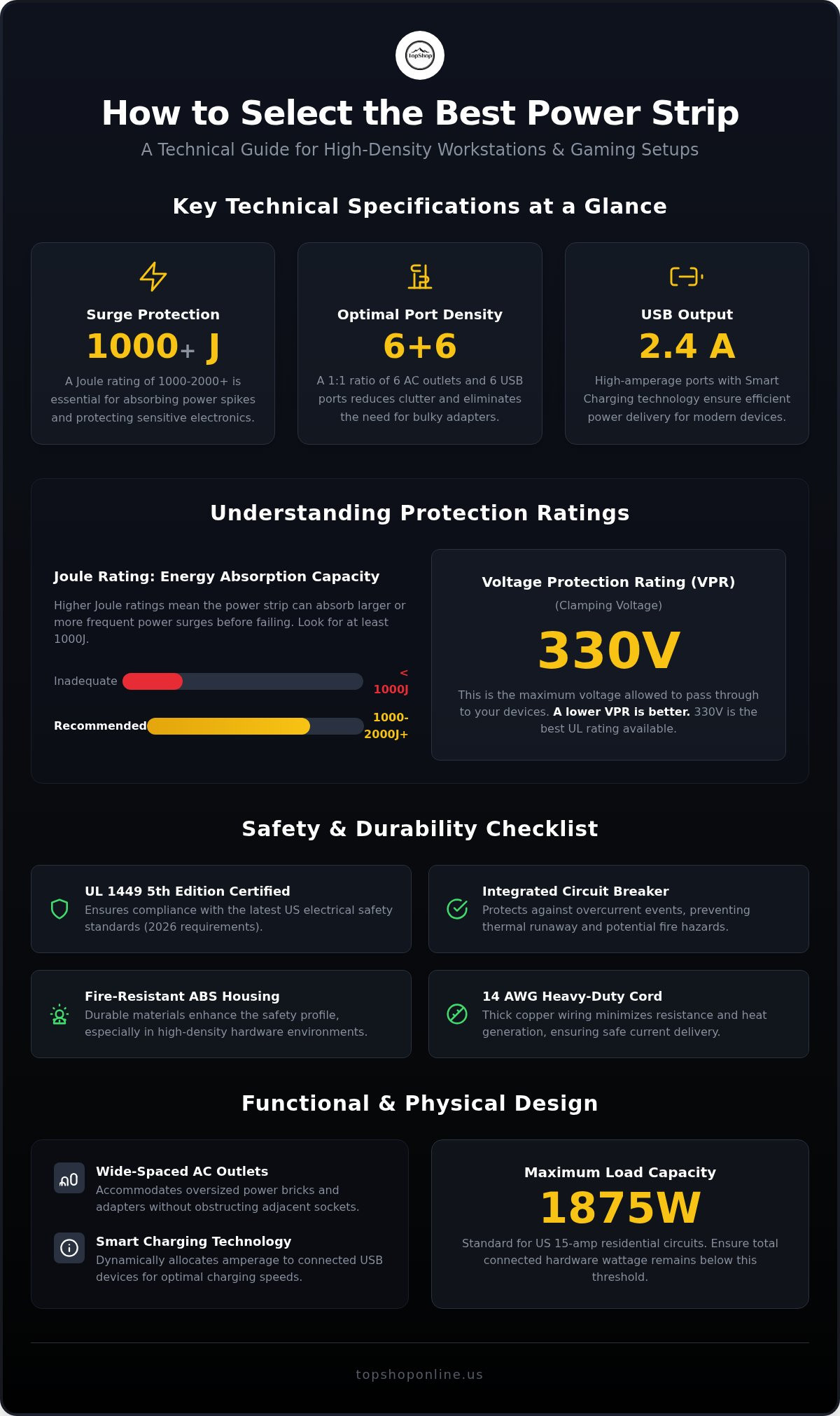
- Verify Joule ratings of 1000 or higher to ensure the hardware provides adequate energy absorption capacity for expensive electronics and sensitive computing equipment.
- Assess USB amperage outputs, specifically the 2.4A standard, to guarantee efficient charging speeds for modern mobile devices and peripheral hardware.
- Implement integrated 6 AC and 6 USB configurations to consolidate power sources, which facilitates superior cable management in professional workstations and gaming setups.
- Confirm UL 1449 5th Edition compliance and low Voltage Protection Ratings to ensure hardware meets the latest 2026 electrical safety requirements.
Essential Hardware Criteria for Multi-Device Power Management
High-density hardware environments require centralized power hubs capable of managing diverse electrical loads. Identifying the best power strip for multiple devices necessitates an evaluation of specific measurable attributes rather than aesthetic preferences. Primary criteria include outlet spacing, port variety, and total wattage capacity. A standard Power strip functions as a block of electrical sockets; however, modern high-capacity versions serve as foundational hardware hubs for integrated electronics. These hubs are essential for cable management for home office environments, high-performance gaming setup essentials, and complex entertainment centers. Centralized hubs consolidate power sources into a single footprint, reducing the risk of thermal buildup and electrical interference common in cluttered setups.
Port Density and Configuration Ratios
Modern hardware ecosystems have shifted from pure AC strips to hybrid AC/USB configurations. This evolution addresses the high density of low-voltage peripherals that charge via USB alongside high-voltage hardware. A 1:1 port ratio provides the ideal technical balance for workstations. High port density eliminates the need for secondary wall adapters, which often obstruct adjacent outlets. By integrating dedicated USB ports with 2.4A output, these strips ensure consistent charging speeds for mobile devices without sacrificing AC capacity for monitors or desktop towers. This integration reduces hardware clutter and streamlines the power delivery process for peripheral devices.
Physical Dimensions and Spatial Layout
Physical layout determines the functional utility of a power hub. Wide-spaced outlets are essential for accommodating oversized power bricks without blocking neighboring sockets. Footprint requirements vary based on placement; desktop models prioritize accessible ports, while under-desk units often require mounting brackets for secure installation. Cord gauge is a critical safety metric. Thick 14 AWG copper wiring minimizes electrical resistance and heat generation over long distances. Standard 6-foot or 10-foot lengths provide sufficient reach for most professional setups while maintaining safe current delivery. Selecting the best power strip for multiple devices involves verifying these physical specifications to ensure compatibility with existing furniture and hardware dimensions. Durable housing materials, such as fire-resistant ABS plastic, further enhance the safety profile of high-density hubs.
Port Density and Electrical Load Capacity Analysis
The best power strip for multiple devices must manage high-density electrical loads without compromising circuit integrity. Standard US hardware utilizes 110V-125V input, supporting a maximum current of 15 amps on standard residential circuits. Total wattage capacity for these systems typically peaks at 1,875 watts. Integrated circuit breakers provide essential hardware protection by monitoring current flow and disconnecting power during overcurrent events. This mechanism prevents thermal runaway and potential fire hazards in high-volume setups. For those managing complex workstations, utilizing high-capacity power hubs ensures that each connected device receives stable current within safe operational parameters.
Understanding Combined USB Amperage
USB port performance depends on the distribution of amperage across the hardware's internal bus. Legacy ports often provide 1.0A, while modern standards require 2.1A or 2.4A for efficient charging of high-capacity batteries. Amperage is often shared across multiple ports; for instance, a strip with six USB ports might feature a total output of 4.8A or 6.0A. Simultaneous charging of multiple high-draw devices, such as tablets and smartphones, will reduce the individual output speed if the total demand exceeds the shared limit. Smart Charging technology acts as a dynamic power distribution mechanism that identifies the specific amperage requirements of a connected device and allocates current accordingly.
AC Outlet Voltage and Wattage Thresholds
Selecting the best power strip for multiple devices involves verifying the total load capacity against the connected hardware's wattage requirements. Calculating total wattage involves multiplying voltage by amperage (125V x 15A = 1,875W). To maintain stability, continuous loads shouldn't exceed 80% of this capacity. High-wattage hardware, including space heaters, refrigerators, and portable air conditioners, shouldn't be connected to power strips. These devices draw significant current that can degrade internal components. Proper usage includes following OSHA compliance requirements for power strips, which prohibit "daisy-chaining" or plugging one strip into another. This practice creates excessive electrical resistance and bypasses the safety mechanisms intended to protect the primary circuit. High-density setups benefit from a 1:1 ratio of AC to USB ports to distribute load across different power types effectively.
Surge Protection Ratings and Circuit Safety Standards
Joule ratings measure the energy absorption capacity of a surge protective device before its internal components fail. The best power strip for multiple devices utilizes Metal Oxide Varistors (MOVs) to detect voltage spikes and divert excess energy away from connected hardware to the ground wire. Safety certifications are critical for identifying reliable hardware; specifically, the UL 1449 5th Edition standard, published on August 26, 2026, ensures the device meets rigorous testing for surge suppression. High-density setups where multiple expensive components share a single power source require hardware with a low Voltage Protection Rating (VPR) of 400V or less and a clamping voltage of 330V for optimal performance.
Joule Rating Requirements for High-Value Electronics
Protection requirements vary based on the electrical sensitivity of the connected hardware. Basic lighting or small appliances require minimal protection, but high-value electronics such as gaming PCs, monitors, or a 1080P HD Wireless Mini Security WiFi Camera require substantial energy absorption. A rating of 1080-2000+ Joules is the technical benchmark for multi-device hubs. This capacity ensures the hardware can withstand multiple smaller surges or a single significant event without failure. Integrated indicator lights provide essential monitoring. A "Protected" LED signifies active MOV functionality, while an extinguished light indicates the surge protection has been depleted through use and the unit requires replacement to maintain hardware safety.
Fire Retardant Materials and Thermal Safety
High-density power management generates heat, necessitating the use of specialized housing materials. Quality power strips utilize ABS or polycarbonate fire-resistant plastics that self-extinguish during thermal events. Internal safety is further managed by the thickness of copper wiring, measured in American Wire Gauge (AWG). Utilizing 14 AWG wiring prevents overheating by reducing electrical resistance during high-amperage draws across all six AC outlets. Overloaded circuit protection is a mandatory safety feature for high-volume setups. Integrated reset switches automatically disconnect power when the total load exceeds the 15-amp threshold, preventing damage to internal circuitry and reducing fire risks in home office or entertainment environments. These mechanical fail-safes are essential for maintaining the stability of a best power strip for multiple devices under continuous load.
Functional Integration for Home Office and Gaming Stations
Functional integration of the best power strip for multiple devices requires strategic placement to ensure hardware accessibility and electrical safety. Effective cable management for home office environments involves the physical separation of high-voltage AC cables from low-voltage USB lines. This organization prevents signal interference and simplifies technical troubleshooting. In high-performance environments, the technical synergy between power hubs and gaming setup essentials ensures that peripherals like mechanical keyboards and headsets receive stable current without occupying primary AC outlets. Separating these lines reduces electromagnetic clutter, which is critical for maintaining clean signal paths for audio and data peripherals.
Desktop vs. Floor Power Distribution
Placement of the hardware hub depends on device frequency of use and physical proximity to the user. Desktop-mounted strips are optimal for frequently swapped USB devices, providing immediate access to charging ports without requiring the user to reach under furniture. Conversely, floor-based setups are more suitable for stationary, high-wattage hardware that doesn't require frequent disconnection. For instance, the power requirements of a smart wifi projector 1080p portable are best served by floor placement to minimize visible cable runs across the workspace. Technical integration should prioritize a right-angle plug design to allow furniture to sit flush against walls, maximizing usable floor space while protecting the cord from excessive bending or strain.
Optimizing Laptop and Peripheral Charging
Coordinating power strip usage with ergonomic laptop desk for bed setups requires sufficient cord length to maintain mobility and reach. Integrated USB ports offer a significant advantage by reducing the need for external power bricks that consume excess space. This consolidation allows for the direct charging of wireless keyboards, mice, and headsets, preserving AC sockets for the primary laptop power supply. A technical checklist for ergonomic integration includes:
- Verify 14 AWG cord gauge for thermal stability under continuous 15-amp loads.
- Confirm the presence of integrated keyhole slots for secure vertical or under-desk mounting.
- Ensure 1.5-inch minimum spacing between AC outlets to accommodate wide power adapters without blocking adjacent sockets.
- Check for a master power switch with an integrated 15A circuit breaker for rapid manual disconnection.
Consolidating power sources into a single 6 AC and 6 USB configuration reduces the total hardware footprint and improves overall workspace efficiency. Access the TopShop hardware catalog to source high-capacity power solutions for modern hybrid workstations.
TopShop Multi-Port Power Strip Hardware Overview
The power strip 6 outlet 6 usb represents a high-density hardware solution for centralized workspace power distribution. This unit utilizes a specific 6 AC and 6 USB port configuration to address the technical requirements of modern hybrid workstations. By providing 12 total power points in a single footprint, it functions as the best power strip for multiple devices in environments requiring simultaneous high-voltage and low-voltage energy delivery. The hardware design prioritizes functional efficiency, utilizing a compact layout that minimizes spatial requirements while maximizing port availability. This configuration serves as a primary hub for desktop electronics, ensuring that all peripherals remain powered through a single, protected source.
6 AC + 6 USB Port Configuration Analysis
The 1:1 ratio of AC outlets to USB ports provides a significant technical advantage for 2026 device ecosystems. Six NEMA 5-15R AC outlets feature wide-spaced positioning to accommodate standard US plugs and oversized power adapters without socket obstruction. Complementing these are six integrated USB charging ports, which eliminate the need for external wall bricks. These ports are compatible with a broad range of hardware, including:
- Mobile devices such as smartphones and tablets
- Wireless Keyboard for PS5 Controller
- 1080P HD Wireless Mini Security WiFi Camera
- 10M/20M USB Christmas Tree LED String Lights
This integrated approach ensures that high-voltage hardware like monitors or projectors maintains dedicated AC access while smaller peripherals charge via the low-voltage bus.
Safety and Durability Specifications
Durability is established through the use of high-strength, fire-retardant ABS and polycarbonate housing materials. These materials are engineered to maintain structural integrity under thermal stress, providing a critical safety layer for high-density setups. The unit includes integrated surge protection rated at 1080-2000+ Joules, effectively absorbing voltage spikes to protect connected electronics. A dedicated 15-amp circuit breaker with a manual reset switch provides overcurrent protection, automatically disconnecting power during load imbalances. The heavy-duty 14 AWG power cord ensures sustained electrical load capacity without overheating, even when all twelve ports are active. This combination of fire-resistant materials, mechanical fail-safes, and high-gauge wiring makes this hardware a reliable choice for the best power strip for multiple devices in professional or gaming environments. The utilitarian design focuses strictly on measurable performance and safety standards, delivering a transparent power management solution for complex technical configurations.
Standardizing Workspace Power Infrastructure
Effective multi-device management requires hardware that balances high-voltage AC capacity with high-amperage USB output. Technical benchmarks for 2026 emphasize the importance of UL 1449 5th Edition compliance and Joule ratings exceeding 1000 to ensure hardware safety. Selecting the best power strip for multiple devices involves verifying technical specifications such as 14 AWG wiring and fire-retardant ABS housing to mitigate thermal risks in high-density environments. Integrated surge protection circuitry remains the primary defense against voltage spikes that threaten expensive electronics. Centralizing power distribution through a 1:1 ratio configuration reduces cable clutter and improves overall setup efficiency. This utilitarian approach ensures that both high-draw hardware and low-voltage peripherals receive stable, regulated current. Accessing high-capacity hubs with 6 AC outlets and 6 USB ports provides a scalable solution for evolving home office and gaming configurations. View Technical Specifications for the Power Strip 6 Outlet 6 USB to verify hardware dimensions and electrical load limits. Implementing these standardized safety protocols facilitates a stable and organized technical environment for all connected hardware.
Frequently Asked Questions
How many devices can I safely plug into a single power strip?
You can safely plug in as many devices as the total wattage and amperage limits allow, typically 15 amps or 1,875 watts for standard US residential circuits. To determine the best power strip for multiple devices, you must calculate the combined draw of all hardware. Continuous loads shouldn't exceed 80% of the rated capacity, which is 1,500 watts. Connecting high-wattage appliances like space heaters can cause thermal overload and trigger the integrated circuit breaker.
What is the difference between a power strip and a surge protector?
A basic power strip provides additional outlets without voltage regulation, while a surge protector includes internal Metal Oxide Varistors (MOVs) to absorb electrical spikes. Surge protectors are essential for sensitive electronics like gaming PCs or security cameras. They're rated in Joules, indicating their energy absorption capacity. Without these components, a standard strip offers no protection against lightning strikes or grid fluctuations, acting only as a physical extension for power delivery.
Are the USB ports on a power strip fast enough for smartphones?
Integrated USB ports on modern power strips are fast enough for smartphones if they provide at least 2.4A output. Many high-capacity hubs utilize smart charging technology to distribute a total shared amperage across all ports. While standard 1.0A ports charge slowly, 2.4A ports provide sufficient current for modern mobile hardware. However, simultaneous use of all six ports might reduce individual speeds if the total demand exceeds the internal bus capacity of the hardware.
What does the Joule rating on a power strip actually measure?
The Joule rating measures the total amount of energy the internal surge protection components can absorb before they fail. Higher ratings indicate longer-lasting protection against repeated smaller surges or a single massive spike. For high-value hardware like a 1080P HD Wireless Mini Security WiFi Camera, a rating of 1000-2000 Joules is recommended. This metric is cumulative, meaning the protection level decreases every time the MOVs divert excess voltage away from your connected devices.
Can I plug a power strip into another power strip (daisy-chaining)?
You cannot plug one power strip into another, a practice known as daisy-chaining, because it violates OSHA safety standards and National Electrical Code (NEC) 2026 requirements. This configuration creates excessive electrical resistance and increases the risk of thermal failure or fire. It also bypasses the safety mechanisms intended to protect the primary circuit. For high-density setups, utilize a single high-capacity hub with an integrated 15-amp circuit breaker to manage all devices safely.
What safety certifications should I look for in a multi-device power strip?
Look for the UL 1449 5th Edition certification, which is the current standard for Surge Protective Devices as of August 26, 2026. This certification ensures the hardware has undergone rigorous testing for fire safety and surge suppression. ETL certification is also a recognized safety standard in US markets. These labels confirm the power strip uses fire-retardant ABS housing and heavy-duty 14 AWG copper wiring to handle sustained electrical loads without overheating.
Do power strips wear out or lose their surge protection over time?
Surge protection components definitely wear out over time as the internal MOVs degrade with every diverted voltage spike. Most high-quality units feature an integrated LED indicator light that remains illuminated when protection is active. If this light extinguishes, the energy absorption capacity has been depleted, and the unit no longer protects your hardware. To maintain the best power strip for multiple devices, you should replace the unit every two to three years or after a major electrical event.
Is a 6 AC and 6 USB port configuration better than a standard 12-outlet strip?
A 6 AC and 6 USB configuration is technically superior for modern hybrid setups because it provides a 1:1 ratio for high-voltage and low-voltage hardware. Standard 12-outlet strips often require multiple external power bricks that block adjacent sockets, reducing actual port density. The 6+6 design allows for direct connection of USB-powered peripherals like wireless keyboards or LED string lights, which clears AC sockets for primary hardware and significantly reduces cable clutter in professional workstations.