

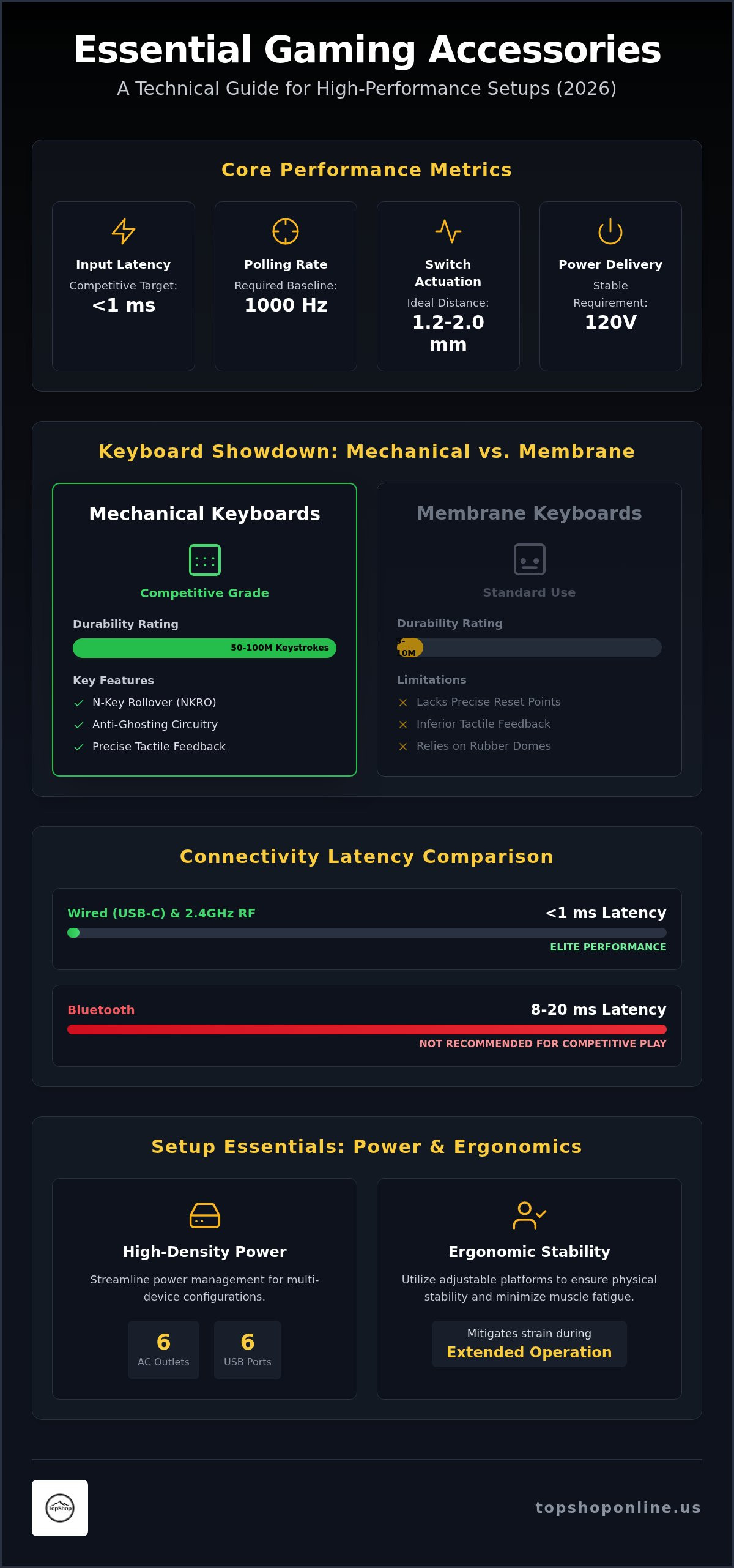
Sub-millisecond input response and stable 120V power delivery define the technical requirements for modern competitive setups. Identifying essential gaming accessories for PC and console is a functional necessity for users managing high-load hardware configurations across multiple platforms. Performance bottlenecks often stem from peripheral latency, insufficient AC outlets, or cumulative physical strain during extended operation. This 2026 guide provides technical specifications for hardware designed to optimize data transmission speeds, streamline power management, and ensure structural ergonomic support. We analyze the utility of tactile mechanical switches, multi-port power distribution units, and adjustable furniture platforms to improve overall system efficiency.
The following technical overview categorizes high-performance peripherals based on measurable attributes like switch actuation force, port density, and material composition. We focus on specific hardware solutions including RGB mechanical keyboards with tactile switches, wireless controller keyboards for enhanced chat functionality, and power strips featuring 6 AC outlets and 6 USB ports. This documentation ensures that your setup maintains peak operational capacity while mitigating the risks of hardware overheating or ergonomic misalignment. The objective is to provide a comprehensive inventory of functional tools that prioritize data accuracy and physical durability for serious gaming environments.
Key Takeaways
- Identify technical specifications for hardware that reduces input latency and enhances tactile feedback through mechanical switch actuation.
- Select essential gaming accessories for PC and console, including high-performance mechanical keyboards and specialized controller input devices, to optimize data transmission.
- Streamline power management for multi-device setups using high-density power strips featuring 6 AC outlets and 6 USB ports for maximum connectivity.
- Utilize adjustable ergonomic platforms like the Deskpro XL to ensure physical stability and minimize muscle fatigue during extended hardware operation.
- Apply a platform-specific framework to prioritize accessory upgrades based on polling rates, material durability, and peripheral compatibility.
Technical Requirements for High-Performance Gaming Peripherals
High-performance gaming requires hardware that minimizes the interval between physical user action and on-screen execution. These essential gaming accessories for PC and console prioritize low-latency data transmission and musculoskeletal support. Peripheral selection depends on measurable metrics like polling rate, measured in Hertz (Hz), which dictates how frequently the device reports data to the processor. A 1000Hz polling rate ensures a 1ms report interval, which is the baseline for competitive environments. Actuation force, measured in centinewtons (cN) or grams (g), determines the resistance encountered during a press. Linear switches require consistent force, while tactile switches provide a physical bump at the actuation point to confirm registration without requiring a full bottom-out stroke.
Mechanical vs. Membrane Keyboard Specifications
Mechanical keyboards utilize individual physical switches for each keycap. This design offers a distinct actuation distance, often between 1.2mm and 2.0mm, and a total travel distance of 4.0mm. Membrane alternatives rely on pressure-sensitive rubber domes, which lack precise reset points and provide inferior tactile feedback. High-tier mechanical hardware, such as the RGB Mechanical Gaming Keyboard - ROG Strix Flare, utilizes tactile switches that allow for rapid-fire inputs without full key release. Technical advantages include:
- Durability Ratings: Mechanical switches are frequently rated for 50 million to 100 million keystrokes, whereas membrane layers often degrade after 5 million to 10 million cycles.
- N-Key Rollover (NKRO): This feature allows the hardware to scan every key independently, ensuring that every simultaneous press is registered correctly.
- Anti-Ghosting: Specialized circuitry prevents the registration of "phantom" keys when multiple buttons are pressed in rapid succession.
Input Latency and Connectivity Standards
Input latency remains a critical bottleneck for both PC and console users. Wired connections via USB-C offer superior data transfer speeds and more stable power delivery compared to legacy USB-A standards. For wireless configurations, 2.4GHz radio frequency (RF) connections provide sub-1ms latency, effectively matching wired performance levels. Bluetooth connectivity often introduces 8ms to 20ms of delay, making it unsuitable for high-speed gaming genres like first-person shooters. Modern peripherals also require specific power distribution to maintain backlit RGB arrays and internal processing units. Console-specific limitations, such as fixed controller layouts and limited text input options, necessitate specialized hardware like the Wireless Keyboard for PS5 Controller to maintain communication efficiency. These devices integrate directly with existing controllers to provide full QWERTY functionality without adding significant weight or bulk to the setup.
Mechanical Keyboards and Console Input Enhancements
Optimizing input precision across multiple platforms requires hardware capable of high-speed data transmission and immediate physical feedback. For PC-centric environments, the RGB Mechanical Gaming Keyboard - ROG Strix Flare serves as a primary performance upgrade. It utilizes tactile switches designed for 1.0mm to 2.0mm actuation distances, ensuring rapid key registration during high-intensity sequences. Dedicated media keys allow for real-time audio adjustments without exiting active software windows, maintaining focus on gameplay. Customizable RGB lighting zones provide functional visual cues for specific key bindings, improving navigation speed in complex control schemes. This hardware is a central component when selecting essential gaming accessories for PC and console to ensure consistent performance levels.
RGB Mechanical Gaming Keyboard Features
Tactile feedback profiles provide distinct auditory and physical confirmation of each keystroke, reducing the probability of missed inputs. The ROG Strix Flare includes software-free lighting customization, allowing users to modify visual patterns directly through onboard hardware commands. This functionality ensures compatibility across systems without requiring background software resources. An integrated, detachable ergonomic wrist rest provides structural support for the carpal region, mitigating strain during long-duration sessions. High-density plastic construction and reinforced keycap stems ensure long-term durability under high-frequency usage. These features categorize the unit as a high-performance component among essential gaming accessories for PC and console.
PS5 Wireless Keyboard Utility
Console environments often face communication bottlenecks due to the limitations of standard controller-based text input. The Wireless Keyboard for PS5 Controller addresses this by mounting directly between the controller handles, providing a full physical QWERTY layout. This hardware uses a Bluetooth connection to pair with the console, maintaining a clean, cable-free setup. Battery life specifications ensure multiple hours of continuous operation before requiring a recharge via standard USB-C ports. Physical keys significantly increase in-game chat efficiency and menu navigation speed compared to virtual on-screen keyboards. This integration allows for rapid strategic coordination in multiplayer environments where voice communication is unavailable or impractical. The compact form factor ensures that the additional weight does not interfere with standard controller ergonomics or trigger accessibility. Direct mounting provides a secure, vibration-resistant fit that maintains the structural integrity of the controller during intense gameplay.
Power Distribution and Peripheral Connectivity Management
High-load gaming environments require a robust electrical infrastructure to sustain PC towers, multiple monitors, and consoles simultaneously. Modern PC towers pull significant wattage during peak GPU utilization, while consoles require consistent power delivery to maintain frame rates. Managing these loads through a single, high-capacity point is a technical requirement. The Power Strip with 6 AC Outlets & 6 USB Ports functions as a centralized hub for this purpose. It eliminates the need for multiple wall sockets and provides dedicated ports for essential gaming accessories for PC and console, such as wireless controller keyboards and external storage drives. Integrated surge protection is mandatory for safeguarding high-value internal components against voltage spikes, brownouts, and electrical noise.
High-Density Power Strip Specifications
This hardware supports high total wattage capacity suitable for standard 120V systems. Each of the 6 USB ports provides dedicated amperage, delivering up to 2.4A per port for a combined output that handles multiple peripherals. Physical dimensions are optimized for placement behind desks or within media consoles, featuring a heavy-duty power cord for flexible positioning. The unit features fire-resistant ABS housing and independent safety shutters for each AC outlet to prevent accidental contact or dust accumulation. High-conductivity copper wiring within the cord ensures low resistance and efficient heat dissipation during maximum load operation.
Cable Management Strategies
Centralizing power distribution reduces physical clutter and improves airflow around thermal-sensitive hardware like GPUs and console exhaust vents. Organized routing prevents cable tangles that can lead to physical damage or accidental disconnections during movement. You can optimize your workspace with our Cable Management for Home Office guide to implement professional-grade organization for high-density setups. Separating power cables from data lines, such as HDMI 2.1 or DisplayPort cables, prevents electromagnetic interference (EMI) that can degrade signal quality or cause screen flickering. This methodical approach to connectivity ensures that essential gaming accessories for PC and console remain accessible and fully powered without compromising the functional integrity of the setup. Using a single hub also simplifies the shutdown process for non-essential peripherals, reducing phantom power draw.
Ergonomic Support and Portable Gaming Station Hardware
Physical stability and musculoskeletal alignment are critical for maintaining performance during high-duration sessions. Identifying essential gaming accessories for PC and console includes evaluating furniture that supports neutral posture and prevents repetitive strain injuries. Cervical spine protection requires maintaining a 90-degree viewing angle to the monitor or laptop screen to avoid neck torque. Portable solutions like the Deskpro XL Ergonomic Adjustable Laptop Bed Desk facilitate this alignment in non-traditional environments like beds or couches. This hardware provides a stable platform for both high-load laptops and console peripherals. It ensures that physical fatigue does not become a performance bottleneck while maintaining the integrity of the setup.
Deskpro XL Ergonomic Features
The Deskpro XL features a reinforced surface area designed to accommodate large gaming laptops up to 17 inches alongside external mice. Its structural composition ensures a high stability rating on soft surfaces, preventing the tilt or wobble common with standard tray tables. The adjustable leg height and multi-angle tilt mechanisms allow for precise positioning of the keyboard and display. Technical benefits include:
- Thermal Dissipation: Elevation above soft fabrics prevents intake vent obstruction, reducing internal hardware temperatures during high-load gaming.
- Surface Friction: Non-slip coatings and integrated stoppers maintain peripheral placement during high-frequency movements.
- Weight Distribution: Wide-base legs distribute the load across a larger surface area to maintain balance on mattresses or cushions.
You can purchase the Deskpro XL to upgrade your portable configuration and maintain hardware safety.
Long-Term Health Benefits of Proper Alignment
Optimizing the angle of the keyboard reduces carpal tunnel pressure and wrist extension strain. Eye-level screen positioning is a functional requirement to prevent neck fatigue and forward-head posture. These adjustments ensure that the user remains within the optimal ergonomic zone for the duration of operation. Proper alignment also reduces ocular strain by maintaining a consistent focal distance between the user and the display. For additional technical data on peripherals, explore our Gaming Setup Essentials for more hardware tips. Utilizing adjustable stands prevents the physical degradation often associated with static, poorly aligned setups. This infrastructure is as vital as the internal hardware specs for maintaining competitive consistency across different physical environments.
Buying Framework: Selecting Accessories by Platform and Utility
Selecting essential gaming accessories for PC and console requires a technical evaluation of genre-specific demands and hardware compatibility. First-person shooter (FPS) gameplay necessitates peripherals with high polling rates and low actuation force to minimize reaction times. Role-playing games (RPGs) often prioritize ergonomic stability and expanded input options for complex macro mapping. Users should evaluate build material quality, such as double-shot PBT keycaps or reinforced aluminum frames, to ensure long-term durability. While aesthetic features like RGB lighting provide visual customization, they must remain secondary to functional specifications such as N-key rollover or surge protection ratings. Verifying warranty terms and manufacturer support cycles is a mandatory step before finalizing high-load hardware investments.
PC vs. Console Accessory Checklist
Hardware requirements differ based on the primary interface and power infrastructure of the system. PC environments utilize high-density input devices, while consoles benefit from integrated controller attachments. Use the following checklist to categorize hardware needs:
- Input Devices: PC setups require full-sized mechanical keyboards with tactile switches. Console users should prioritize controller-mounted QWERTY boards to bypass slow on-screen text entry.
- Power Management: High-performance PC towers require surge protectors with high joule ratings. Console setups benefit from multi-port USB hubs to charge headsets and controllers simultaneously.
- Display and Positioning: Fixed monitor stands are necessary for desktop PC configurations. Hybrid console environments require adjustable portable desks or projector mounts to maintain eye-level alignment in varied seating positions.
Standout Products for 2026
Technical performance in 2026 is defined by specific hardware categories. The RGB Mechanical Gaming Keyboard - ROG Strix Flare provides the necessary tactile precision for competitive PC gaming. For complex multi-device hubs, the Power Strip with 6 AC Outlets & 6 USB Ports ensures stabilized power distribution and connectivity. The Deskpro XL Ergonomic Adjustable Laptop Bed Desk offers maximum ergonomic flexibility for hybrid setups. These items represent the baseline for essential gaming accessories for PC and console in the current hardware cycle. You can view the complete Sports & Outdoors collection for performance gear to finalize your setup infrastructure. Selecting hardware based on measurable utility ensures system longevity and peak operational efficiency across all platforms.
Optimizing Your 2026 Gaming Infrastructure
Maintaining a high-performance setup requires a focus on measurable technical attributes like actuation force, port density, and structural stability. Tactile RGB Mechanical Keyboards provide the necessary sub-millisecond input registration for competitive PC environments, while specialized controller attachments address console communication bottlenecks. High-capacity 6x6 power hubs ensure that multiple high-load devices receive stabilized current without signal interference. Ergonomic Deskpro XL solutions maintain user health by providing adjustable viewing angles and thermal dissipation for portable hardware. It's a functional necessity to identify essential gaming accessories for PC and console to mitigate physical fatigue and technical latency. Selecting peripherals based on durability ratings and connectivity standards ensures that your system remains operational at peak efficiency. You can Shop Performance Gear and Accessories to acquire the hardware necessary for professional-grade configurations. Maintaining a stabilized, high-speed environment allows for consistent performance across all platforms.
Frequently Asked Questions
Do I need a mechanical keyboard for casual gaming?
Mechanical keyboards provide superior durability and tactile consistency compared to membrane alternatives. Casual users benefit from the 50 million keystroke lifespan and the physical feedback that reduces missed inputs during gameplay. These units are essential gaming accessories for PC and console users seeking long-term hardware reliability. The mechanical switch architecture ensures that every key press remains distinct and predictable over years of high-frequency operation.
Is the Wireless Keyboard for PS5 compatible with all controller versions?
The Wireless Keyboard for PS5 Controller is designed specifically for standard DualSense layouts to ensure a secure physical mount. It utilizes Bluetooth protocols for data transmission, ensuring compatibility with the console’s internal wireless receiver. Users should verify that third-party pro controllers maintain the standard handle dimensions and 3.5mm jack placement before attempting installation. This ensures the mounting clips align correctly with the controller chassis.
How many devices can I safely plug into a 6-outlet power strip?
You can safely connect six AC devices provided the total wattage does not exceed the strip’s rated capacity, typically 1875W for 15A circuits. High-load hardware like PC towers and monitors should be prioritized for AC outlets. The additional 6 USB ports on the Power Strip with 6 AC Outlets & 6 USB Ports handle low-draw peripherals like headsets and mobile devices. This configuration expands connectivity without overloading the primary AC circuit.
What is the benefit of an ergonomic laptop desk for gaming?
An ergonomic laptop desk like the Deskpro XL provides cervical spine protection by elevating the display to a 90-degree viewing angle. This positioning prevents forward-head posture and reduces muscle strain in the neck regions. The adjustable tilt also optimizes wrist alignment for external keyboards. This is vital when managing essential gaming accessories for PC and console in non-traditional seating areas like beds or couches.
Can I use a PC mechanical keyboard on a gaming console?
Most modern consoles support HID-compliant USB keyboards for system navigation and text entry. However, in-game support varies by title and developer settings. Some competitive games restrict keyboard use to maintain lobby balance. Users should check game-specific compatibility lists before relying on a mechanical keyboard as a primary console input device. Direct USB connection typically ensures the lowest possible input latency for supported titles.
What technical specifications should I look for in a gaming power strip?
Priority specifications include a high Joule rating for surge protection and a fire-resistant ABS housing. Look for a minimum of 1080 Joules to protect sensitive GPU and CPU components. Independent safety shutters and a heavy-duty 14AWG power cord ensure safe current delivery. Integrated USB ports with at least 2.4A output provide efficient charging for wireless peripherals. These features prevent electrical noise from affecting peripheral performance.
How does RGB lighting affect the power consumption of accessories?
RGB lighting typically adds 0.5W to 2.0W of power draw per peripheral depending on brightness levels and LED density. While negligible for AC-powered PC setups, this draw can reduce the battery life of wireless accessories by 15% to 30%. Using hardware with onboard controls allows for brightness attenuation to balance aesthetic requirements with power efficiency. This is a critical consideration for maintaining long-duration wireless operation.
Are portable projectors suitable for competitive console gaming?
Portable projectors like the Smart Projector Wifi Portable 1080P are suitable for casual or large-scale viewing but may have higher input latency than dedicated gaming monitors. Competitive players should verify the projector’s response time in milliseconds. For social gaming or RPGs, the high-definition 1080P output and portability offer significant utility in varied environments. They provide a functional alternative when traditional monitor setups are unavailable.