

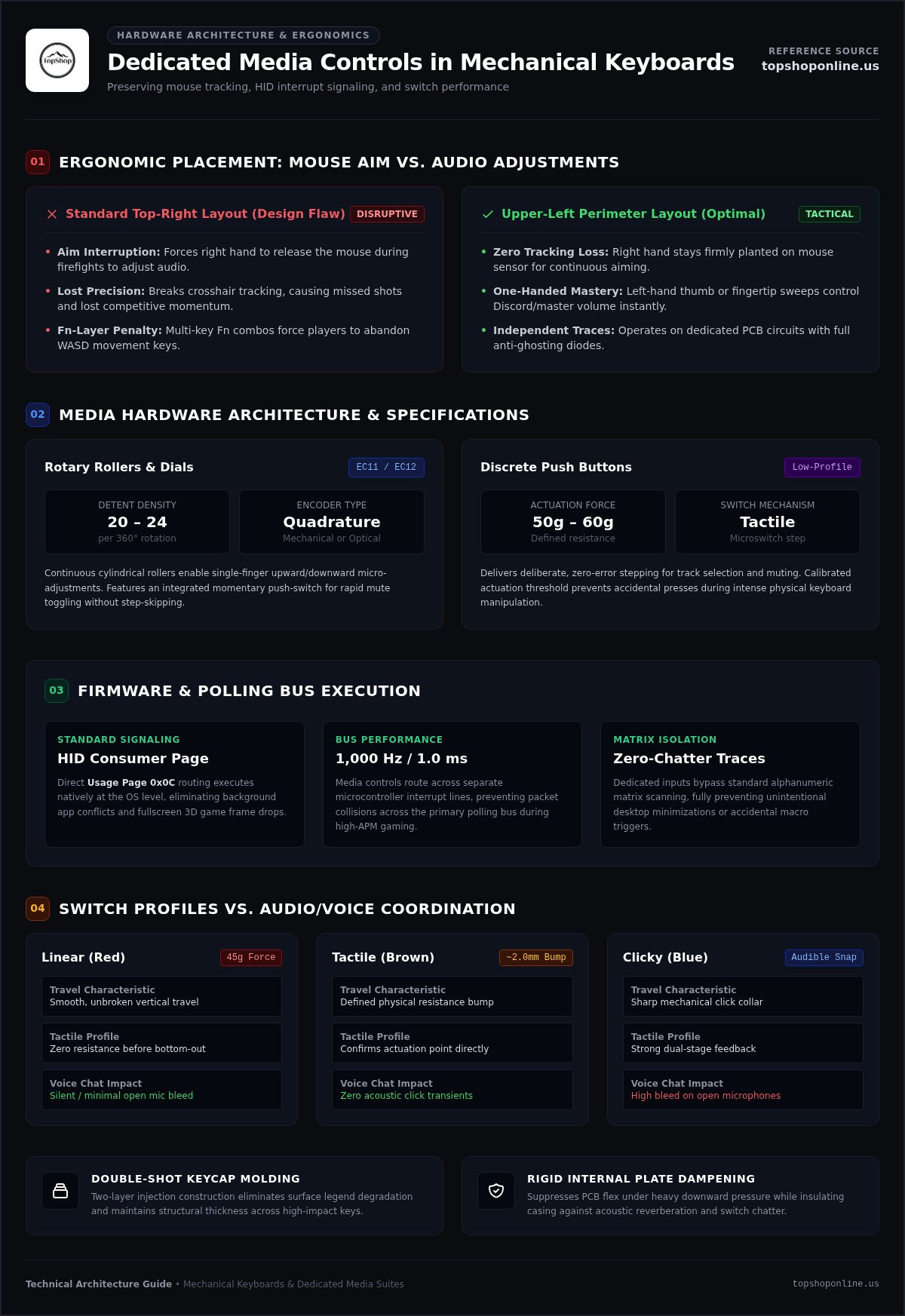
The standard top-right placement for keyboard audio rollers is an ergonomic design flaw. Lifting your right hand off the mouse during active firefights to lower Discord chatter breaks tracking, invites missed shots, and ruins competitive momentum. Finding the right mechanical gaming keyboard with dedicated media controls isn't just about adding extra buttons; it's about preserving input precision while executing audio adjustments on the fly.
You shouldn't have to deal with clunky two-handed Fn combos, accidental Alt-Tabs mid-match, or wobbly volume dials that skip steps and require bloated background software. This technical guide evaluates switch actuation profiles, rotary encoder standards like Alps Alpine EC11 components, and layout ergonomics. You'll learn which configurations deliver seamless one-handed volume mastery, durable key construction, and zero-latency hardware execution without stalling your system MCU.
Below, we analyze switch response times, dedicated media roller placements, and consumer-page HID firmware handling so you can select the ideal control suite for your desktop setup.
Key Takeaways
- Dedicated physical media controls bypass secondary modifier layers to execute instant volume commands via independent consumer-page HID pathways.
- Selecting a mechanical gaming keyboard with dedicated media controls placed along the upper-left perimeter preserves right-hand mouse aim during active matches.
- Discrete mechanical switch architectures deliver zero-chatter keystroke registration to run parallel with tactile audio adjustments.
- Double-shot keycap molding and rigid internal plate dampening eliminate switch flex, legend degradation, and casing acoustic reverberation.
- Five-step hardware evaluation protocols align switch actuation thresholds, rotary detent profiles, and USB passthrough needs with specific gameplay requirements.
Understanding Media Control Hardware in Mechanical Gaming Keyboards
Integrated media hardware provides dedicated physical input paths completely separate from the primary keyboard switch matrix. A mechanical gaming keyboard with dedicated media controls routes audio signaling through discrete electrical traces directly to the onboard microcontroller. This physical isolation lets users alter system sound without relying on secondary Fn modifier layers or software shortcuts that pull attention away from competitive gameplay.
Standard media suites typically feature dedicated controls for track skipping, play, pause, mute, and master volume. Because these controls utilize direct Human Interface Device (HID) Consumer Page (Usage Page 0x0C) signaling, commands execute natively at the operating system level. Adjustments trigger instantly without causing background process conflicts or frame drops in fullscreen 3D gaming engines.
Dedicated Physical Controls Versus Multi-Key Function Layers
Secondary Fn key layers require multi-finger combinations. Hitting these chords forces players to abandon movement keys like WASD mid-match, leaving their in-game avatars stationary. Dedicated switches eliminate this input disruption. Built on independent printed circuit board (PCB) traces with full anti-ghosting diodes, dedicated inputs send separate scan codes that never interfere with standard alphanumeric matrix tracking.
This technical separation eliminates unintended desktop minimizations or accidental macro executions during high-APM (actions per minute) sessions. Understanding how these isolated traces interface alongside underlying mechanical switch architectures and keyboard construction is vital when evaluating overall board responsiveness and hardware longevity.
Mechanical Volume Rollers Versus Discrete Push Buttons
Manufacturers implement physical audio adjustments using two primary hardware architectures: continuous rotary rollers and discrete push buttons. Each design suits different operational requirements:
- Rotary Rollers and Dials: Utilize standard incremental quadrature mechanical rotary encoders (such as Alps Alpine EC11 or EC12 form factors) or optical sensors. These components deliver 20 to 24 distinct tactile detents per 360-degree rotation. They are engineered for rapid, single-finger upward or downward micro-adjustments and often include an integrated momentary push-switch for fast mute toggling.
- Discrete Push Buttons: Feature tactile microswitches or low-profile mechanical buttons with defined travel distance and distinct actuation force thresholds (typically 50g to 60g). These ensure deliberate, zero-error stepping for track selection and muting without overshooting target audio levels.
Opting for a mechanical gaming keyboard with dedicated media controls that uses an edgeless cylindrical roller gives you instant volume manipulation with a simple fingertip sweep, keeping your core keystrokes continuous and uninterrupted.
Mechanical Switch Architectures and Audio Control Integration
High-performance typing relies on discrete mechanical switch mechanisms functioning alongside dedicated media circuitry. While primary keys cycle switch stems across contact leaves or Hall Effect sensors, secondary media controls route across separate microcontroller interrupt lines. This architectural separation prevents packet collisions and latency spikes across the standard 1,000 Hz (1.0 ms) polling bus, maintaining uncompromised responsiveness during intense gaming sequences.
Linear, Tactile, and Clicky Switch Actuation Characteristics
Selecting the right switch mechanism dictates actuation speed, hand fatigue, and acoustic output during voice communications:
- Linear Switches (Red): Feature smooth, unbroken vertical travel requiring 45 grams of actuation force. They present zero tactile resistance prior to bottoming out, making them ideal for high-speed multi-tap inputs in competitive titles.
- Tactile Switches (Brown): Incorporate a physical resistance bump at the actuation point (typically around 2.0 mm). They confirm switch registration without producing acoustic click transients, preventing background noise from bleeding into voice channels.
- Clicky Switches (Blue): Deliver an audible snap alongside tactile registration. The acoustic signature can register on open desk microphones and disrupt active team coordination.
Selecting keycap profiles and switch travel depths that comply with OSHA workstation keyboard ergonomics guidelines limits wrist extension and tendon strain across long competitive sessions.
Matrix Scanning, N-Key Rollover, and Anti-Ghosting
Standard keyboard switch matrices process signals along intersecting rows and columns. Without proper electrical architecture, pressing multiple keys simultaneously can create phantom inputs, known as ghosting. True N-Key Rollover (NKRO) resolves this by placing an individual isolation diode on every switch position across the printed circuit board, allowing unlimited simultaneous keystroke registration.
In a quality mechanical gaming keyboard with dedicated media controls, audio controls operate outside this standard matrix. The system microcontroller scans dedicated media pins on separate polling cycles. Rapid volume adjustments will never block your WASD movement vectors or drop crucial tactical inputs. High-speed setups benefit from comprehensive boards such as the RGB Mechanical Gaming Keyboard - ROG Strix Flare, which features onboard media suites and integrated USB passthrough available via TopShop's gaming peripheral lineup.
Ergonomic Placement and Layout Efficiency of Media Clusters
Physical placement of audio controls dictates competitive hand economy. While traditional office boards position media keys wherever chassis space permits, gaming demands distinct physical isolation. A mechanical gaming keyboard with dedicated media controls must locate its adjustment cluster where it will not force you to abandon primary tracking inputs or interrupt ongoing motion commands.
Rigid, knurled metal scroll wheels and textured rollers provide distinct tactile feedback. This surface differentiation lets players identify audio hardware instantly through peripheral touch during low-light sessions, removing the need to glance down from high-refresh-rate displays. Independent lab testing on gaming keyboard latency and features demonstrates that separating peripheral adjustment dials from central input clusters prevents accidental keystroke drops and lowers overall input hesitation.
Left-Hand Versus Right-Hand Media Cluster Ergonomics
Cluster orientation impacts hand utility during active gaming:
- Upper-Left Orientation: Places cylindrical rollers and mute buttons directly above the Escape and function keys. This geometry allows the left hand to flick the roller with a thumb or index finger while the right hand maintains steady mouse tracking and crosshair placement.
- Upper-Right Orientation: Positions controls directly above the numerical keypad. While practical for desktop productivity, general video playback, and casual audio browsing, it forces competitive players to remove their right hand from the mouse to execute simple volume corrections.
- Top-Edge Elevation: Elevates dials above the standard switch plane, preventing unintended palm contact during rapid macro execution across the number row.
Integrated Wrist Rests and Peripheral Form Factors
Full-size 104-key and 108-key form factors provide the chassis real estate necessary to house isolated volume wheels, dedicated mute toggles, and USB passthrough hubs without shrinking the navigation cluster. Integrating a detachable, soft-touch ergonomic wrist rest levels the palm elevation with the mechanical switch tops. This keeps the wrist in a neutral, flat angle to prevent median nerve compression during long competitive sessions.
Managing extensive desk hardware requires structured cabling. Premium full-size boards route thick, braided cables alongside secondary passthrough lines to prevent desktop clutter. Review our cable management for home office guide to implement clean peripheral wire routing behind your workstation monitors. Choosing a mechanical gaming keyboard with dedicated media controls that matches your grip posture guarantees complete sound management without degrading hardware ergonomics.
Hardware Durability, Keycap Construction, and Board Architecture
A mechanical gaming keyboard with dedicated media controls must endure intense physical use while maintaining switch stability. Structural integrity directly dictates acoustic resonance, PCB flex, and overall component lifespan. Rotary volume encoders and secondary media clusters require robust dust-resistant housings, such as sealed Alps Alpine assemblies rated up to 100,000 cycles, to prevent contact oxidation, skipped steps, or false adjustments over extended use.
Keycap Materials: Double-Shot PBT Versus ABS Formulations
Keycap composition defines tactile grip and long-term legend clarity under continuous fingertip friction:
- Double-Shot PBT: Features two distinct polymer layers molded together with dense 1.4 mm to 1.5 mm wall thickness. PBT resists finger oils, prevents surface shine, and ensures legends never wear off.
- ABS Formulations: Produce vibrant RGB diffusion and smooth initial surfaces. However, ABS polishes down rapidly, developing slick contact spots and uneven wear over prolonged gaming hours.
Dedicated media buttons require clear, illuminated legends to preserve immediate legibility during low-light sessions.
Onboard Memory Profiles Versus Background Software Overhead
Heavy peripheral software suites consume unnecessary background system resources. Premium keyboards integrate onboard flash memory microcontrollers to store RGB configurations, macro assignments, and dedicated audio bindings directly on the hardware. Hardware-level storage frees your operating system from bloated companion utilities, eliminating background CPU spikes and frame stutter during competitive play. Powering multiple high-draw peripherals across your desk requires stable electrical routing. Organize your setup using our power strip with USB ports guide.
Chassis Structural Rigidity and Integrated USB Passthrough
Solid metal top plates anchor the internal PCB, preventing structural flex during heavy keystrokes and rapid adjustments. Solid chassis dampening eliminates hollow acoustic reverberation, producing clean bottom-out feedback. Heavy-duty cabling isolates internal signal lines to support an onboard USB passthrough port, allowing you to connect mouse receivers or wired headsets directly to the keyboard frame without reaching for your PC tower.
To upgrade your desk setup with durable metal plates, dedicated volume rollers, and integrated USB passthrough, browse gaming keyboards at TopShop to secure high-performance models like the RGB Mechanical Gaming Keyboard - ROG Strix Flare with nationwide delivery.
Selecting and Configuring Mechanical Gaming Keyboards for Peak Performance
Matching hardware capabilities to specific gaming genres demands a systematic technical evaluation. Selecting a mechanical gaming keyboard with dedicated media controls involves verifying switch latency, structural rigidity, and direct operating system command integration. Follow this four-step selection process to configure your desktop setup:
- Step 1: Select Switch Dynamics: Match linear switches for rapid competitive key-spamming or tactile variants for hybrid typing accuracy.
- Step 2: Confirm Cluster Geometry: Ensure volume rollers and media switches sit within comfortable reach of your non-mouse hand to preserve target tracking.
- Step 3: Validate Motherboard I/O Allocation: Confirm your rear I/O panel has sufficient USB-A bandwidth to power dual-cable keyboard passthrough hubs alongside high-polling mice.
- Step 4: Calibrate System Routing: Map consumer-page audio commands cleanly within operating system sound mixers to eliminate companion driver overhead.
System Audio Integration and Media Key Mapping in Windows 11
Modern operating systems natively detect standard HID consumer usage codes, eliminating the need to run third-party software in the background. Windows 11 routes these signals directly through the core audio engine. Open the Windows Volume Mixer to balance application levels individually so that physical keyboard rollers adjust master output without throwing Discord or streaming audio out of balance. Pair your board with complementary hardware outlined in our gaming setup essentials guide to ensure balanced desktop connectivity.
Evaluating the RGB Mechanical Gaming Keyboard - ROG Strix Flare
TopShop distributes competitive desktop hardware nationwide across the United States, including full-sized mechanical models engineered for high-speed input stability. The RGB Mechanical Gaming Keyboard - ROG Strix Flare positions its dedicated media keys and smooth-scrolling volume roller on the upper-left corner of the chassis. This layout lets your left hand adjust audio without releasing your mouse grip mid-match.
Built with genuine mechanical switches, the keyboard features per-key customizable RGB backlighting, an integrated USB passthrough port for direct mouse receiver connection, and a detachable soft-touch wrist rest. These physical attributes provide durable performance and ergonomic support during long competitive sessions.
Long-Term Peripheral Maintenance and Encoder Cleaning
Routine hardware upkeep maintains switch responsiveness and prevents rotary skipping. Use compressed gas canisters at a 45-degree angle every few weeks to clear debris from key switch housings and open encoder cavities. Clean keycap surfaces using diluted isopropyl alcohol on microfiber cloths to prevent oil buildup, and verify firmware updates annually to preserve native OS compatibility.
Upgrade Your Workspace With Hardware-Level Audio Precision
Integrating a mechanical gaming keyboard with dedicated media controls eliminates slow Fn-key chords and keeps your mouse tracking steady. Isolated Consumer Page HID routing, rugged internal switch plates, and stepped mechanical rollers prevent input latency across high-polling setups. Placing physical dials within easy reach of your movement hand safeguards competitive reaction times during intense multiplayer matches.
TopShop maintains an exhaustive technical catalog focused on durable electronics and pure hardware utility. You don't have to settle for unstable software overlays or wobbly volume encoders when building out your command center. Enhance your rig with field-tested peripherals like the RGB Mechanical Gaming Keyboard - ROG Strix Flare, supported by reliable, fast nationwide shipping across the United States. Explore High-Performance Mechanical Gaming Keyboards at TopShop to equip your battlestation with uncompromised input precision and tactile media mastery.
Frequently Asked Questions
How do dedicated media controls differ from standard Fn key combinations on mechanical keyboards?
Dedicated controls use distinct electrical traces and send direct HID Consumer Page signals without requiring secondary key chording. Standard Fn combinations require pressing the function key alongside an F-row key, forcing awkward two-handed contortions that disrupt gameplay. A mechanical gaming keyboard with dedicated media controls executes instant volume changes or track skips with a single finger stroke while keeping your primary movement keys active.
Do mechanical gaming keyboards with dedicated media keys require special software drivers?
No, dedicated media keys operate natively through universal operating system HID consumer protocols without requiring companion software. Modern platforms like Windows 11 immediately interpret hardware usage codes for volume up, volume down, and mute commands. While proprietary software suites allow custom macro reassignments or RGB profiles, basic media manipulation functions straight out of the box with zero background CPU overhead or software-induced latency.
Why do many competitive gamers prefer top-left volume roller placement?
Top-left volume roller placement allows gamers to make audio adjustments using their left hand without lifting their right hand off the mouse. Traditional top-right placement forces players to compromise aim, crosshair tracking, and firing readiness during live multiplayer matches. Left-oriented controls enable swift index finger or thumb flick adjustments while keeping the mouse hand completely engaged in tracking targets.
Are mechanical volume rollers more prone to hardware failure than push buttons?
Rotary mechanical encoders experience rotational friction that can make them susceptible to dust ingress if unsealed, though quality components are rated for 15,000 to 100,000 rotational cycles. Discrete push buttons feature simpler switch contacts with fewer moving parts. However, enclosed incremental quadrature encoders resist particulate accumulation and maintain accurate, tactile step detents over years of continuous desktop operation.
Can dedicated media controls adjust individual game volume independently of master audio?
Standard dedicated hardware controls modify OS-level master volume by default rather than isolating individual game processes. Adjusting specific programs like Discord or a game client independently requires binding keys through software audio routers or third-party channel mixers. Hardware dials transmit universal system consumer codes, so without targeted application software routing, every adjustment alters the primary operating system output device uniformly.
Does a keyboard USB passthrough port introduce input latency to connected gaming mice?
Dedicated passthrough ports introduce zero latency because they operate as direct electrical extensions rather than shared data hubs. Keyboard passthrough circuits typically use a secondary internal cable that connects straight to an independent USB port on the PC motherboard. This dedicated wiring completely isolates the mouse polling traffic from the keyboard switch matrix, preserving native 1,000 Hz or higher mouse reporting rates.
Which mechanical switch type is best suited for both high-speed gaming and multimedia typing?
Brown tactile mechanical switches offer the optimal middle ground for mixed gaming and productivity workflows. They feature a defined physical tactile bump around 2.0 mm of travel without the sharp acoustic click of blue switches, ensuring clean mic audio on voice calls. When paired with a mechanical gaming keyboard with dedicated media controls, tactile switches provide reliable input confirmation during typing tasks alongside rapid actuation speed for competitive play.